

 Posted by
- Summary:
- Certain Rings can be converted to have Chaos Upgrade.
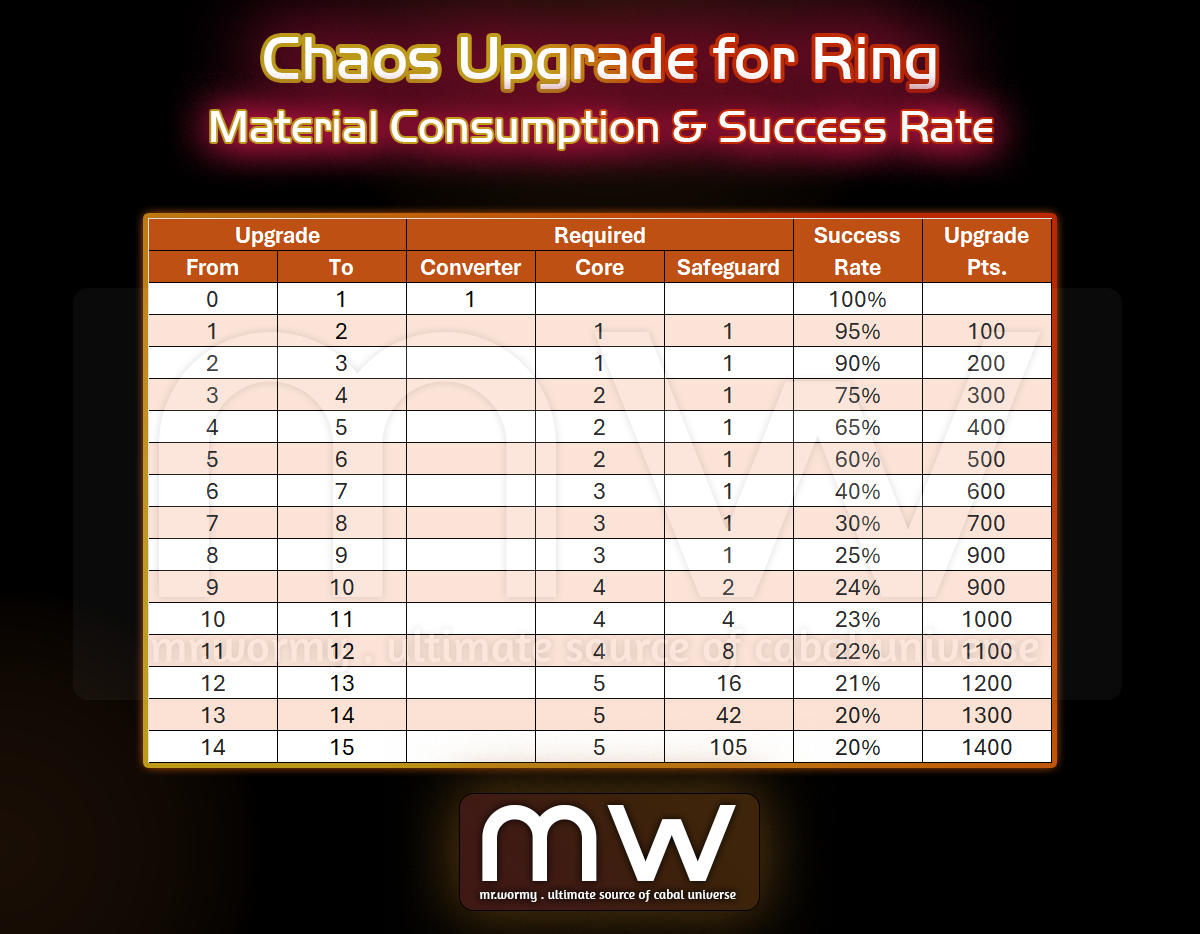
- From +0 to +1, using Chaos Converter will grant the Chaos Upgrade at +1 with 100% success.
- From +1 to +15, using Chaos Core to upgrade as usual.
- Different amount of Chaos Core and success rate depends on upgrade grade.
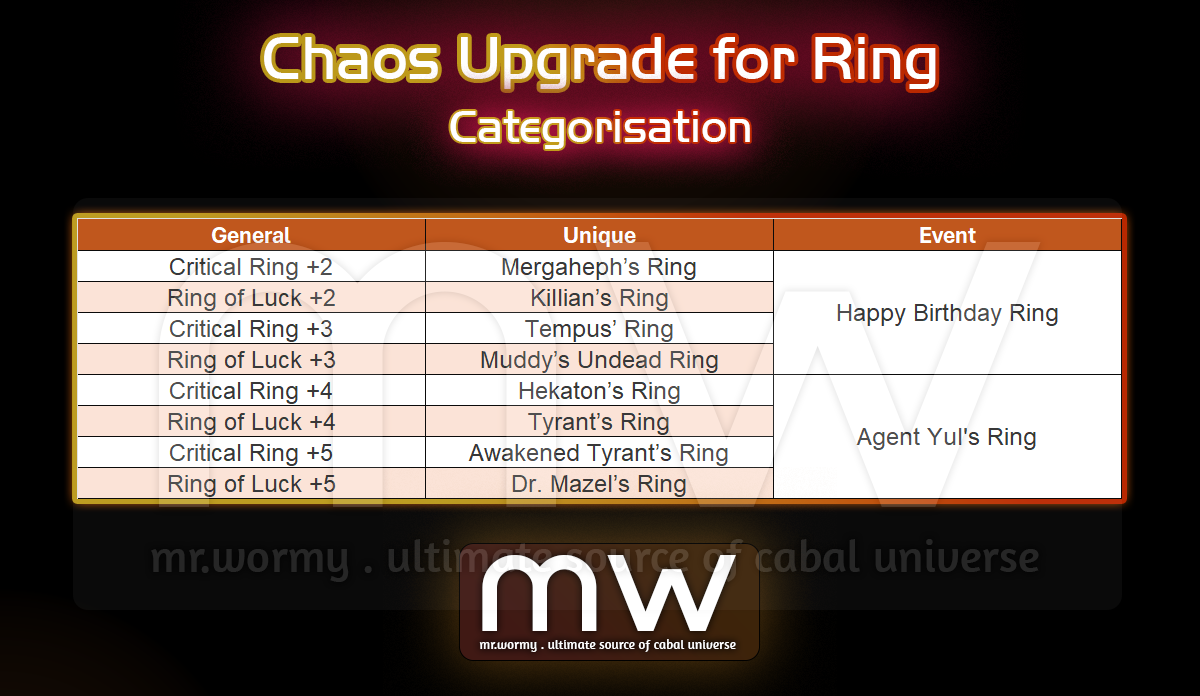
- Ring Categorisation:
- Core Consumption & Success Rate per Upgrade Level:
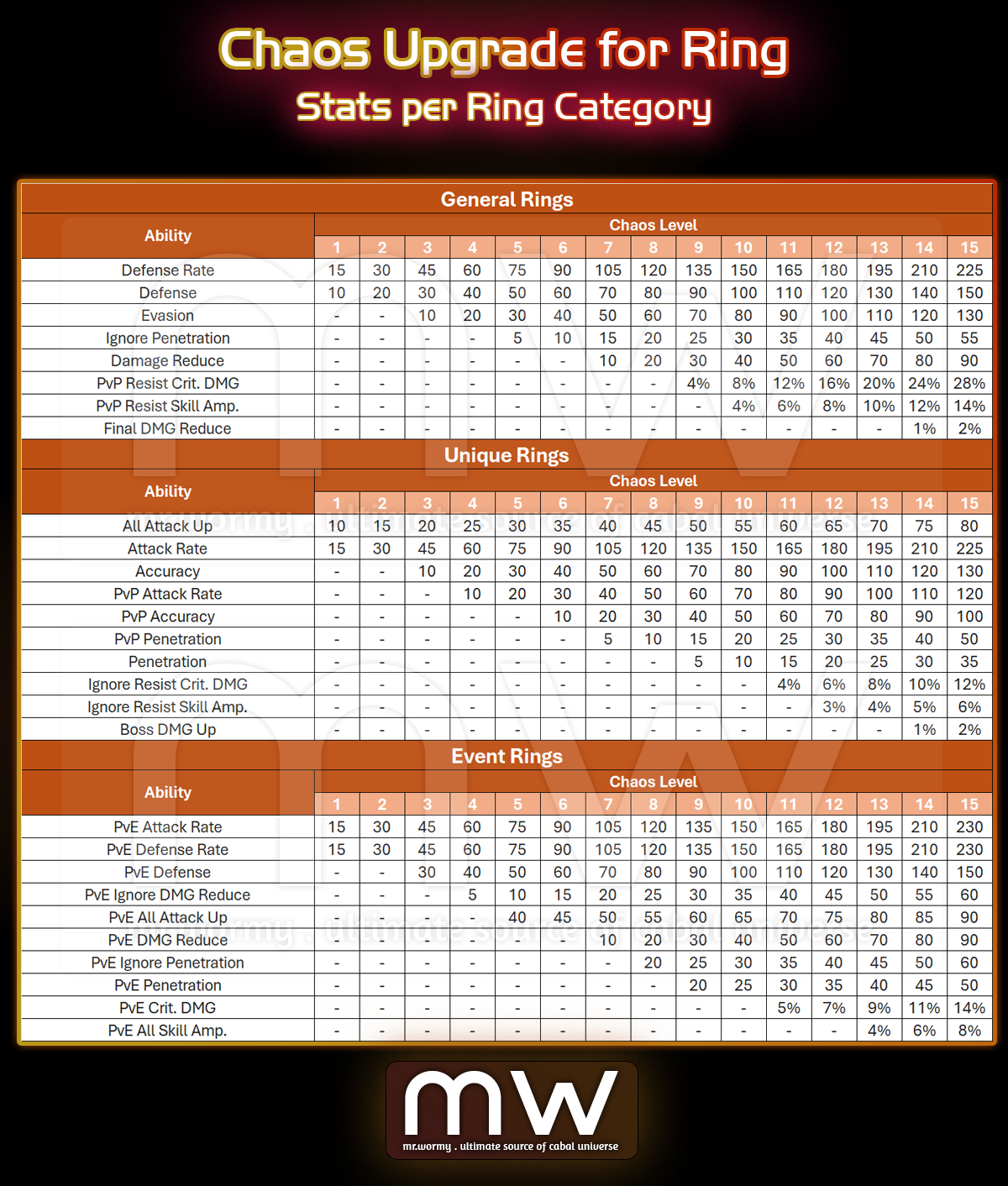
- Stats:
- Stats are different, depends on Ring type.
- Concepts:
- General Ring: Defensive Stats
- Unique Ring: Offensive Stats & PvP Offensive Stats
- Event Ring: PvE Defensive & Offensive Stats
- Safeguard:
- New type of material is added: Essence of Chaos Guardian (Ring)
- Source:
- Last Boss of Eternal Chaos Arena
- Cube of Blaze (Easy ~ Awakening) [Guild Dungeon Reward]
- Able to register in Auction House
- Source:
- New recipe to request “Chaos Safeguard (Ring)” at NPC Chloe.
- Required Amity: 5,500
- Registration Fee: 50,000,000 Alz
- Material:
- Chaos Core x100
- Essence of Chaos Guardian (Ring) x1
- Success Rate: 100%
- Request Time: 2s
- New type of material is added: Essence of Chaos Guardian (Ring)
- Sealing
- Can seal the Chaos Upgrade of Ring and allow trading
- Applying Restriction:
- Only allowed to apply on the correct Ring Category.
- E.g.:
- A Chaos Upgrade Seal Stone of Critical Ring +5 cannot be applied on Dr. Mazel’s Ring, because one is General Ring and another is Unique Ring.
- A Chaos Upgrade Seal Stone of Critical Ring +5 cannot be applied on Ring of Champion +10, because one is General Ring and another is not supported Chaos Upgrade.
- E.g.:
- Only allowed to apply on the correct Ring Category.
- Ring with Chaos Upgrade cannot be registered into Collection or used as material for requests.
- E.g. request to convert from Awakened Tyrant’s Ring to Dr. Mazel’s Ring; for that case the Awakened Tyrant’s Ring must NOT have Chaos Upgrade.

- Allow setting up the Preset for character for the look when Battle Mode 3 is activated.
- Access: Using the special switch button on the top-right of the Costume UI.
- Available slots for configure on Battle Mode 3 Presets:
- Clothing Costume
- Head Costume
- Force Wing Costume
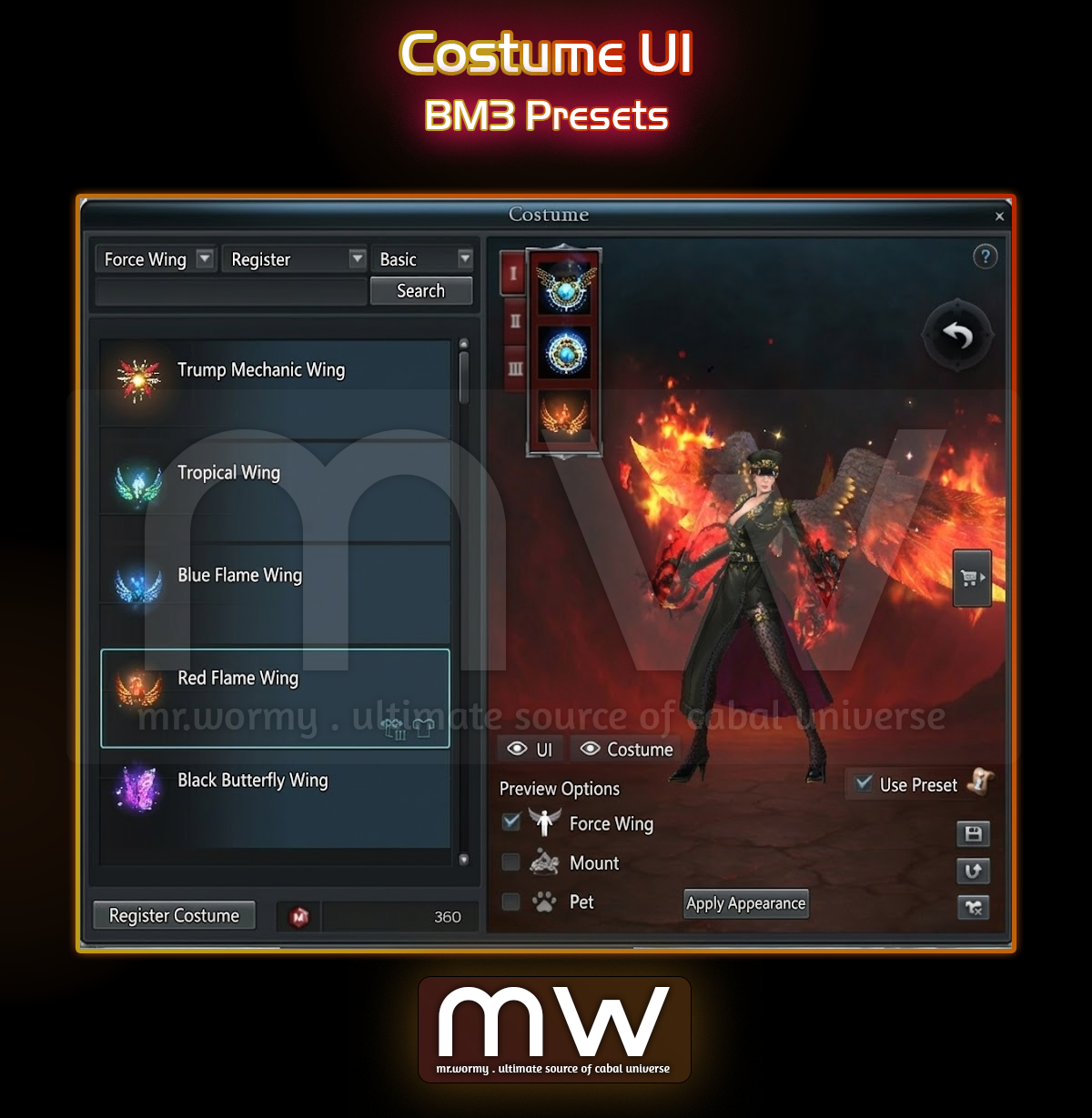
- A special checkbox “Use Preset” is available in the UI:
- If the checkbox is checked:
- Apply the costumes equipped in the slots of BM3
- When no costumes are equipped, default BM3 appearance will be shown
- If the checkbox is NOT checked:
- Apply the character normal costume presets, BM3 weapon is showing as normal.
- If the checkbox is checked:
- Allow the BM3 costumes to be linked with Combined Presets.
- Changes of existing game options:
- Option > Display > General
- Old: Disable BM3 Helmet / Armor Display
- New: Use BM3 Preset for Costume
- Option > Display > General
- Other changes for Costume UI:
- Move the “Register” button to bottom-left of the UI.
- Add “Search” button to top-right of the left side of the UI.
- Still search is possible with typing and hitting Enter.
- Add icon to indicate that the costume is equipped or not.
- Equipped in Normal mode
- Equipped in BM3
- Add new convenient buttons:
- Hide / Show UI
- Hide / Show Costumes
- When toggle the “Hidden” mode, all cosmetic items will be hidden, showing the original actual item-based appearance.
- Non items will be unequipped when triggering “Hidden” mode.
- Save Preset:
- Normal Mode: 5 Presets
- BM3: 3 Presets
- Revert: To revert all change without saving
- Remove All: To remove all equipped costume items.
- Change the icon of Shopping Cart icons for open/close state

- Change of Inventory Sorting Rule:
- Priority:
- Existing: Item Size
- New: Item Type
- Order: High to Low
- Weapon
- Armor
- Vehicle
- Accessories
- Other Equipment (Effector, Crest…)
- Costume
- Rune
- Potion
- Others
- Priority:
- Chat-related improvements
- General Changes:
- Change Chat to tab design.
- Each tab can be filtered with what content should be shown.
- Default: Normal / Party / Guild
- All available conversation types:
- Normal
- Party
- Guild
- Trade
- Channel
- Whisper
- Shout
- E.g., you can config that:
- Tab #1 name is “General”
- Showing: Normal / Party / Guild / Should
- Tab #2 name “Private”
- Showing: Party / Whisper / Channel
- Tab #3, #4, #4: Not used
- Tab #1 name is “General”
- Change of Options UI for Chat according to new changes:
- Allow to change in Tab style
- Allow to see / not see “Buddy” and “Guild” login message separately (it was combined before)
- Merged option that show / hide the gaining of EXP / OXP / MXP into a single option
- Chat options are saved as account-based
- Change buttons related to Chat UI
- Add feature to select tabs
- Add “Scroll to Top” button
- Change locations of “Minimize” and “Setting” button
- General Changes:
- Changes related to Blocking:
- Blocking is now account-wise, not character-wise
- E.g.:
- A player initiate the “Block” from a character in account A, the block is for a character in account B.
- Result:
- All characters in accounts A cannot see chat of all characters in account B.
- E.g.:
- Add notice message to explain the consequences of blocking is account-wise.
- If the target is moving the character to another account or renaming the character, there will be an “X” mark next to the character name, and that “block entry” is not applied.
- Both blocker and blockee cannot send friend request or party request to each other.
- If a block is initiated and the target is in the friend list, it will also be automatically removed from the friend list (including all other characters from that account).
- Blocking is now account-wise, not character-wise
Discover more from Mr. Wormy
Subscribe to get the latest posts sent to your email.
 Mr. Wormy