


 Posted by
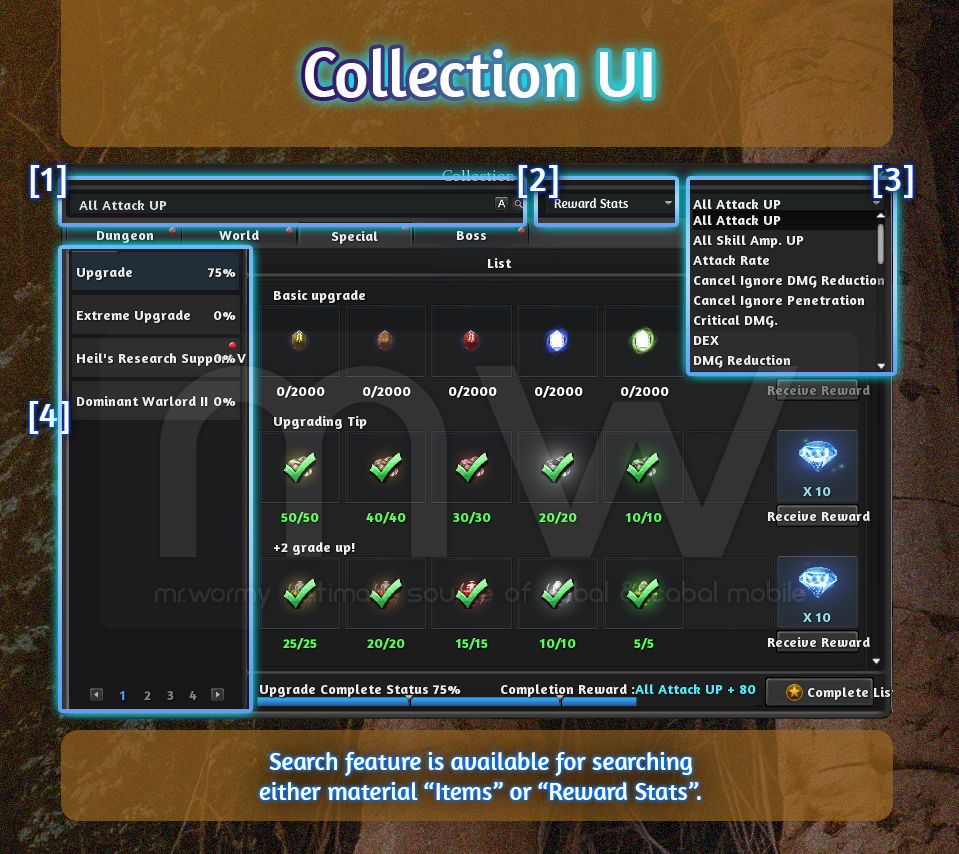
- Add the Collection Search function
- Collection can be searched based on the item or completion reward.
- [1] Depends on the selection of box [2]:
- Items: Item name can be provided to search based on the material items.
- Reward Stats: Reward Stats can be provided to search based on the reward stats.
- [2] Can be selected between:
- Items: For searching based on material items
- Reward Stats: For searching based on reward stats
- [3] Available only for searching with the Reward Stats, allow to select the specific reward stats from the list
- [4] Matching collections will be filtered and displayed here
- [1] Depends on the selection of box [2]:
- Collection can be searched based on the item or completion reward.
- Collection which was completed will be shown in yellow text.

- Change name of some collections:
- Due to the addition of some collections, the original corresponding collections will be renamed with ” II ” at the end, for example:
- “Tower of the Dead B3F” => “Tower of the Dead B3F – II”
- “Porta Inferno” => “Porta Inferno II”
- Shorten the name of some collections:
- Illusion Castle Underworld (Apocrypha) => Underworld (Apocrypha)
- Illusion Castle Radiant Hall (Apocrypha) => Radiant Hall (Apocrypha)
- Due to the addition of some collections, the original corresponding collections will be renamed with ” II ” at the end, for example:
- Add 68 new collections (detailed of collections will be posted later in the Collection page).
- 11 Dungeon collections
- 13 World collections
- 44 Special collections
- Add 13 new Transformation Cards (claim as the reward of World collections)
- Bloody Ice: Corrupted Swordsman’s Specter
- Desert Scream: Guardian Scorpion
- Green Despair: Moss site
- Port Lux: Bapomat
- Fort Ruina: Steam Floater
- Undead Ground: Berserk Ghoul
- Forgotten Ruins: Mayozin
- Lakeside: Hupier(Orc 2nd Corps)
- Mutant Forest: Maku Sha
- Pontus Ferrum: ARM-03 Inspector
- Porta Inferno: Diable Beholder
- Arcane Trace: Evil’s Shadow Curse
- Senillinea: Lesser Panda

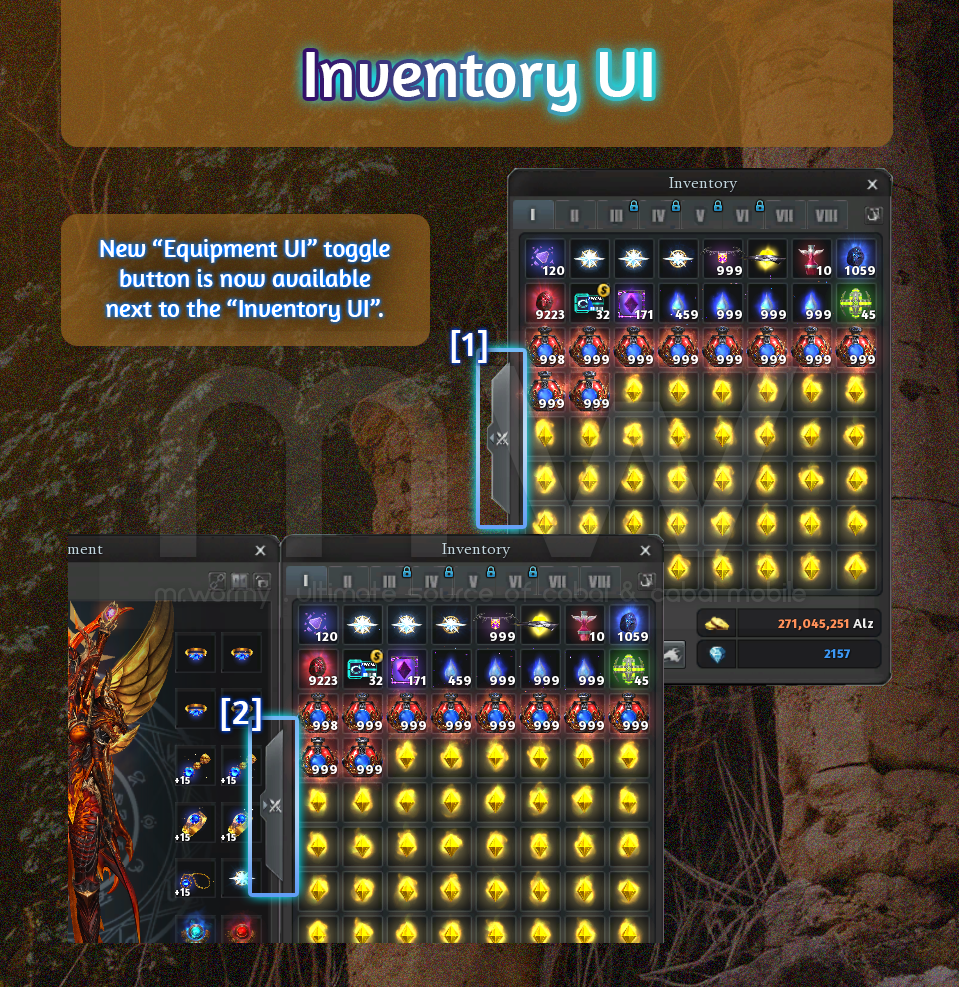
- Add button to toggle “Equipment UI” from “Inventory UI”.
- [1] By default the “Equipment UI” is closed the toggle button will be displayed with [ < ] arrow.
- [2] Once the “Equipment UI” is already open, the toggle will be displayed with [ > ] arrow.
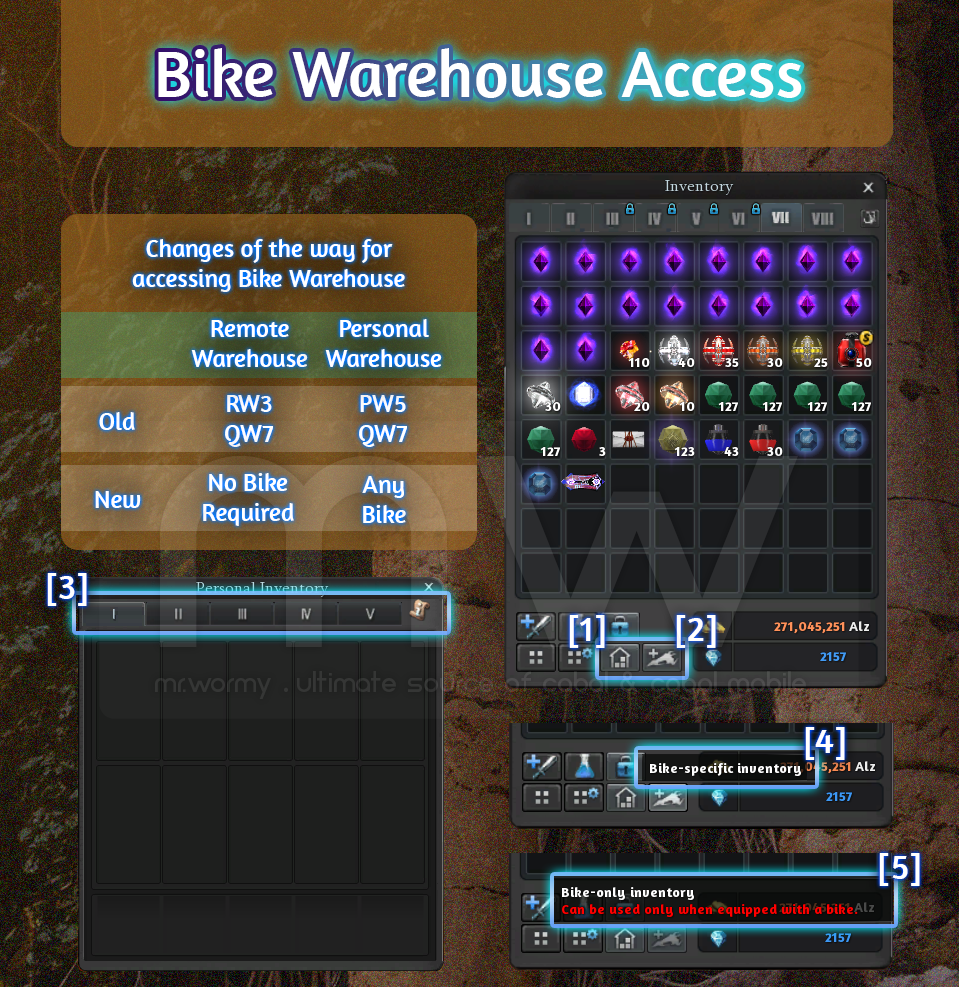
- Changes related to Bike Warehouses:
- Accessibility:
- Old:
- Remote Warehouse: Need RW3 or QW7 to access.
- Personal Warehouse: Need PW5 or QW7 to access.
- New:
- Remote Warehouse: Can access without any bike.
- Personal Warehouse: Need any bike to access.
- Old:
- [1] Add button to open “Remote Warehouse”
- Can access to Warehouse at anytime.
- Not required any bike to get access.
- [2] Add button to open “Personal Warehouse”
- Can access to Personal Warehouse as long as a bike is equipped.
- [4] Button will be enable if a bike is equipped.
- [5] Button will be disabled and red text in button tooltip.
- [3] Personal Warehouse can be used freely all slots without depending on Upgrade level of the bike.
- Accessibility:
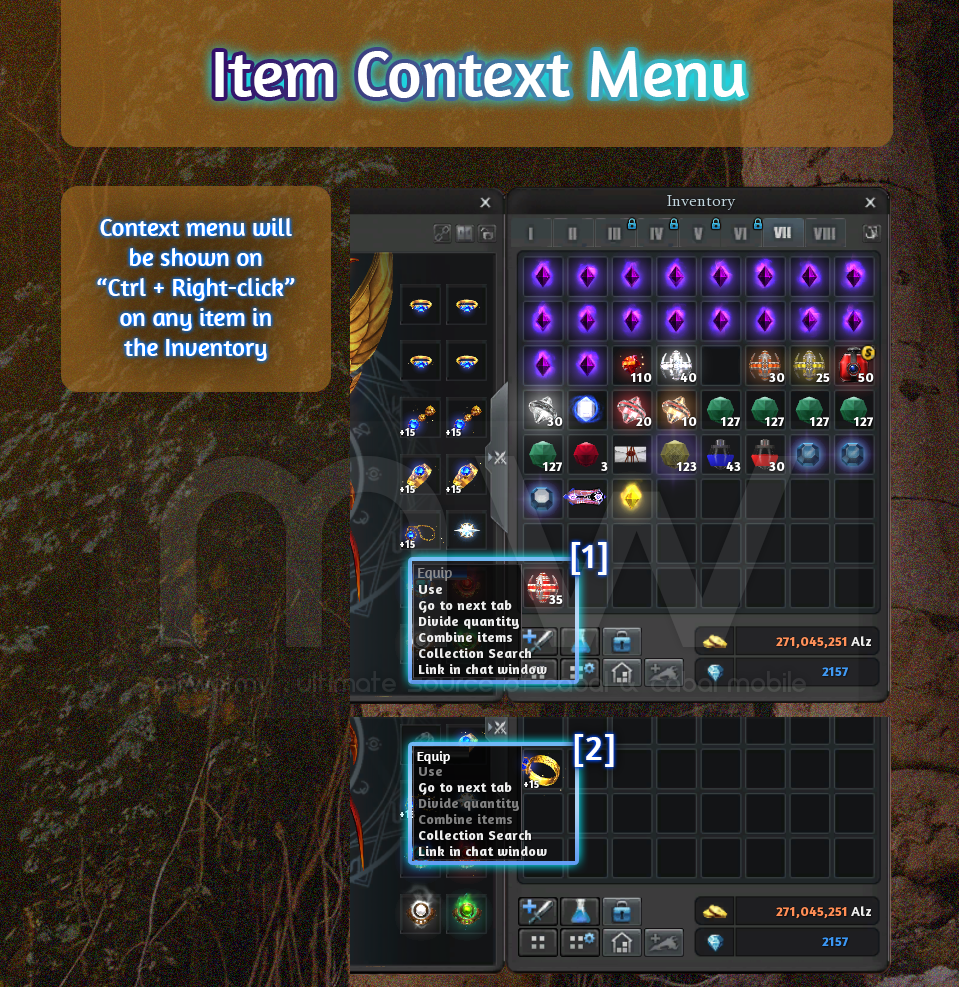
- Add the Item Context Menu for items in the Inventory.
- Remove the ability to link an item in the inventory into chat window by Ctrl + Right-click on item.
- Ctrl + Right-click to show the Item Context Menu, depends on specific item, certain menu item will be enabled / disabled.
- Available menu items:
- Equip: Equip the item if item is equip-able
- Use: Use the item if item is usable
- Move to next Tab: Move the item to the next inventory tab
- Combine Items: Try to combine similar available items in the inventory
- Collection Search: Search for this item in the Collection system
- Link to Chat: Link to the chat window (like the original feature of Ctrl + Right-click)
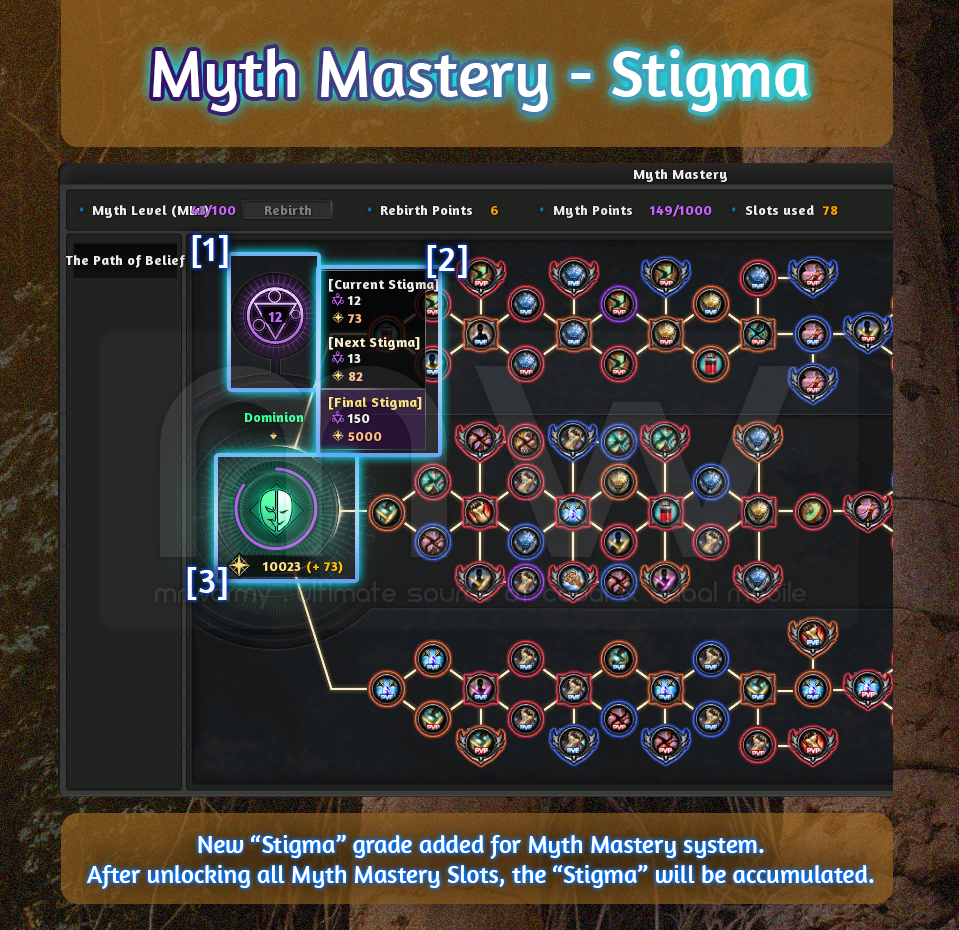
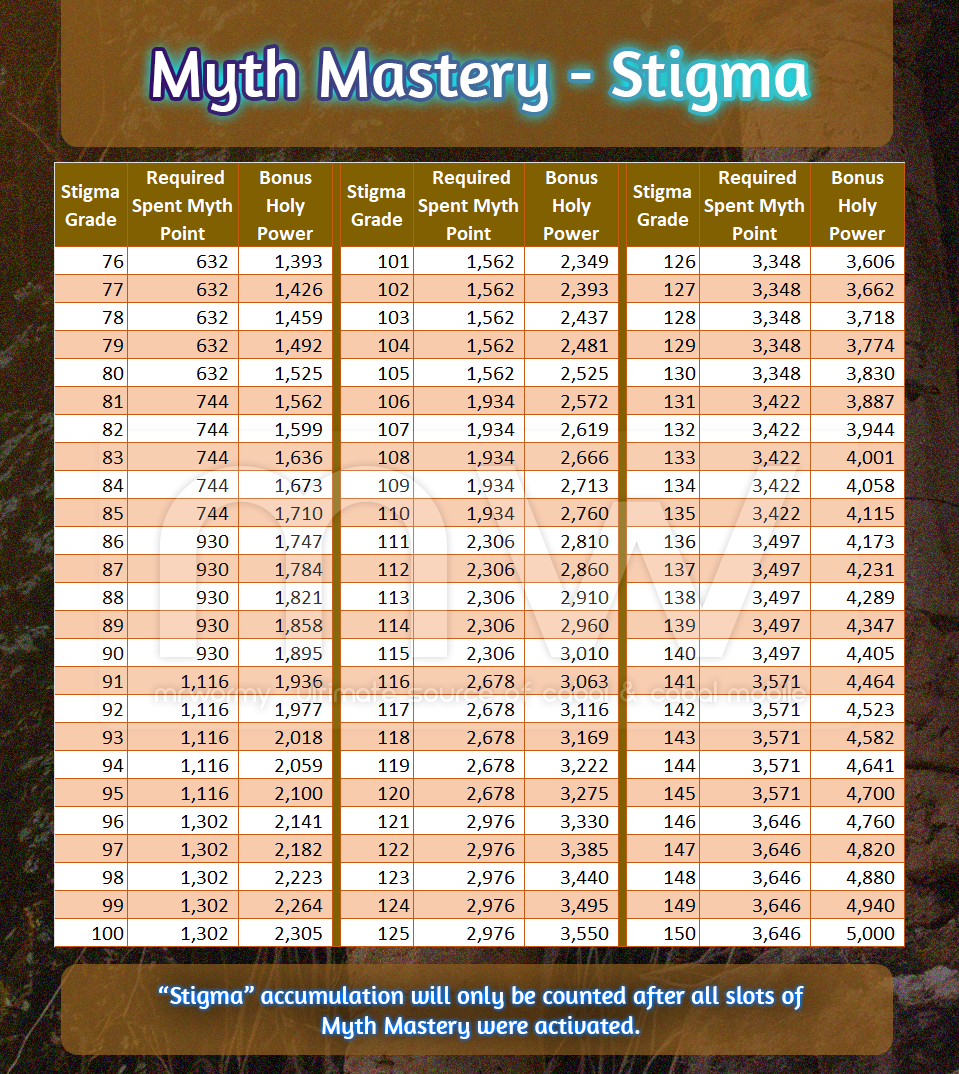
- New “Stigma” grade is added for the Myth Mastery system.
- When all Myth Mastery Slots are granted with options, the Stigma will be automatically unlocked.
- [1] A special icon will be displayed above the Holy Power area, there is a number to show the current “Stigma” grade.
- [2] Moving the mouse on the Stigma icon [1] will display:
- 3 groups of numbers:
- Current Stigma grade
- Next Stigma grade
- Max Stigma grade
- Each group contains:
- Purple icon: Stigma grade
- Yellow icon: Bonus Holy Power
- 3 groups of numbers:
- [3] Once the Stigma is activated:
- The Holy Power circle will turn Purple (originally is Yellow)
- Next to Holy Power there is also Bonus Holy Power (gain from Stigma)
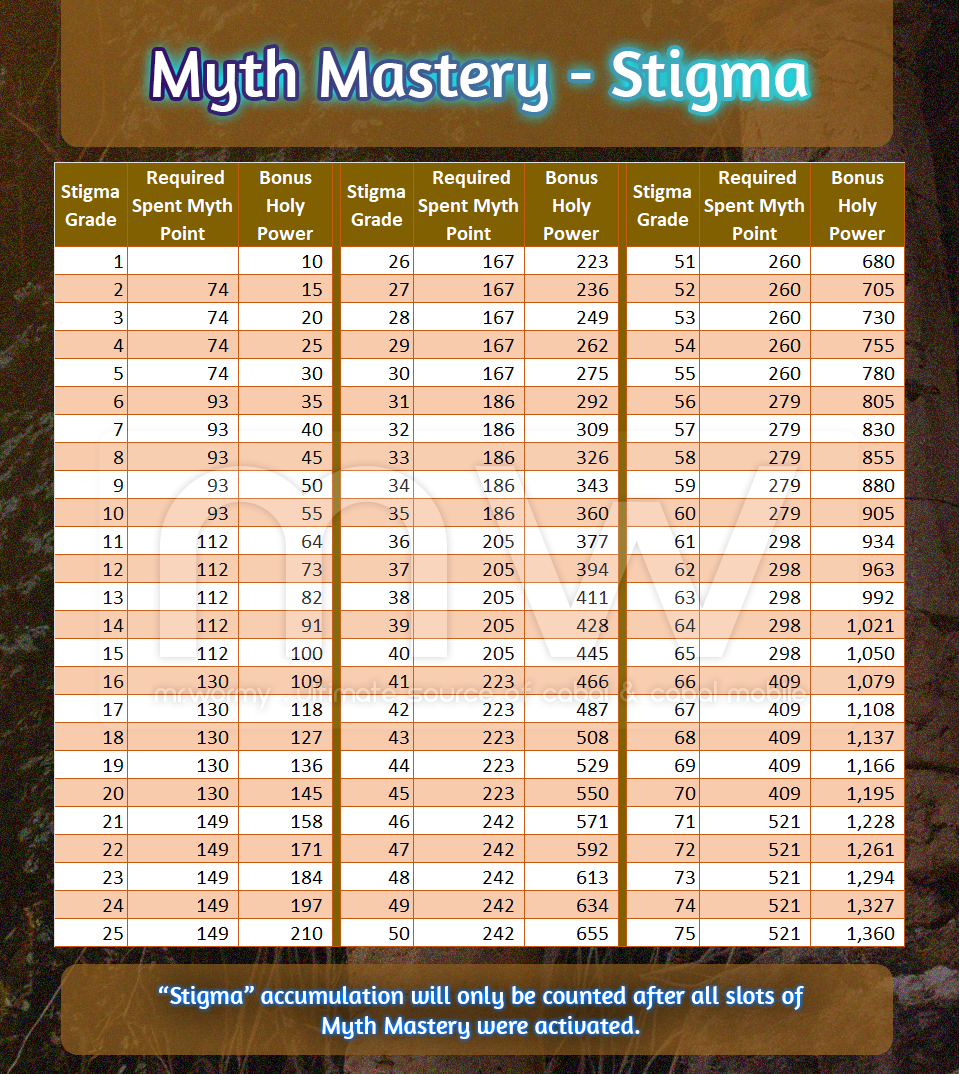
- The Stigma will be retrospectively applied for all of used Myth Point (after all of Myth Mastery slots were activated) from the past.
- Stigma Bonus Power
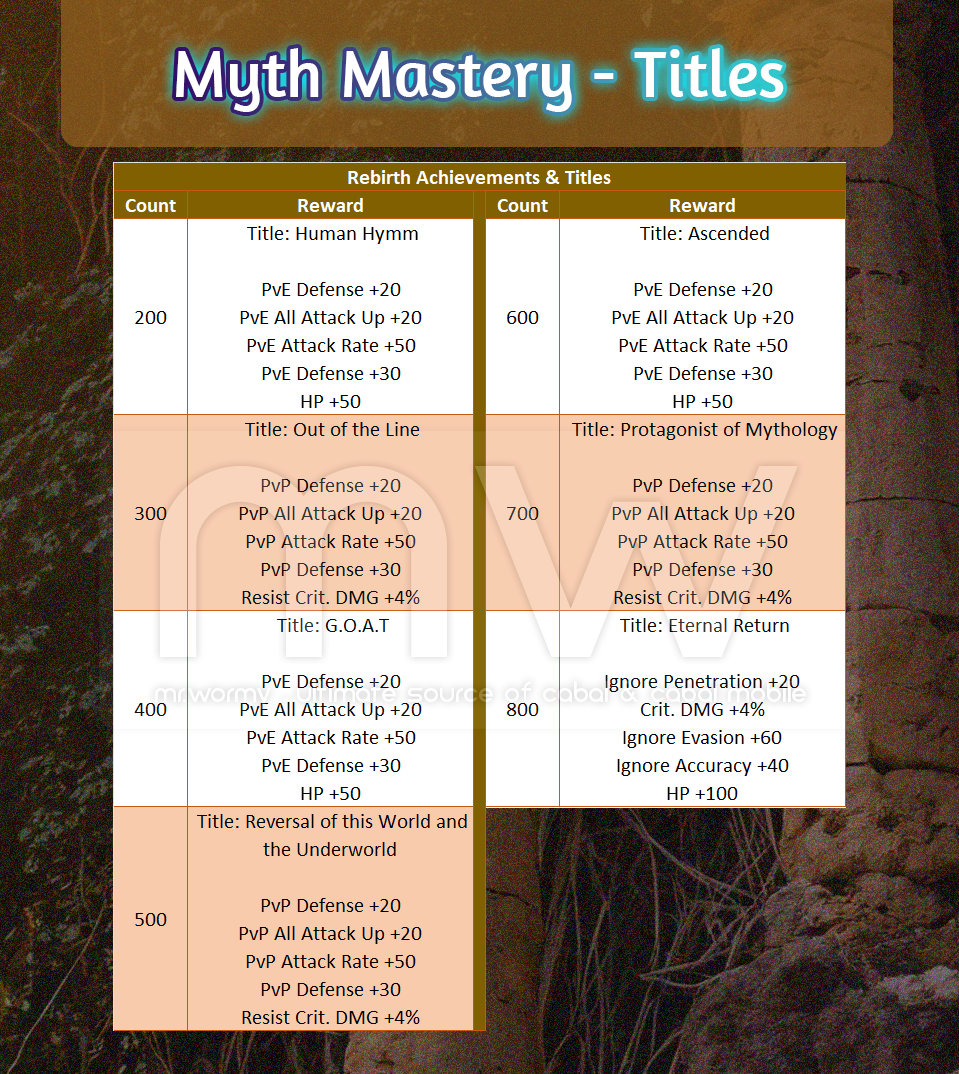
- New Achievements and Titles related to Rebirth of Myth Mastery system
- Add new titles for 200th, 300th, 400th, 500th, 600th, 700th, 800th Rebirths
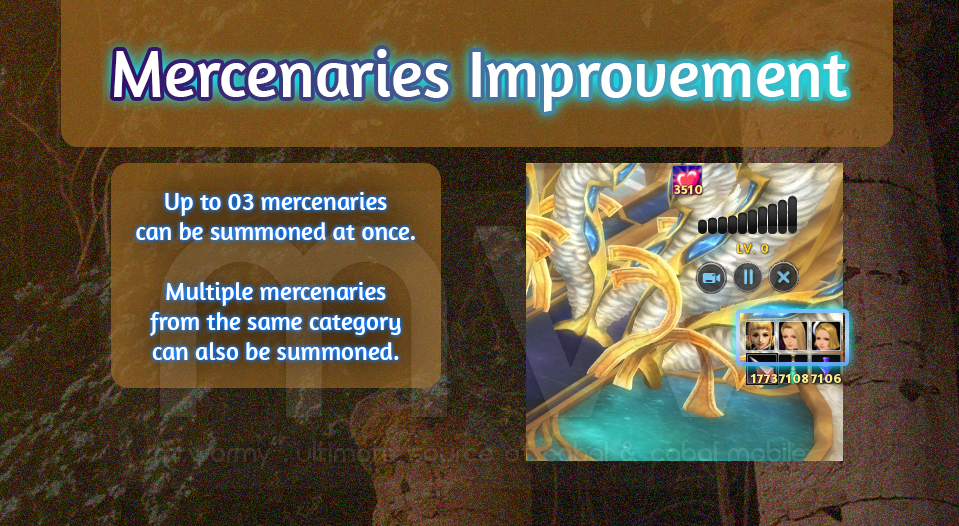
- Mercenaries Improvements
- Up to 03 mercenaries can be summoned at once.
- Old: Up to 02 mercenaries
- New: Up to 03 mercenaries
- Allow for multiple mercenaries of the same category can be summoned at once.
- Up to 03 mercenaries can be summoned at once.
- Add bulk receive button “Receive All” for Bingo event.
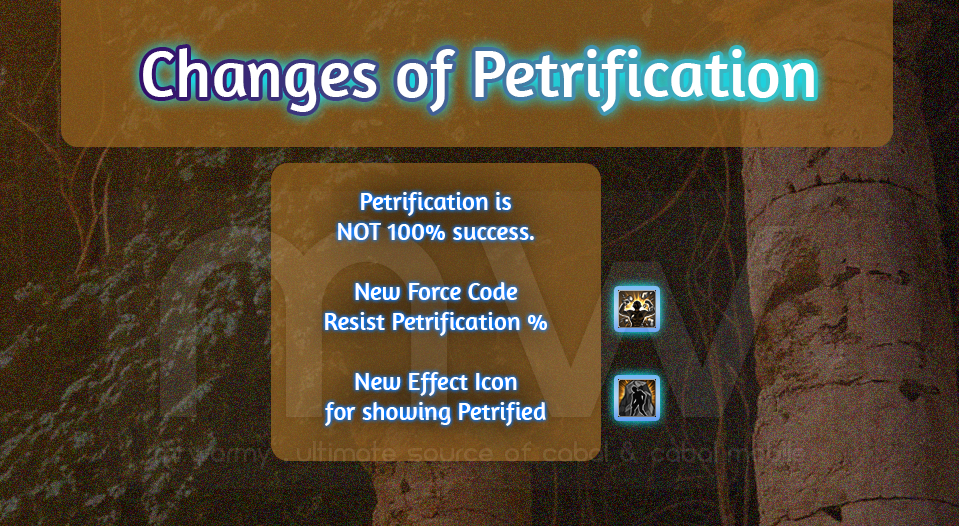
- Change to Petrification
- An icon will be displayed if the character is under effect of “Petrification”
- Chance to be petrified is in %. Once the target is “Petrified”, the target cannot be attacked and all attacks received will be treated as “MISS”.
- Petrification cannot be overridden with knockback, stun, down.
- Getting “Petrification” effect will break the combo.
- A new Force Code is added “Resist Petrification”
- To reduce the chance of getting Petrified by a specific %.
Discover more from Mr. Wormy
Subscribe to get the latest posts sent to your email.
 Mr. Wormy