

 Posted by
 ▶ Public Servers
■ Fixes
1. In certain situations, bugs might be appeared that causes monsters display abnormally on maps
2. Fix bug that related to Forgotten Temple B2F Awakening Mode
- Fix the bug that causes unable to complete / proceed quest stage in certain situations
- Fix bug that related to Aryak quest
■ Changes
1. Change Mission Battle Skill cooldown
- Change the cooldown time of Mission Battle skills
- ▶ Test Server Updates
- ■ Fixes
- 1. Achievement-related bugs
- Fixed bug that displays the requirement of “Another area IV” incorrectly
- Fixed bug that displays description of some achievement abnormally
■ Changes
1. Change some tooltip message
- Add tooltip for Enchant Safeguard
- Social skills
- Including shortcut in the description tooltip
■ Additions
1. Add new item: Effector

- Effector
- Allow to equip like weapons / armors / accessories
- When equiping, the stats of a signle skill will be enhanced
- Types
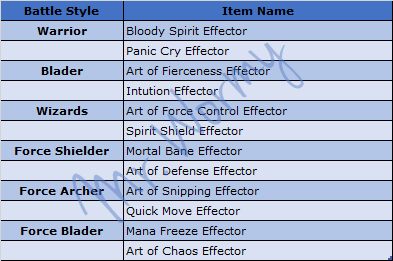
- Enlightening Effector
- Normally, Effector has no additional effect. that means it gives nothing
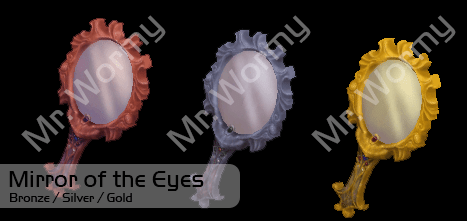
- To reveal its effect(s), player need to use Mirror of the Eyes on it
- Depends on Mirror of the Eye grade, there are different results can be obtained
- To use the Mirror of the Eye
- Right click on the mirror
- Left click on the Effector
- Using higher grade of Mirror will give more chance to get better result of Effector
- In test server, Bronze/Silver mirror are sold in Event NPC
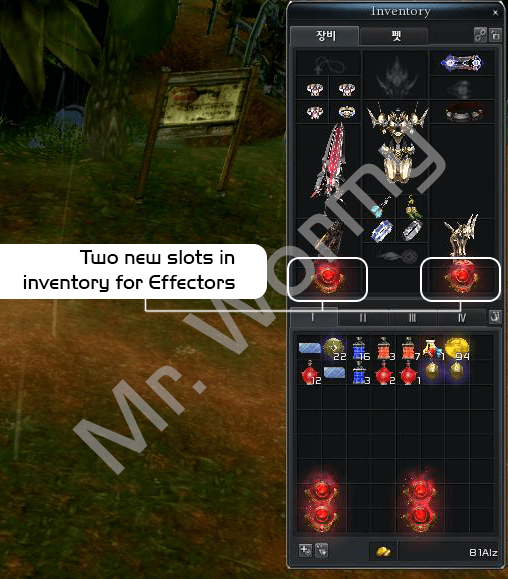
- Equiping Effector
- There are two new inventory slot for Effectors
- Two Effectors can be equipped at once
- Effectors can give effect in Mission Field / Mission Dungeon / Mission War but not in Mission Battle
- Applying effect
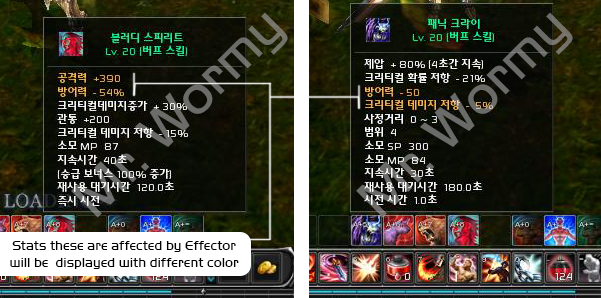
- Stats of Effector will be applied directly to skill, regardless of skill level
- Stats change will be noticed with different color in skill tooltip

- Result of enlightening
- There are chances to get different result of effect(s) which are granted by Effector
- There are chances to get different grade of same effect which are granted by Effector
- Depends on grade of all effect(s), Effector(s) are ranked in 4 grades, can be sorted in 4 types (based on item name color)
Effector in Action
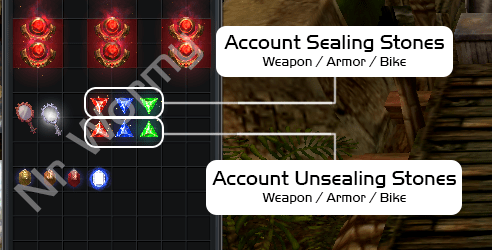
2. Add feature to seal / unseal account binding items
- All to seal / unseal items with “Account Binding” property so it can be traded
- Target item: Weapons / Armor / Bike
- Account Binding Sealing Stone
- Target : Account-Binding items
- Can be applied once for one item
- Cannot be applied on equipping item
- Account Binding Unsealing Stone
- Unseal a sealed item
- Add new category in Auction Hall
- Add new categories in Auction Hall for Sealing/Unsealing stone
- Account Seal / Unseal > Account Sealing Stone
- Weapon
- Armor
- Bike
- Account Seal / Unseal > Account Unsealing Stone
- Weapon
- Armor
- Bike
- Account Seal / Unseal > Account Sealing Stone
- Add new categories in Auction Hall for Sealing/Unsealing stone
3. Upgrading Point
- User Interface
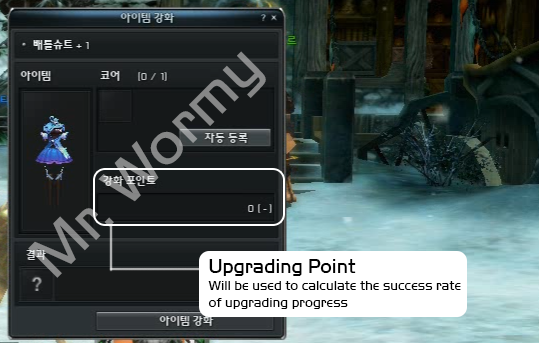
- Add place to display Upgrading Point in Upgrade UI
- Acquisition
- Upgrading Point will be obtained on upgrading failure

- Higher grade of item will give more Upgrading Point

- Using Enhanced Cores or Superior Cores will give more Upgrading Point (of course on failure too)
- Consumption
- Upgrading Point will be used to calculate the success rate of upgrading
- On success, the Upgrading Point will be reset to 0
- Upgrading Point will be accumulated on every failure until success
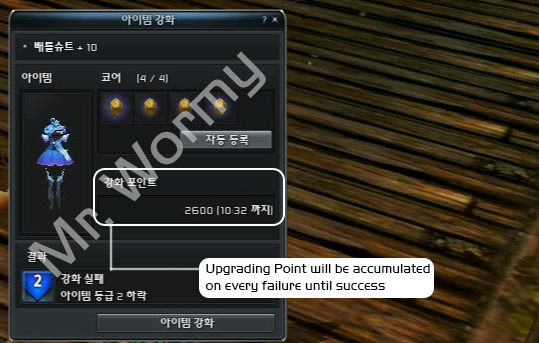
- The total amount of Upgrading Point will be reset to 0 after 3 hours since the last time of failure (expiry time is displayed on the Upgrading UI)
4. Buddy Bonus System
- Buddy Bonus: Add bonus that based on buddy list
- Buddy Point
- Calculate based on number of currently online buddies
- Buddies with Premium Service / PC-Room Service / Blessing Bead – Plus will give more point
- Calculate up to 50 buddies
- If there are more than 50 online buddies, the calculation will be proceeded limit to 50 buddies
- Buddy Bonus
- Increasing based on character level
- Increasing based on Buddy Point
- Buddy Bonus information display
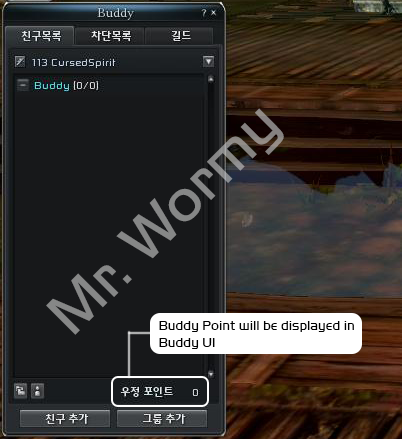
- Buddy Point will be displayed at bottom of Buddy UI
- Buddy Bonus summary will be displayed in Benefit window (like other benefits)
Discover more from Mr. Wormy
Subscribe to get the latest posts sent to your email.
 Mr. Wormy
This was great to rread
LikeLike