


Last Update: 31-Aug-2025 with New Episode 42 Merit Medal UI.

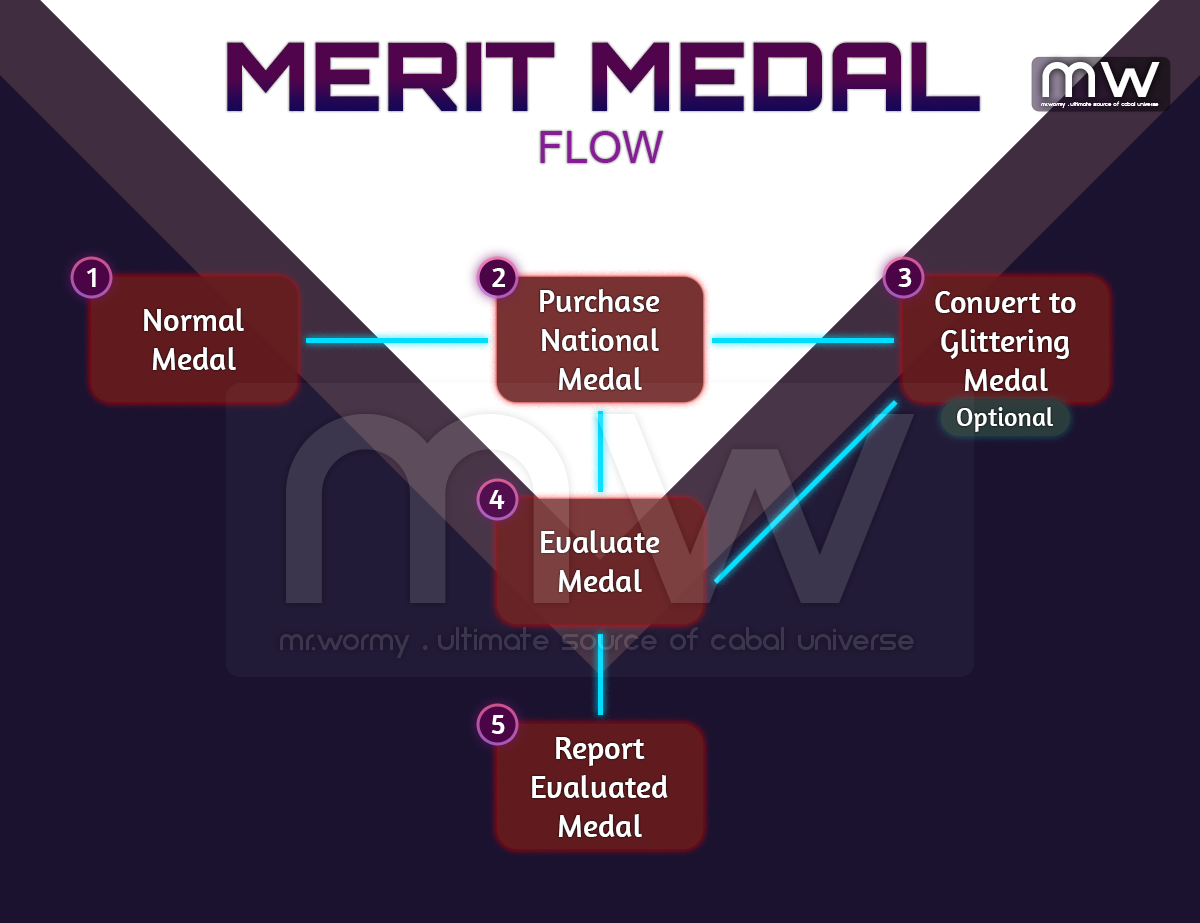
- [1] Merit Medal Exchange Ticket can be earned by completing Mission War. It will be sent via in-game mail. Amount of Merit Medal Exchange Ticket is based on the obtained War Score.
- [2] By exchange (purchase at rate 1:1) the Merit Medal Exchange Ticket at designated NPCs for each nation, character can get the equivalent Merit Medal of that nation.
- [3] Optionally, the National Medal could be converted into Glittering Medal using cash item.
- [4] By evaluating the Merit Medal, random result could happen.
- [5] Once the evaluation is completed, player can report the evaluated medals at NPCs to obtain Merit Score and if player’s Honor Rank is higher than Rank 10, additionally Honor Point will be granted.
- Merit Score is for growing Merit Mastery Gold / Platinum / Diamond Insignia.

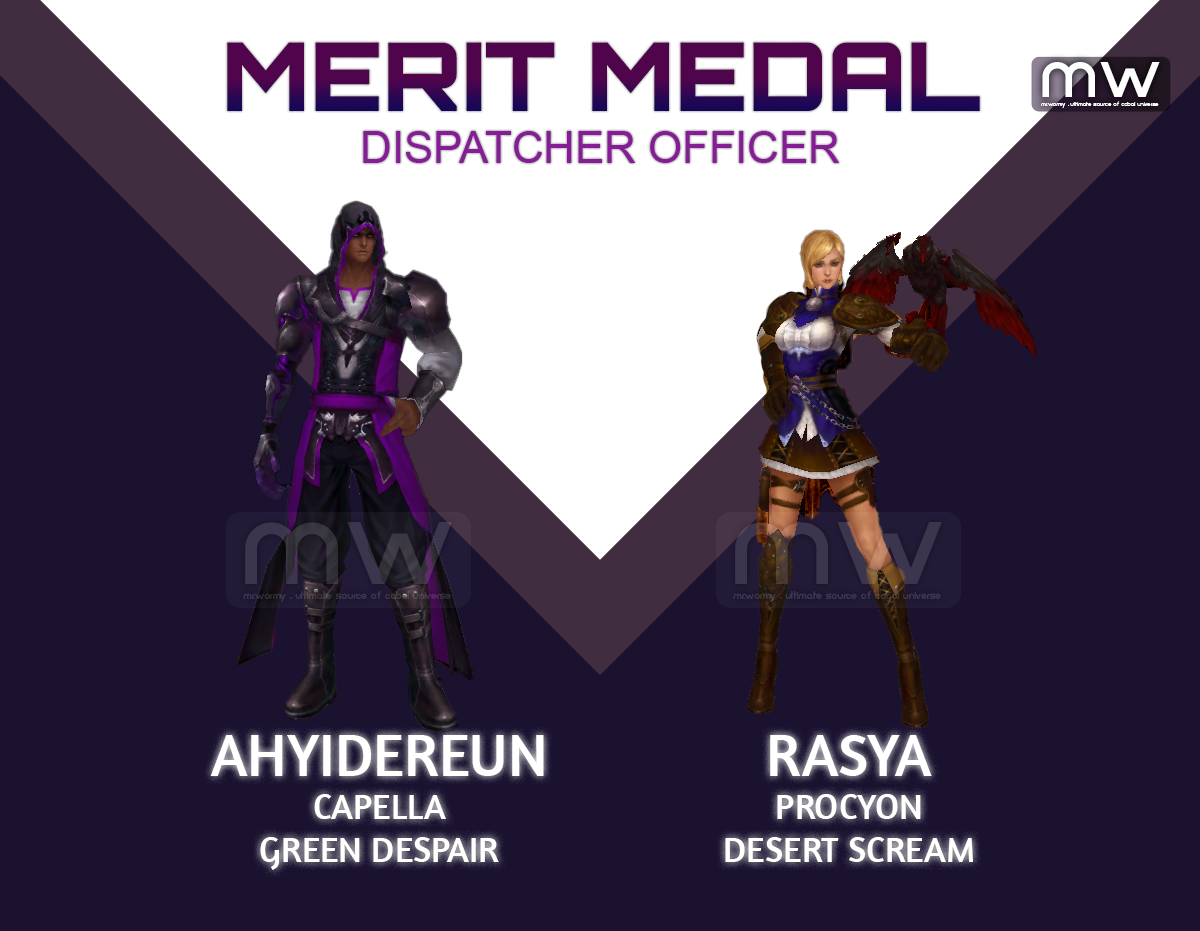
- Using Merit Medal Exchange Ticket, player can exchange for national medal from designated NPCs.
- Capella:
- War Lobby: Contribution Officer – Olivia
- Green Despair: Dispatcher Officer – Ahyidereun
- Procyon:
- War Lobby: Contribution Officer – Kyle
- Desert Scream: Dispatcher Officer – Rasya
- Capella:

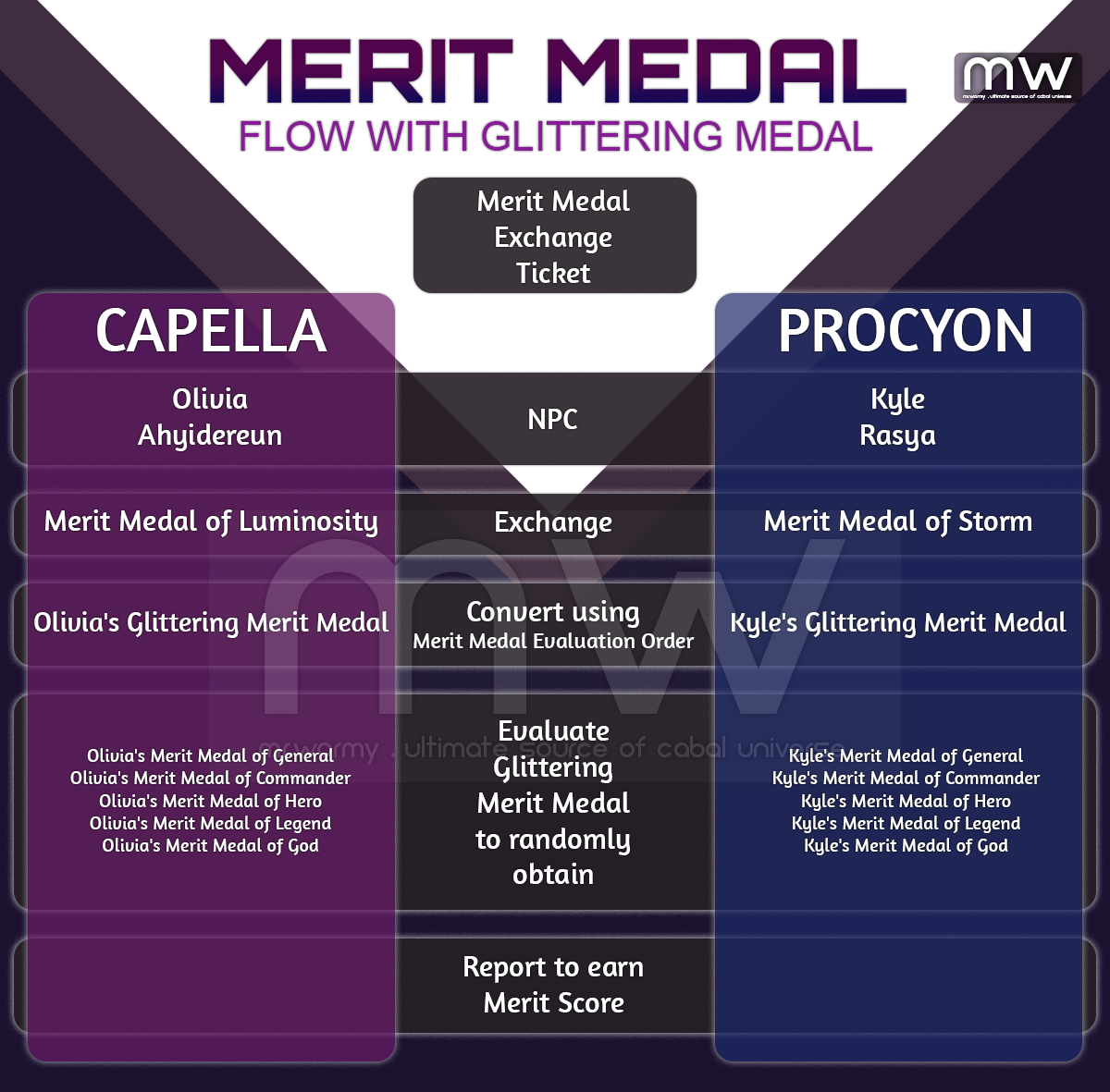
- Exchange Rate is 1:1, that means:
- If you are Capella, you can exchange 01x Merit Medal Exchange Ticket for 01x Merit Medal of Luminosity.
- If you are Procyon, you can exchange 01x Merit Medal Exchange Ticket for 01x Merit Medal of Storm.
- National Merit Medal (Merit Medal of Luminosity or Merit Medal of Storm) can be converted into Glittering version using Merit Medal Evaluation Order.
- If you are Capella, you can convert 01x Merit Medal of Luminosity into 01x Olivia’s Glittering Merit Medal.
- If you are Procyon, you can convert 01x Merit Medal of Storm into 01x Kyle’s Glittering Merit Medal.
- Flow of normal Merit Medal:

- Flow of Glittering Merit Medal:

By Episode 42, a new revamped UI is added for Merit Medal allows doing all tasks in the same screen even with batch processing.
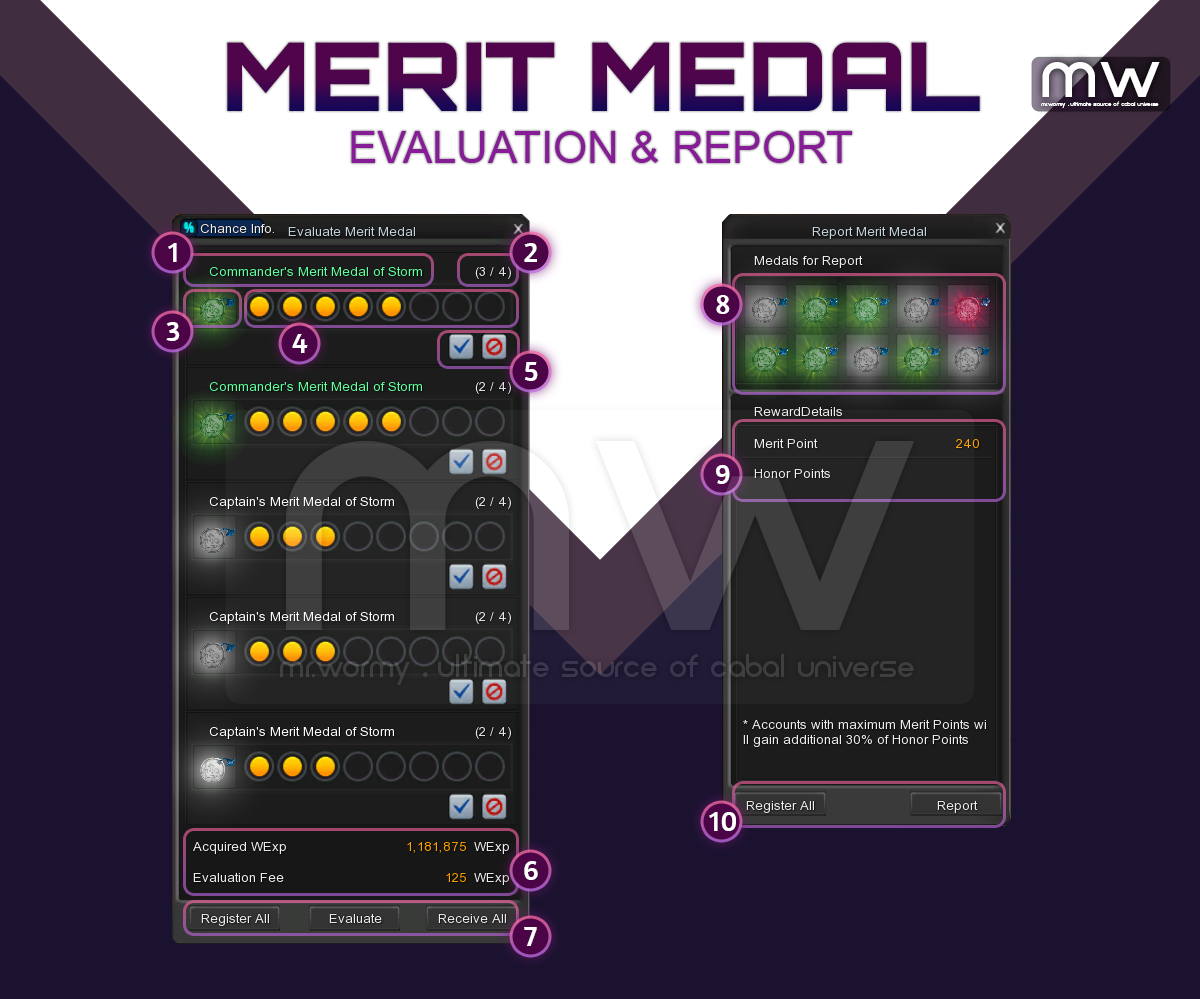
Merit Medal UI before Episode 42
- Evaluate:
- [1] Current Grade of the Merit Medal
- [2] Number of evaluation could be performed on that Merit Medal
- [3] Image of the Merit Medal
- [4] Grade of the Merit Medal
- [5] Button for Accept / Restore the Merit Medal Evaluation result
- By clicking on “Accept”, the result will be finalized for that evaluation. If the Merit Medal has additional try for Evaluation, it could be again re-evaluated.
- By clicking on “Restore”, the result will be reverted back to the previous result before the current evaluation. However the count of evaluation try will still be deducted. If the Merit Medal has additional try for Evaluation, it could be again re-evaluated.
- [6] As the evaluation requires WEXP, the details of WEXP that character has and the required WEXP for evaluation will be displayed.
- [7] Buttons:
- Register All: All evaluable Merit Medal will be automatically registered.
- Evaluate: All of registered Merit Medal will be evaluated / re-evaluated.
- Receive All: All of evaluated Merit Medal will be received back to Inventory.
- Report:
- [8] List of all registered Merit Medals for Report.
- [9] Sum of Merit Score that could be obtained from the Report and Honor Point (if applicable).
- [10] Buttons:
- Register All: All registerable Merit Medals will be automatically registered.
- Report: Report all of registered Merit Medals.
Merit Medal UI after Episode 42
- New integrated UI for Merit Medal that supports
- Evaluation
- Report
- Convert with
- Merit Medal evaluation order
- Merit Medal evaluation cancel order
- Access:
- Via menu item in Cabal Menu > Merit Medal
- Quick Access with shortcut: Alt + T
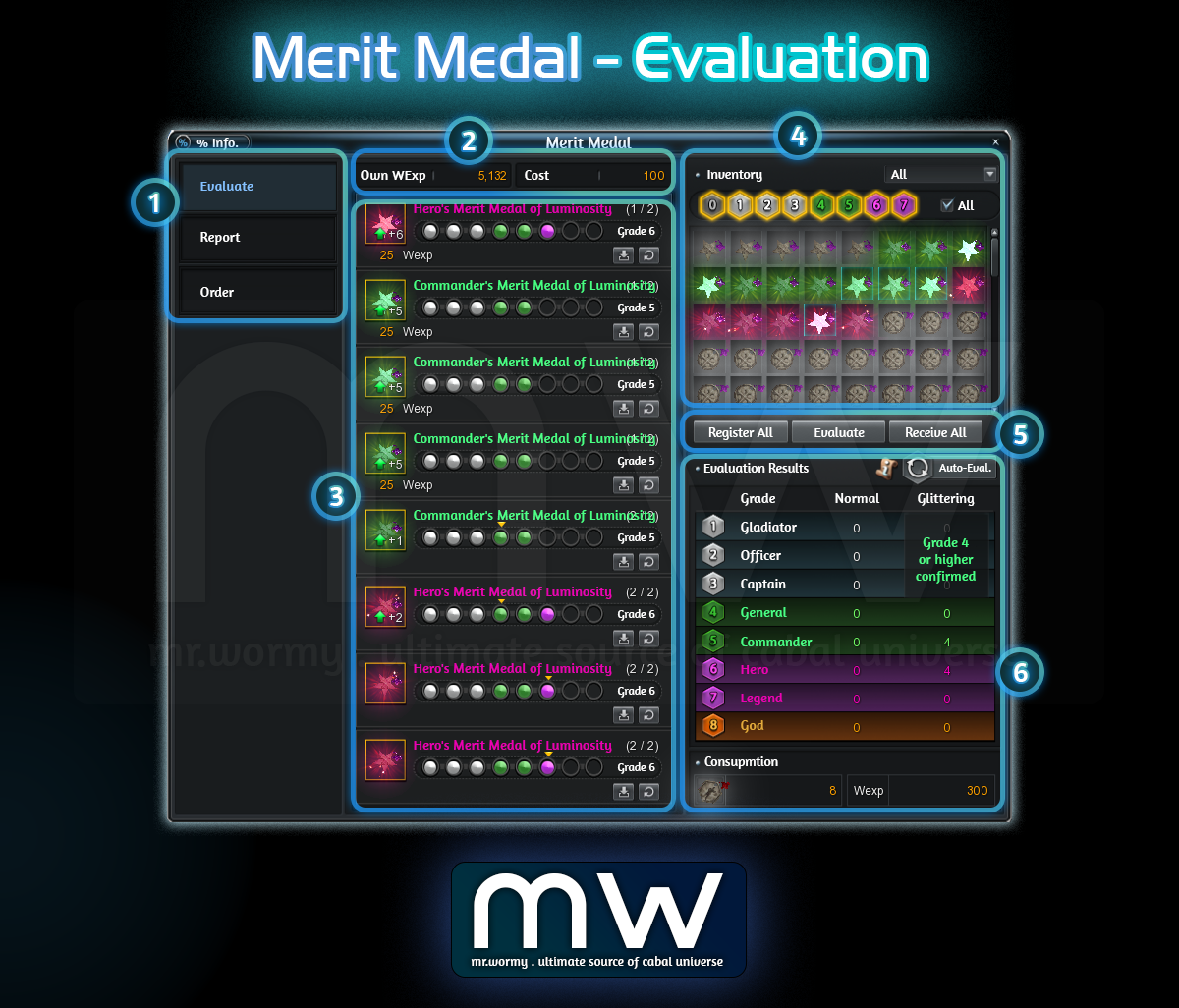
- Evaluation UI:
- [1] Tab Selection, “Evaluate” is selected
- [2] Current amount of WExp and Cost for the Evaluation
- [3] List of registered Merit Medal for Evaluation
- [4] List of available Merit Medal in Inventory, allow filtering
- Able to select from the list or manually selected desired grades
- Cannot select Grade 8 (as it is already MAXed)
- [5] Buttons for Register All / Evaluate / Receive All
- [6] Evaluation Results
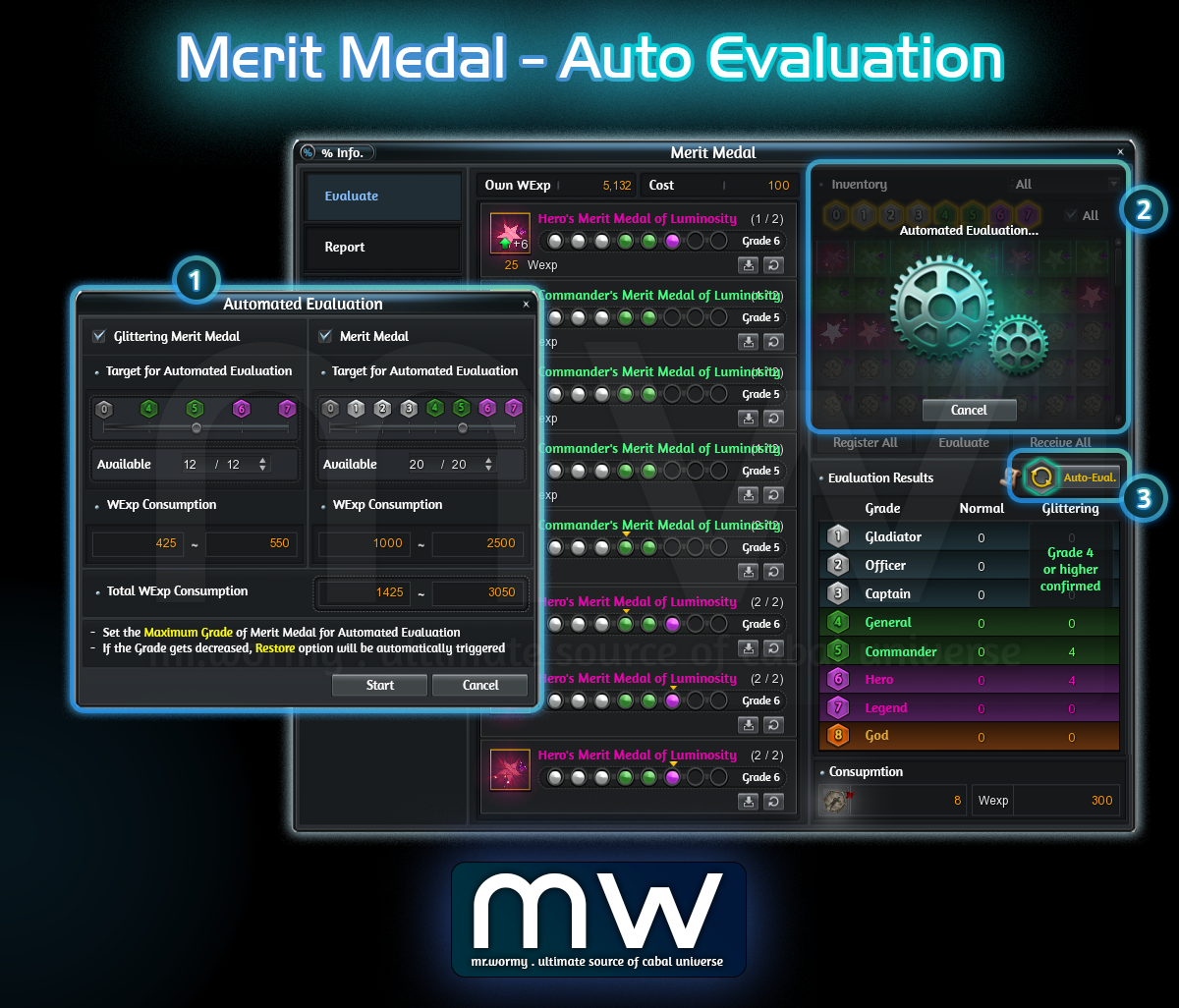
- Automated Evaluation UI:
- [1] Automated Evaluation Option UI is shown of Button [3] is clicked, allow configuration of:
- Max grade of Merit Medal to keep re-evaluating
- Glittering Merit Medal: 0 / 4 / 5 / 6 / 7
- Merit Medal: 0 / 1 / 2 / 3 / 4 / 5 / 6 / 7
- Limit the number of Merit Medal to keep re-evaluating
- Button to [Start] or [Cancel]
- [Start] will start the process, main Evaluation UI will be displayed like in [2] and button will be marked with different color like [3]
- [Cancel] will close the UI
- Max grade of Merit Medal to keep re-evaluating
- [1] Automated Evaluation Option UI is shown of Button [3] is clicked, allow configuration of:
- Automated Evaluation concept:
- Once started, the Evaluation will keep running for all based on selection
- Type of Medal is selected
- Merit Medal and / or Glittering Merit Medal
- The medal still have evaluation count
- If the evaluation count is not available, even the Grade is lower than selected Grade, that medal will still be excluded
- The medal is with Grade lower or equals to the selected Grade
- Medal with higher grade than selected grade will be excluded
- Character still has enough WExp to perform the Evaluation
- Type of Medal is selected
- Cannot switch to other tab Report / Order while under the Automated Evaluation
- Once started, the Evaluation will keep running for all based on selection
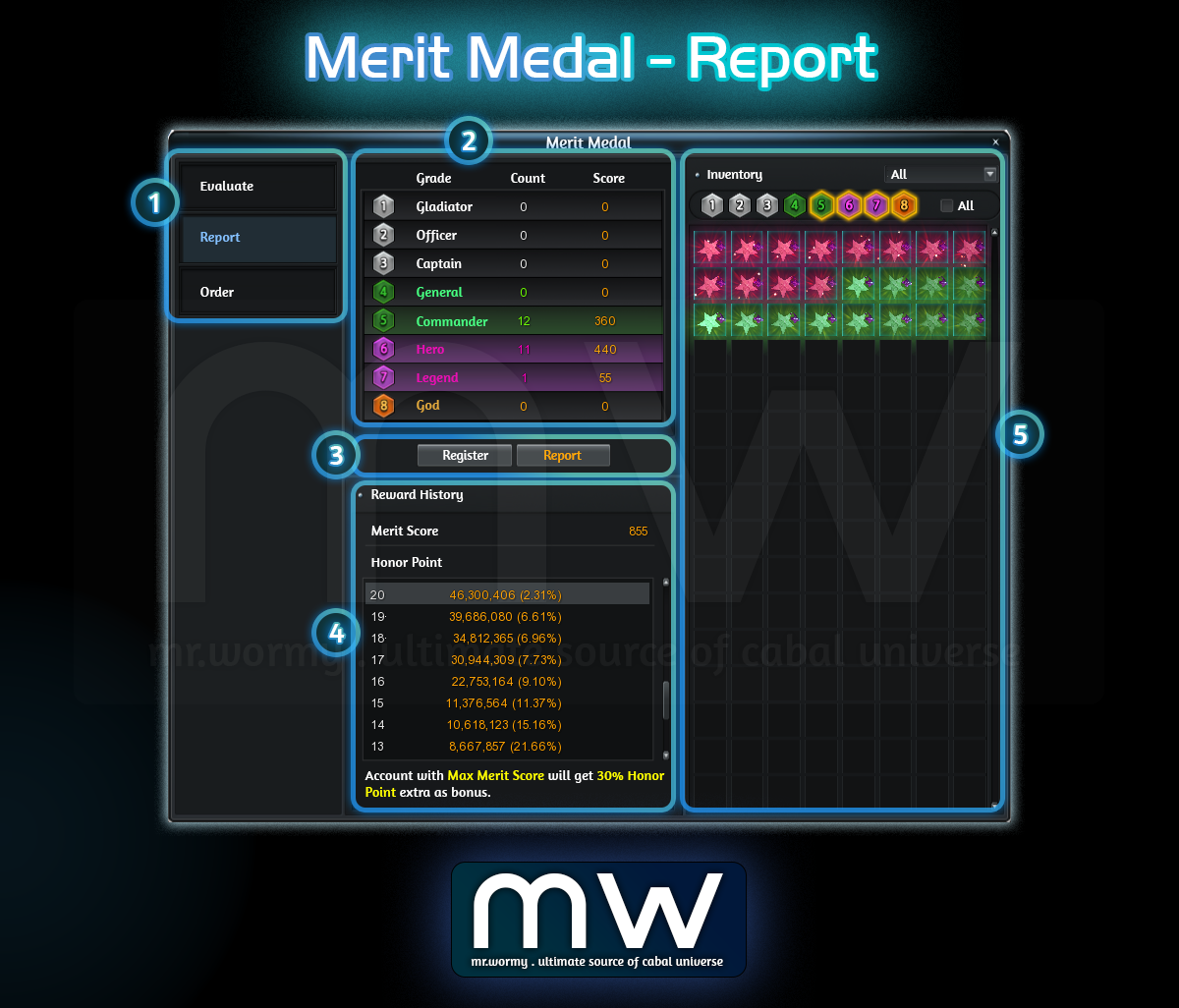
- Report UI:
- [1] Tab Selection, “Report” is selected
- [2] List of available Merit Medals ready to get reported
- Breakdown by Grade, with Count and Score
- [3] Button to Register and Report
- [4] History of Rewards from Report
- [5] List of Merit Medals which can be reported in Inventory
- Register in Batch up to 640 Merit Medals at once.
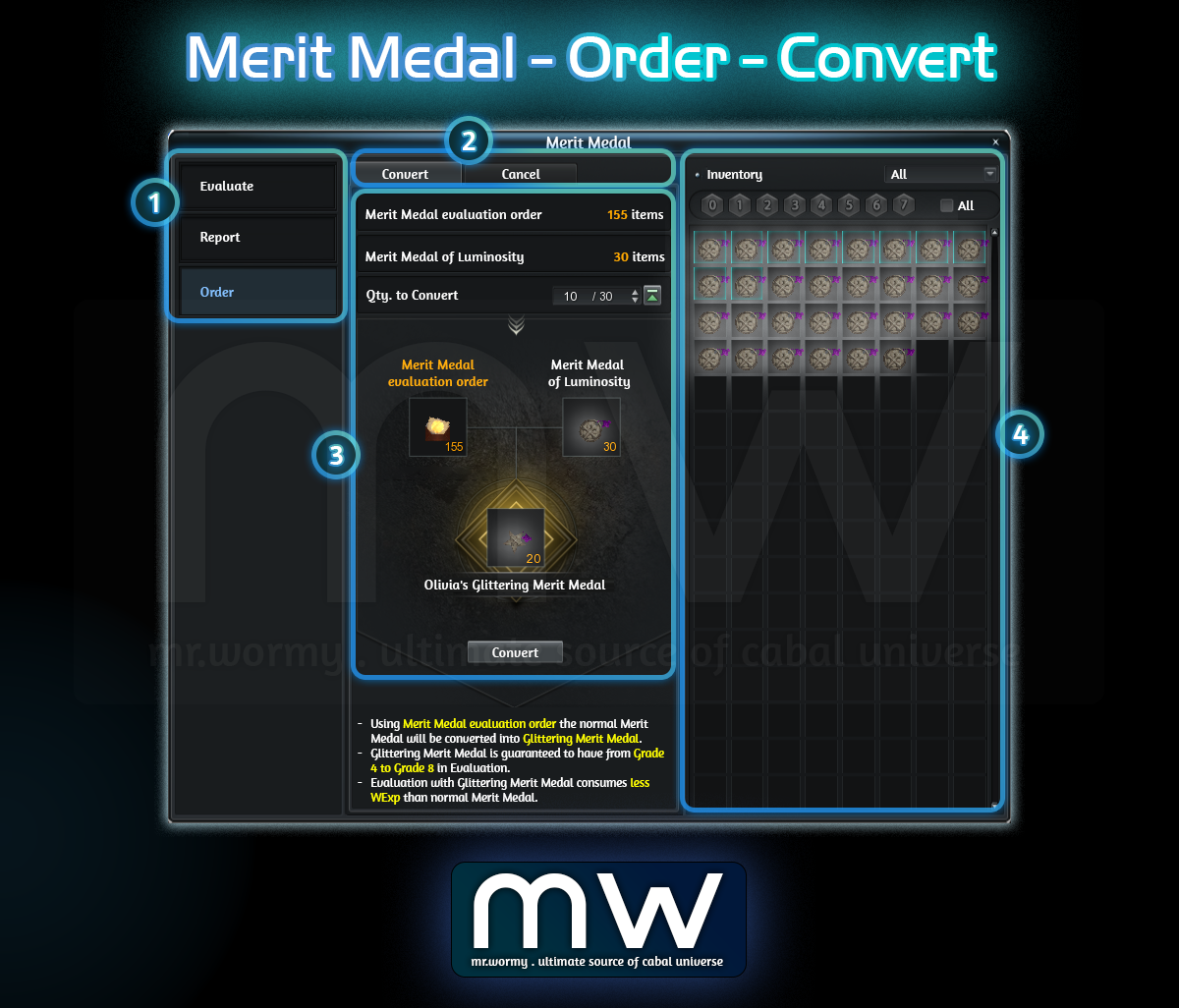
- Order > Use of “Merit Medal evaluation order”
- [1] Tab Selection, “Order” is selected
- [2] Able to switch between batch use of:
- Convert: For using “Merit Medal evaluation order”
- Cancel: For using “Merit Medal evaluation cancel order”
- [3] Listing all of
- Available amount of “Merit Medal evaluation order”
- Available amount of normal Merit Medal, depends on Nation:
- Capella: Merit Medal of Luminosity
- Procyon: Merit Medal of Storm
- [4] Preview of Result & “Convert” button to perform
- [5] Available Merit Medal that can be converted are showing in the right side
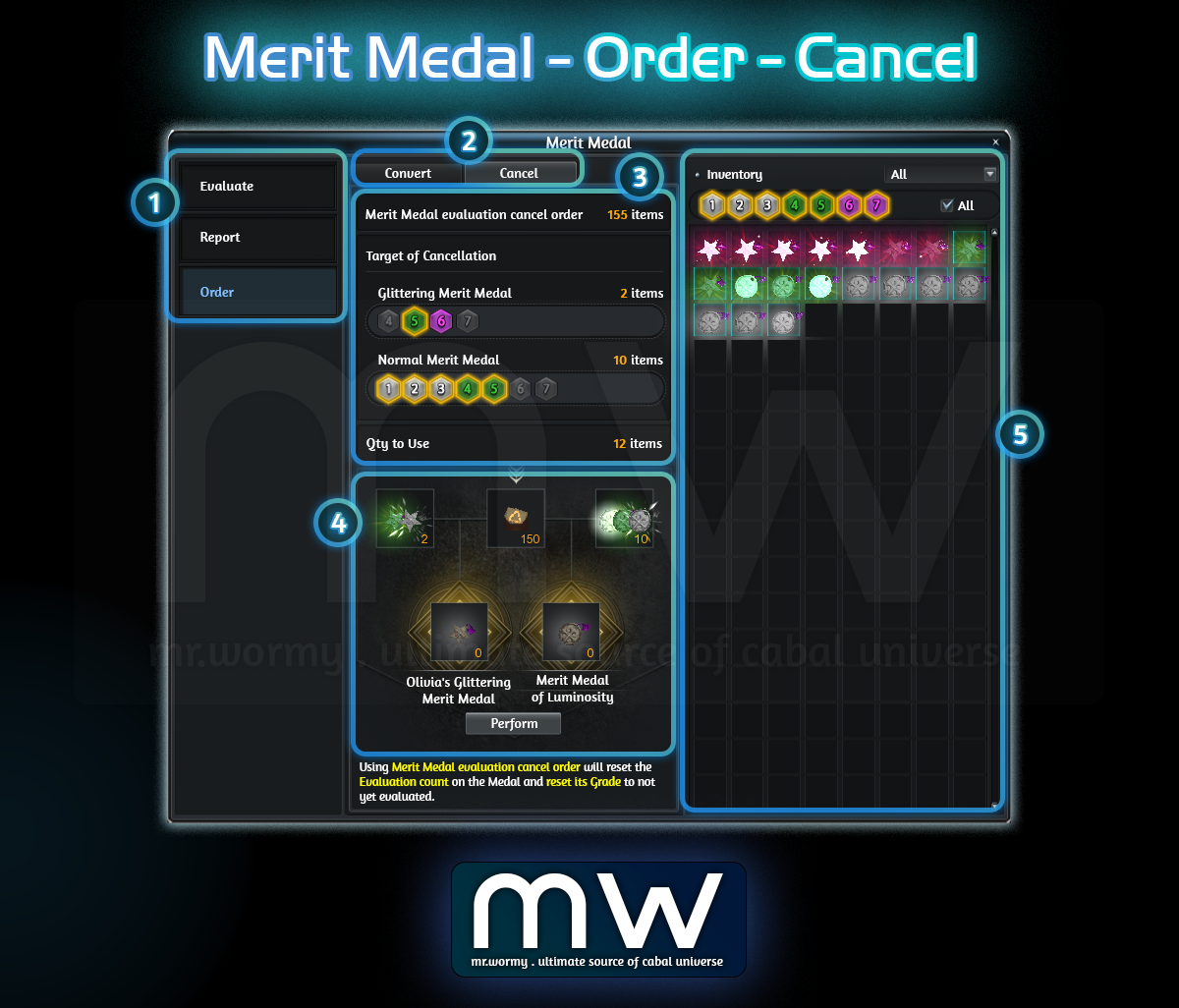
- Order > Use of “Merit Medal evaluation order”
- [1] Tab Selection, “Order” is selected
- [2] Able to switch between batch use of:
- Convert: For using “Merit Medal evaluation order”
- Cancel: For using “Merit Medal evaluation cancel order”
- [3] Listing all of
- Available amount of “Merit Medal evaluation cancel order”
- Available amount of Glittering Merit Medal and Normal Merit Medal, depends on Nation, allow selecting the target of Grade for cancellation
- [4] Preview of Result & “Perform” button to perform
- [5] Available Merit Medal that can be cancelled are showing in the right side
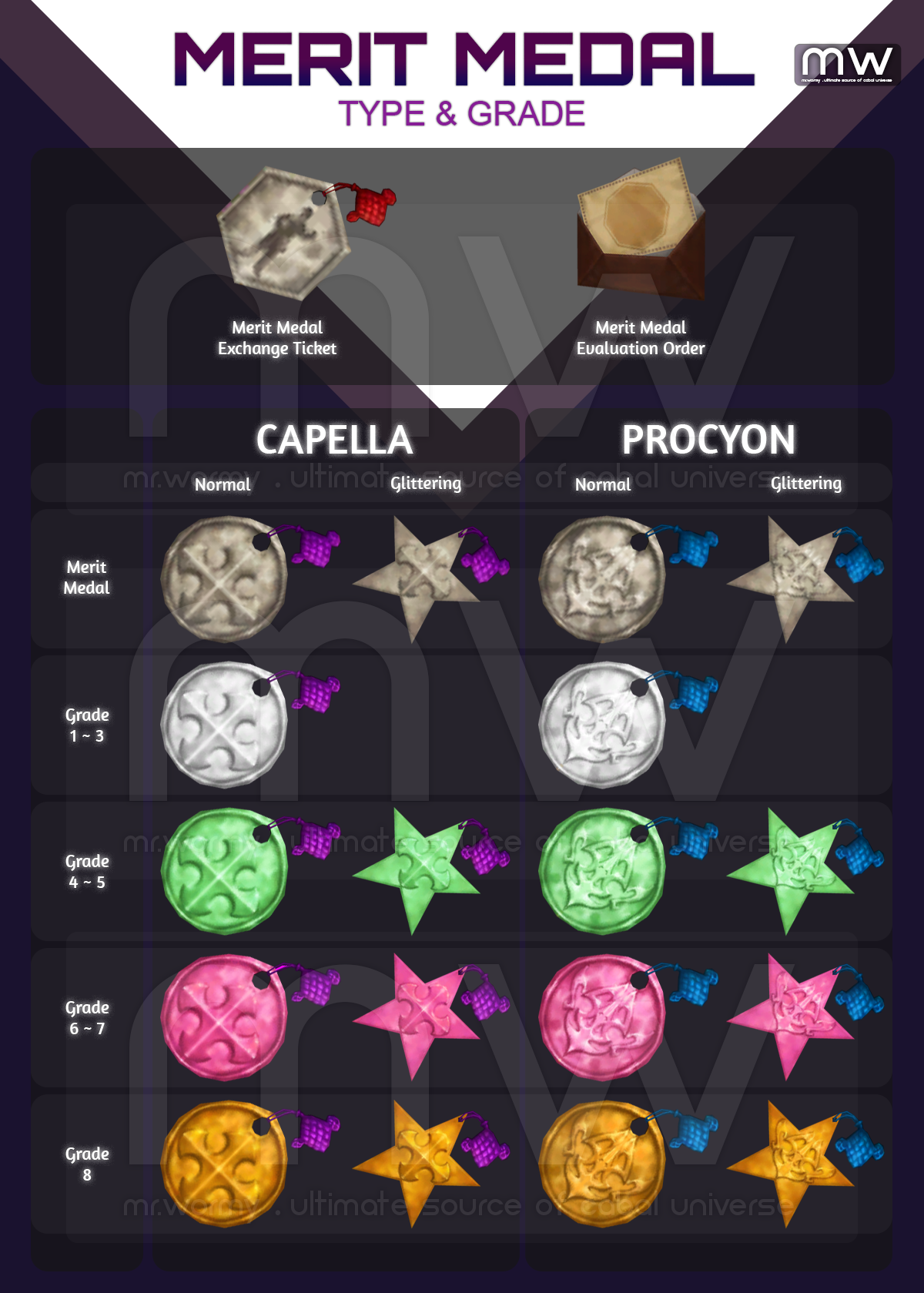
- Merit Medal Type / Grade:
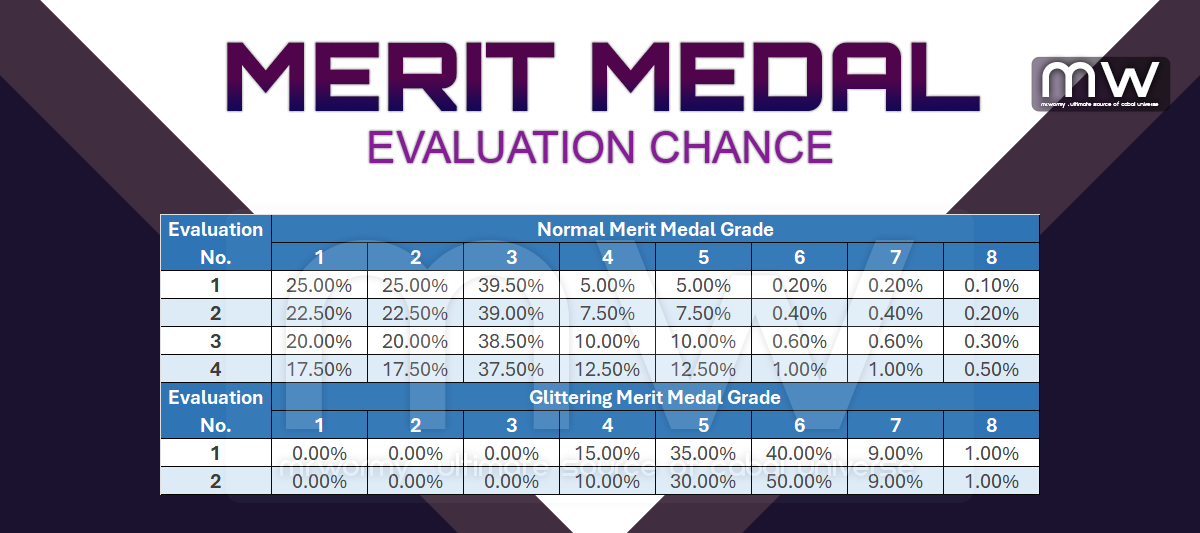
- Chance of Evaluation:

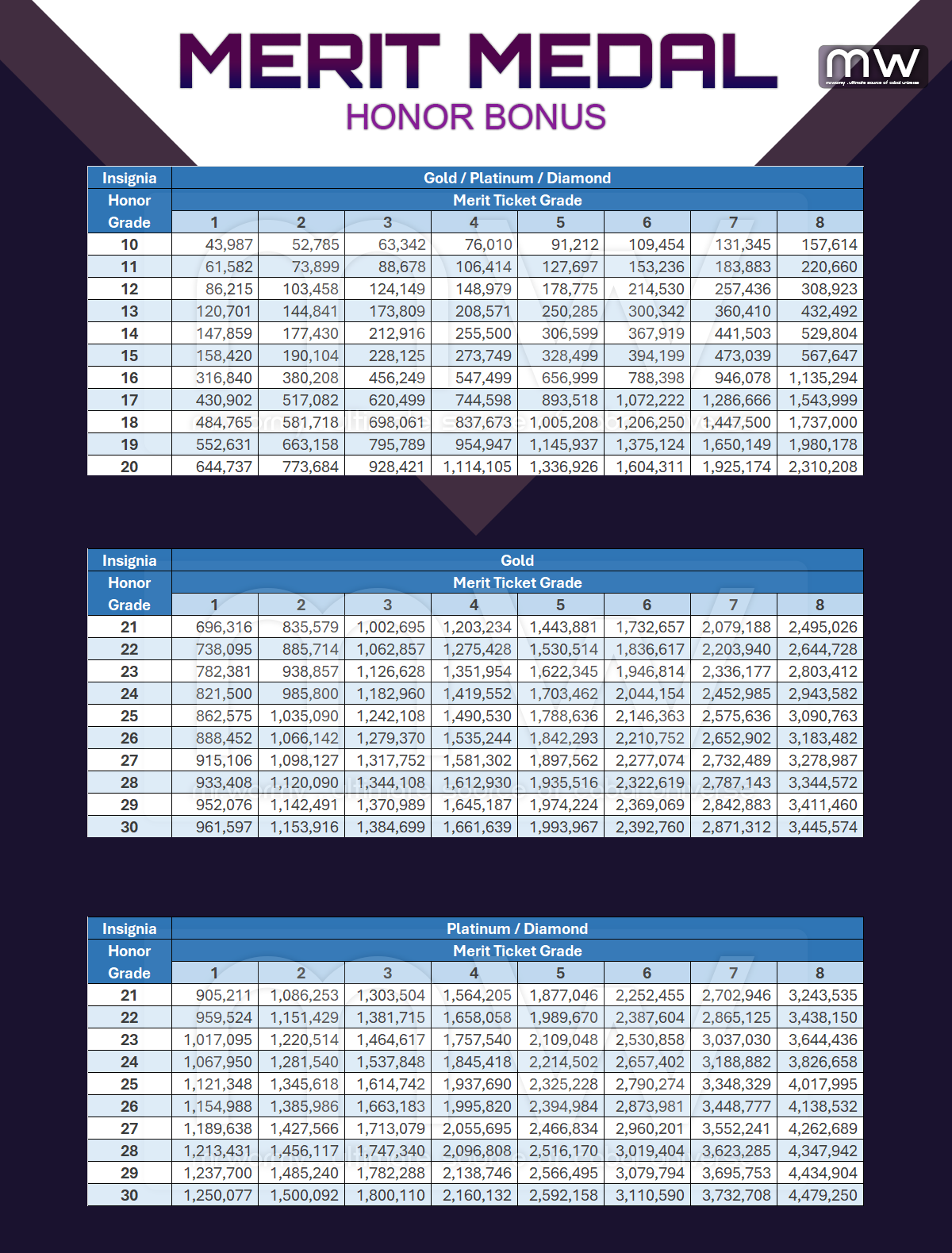
- All characters with Honor Grade 10 or higher in the account will get the Honor Points if any character in the account report Merit Medal.
- Amount of Honor Point obtained by reporting Merit Medal is based on the type of current Insignia and target character Honor Grade.
 Mr. Wormy