

- Overview:
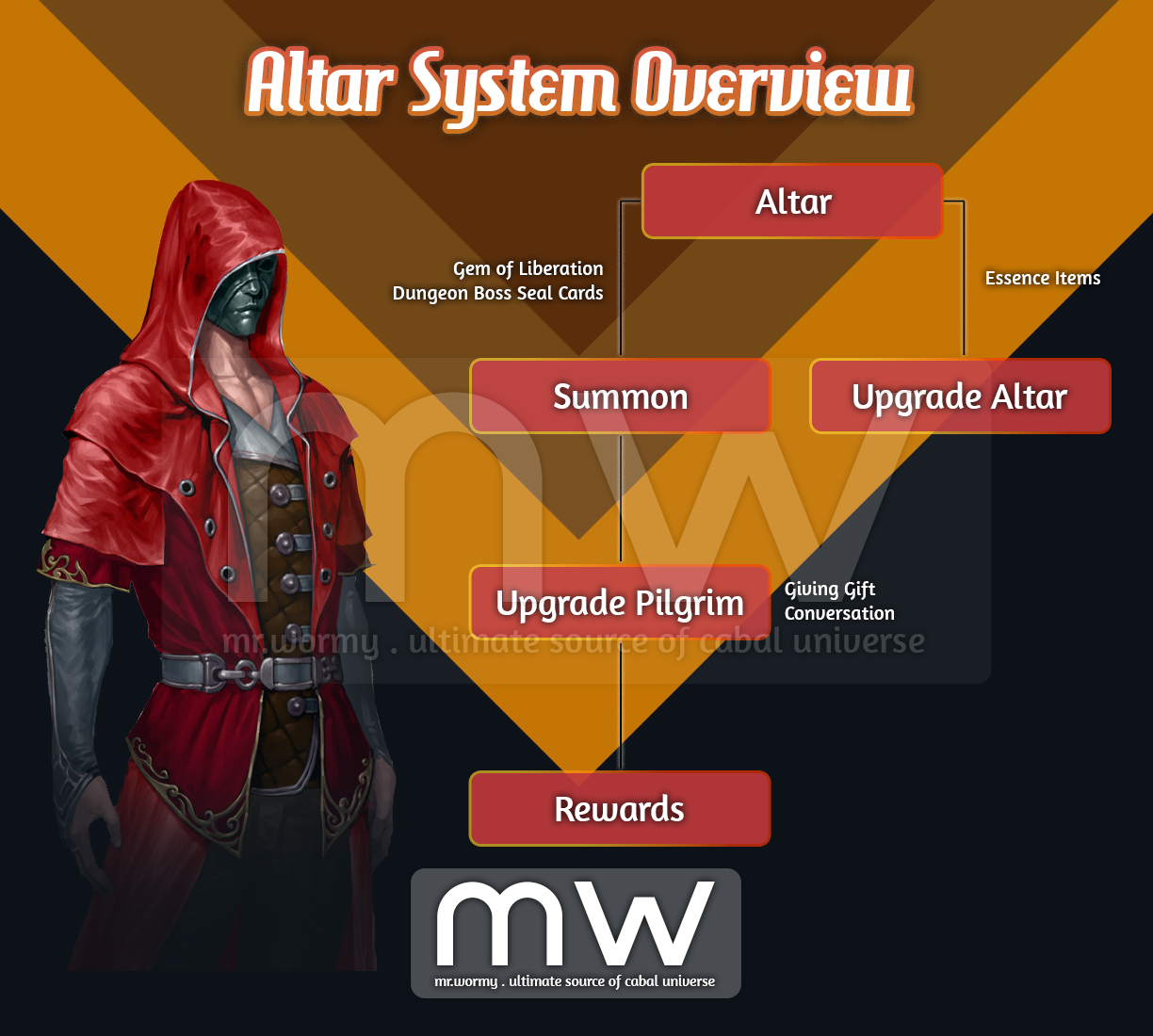
- A new content that allows summoning “Pilgrims” to the “Altar”, upgrade the Altar / Pilgrims to obtain Rewards.
- The higher condition of the Altar, the better / Pilgrims’ effect you can obtain; therefore, it’s important to keep the Altar with higher condition.
- Pilgrims have buffs, if the Pilgrims reach to highest Rank, additional bonus will be applied.
- Activation Quest:
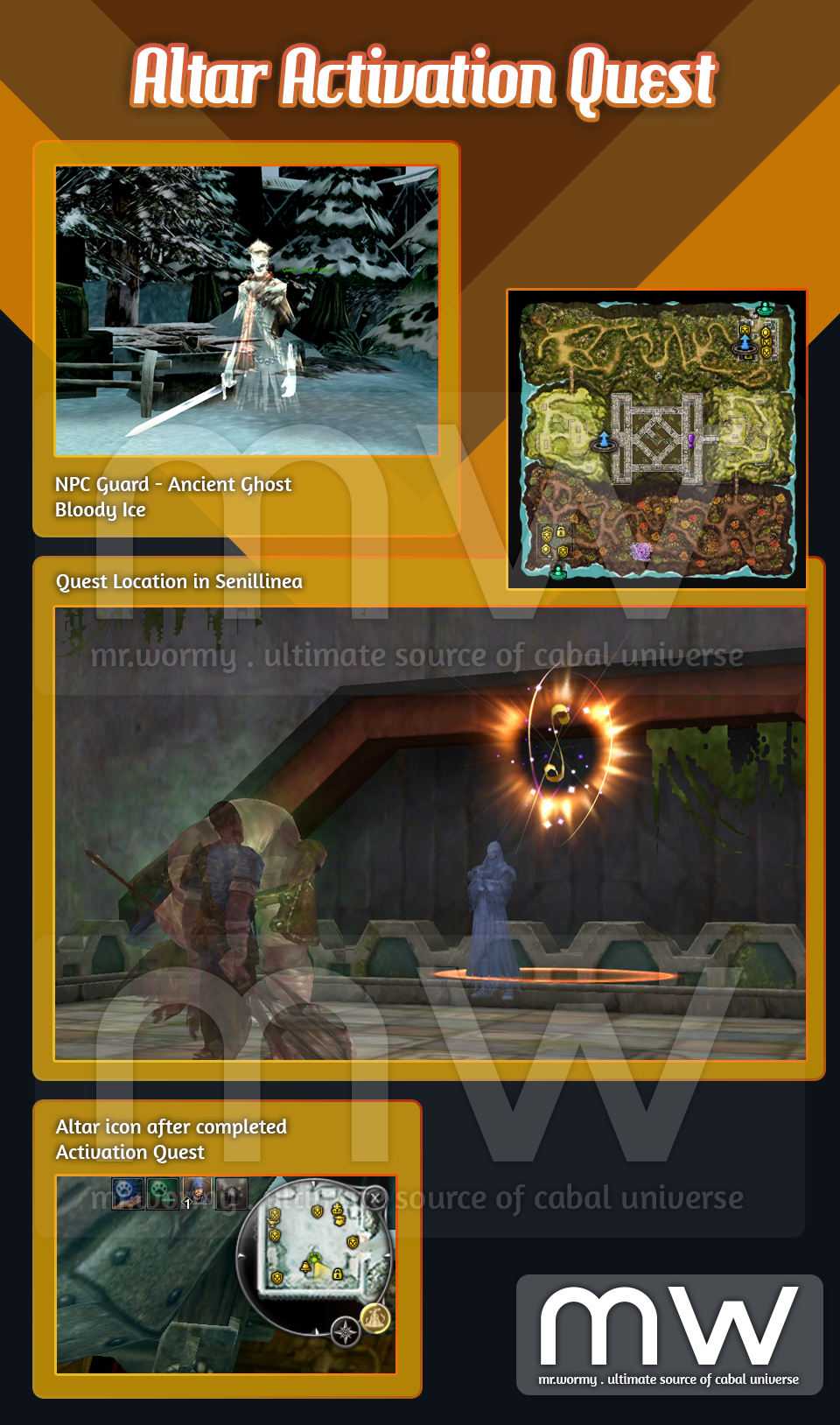
- Quest Name: The Inner Altar
- Requirement: Character with OLV 10 or higher
- NPC: Guard – Ancient Ghost, Bloody Ice
- Reward: On completion, an “Altar” icon will be shown at top-right corner
- Altar Overview:
- Altar is account-based feature, all characters are from the account will get the same benefits of Altar
- Altar:
- There are 04 Parts: Jewel / Border / Centre / Port on the Altar.
- By giving Essence items to each object, the point on the main Altar will be increased.
- As the point increased, the object will be “Transcended”, allow up to 17,280 points of Essence to be given.
- Altar UI:
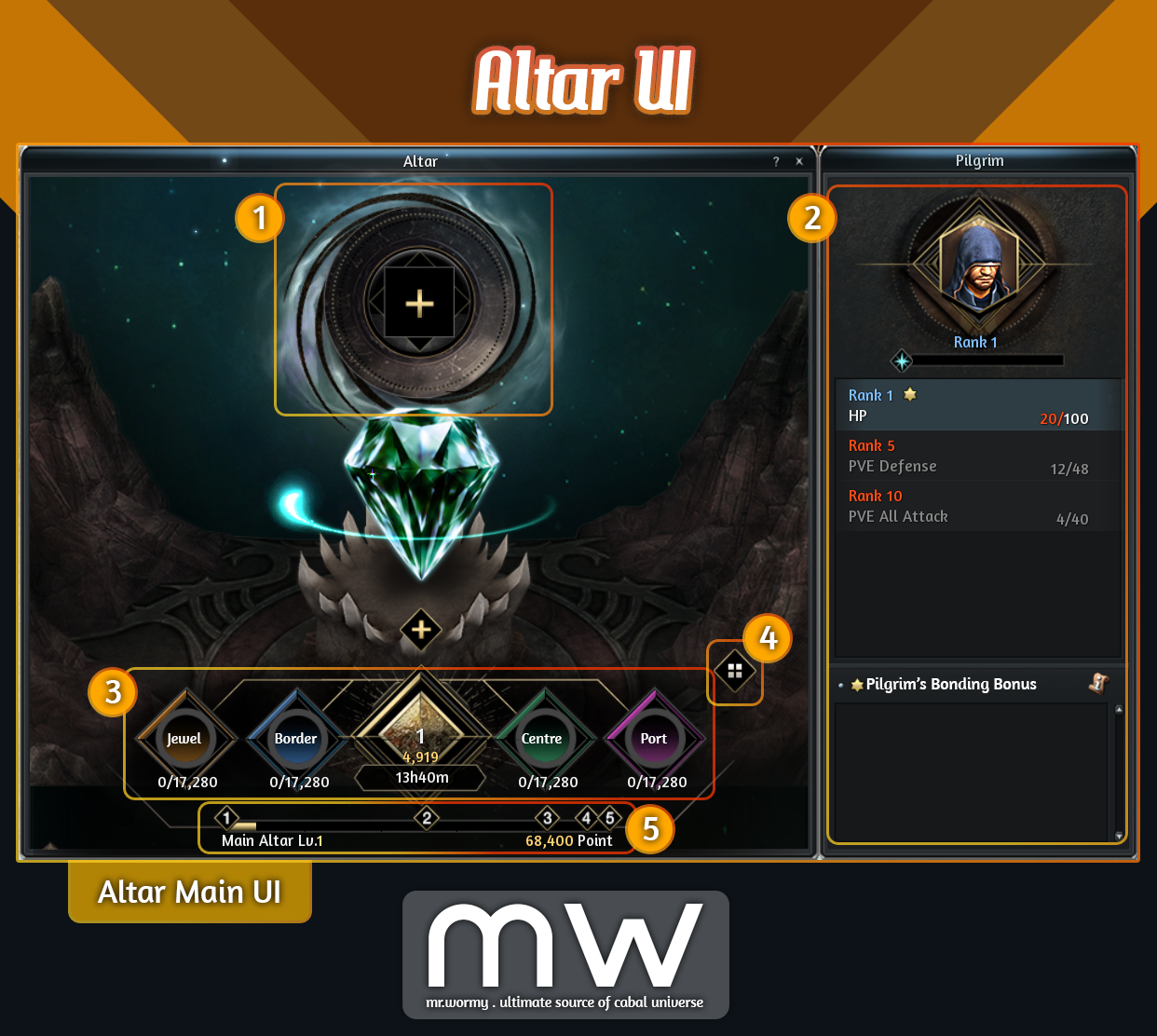
- [1] Input Slot: Players can sacrificing Essences items to grow and maintain the Main Altar condition level
- [2] Altar Context Panel, depends on the situation, this panel could be switched to:
- Showing the current Pilgrim stats
- Showing sacrificing materials for Altar
- Showing sacrificing materials for Pilgrim
- Summon Pilgrims
- [3] Altar comes with 5 parts (from left to right)
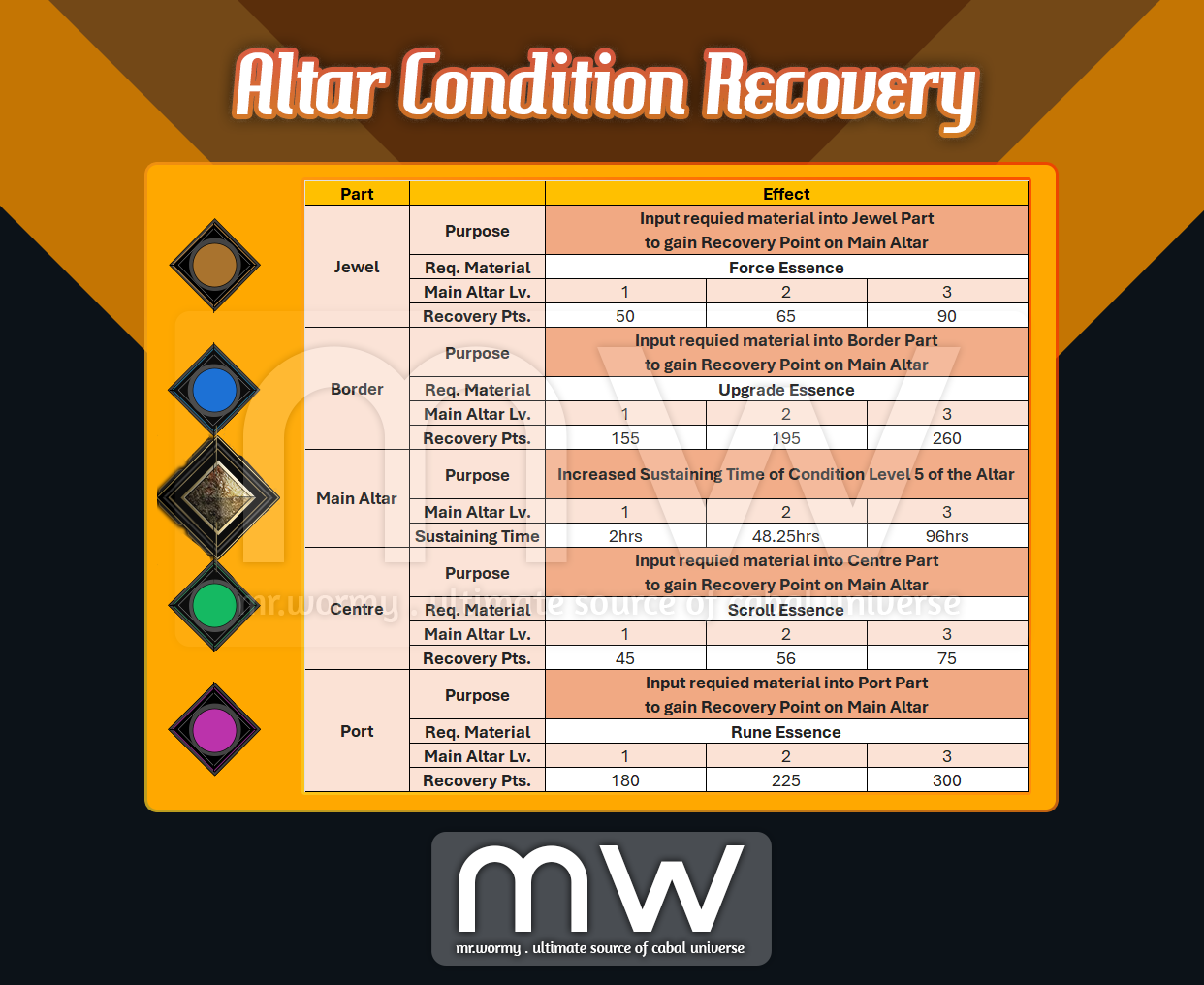
- Jewel: Accept Force Essence as sacrifice
- Border: Accept Upgrade Essence as sacrifice
- Main Altar: Showing the current Altar blessing effect
- Centre: Accept Scroll Essence as sacrifice
- Port: Accept Rune Essence as sacrifice
- [4] Button to switch back to Altar Main UI
- [5] Current Main Altar level progress
- Parts of Altar:
- Source of Essence Items:
- Force Essence: By crafting from Force Core at NPC Chloe in Port Lux.
- Upgrade Essence: By extracting (destroying) Upgrade Core (all grades)
- Scroll Essence: By extracting (destroying) Option Scrolls.
- Rune Essence: By extracting (destroying) Essence Runes.
- Main Altar:
- Concept:
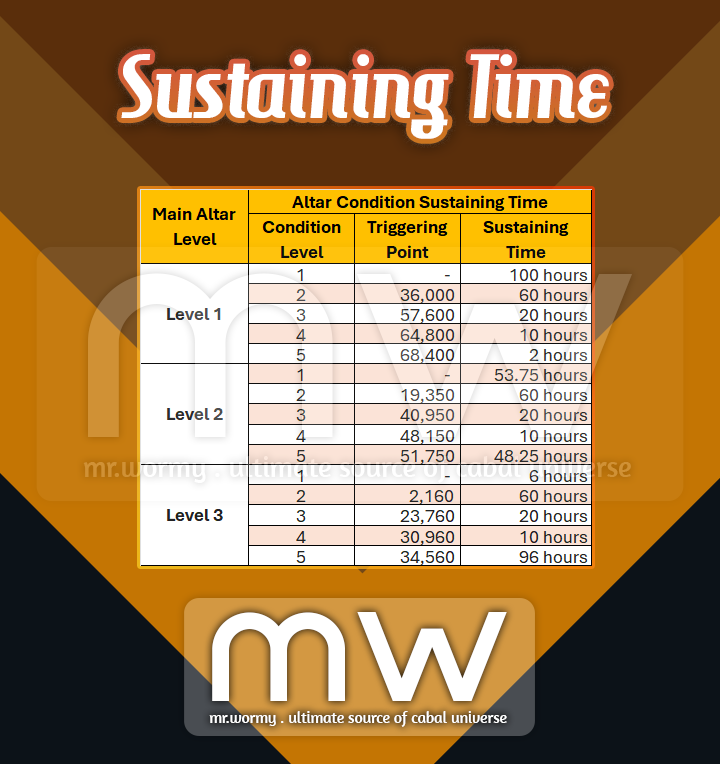
- The Condition Level of the Main Altar increases by the amount of points earned by inputting Essence items into 4 Parts.
- Depends on the Condition Level of the Main Altar, different buff type and values will be available to obtain.
- Depends on the Main Altar Level and Condition Level of the Main Altar, different amount of Points required for levelling up.
- Condition Level Details:
- Concept:
- Condition Recovery:
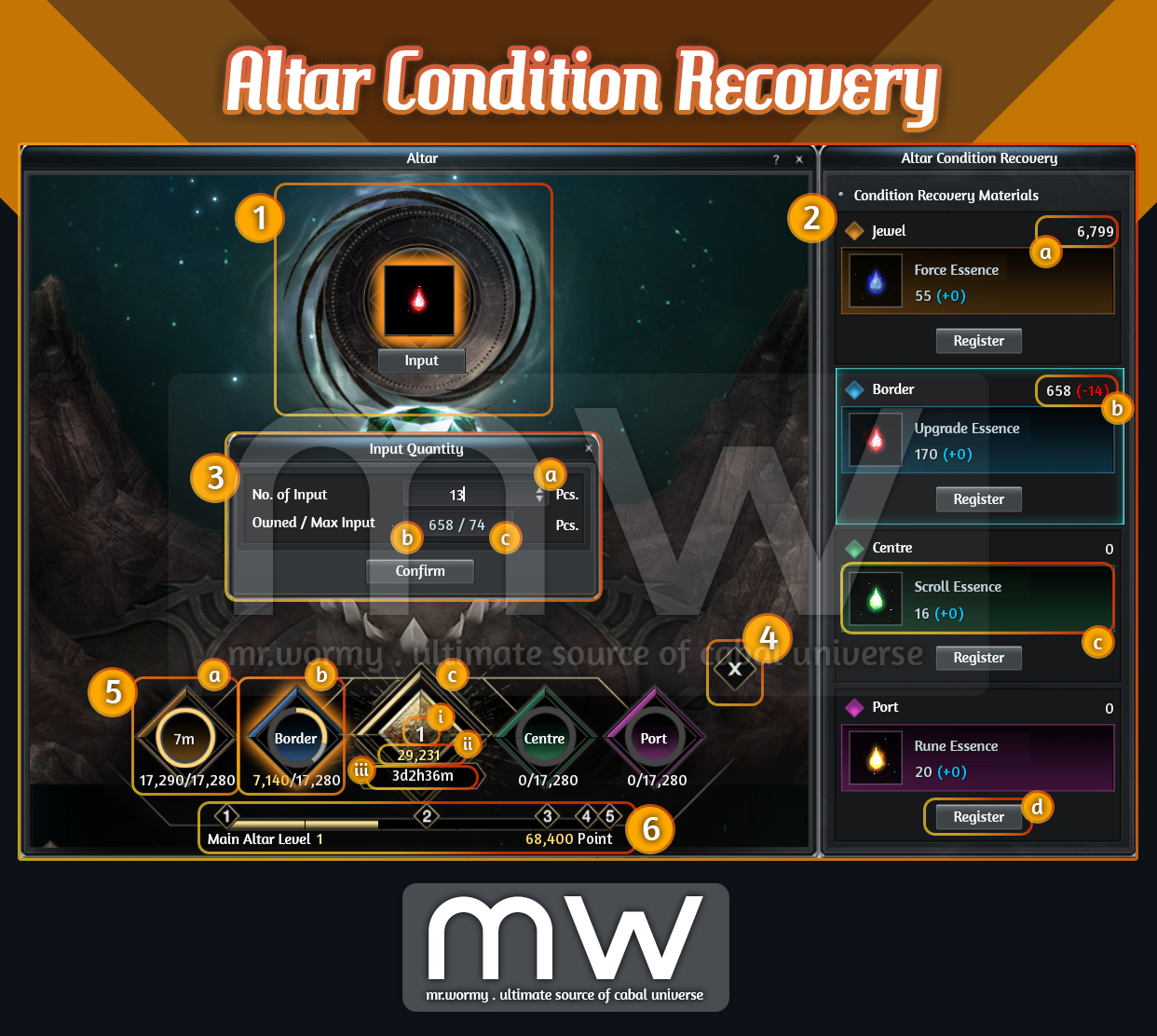
- [1] Input Slot, click to open Condition Recovery Sub-UI on the right side [2]
- [2] Each Part of the Altar requires different materials as mentioned above.
- [a] Number of available quantity for the required item
- [b] Number of material items selected to input into the Altar will be show in red colour
- [c] Name of the material and amount of Point will be increased for contributing into Altar Condition Level
- [d] Button to register the selected material into the Altar
- [3] On click on “Register” button [2d], a small UI is available to input the desired amount of material and also showing the owned amount as well as the maximum amount of material can input
- [4] Button to close the Altar Condition Recovery Sub-UI
- [5] Parts of Main Altar changes the way of displaying depends on the situation
- [a] If a Part reached to the maximum amount of points, it will be in “cooldown” state:
- Gauge is showing with full circle yellow.
- Cooldown duration is displayed inside the circle.
- [b] If a Part hasn’t reached the maximum point:
- Gauge can be with 3 colours:
- Yellow represents the filled points to max.
- Light Gray represents the going-to-be-filled points (happens only if an Essence Item is going to be input).
- Dark Gray represents the remaining amount of points could be filled.
- Name of the Part is displayed at the middle of the circle.
- Gauge can be with 3 colours:
- [c] Main Altar:
- [i] Current Level of the Altar is displayed in white colour with big size.
- [ii] Total accumulated points is displayed in yellow colour right under.
- [iii] Current Condition Level will be maintained for a certain amount of time, the duration is displayed right under the total accumulated point.
- [a] If a Part reached to the maximum amount of points, it will be in “cooldown” state:
- [6] Condition Level gauge shows the progress of filling up the points toward each Condition Level
- Altar Upgrade:
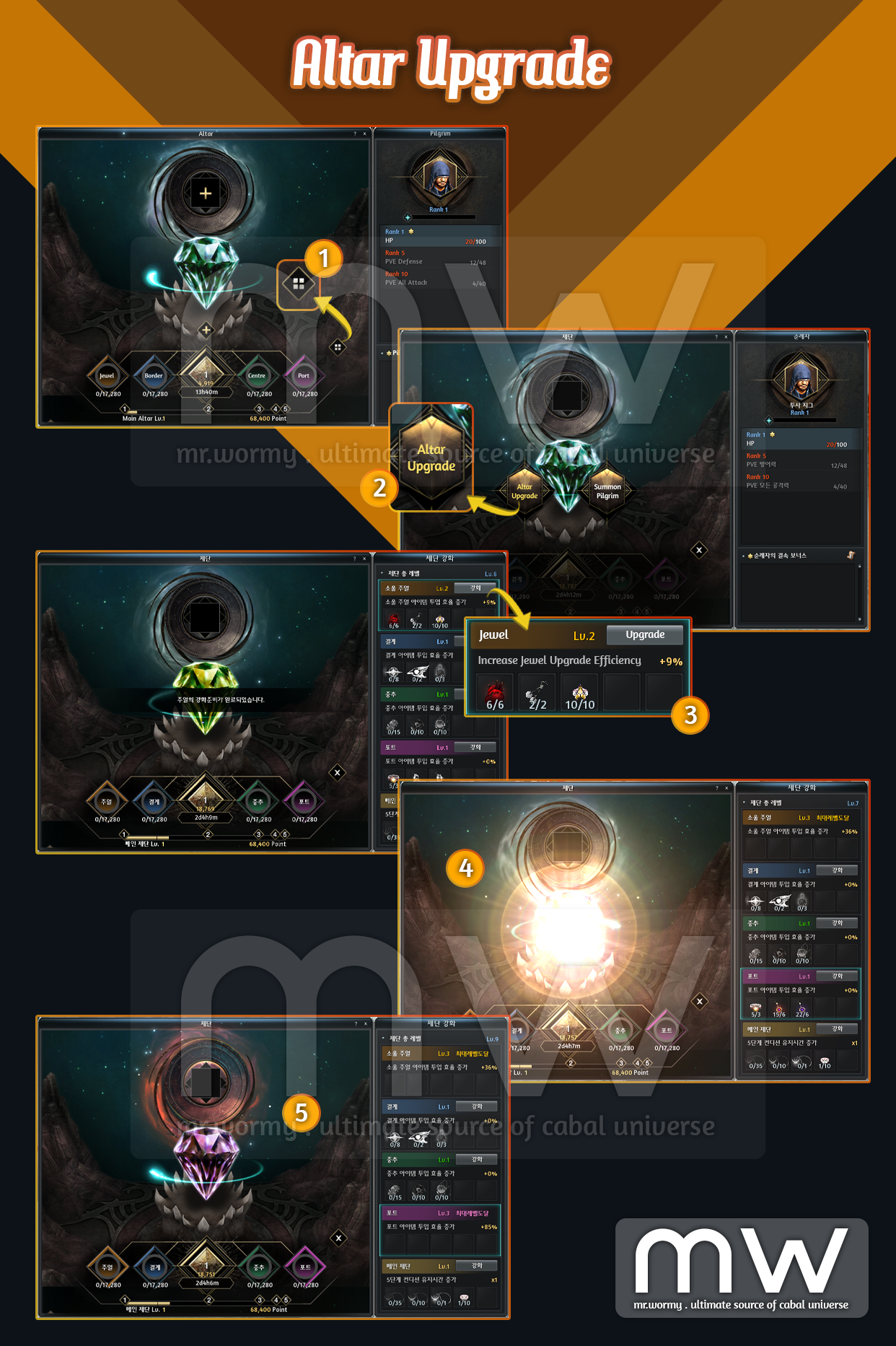
- [1] From the main Altar UI, click on the Altar Menu button
- [2] Select “Altar Upgrade” from the Altar Menu
- [3] Available upgrades will be displayed in the list on the right side of Altar UI with details of
- Required materials (item & qty).
- Effect of the upgrade.
- For Main Altar Part, it will increase the Condition Sustaining Duration effect.
- For other Parts, it will increase the efficiency of inputting materials.
- Upgrade button.
- [4] Once the materials are provided for upgrading, a special visual effect will be displayed.
- [5] Main Altar UI has different visual effect based on the upgrade level.
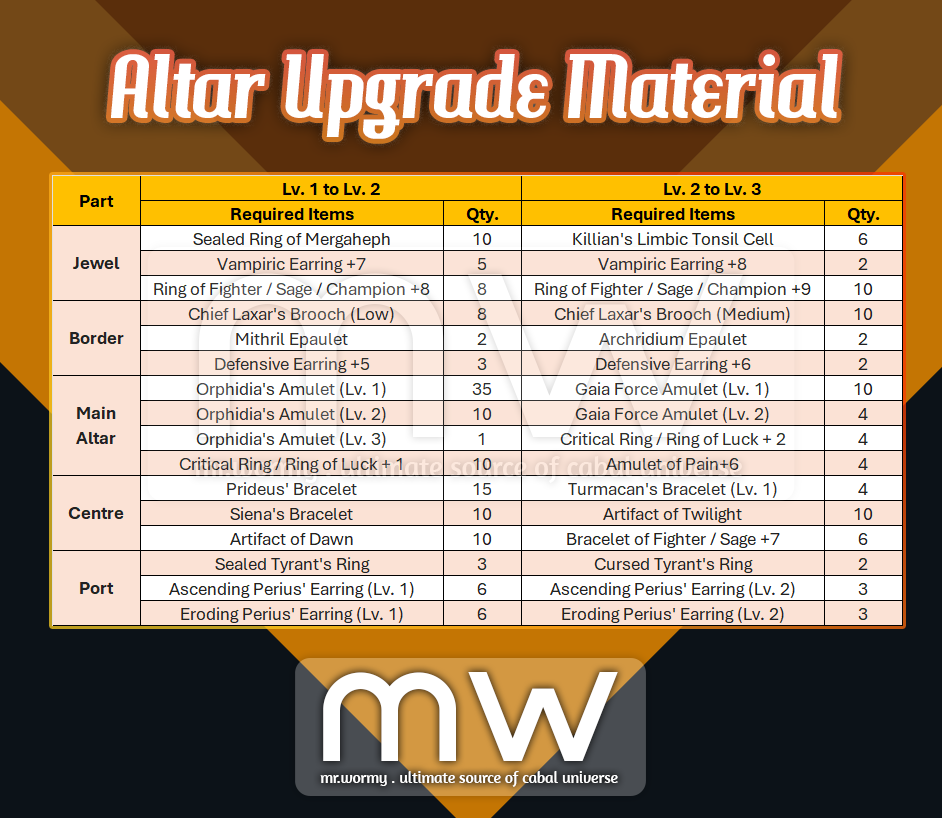
- Altar Upgrade Materials:
- Pilgrim Overview:
- Pilgrim is a specific NPC to be summoned and worshipped at the Altar.
- Summoning Pilgrim consumes Boss Seal Card and Gem of Liberation.
- Rank of Pilgrim could be increased by sacrificing gifts or via conversation.
- By ranking up, the additional options will be available.
- However the value of the stats depends on the Condition Level of the Main Altar.
- Only one Pilgrim can be selected to be worshipped at the Altar at once.
- All of stats from the selected Pilgrim will be applied.
- Some Pilgrims have “Bonding” stats, those stats are applied even when those Pilgrims are not selected.
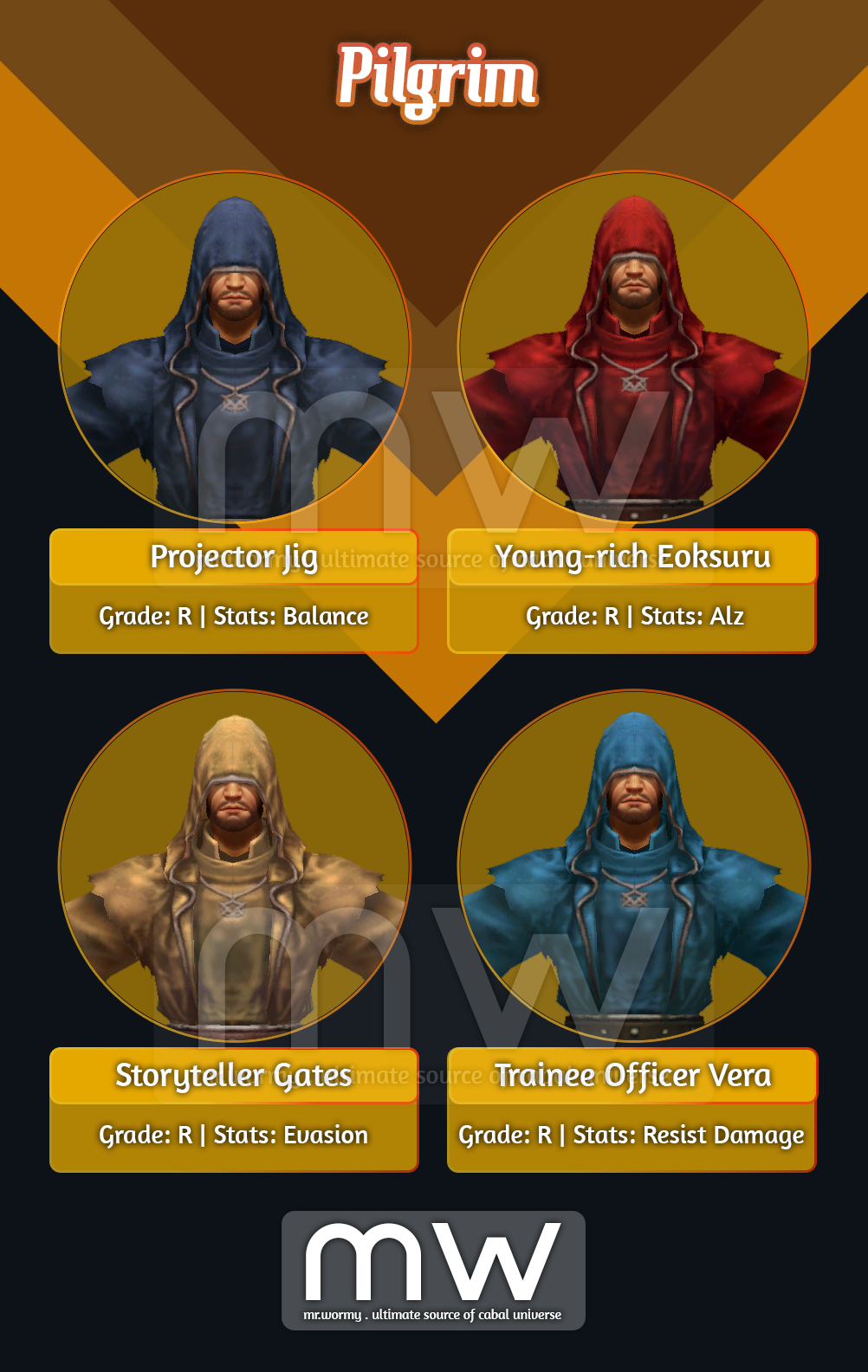
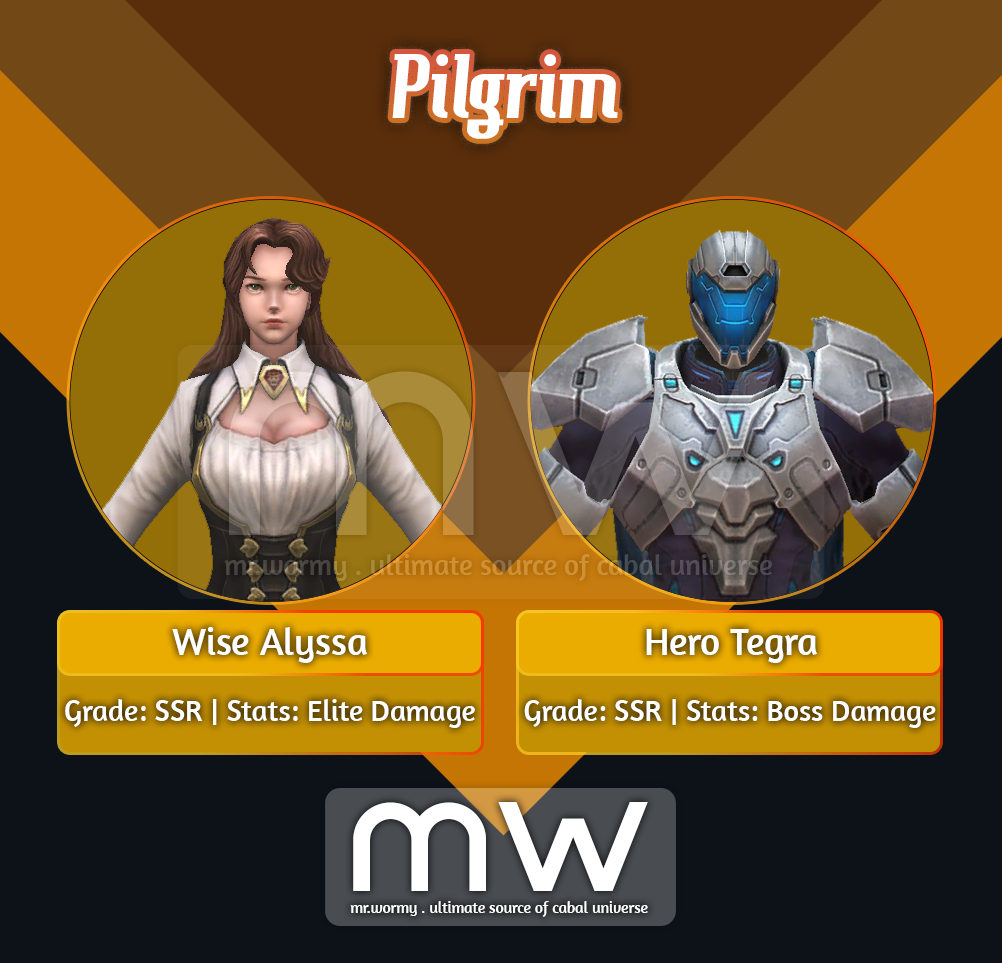
- Pilgrims:

- Summon Pilgrim:
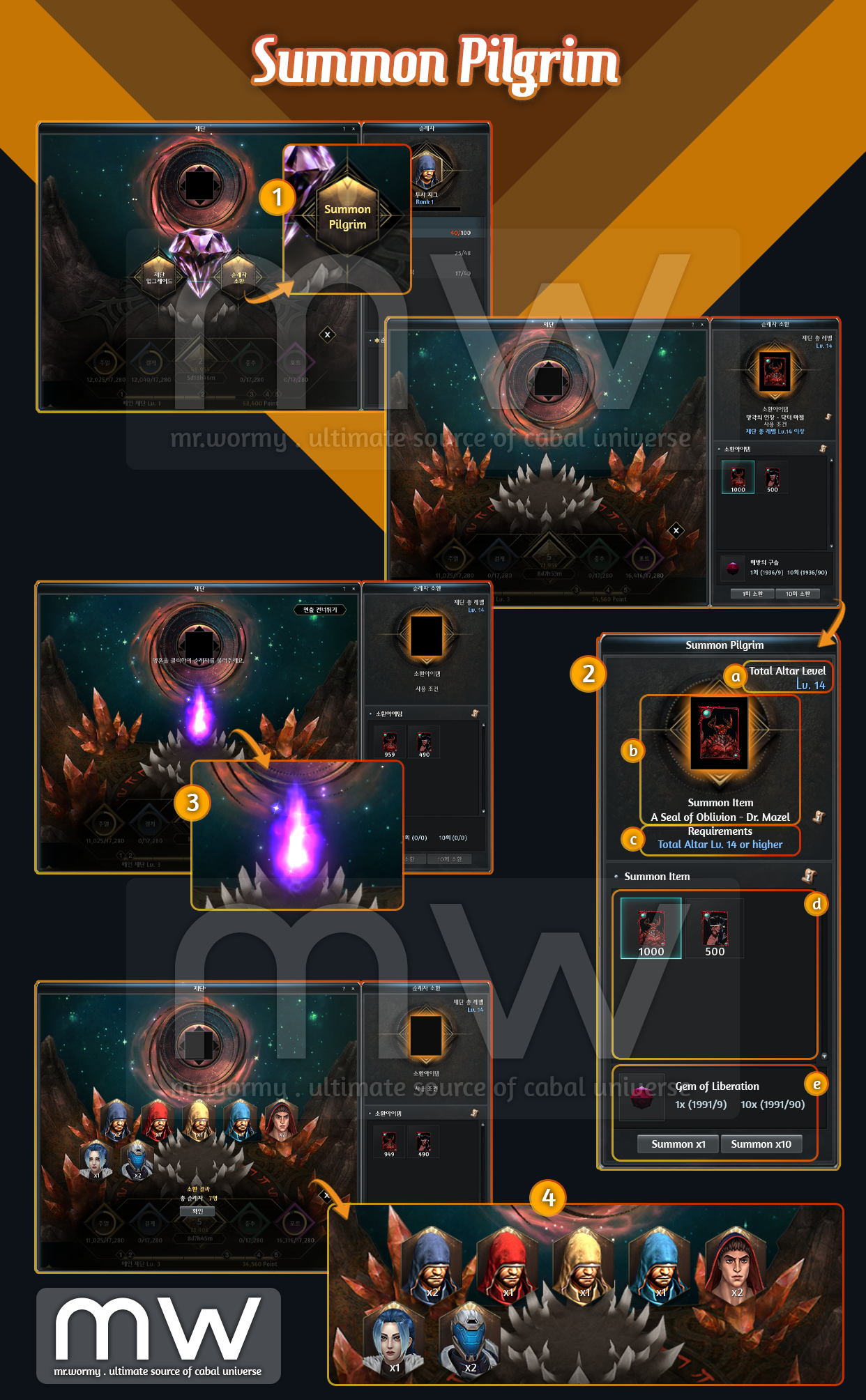
- [1] From Altar Menu, select “Summon Pilgrim”
- [2] Select Boss Seal Card on the right side of the screen:
- [a] Total Altar Level is displayed here as of sum for all Main Altar upgrades.
- [b] Here will show the registered Boss Seal Card.
- [c] To use some Boss Seal Card, a specific “Total Altar Level” is required.
- For example, in this case “A Seal of Oblivion – Dr. Mazel” requires Total Altar Lv. 14 or higher, as we have the Total Altar Lv. 14 here, that’s why text is in blue. Otherwise, text will be displayed in red.
- [d] In this area, all of Boss Seal Card available in inventory will be displayed.
- [e] Summon a Pilgrim consumes Boss Seal Card and Gem of Liberation.
- Depends on the Boss Seal Card, a specific amount of Gem of Liberation is needed.
- There is also option to Summon 1x or 10x at once. The amount of Gem of Liberation required is also displayed for both cases.
- [3] After clicking on Summon, a random Pilgrim will be summoned from the available pool, different Pilgrim will have different summoning effects.
- [4] Result of summoning will also be displayed at last for review.
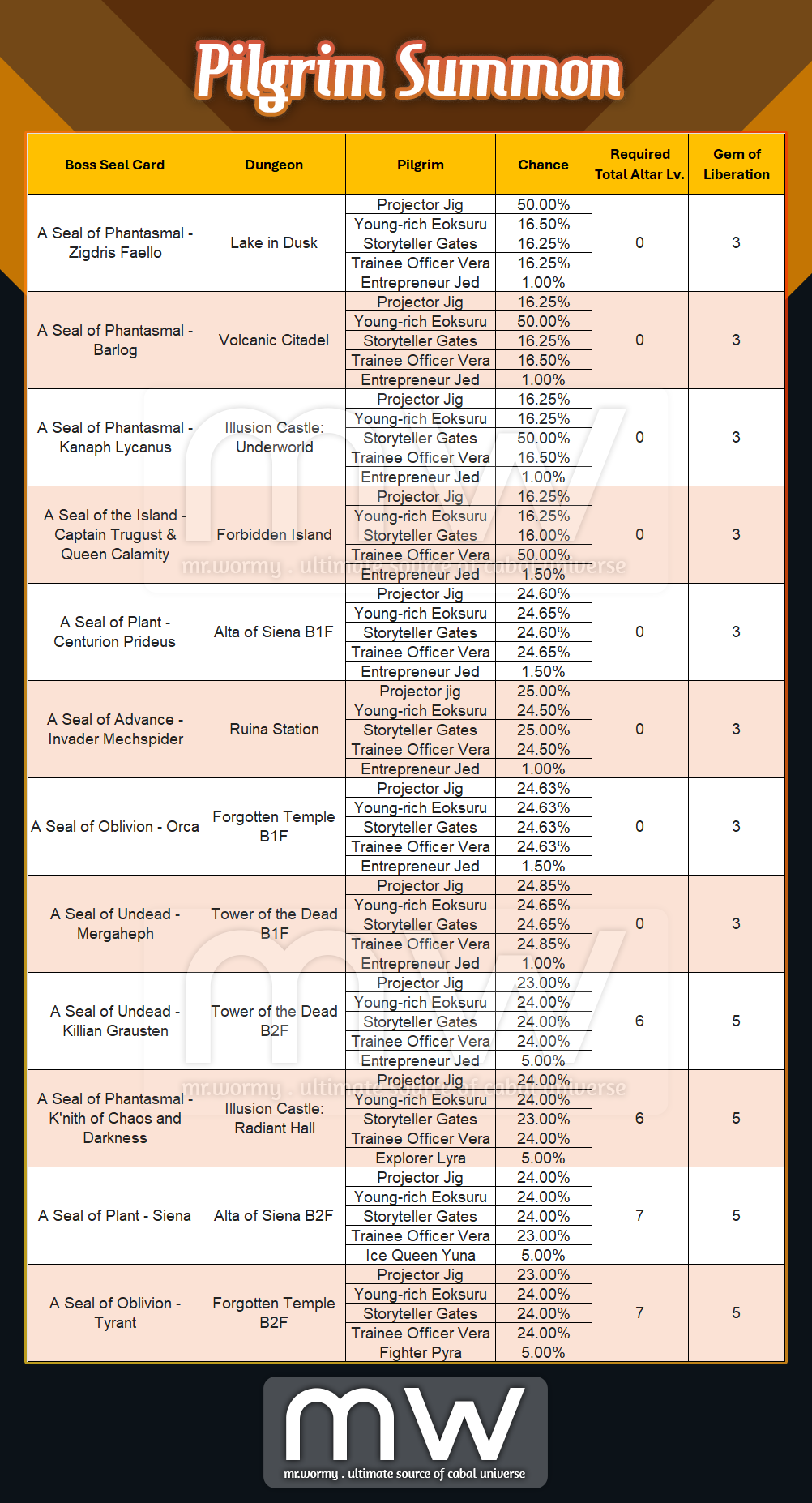
- Pilgrim Summon Details:
Pilgrim Summon – Part 1/2
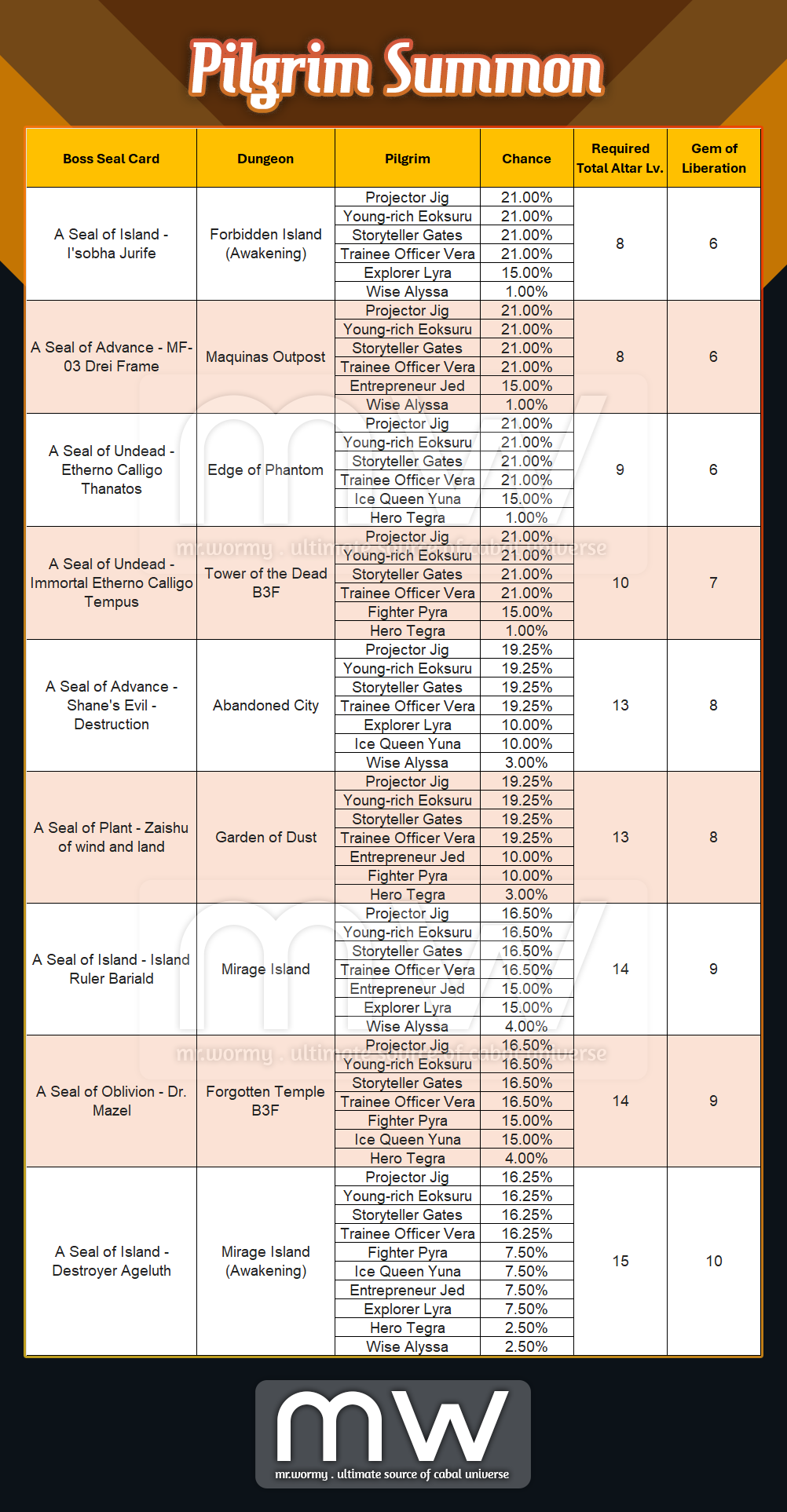
Pilgrim Summon – Part 2/2
- Pilgrims Rank & Stats:
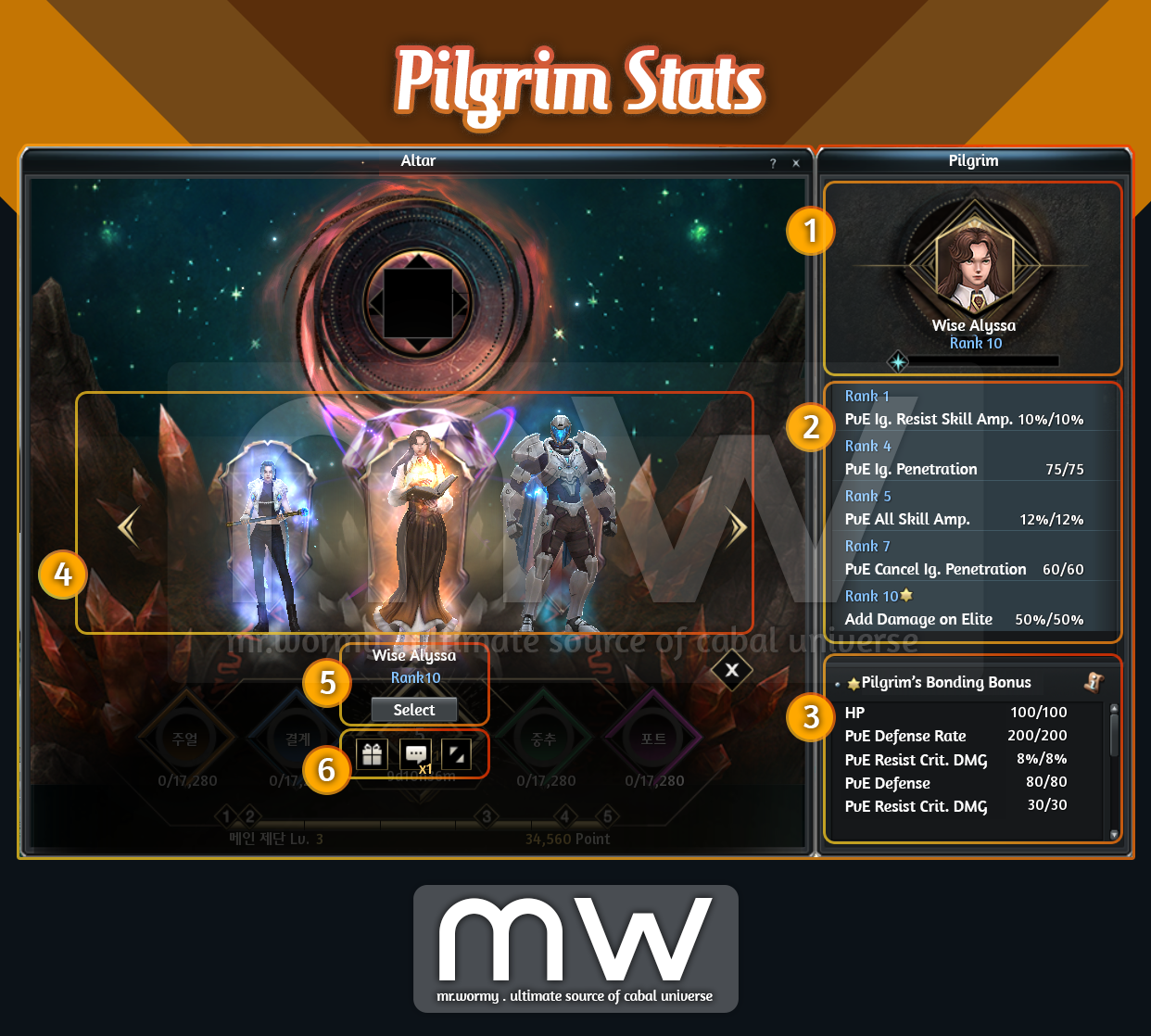
- [1] By select a Pilgrim as the main Pilgrim to worship, player will obtain all of available unlocked stats from that Pilgrim.
- [2] By reaching to higher Rank, new stats will be unlocked.
- Value of stats depends on the Condition Level of the Altar.
- Beside of normal stats, there will be “Bonding Stats”, the stat is marked with a yellow star.
- [3] If a Pilgrim reaches the highest Rank, the Bonding Stats will be activated even if that Pilgrim is not set as the main Pilgrim.
- [4] Player can switching between available Pilgrims at anytime.
- [5] Click on the “Select” button under the Pilgrim name to switch to that Pilgrim.
- [6] By gifting or making conversation, the Pilgrim EXP will be gained for that specific Pilgrim.
- Pilgrim Ranks & EXP:
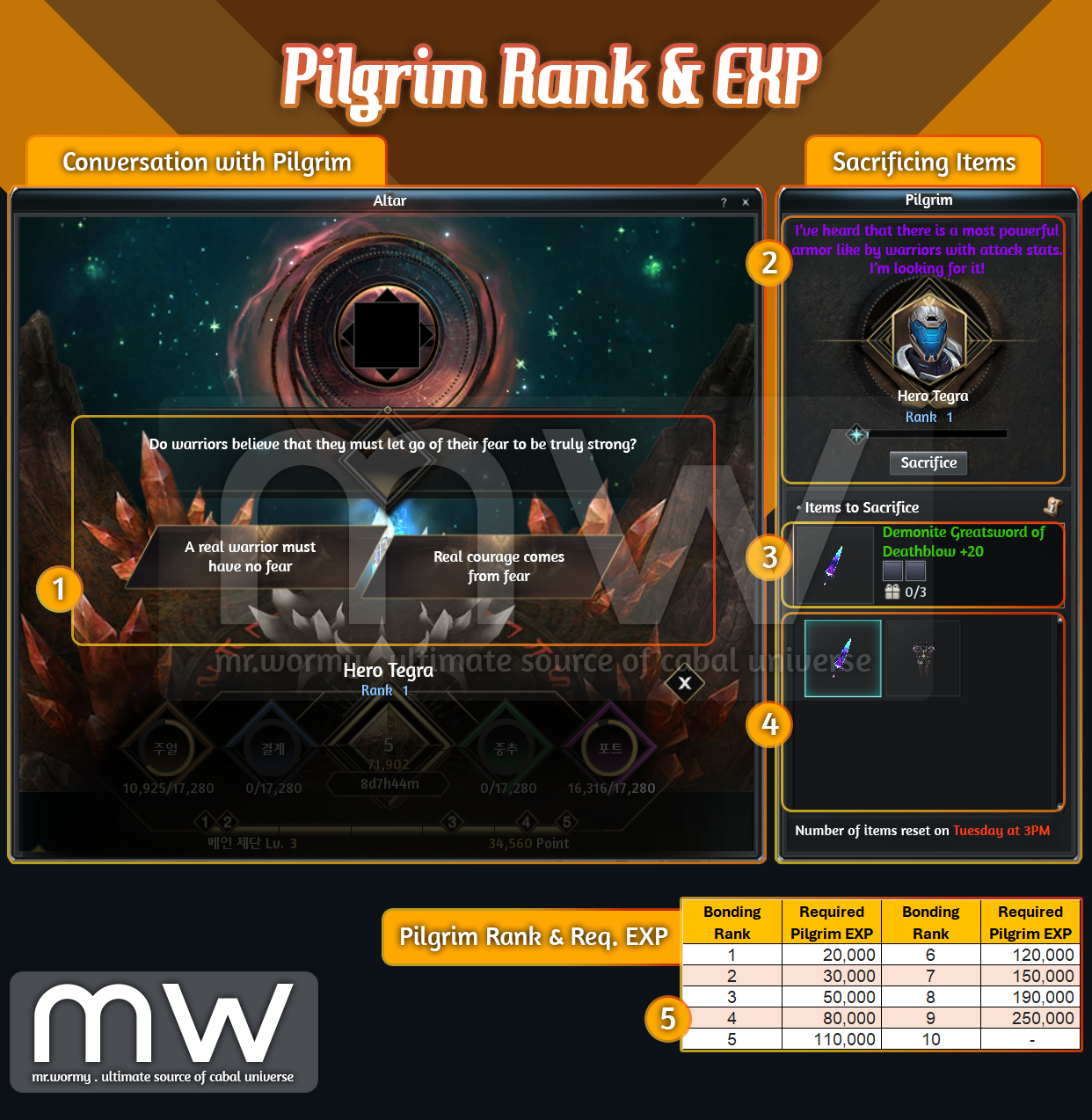
- [1] By making conversation with Pilgrim, the Pilgrim EXP will be increased.
- If the same Pilgrim got summoned for multiple times, the number of times that Pilgrim can talk increase.
- If player answers the correct answer, it will result into big amount of Pilgrim EXP.
- If player answers the correct answer to a Pilgrim at maximum Rank will generate a Pilgrim Reward.
- Another mechanism for growing Pilgrim EXP is by sacrificing items:
- [2] The current Pilgrim, Rank, EXP gauge and “Special Request” are available to check.
- Special Request gives hints about type of item that the Pilgrim is looking for, sacrificing the matching item will result into big amount of Pilgrim EXP.
- [3] By selecting an item from [4], the details of the items are available here
- Normal items with Epic:
- Sacrificing is limited to up to 3 items per week.
- Reset of the limit is at 3:00PM Tuesday.
- Cash Shop items:
- Will be available from Cash Shop
- Result in high amount of Pilgrim EXP.
- No limit on sacrificing.
- Normal items with Epic:
- Sacrificing items for a Pilgrim at maximum Rank will generate a Pilgrim Reward.
- [2] The current Pilgrim, Rank, EXP gauge and “Special Request” are available to check.
- A table of Pilgrim EXP and equivalent Rank are available for references [5]
- [1] By making conversation with Pilgrim, the Pilgrim EXP will be increased.
- Pilgrim Rank and available Stats:
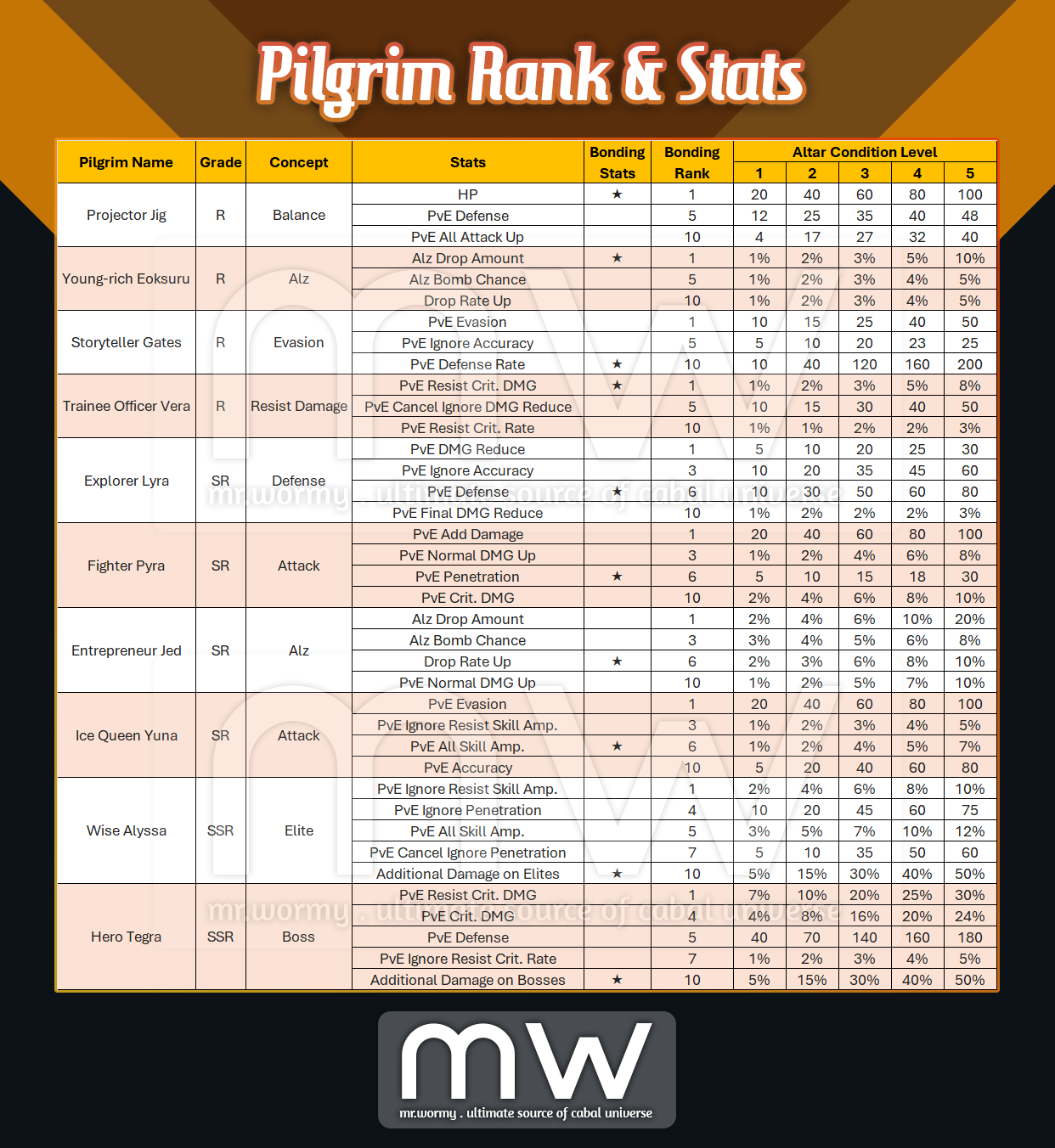
- Bonding Stats are marked with ⭐ in the table, once the Pilgrim passed the required Rank, the Bonding Stats is added to all character in the account, regardless of the selection for the main Pilgrim in the Altar.
- Pilgrim Reward:
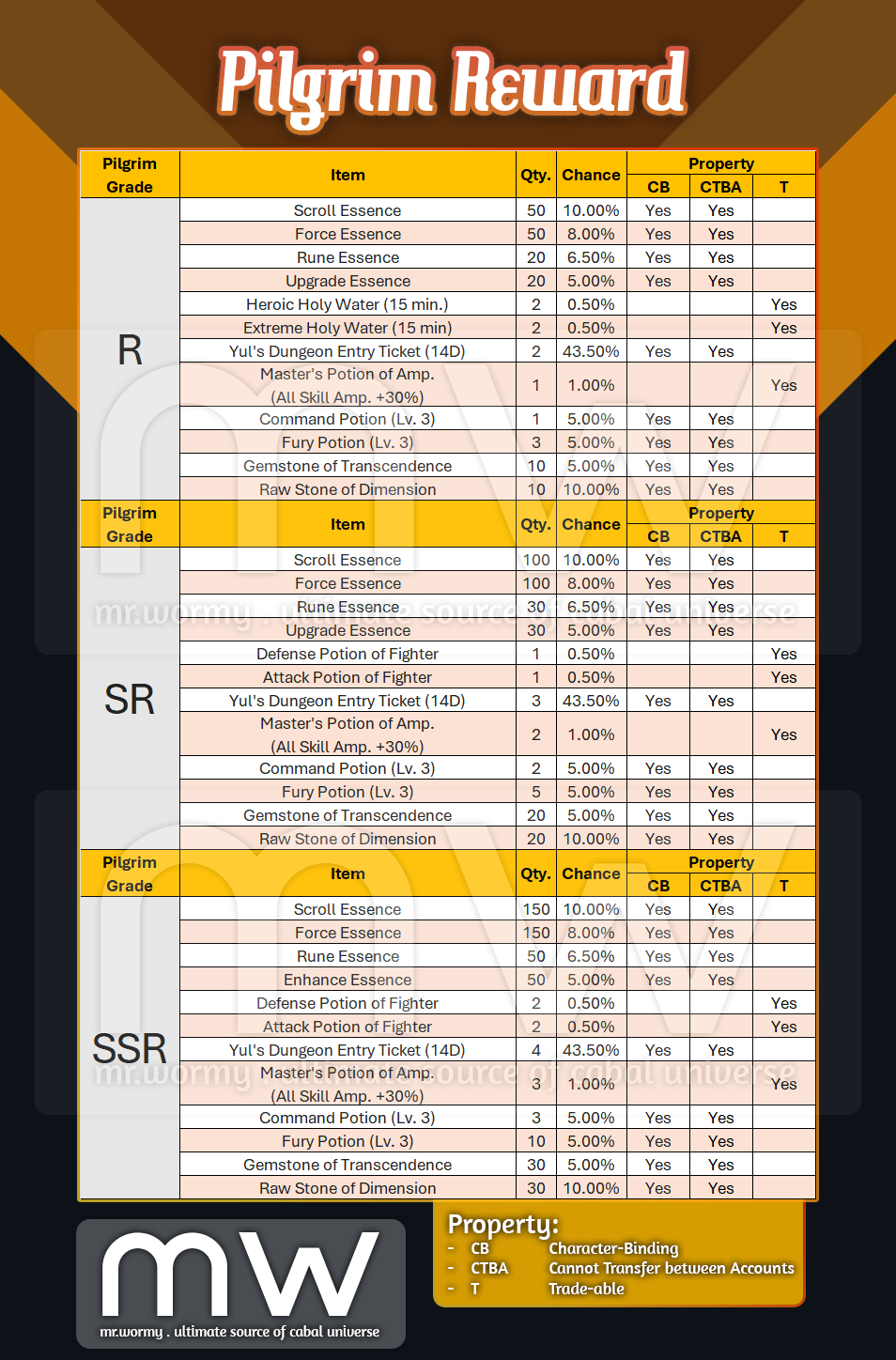
- A “Pilgrim Reward” will be generated if players:
- Answer a correct question to a Pilgrim at maximum Rank.
- Sacrifice an items to a Pilgrim at maximum Rank.
- Pilgrim Reward is with property “Cannot Transfer between Accounts”
- Available outputs:
- A “Pilgrim Reward” will be generated if players:
 Mr. Wormy