

 Posted by
 Due to a Recent Windows Update Patch particularly for Windows 10 & 11, players from certain Cabal services are getting abnormal detect from anti-cheating system XIGNCODE.
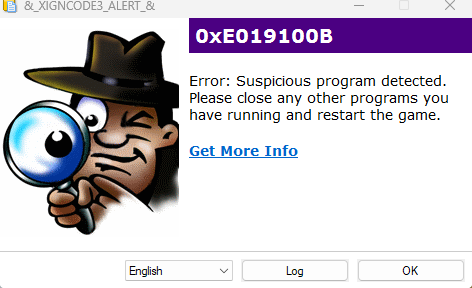
Publishers are working with related parties for sorting out the issues. In the mean time, as an interim solution, if possible, please remove the latest Windows Update Patch.
On Windows 10
To uninstall an update in Windows 10, navigate to Start > Settings > Update & Security > Windows Update > View update history > Uninstall updates.
From there, select the update you wish to remove and click “Uninstall”. Some updates may not be uninstallable, and some may require a system restart.
Guideline link from Microsoft: https://support.microsoft.com/en-us/windows/how-to-uninstall-a-windows-update-c77b8f9b-e4dc-4e9f-a803-fdec12e59fb0#id0ebbf=windows_10
On Windows 11
To uninstall an update in Windows 10, navigate to Start > Settings > Windows Update . Under Related settings, select Update history> Uninstall updates.
From there, select the update you wish to remove and click “Uninstall”. Some updates may not be uninstallable, and some may require a system restart.
Guideline link from Microsoft: https://support.microsoft.com/en-us/windows/how-to-uninstall-a-windows-update-c77b8f9b-e4dc-4e9f-a803-fdec12e59fb0#id0ebbf=windows_11
Hope for a permanent fix coming out soon.
Wormy/
Discover more from Mr. Wormy
Subscribe to get the latest posts sent to your email.
 Mr. Wormy