


 Posted by
 ESTgames announced the rebranding of Cabal from Cabal Transcendence into Cabal Eternal by October, and with the debut of Episode 40, officially they rebrand it into “Cabal Eternal” from this post onwards, Cabal Online / Cabal 1 / Cabal Transcendence will be addressed as “Cabal Eternal”.
Episode 40 features lots of new contents and quality of life improvements such as:
- ⚔️ PvE Renewal
- Monster Adjustment
- Critical Attack
- Dungeon Adjustment
- Separation of Resist Crit. DMG and Resist Crit. Rate to PvE and PvP
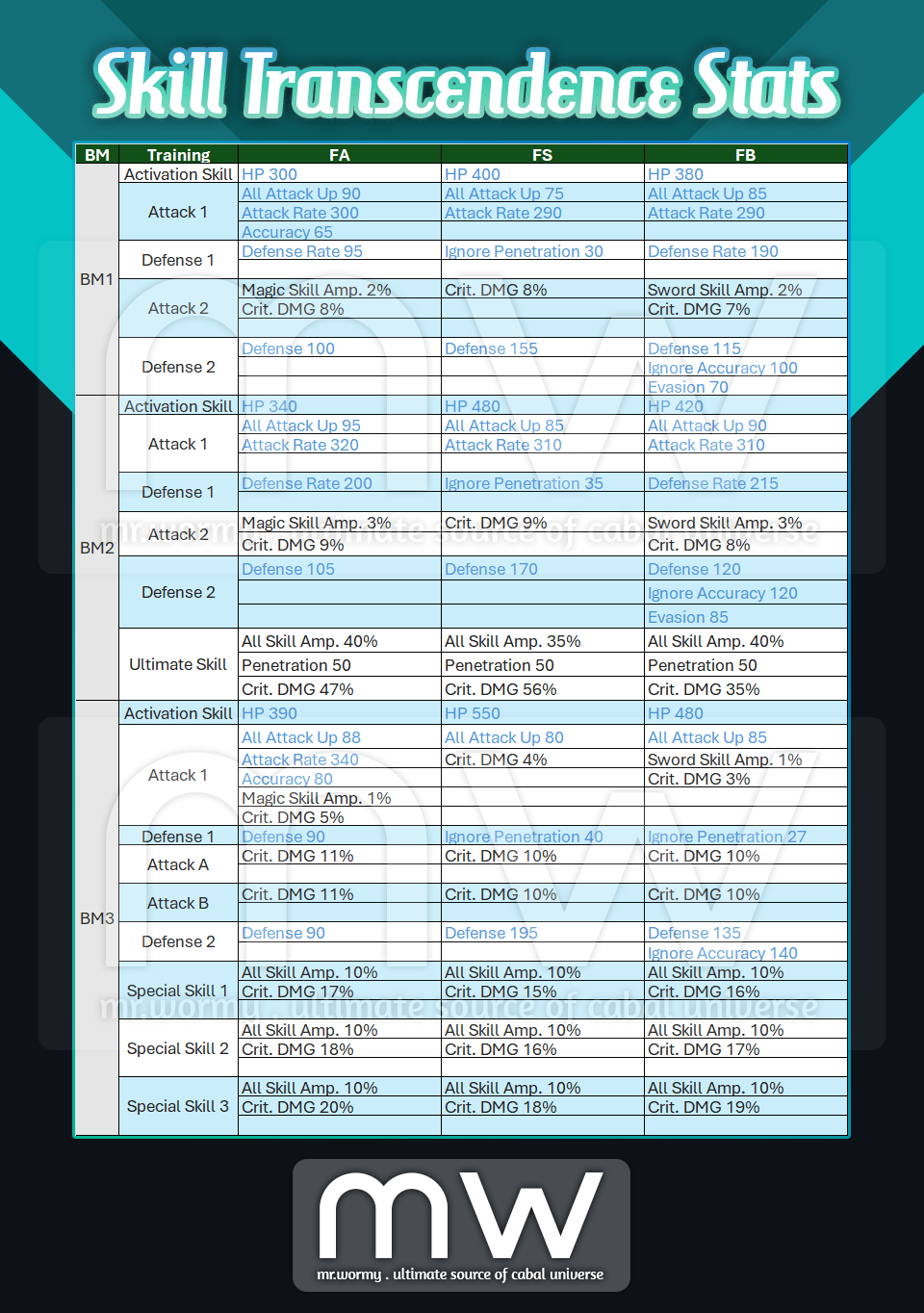
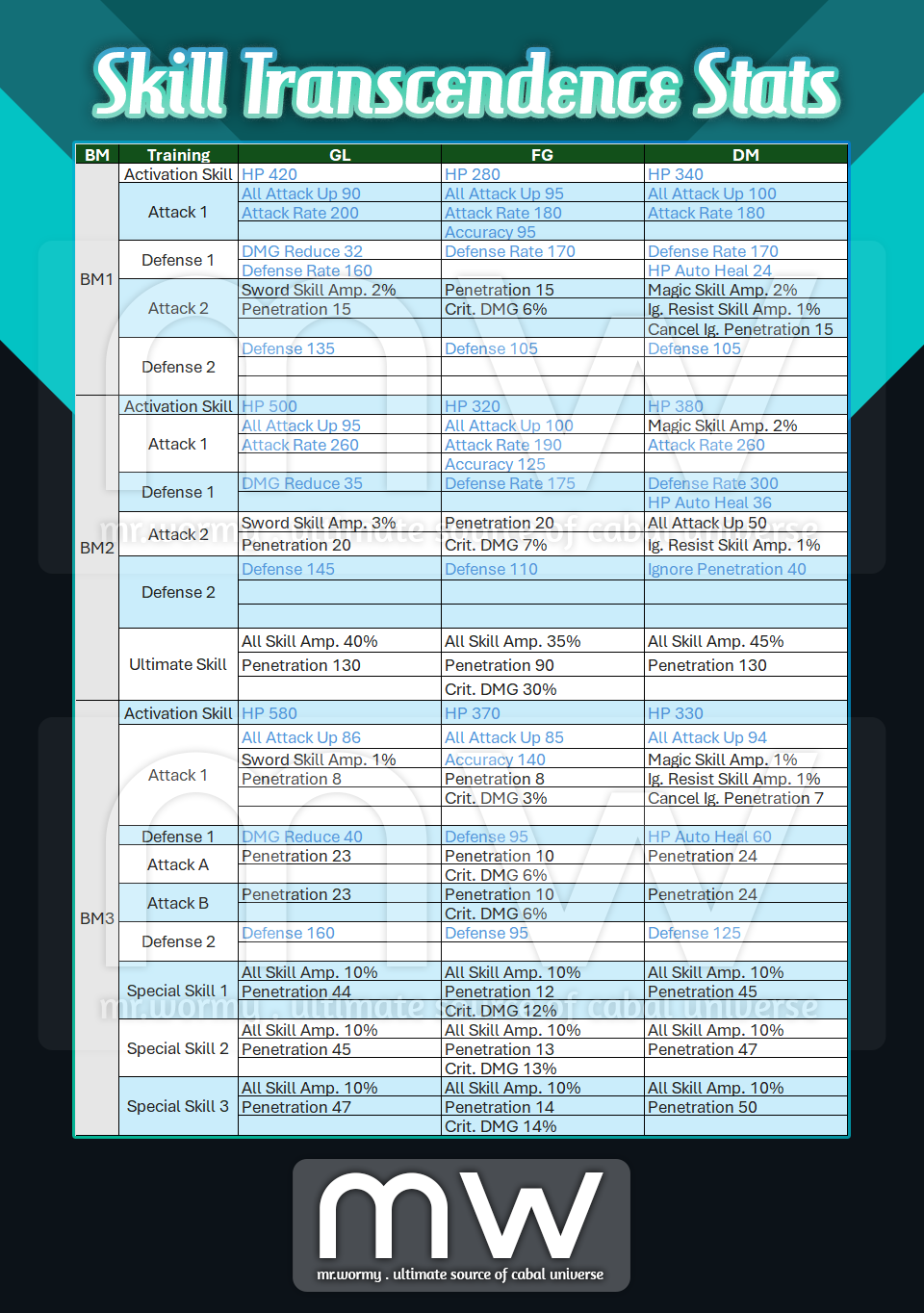
- BM2 / BM3 / Skill Transcendence Adjustment
- Item Adjustment
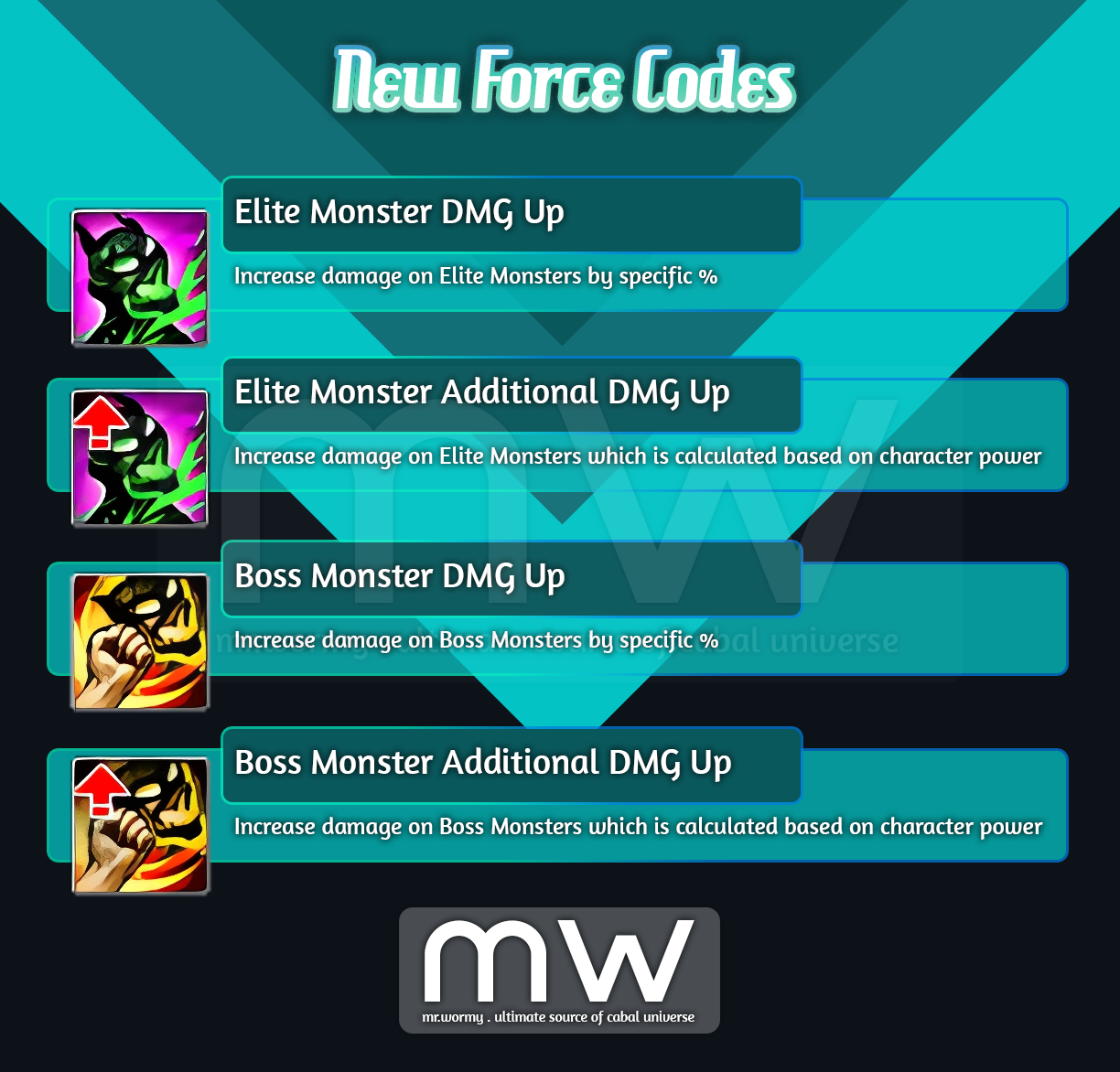
- New Force Codes
- Monster Type Adjustment
- 🙏 Altar System
- Altar System
- Altar Upgrade
- Condition Level
- Pilgrim
- Summon Pilgrim
- Rank / Stats / EXP
- Pilgrim Reward
- Altar System
- 🐈 Pet Exploration
- Pet Attribute
- Pet Exploration
- Research Lab
- Pet Buff
- 🌠 Stellar Force (aka Stellar Link expansion)
- Star Fragment
- Star Crystal
- Star Crystal Examination
- Stellar Force
- Star Fall Buff
- 🔃 Other Changes & Additions
- Ingens Proelium Balancing Adjustment
- Quick Slot Expansion

1. PvE Renewal Overview:
- Increase Monsters’ Attack Rate
- Reasons:
- Monsters’ stats are significantly lower than the characters’ stats. Therefore, monsters’ attacks turn into less effective.
- Dungeon difficulty is not up to the mark as expected.
- Changes:
- Increase Attack Rate of monsters’ in dungeons, so that players can feel the difficulty of monsters in dungeons.
- Reasons:
- Adjust Monsters’ Defensive stats:
- Reasons:
- Some monsters in high-end dungeons have too high stats.
- Players can’t feel the development of their characters.
- Changes:
- Adjust the Defense stats of monsters in dungeons, so that players can see their characters’ growth.
- Reasons:
- Adjust Monsters’ Penetration & Ignore DMG Reduce:
- Reasons:
- Characters’ Ignore Penetration and Cancel Ignore DMG Reduce have less effect in dungeons.
- As there is not much effect, players see no point in growing those stats.
- Changes:
- Adjust monsters’ Penetration, Ignore DMG Reduce, so that the counter stats from characters will have effect.
- Reasons:
- Monsters’ Fixed Attack and Add Monsters’ Critical Attack:
- Reasons:
- Currently monsters in game could attack with a random value in a specific range of minimum – maximum damage. This caused confusion for players.
- For some monsters, the gap between minimum / maximum attack is huge, this leads to a tremendous deviation between damages.
- As the deviation of attack from monsters are removed, there won’t be no “Strike” from monsters.
- Changes:
- Damage of monsters will be unified, there will be no minimum / maximum attack anymore, instead of that monsters’ attack will be consistent.
- Attacks of monsters in high-end dungeons are reduced.
- Critical Attack is added for monsters to address the lack of “Strike” hits.
- Reasons:
- Decrease Monsters’ HP:
- Changes:
- Defense is adjusted.
- Time for killing monsters is increased.
- HP is reduced.
- Changes:
- Improve Characters / Items Stats:
- Reasons:
- Due to lots of stats adjustment, some parts of dungeon are hard to progress.
- Changes:
- Stats for Battle Modes, Skill Transcendence and some items are increased.
- Reasons:
2. Change History:
- 21-Nov-2024:
- Dungeons:
- Hazardous Valley (Awakening) / Forgotten Temple B2F (Awakening) /
- Illusion Castle: Underworld (Apocrypha) / Illusion Castle: Radiant Hall (Apocrypha)
- Holia Keldrasil / Holia Tristee
- Tower of the Dead B3F / Tower of the Dead B2F (Part 2)
- Devil’s Tower / Devil’s Tower (Part 2)
- Mirage Island / Edge of Phantom / Acheron Arena / Abandoned City
- Flame Nest / Ancient Tomb / Frozen Canyon / Terminus Machina
- Garden of Dust
- General Changes:
- Increase Attack Rate, Defense Rate
- Adjust Accuracy, Evasion
- Increase Defensive Stats (Defense, DMG Reduce, Ignore Penetration)
- Adjust Offensive Stats (Attack, Penetration, Ignore DMG Reduce)
- Unify minimum / maximum Attack
- Add Critical Attack
- Specific Changes:
- Garden of Dust: Decrease HP
- Dungeons:
- 28-Nov-2024:
- Dungeons:
- Forgotten Temple B3F / Mirage Island Awakening
- Celestia / Purifier of the Woods / Secret Base SCA-76
- General Changes:
- Decrease significantly Defense Rate, Accuracy, Evasion
- Increase slightly Attack Rate, Defense Rate
- Adjust Accuracy, Evasion
- Increase Defensive Stats (Defense, DMG Reduce, Ignore Penetration)
- Increase Penetration, Ignore DMG Reduce
- Increase Attack for normal monsters
- Decrease significantly Attack for boss monsters
- Specific Changes:
- Purifier of the Woods: Decrease Defense Rate (boss monsters)
- Secret Base SCA-76:
- Decrease Defense Rate for boss monsters
- Decrease significantly Attack for all monsters
- Dungeons:
- 04-Dec-2024:
- Dungeons: All
- General Changes:
- Decrease HP
- Decrease significantly Critical Attack
- Specific Changes:
- Chaos Arena Lv. 7: Increase Attack Rate of Dr. Mazel.
- Tower of the Dead B4F:
- Decrease HP of all monsters
- Decrease significantly Attack of all monsters
- Add Critical Attack
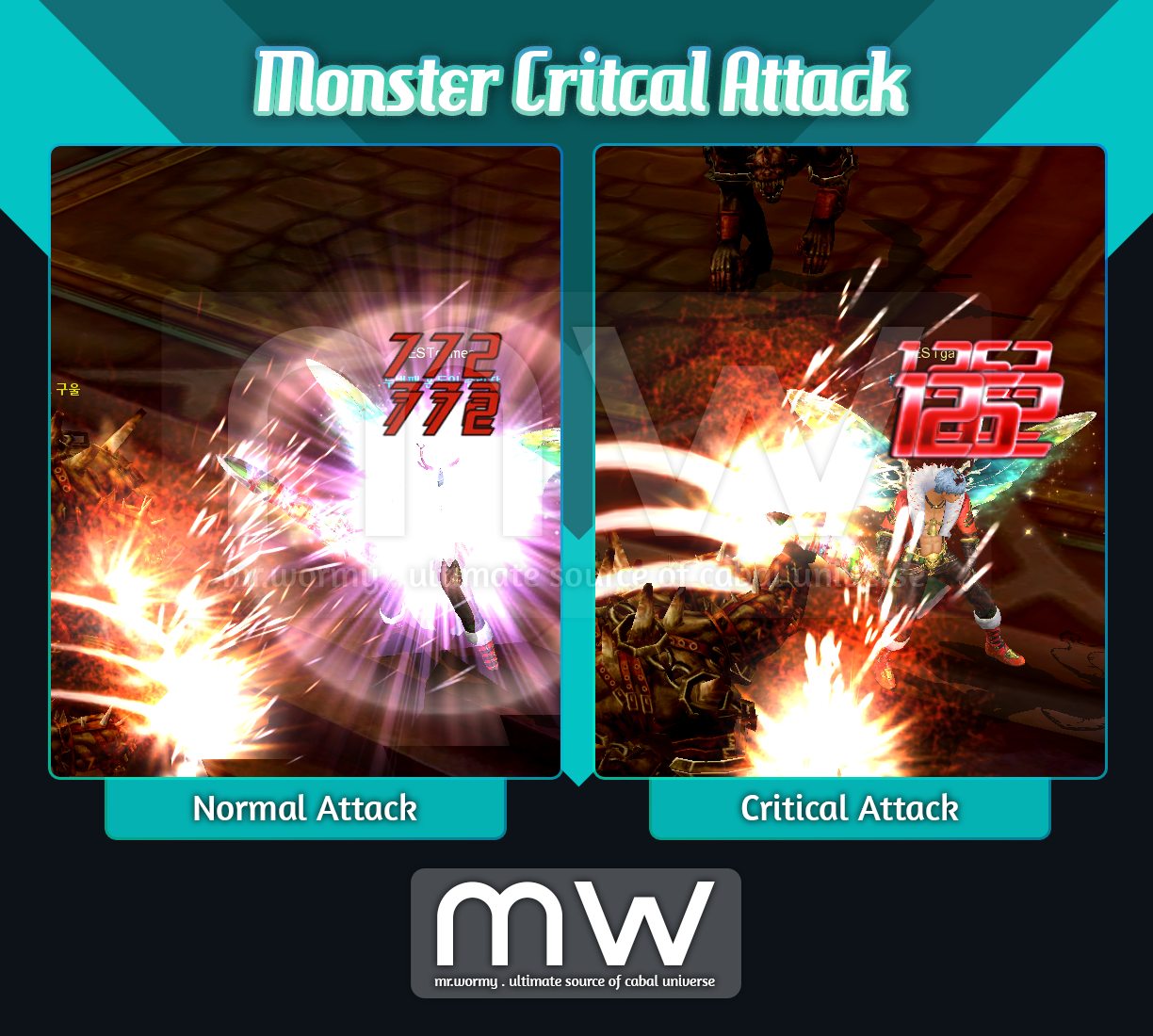
3. Add monsters’ Critical Attack:
- Monsters will have chance to deal Critical Attack. Critical Attack could be casted at a certain chance, once the Critical Attack is casted, a significant damage will be dealed.
- Some of existing options will be renamed to reflect that those will be applied only for PvP, including:
4. Separation of PvP / PvE Force Code related to Resistance:
- Changes:
- Change the name of some existing resistance Force Codes to reflect that those are exclusively for PvP.
- The change is just renaming the existing Force Codes, internally in-game those Force Codes were designed for PvP activities only; therefore, this renaming is just serving to make the meaning of the Force Codes easier to understand.
- Change the name of some existing resistance Force Codes to reflect that those are exclusively for PvP.
- Target / Changes:
- Resist Crit. Rate > PvP Resist Crit Rate
- Resist Crit. DMG > PvP Resist Crit DMG
- Resist Skill Amp. > PvP Resist Skill Amp.
- Other changes:
- Beside the renaming of old Force Codes as mentioned above, new Force Codes for PvE and General are also added.
- Affected Items / Contents:
- Essence Runes
- Achievements / Titles
- Resist stats from INT
- Skills
- Skills
- Awakening Aqua Aura
- Skill Transcendence
- Equipment: Charms / Drei-Frame Epaulet of Laws / …
- Consumable items: Holy Water of Resistance
- Epic / Slot Options:
- Craftsman’s / Master’s Armors
- Bike Epic Converter / Bike Option Scrolls
- Artifact of Twilight: Unique Part
- Divine Upgrade: Helm / Suit
- Force Wing: Force Wing Training / Arrival Skill
- Honor Medal
- Merit Mastery
- Anima Mastery
- Overlord Mastery
- Myth Mastery
- Stellar Link
5. Changes to some dungeon flow
- Abandoned City:
- Reduce the “Silence” effect of “Death Flower”, from 12s to 8s
- Reduce the “Silence” effect of “Shane” (1st form), from 8s to 6s
- Reduce the “Silence” effect of “Shane” (2nd form), from 20s to 8s
- Change the duration of respawning “Shane” (2nd form)
- Old: If “Shane” (2nd form) is not defeated within 130s, it will be respawned
- New: If “Shane” (2nd form) is not defeated within 150s, it will be respawned
- Hazardous Valley:
- Spawn location of White Snake is near to the Orphidia
- Maquinas Outpost:
- Gate destruction time at Armun Felida in Experimental Area (3rd Console) is reduced, from 30s to 10s
- Gate destruction time at Hyper Canus in Experimental Area (3rd Console) is reduced, from 30s to 10s
- Last Bosses area (Eins Frame, Zwei Frame, Drei Frame), each will be spawn if the box of the previous is destroyed (old: have to wait 40s after the defeating)
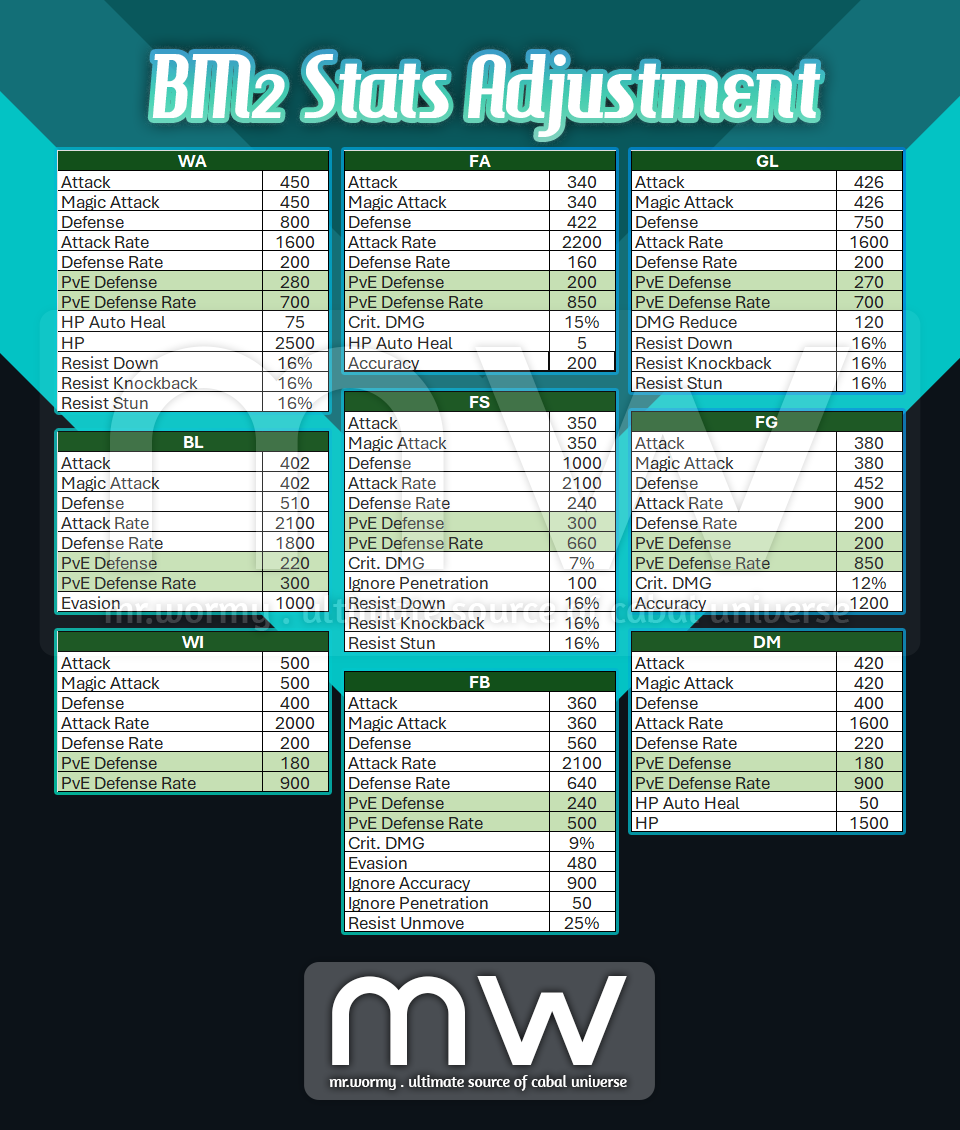
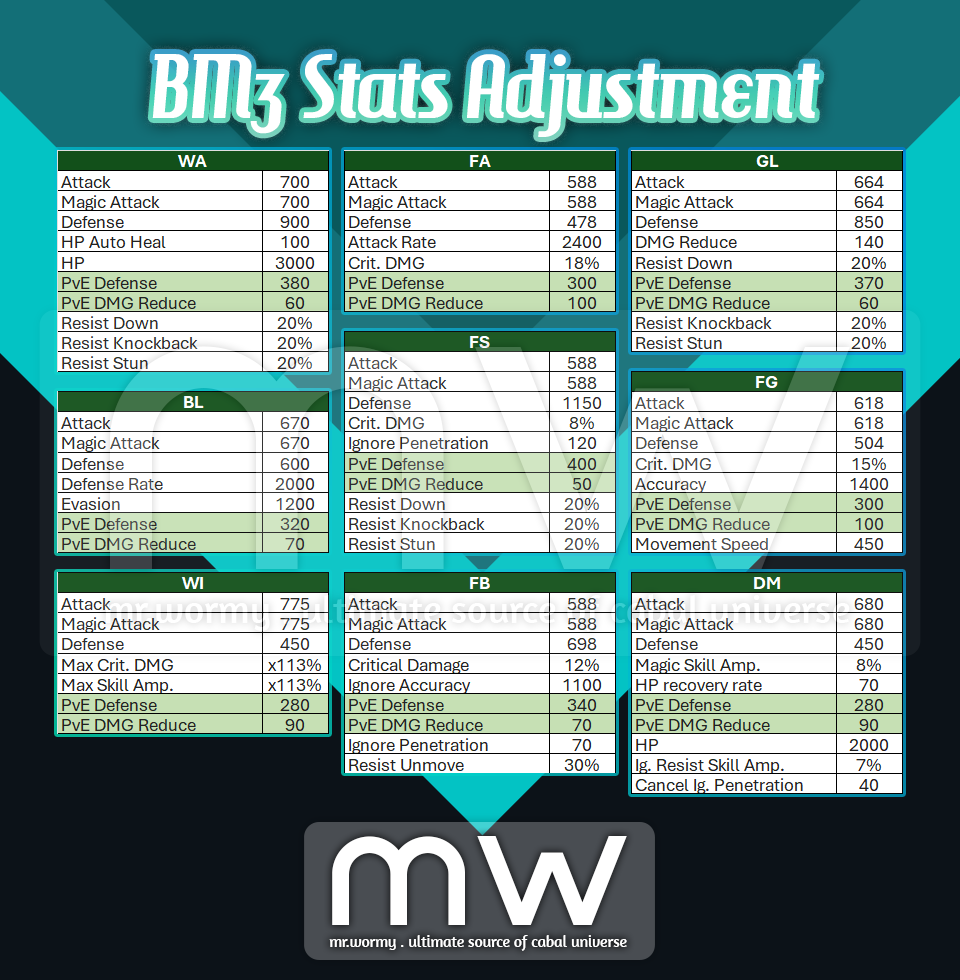
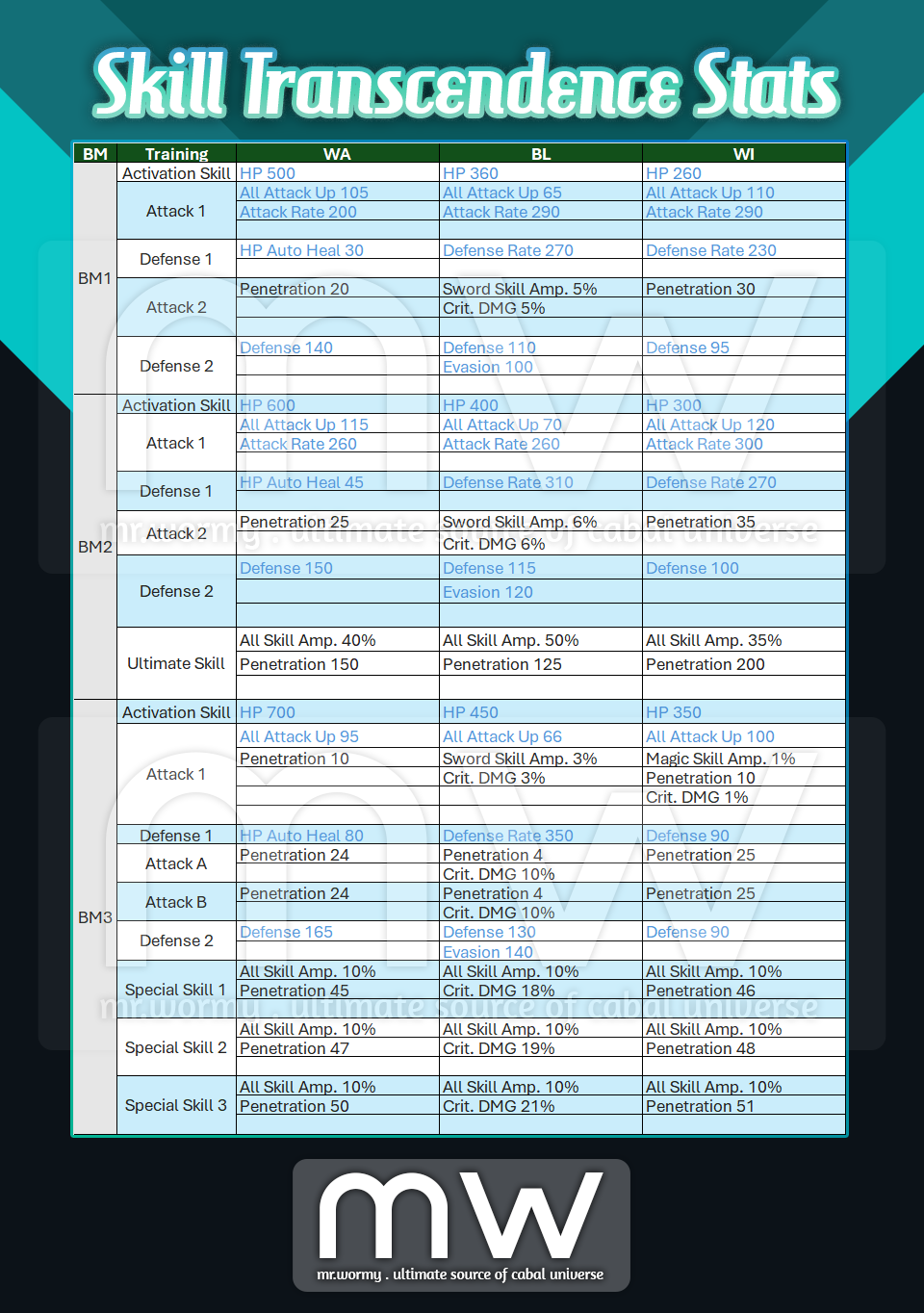
6. Increase stats for Battle Mode & Skill Transcendence
- Add PvE Defense & PvE Defense Rate for Battle Mode 2 (added stats are marked with green):
- Add PvE Defense & PvE DMG Reduce for Battle Mode 3 (added stats are marked with green):
- Increase stats for Skill Transcendence (adjusted stats are marked with blue text):
7. Increase stats of some items:
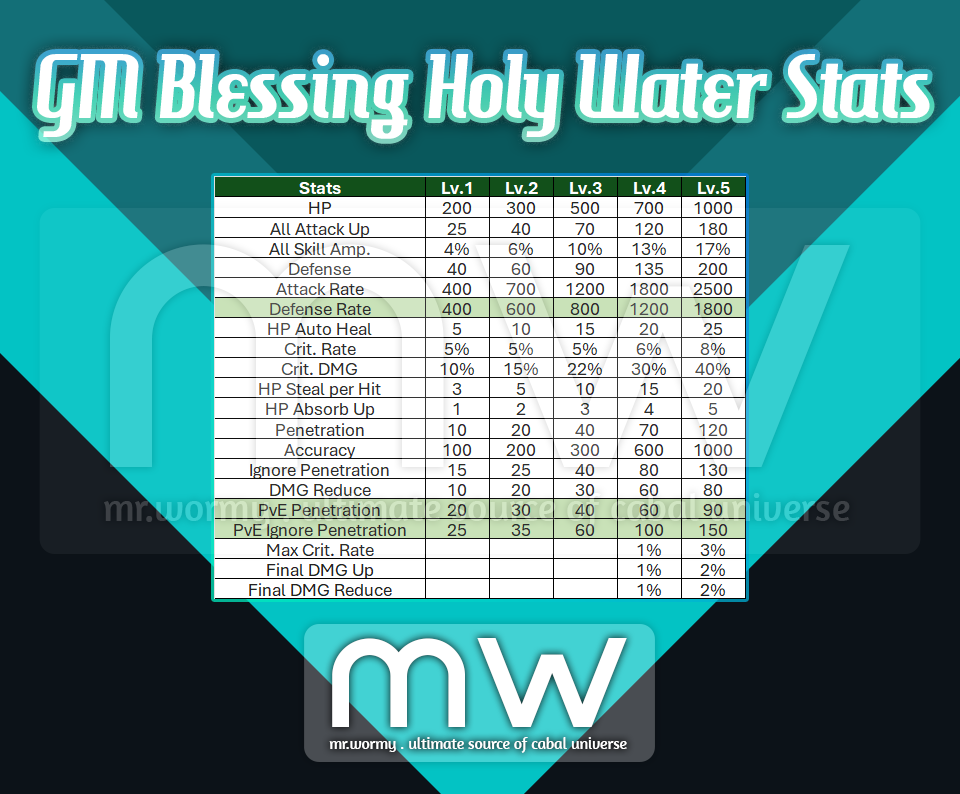
- Increase stats of GM’s Blessing Holy Water
- Changes:
- Increase Defense Rate
- Add PvE Penetration
- Add PvE Ignore Penetration
- Details stats:
- Changes:
- Change HP Recovery Amount:
- HP Lv. 3, HP Capsule Type A (Lv. 3), HP Capsule Type B (Lv. 3): 800HP
- HP Lv. 4, HP Capsule Type A (Lv. 4), HP Capsule Type B (Lv. 3): 1,200HP
- HP Capsule Type A (Special), HP Capsule Type B (Special): 1,800HP
- Change ownership of Jewel Cube of Unity (Emerald) from Guild Shop:
- Duration: 1hr > 3hrs
- Duration: 3hrs > 10hrs
8. Add Master Amp. Potion:
- Source: From “Pilgrim’s Gift” in the Altar system
- Stats: All Skill Amp. +30%
- Duration: 300s
- Cooldown: 5s
9. Add new Force Codes:
10. Changed monster’s group identification:


1. Overview:
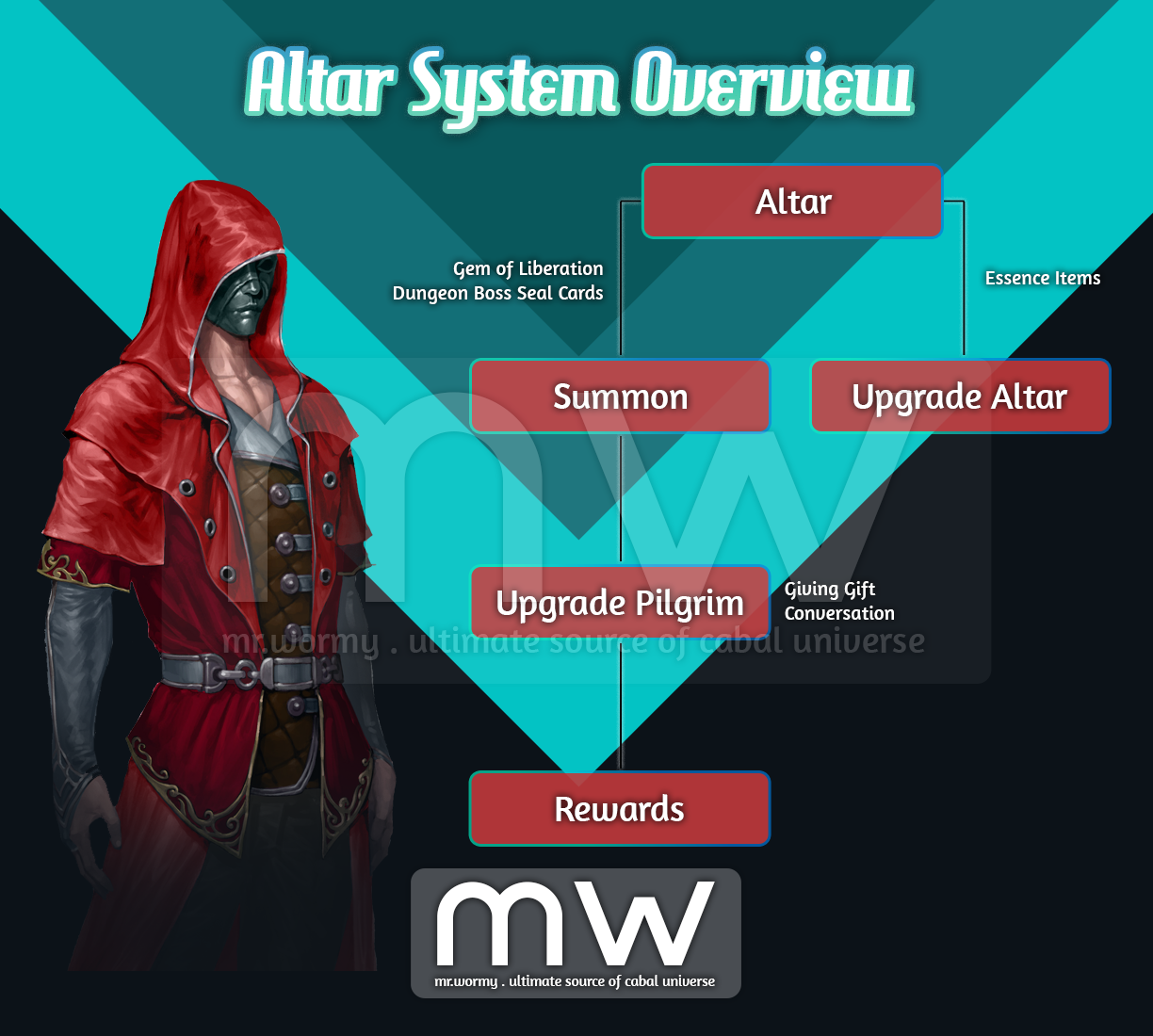
- A new content that allows summoning “Pilgrims” to the “Altar”, upgrade the Altar / Pilgrims to obtain Rewards.
- The higher condition of the Altar, the better / Pilgrims’ effect you can obtain; therefore, it’s important to keep the Altar with higher condition.
- Pilgrims have buffs, if the Pilgrims reach to highest Rank, additional bonus will be applied.
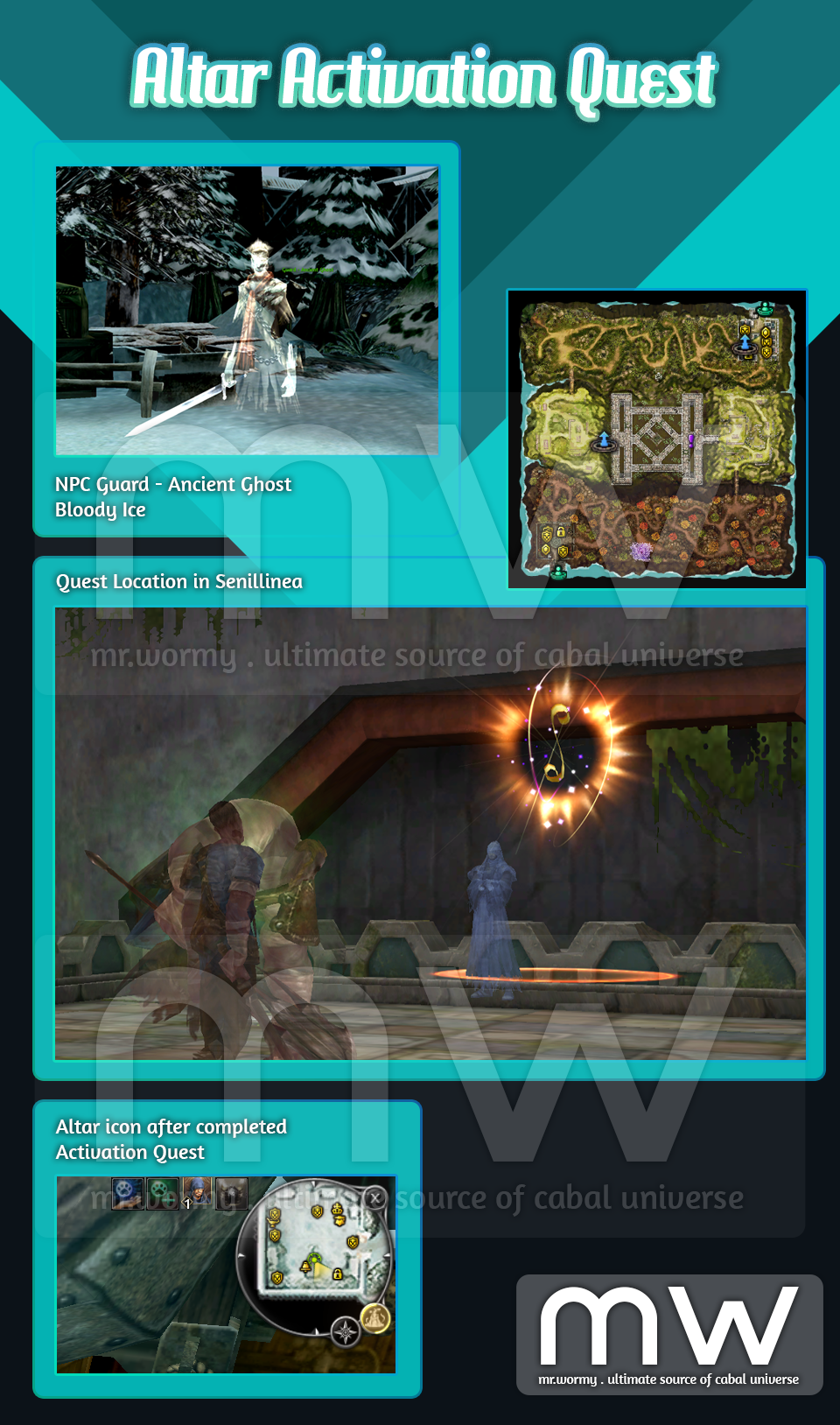
2. Activation Quest:
- Quest Name: The Inner Altar
- Requirement: Character with OLV 10 or higher
- NPC: Guard – Ancient Ghost, Bloody Ice
- Reward: On completion, an “Altar” icon will be shown at top-right corner
3. Altar:
- Altar is account-based feature, all characters are from the account will get the same benefits of Altar
- Altar:
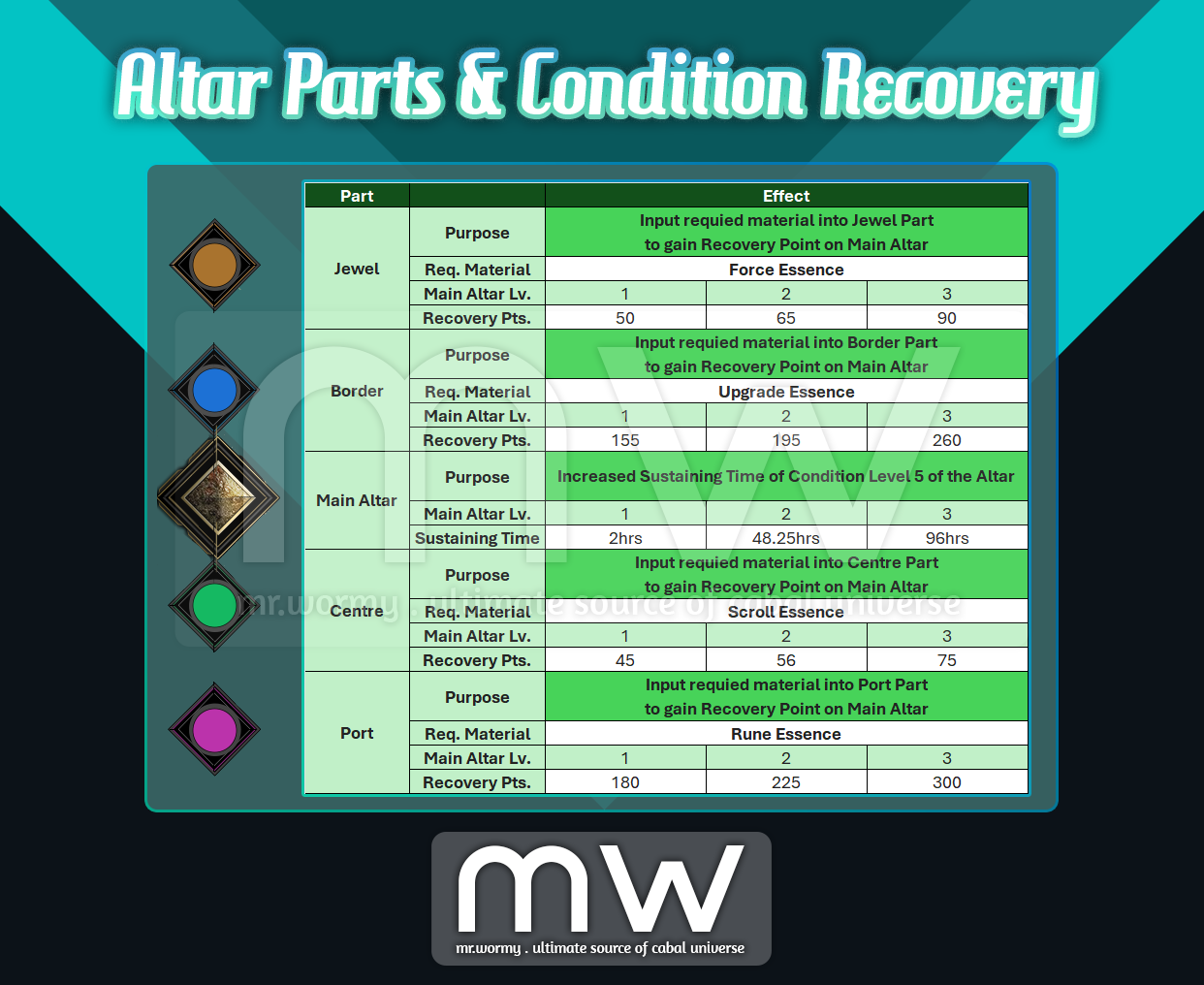
- There are 04 Parts: Jewel / Border / Centre / Port on the Altar.
- By giving Essence items to each object, the point on the main Altar will be increased.
- As the point increased, the object will be “Transcended”, allow up to 17,280 points of Essence to be given.
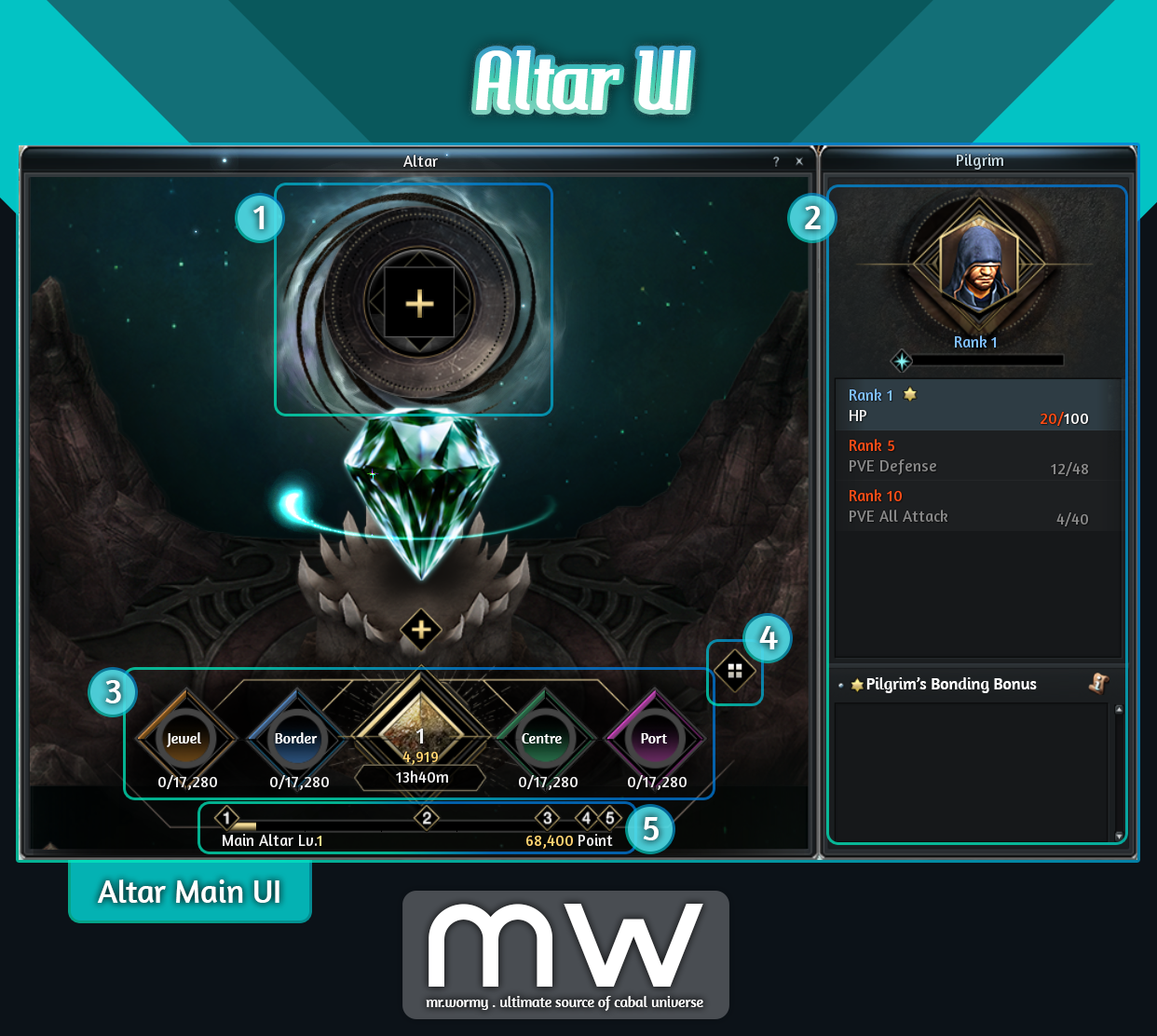
- Altar UI:
- [1] Input Slot: Players can sacrificing Essences items to grow and maintain the Main Altar condition level
- [2] Altar Context Panel, depends on the situation, this panel could be switched to:
- Showing the current Pilgrim stats
- Showing sacrificing materials for Altar
- Showing sacrificing materials for Pilgrim
- Summon Pilgrims
- [3] Altar comes with 5 parts (from left to right)
- Jewel: Accept Force Essence as sacrifice
- Border: Accept Upgrade Essence as sacrifice
- Main Altar: Showing the current Altar blessing effect
- Centre: Accept Scroll Essence as sacrifice
- Port: Accept Rune Essence as sacrifice
- [4] Button to switch back to Altar Main UI
- [5] Current Main Altar level progress
- Parts of Altar:
- Source of Essence Items:
- Force Essence: By crafting from Force Core at NPC Chloe in Port Lux.
- Upgrade Essence: By extracting (destroying) Upgrade Core (all grades)
- Scroll Essence: By extracting (destroying) Option Scrolls.
- Rune Essence: By extracting (destroying) Essence Runes.
- Main Altar:
- Concept:
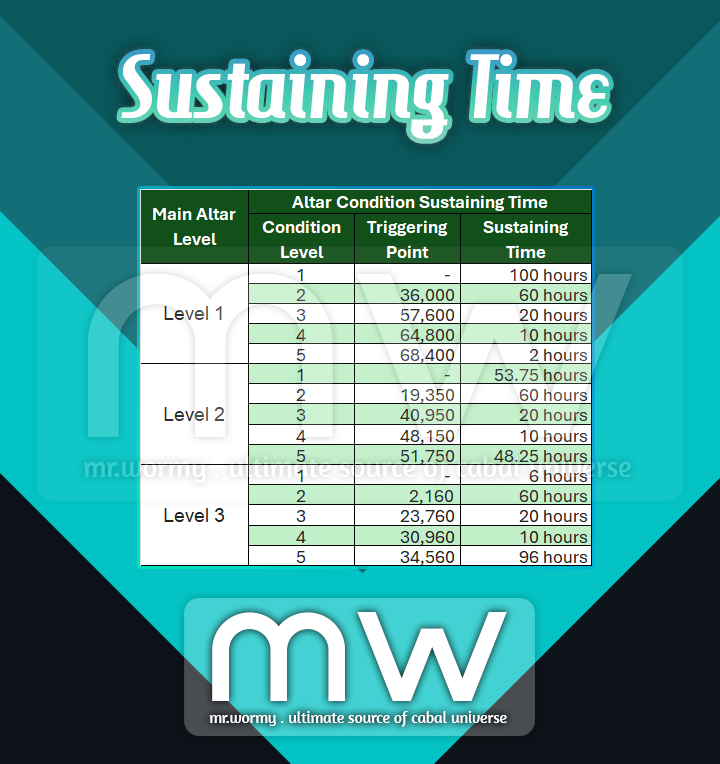
- The Condition Level of the Main Altar increases by the amount of points earned by inputting Essence items into 4 Parts.
- Depends on the Condition Level of the Main Altar, different buff type and values will be available to obtain.
- Depends on the Main Altar Level and Condition Level of the Main Altar, different amount of Points required for levelling up.
- Condition Level Details:
- Concept:
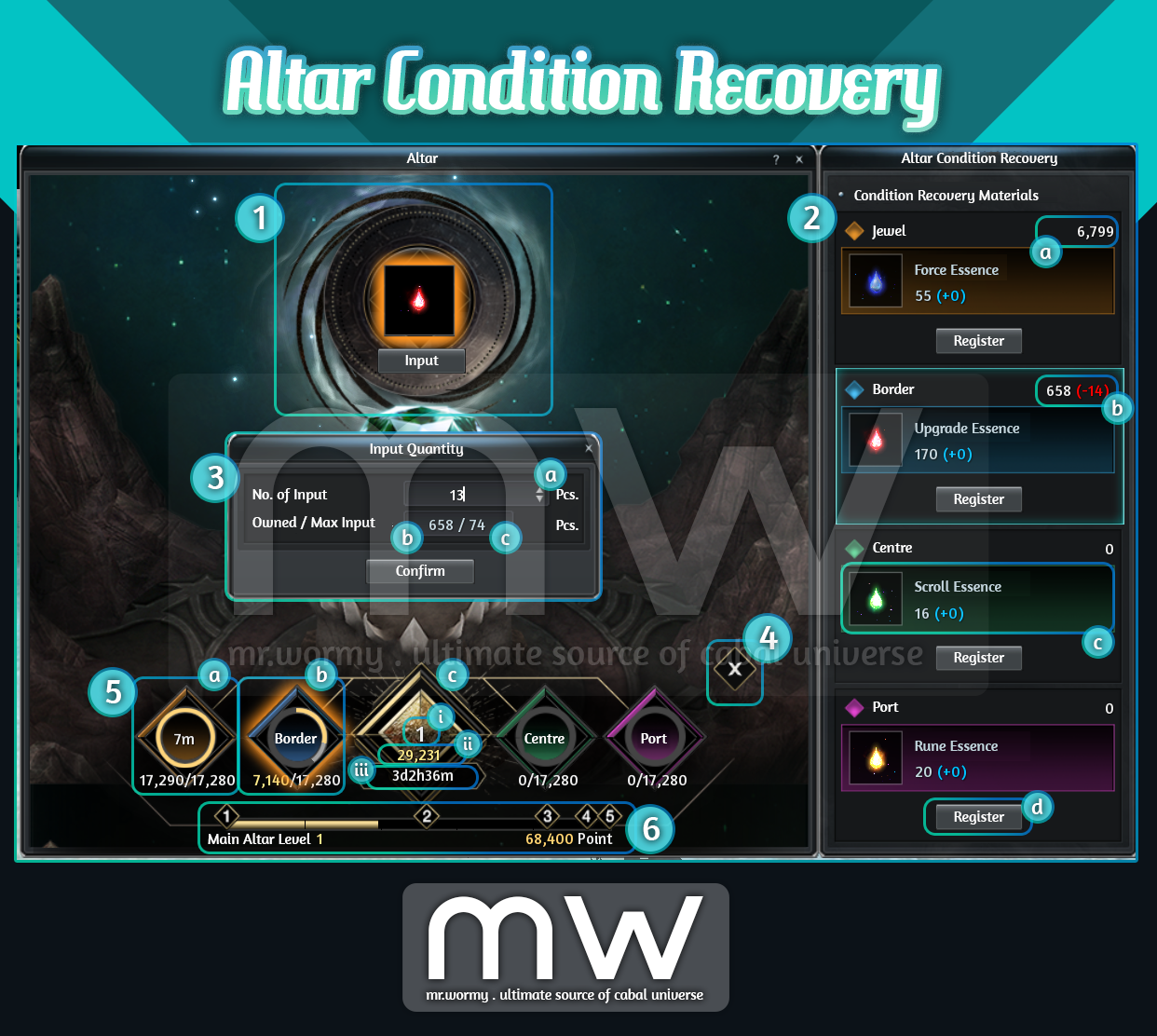
- Condition Recovery:
- [1] Input Slot, click to open Condition Recovery Sub-UI on the right side [2]
- [2] Each Part of the Altar requires different materials as mentioned above.
- [a] Number of available quantity for the required item
- [b] Number of material items selected to input into the Altar will be show in red colour
- [c] Name of the material and amount of Point will be increased for contributing into Altar Condition Level
- [d] Button to register the selected material into the Altar
- [3] On click on “Register” button [2d], a small UI is available to input the desired amount of material and also showing the owned amount as well as the maximum amount of material can input
- [4] Button to close the Altar Condition Recovery Sub-UI
- [5] Parts of Main Altar changes the way of displaying depends on the situation
- [a] If a Part reached to the maximum amount of points, it will be in “cooldown” state:
- Gauge is showing with full circle yellow.
- Cooldown duration is displayed inside the circle.
- [b] If a Part hasn’t reached the maximum point:
- Gauge can be with 3 colours:
- Yellow represents the filled points to max.
- Light Gray represents the going-to-be-filled points (happens only if an Essence Item is going to be input).
- Dark Gray represents the remaining amount of points could be filled.
- Name of the Part is displayed at the middle of the circle.
- Gauge can be with 3 colours:
- [c] Main Altar:
- [i] Current Level of the Altar is displayed in white colour with big size.
- [ii] Total accumulated points is displayed in yellow colour right under.
- [iii] Current Condition Level will be maintained for a certain amount of time, the duration is displayed right under the total accumulated point.
- [a] If a Part reached to the maximum amount of points, it will be in “cooldown” state:
- [6] Condition Level gauge shows the progress of filling up the points toward each Condition Level
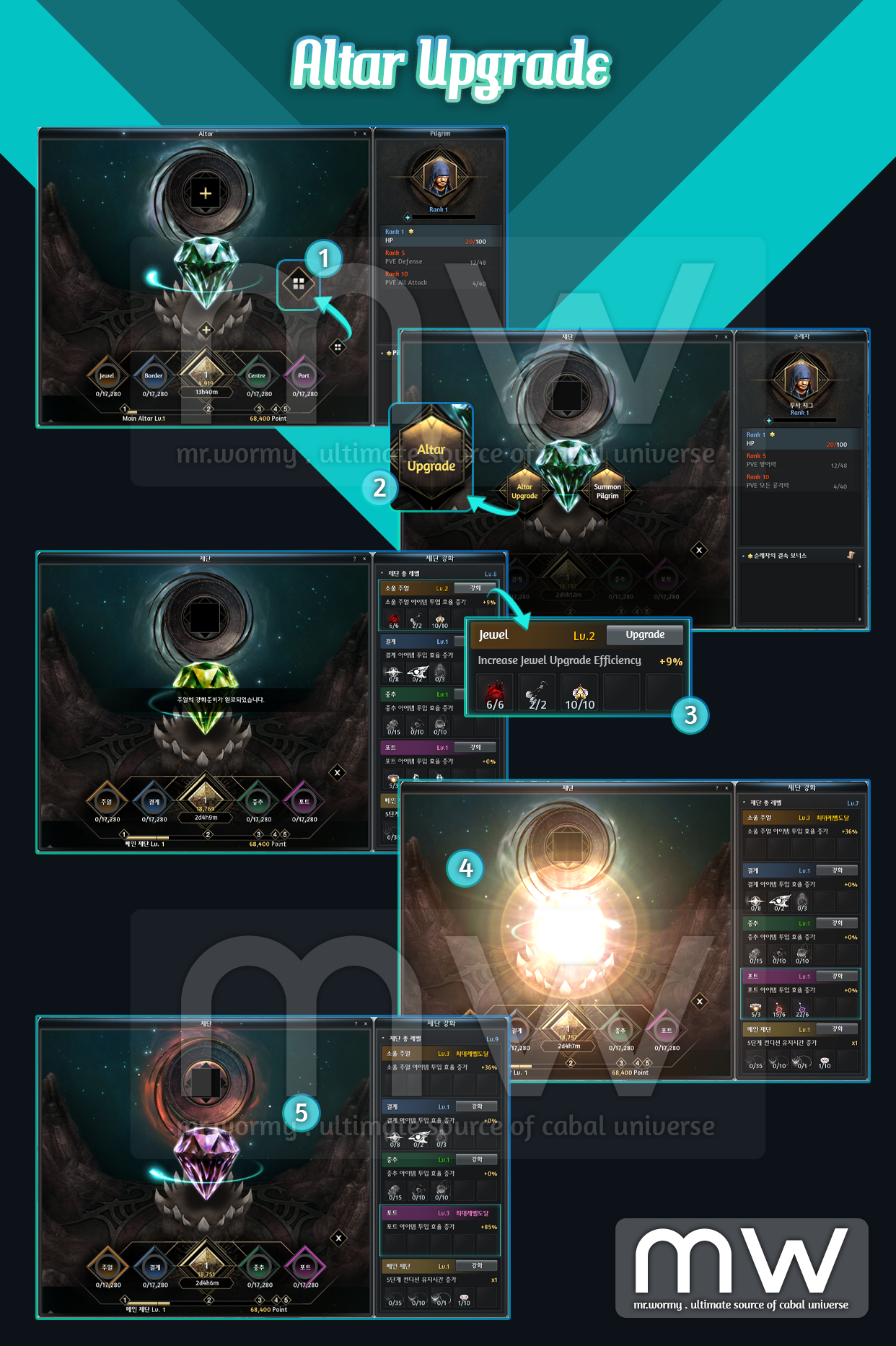
- Altar Upgrade:
- [1] From the main Altar UI, click on the Altar Menu button
- [2] Select “Altar Upgrade” from the Altar Menu
- [3] Available upgrades will be displayed in the list on the right side of Altar UI with details of
- Required materials (item & qty).
- Effect of the upgrade.
- For Main Altar Part, it will increase the Condition Sustaining Duration effect.
- For other Parts, it will increase the efficiency of inputting materials.
- Upgrade button.
- [4] Once the materials are provided for upgrading, a special visual effect will be displayed.
- [5] Main Altar UI has different visual effect based on the upgrade level.
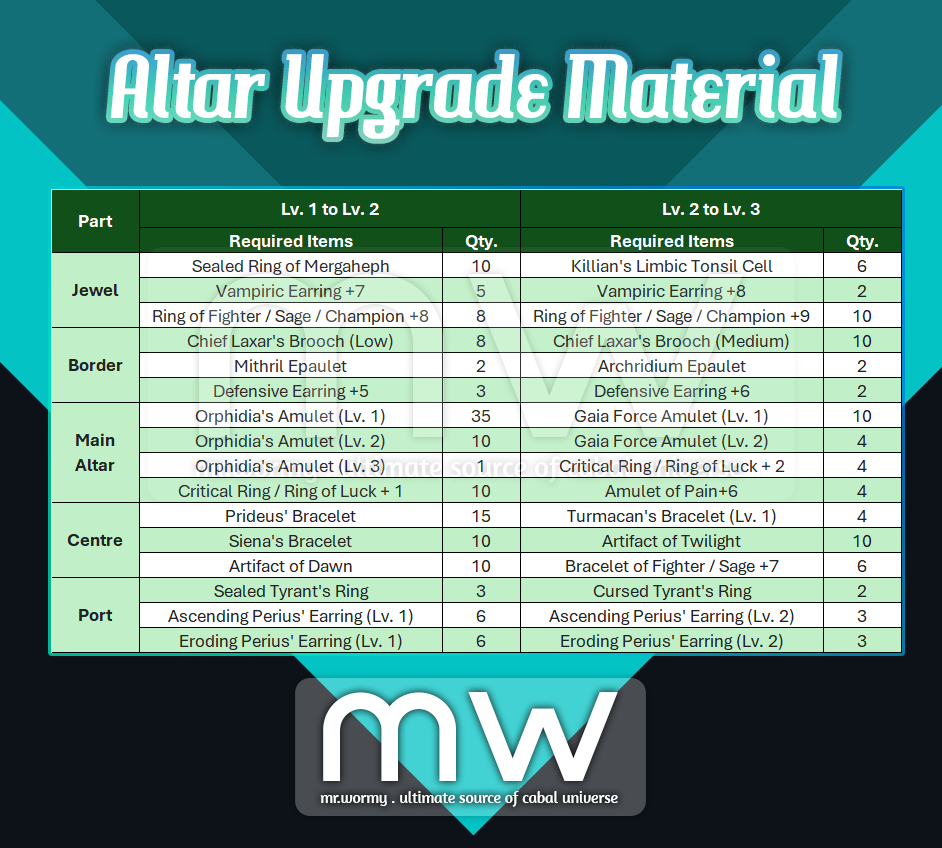
- Altar Upgrade Materials:
4. Pilgrim:
- Pilgrim Overview:
- Pilgrim is a specific NPC to be summoned and worshipped at the Altar.
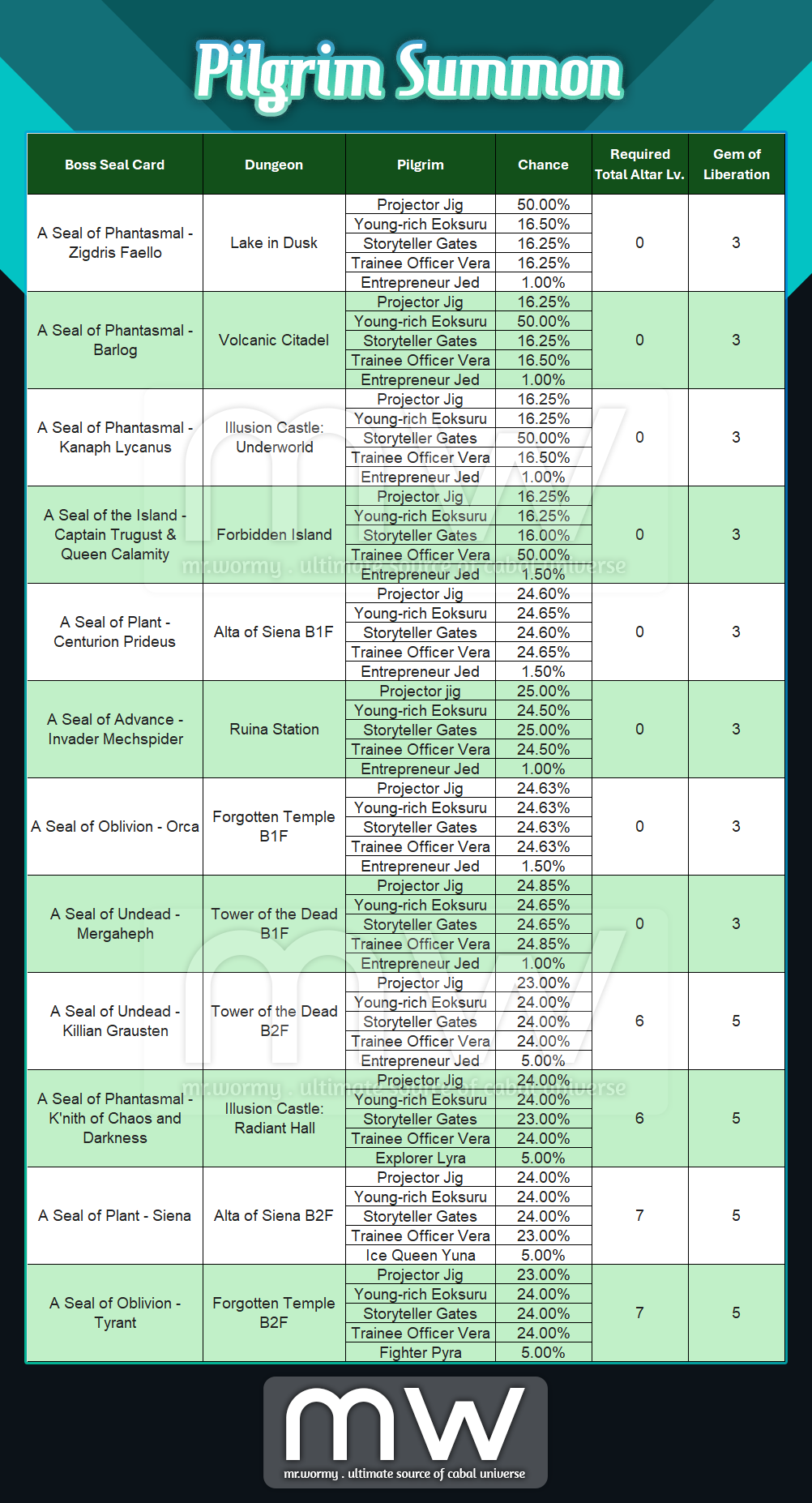
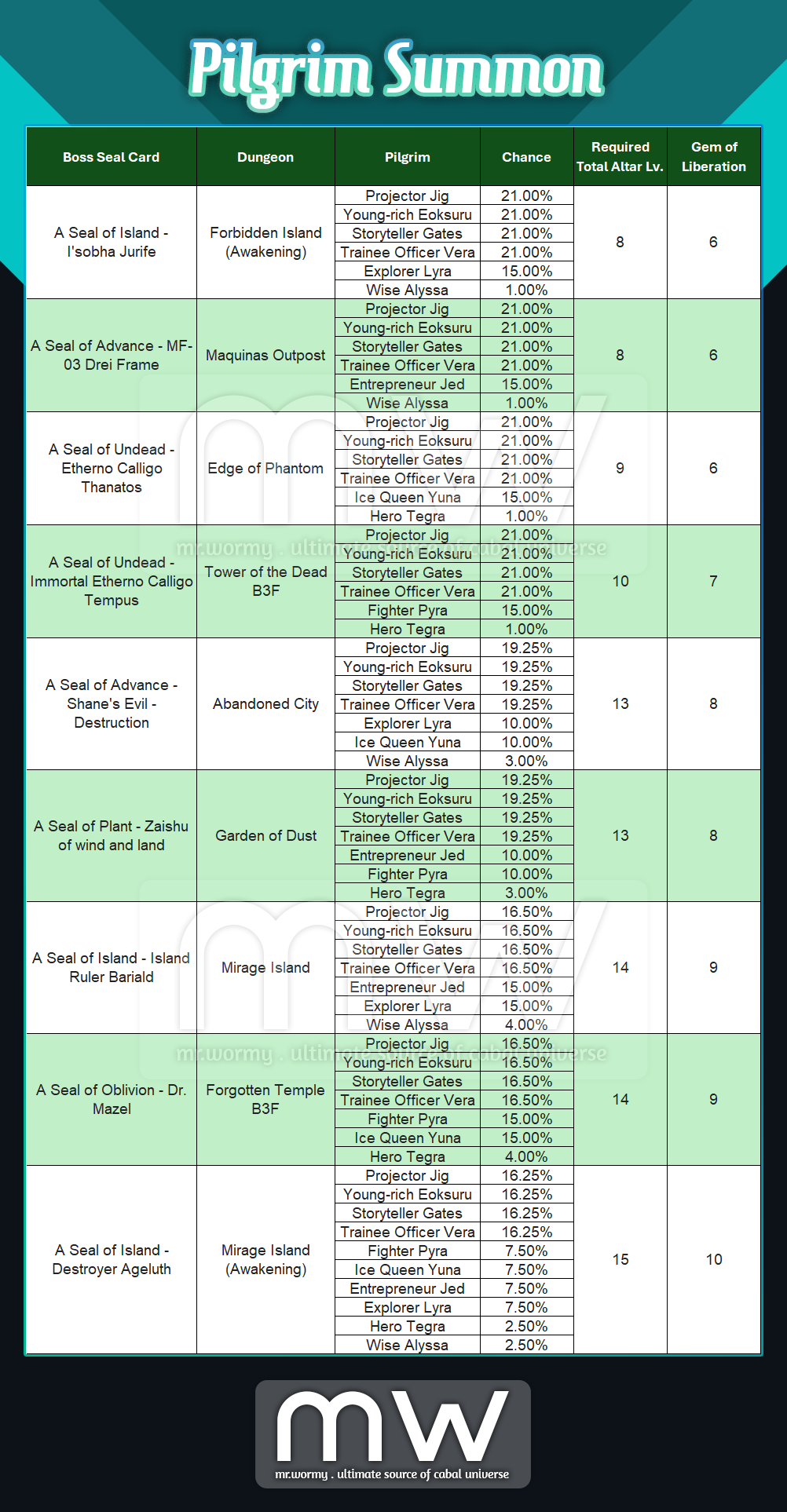
- Summoning Pilgrim consumes Boss Seal Card and Gem of Liberation.
- Rank of Pilgrim could be increased by sacrificing gifts or via conversation.
- By ranking up, the additional options will be available.
- However the value of the stats depends on the Condition Level of the Main Altar.
- Only one Pilgrim can be selected to be worshipped at the Altar at once.
- All of stats from the selected Pilgrim will be applied.
- Some Pilgrims have “Bonding” stats, those stats are applied even when those Pilgrims are not selected.
- Pilgrims:
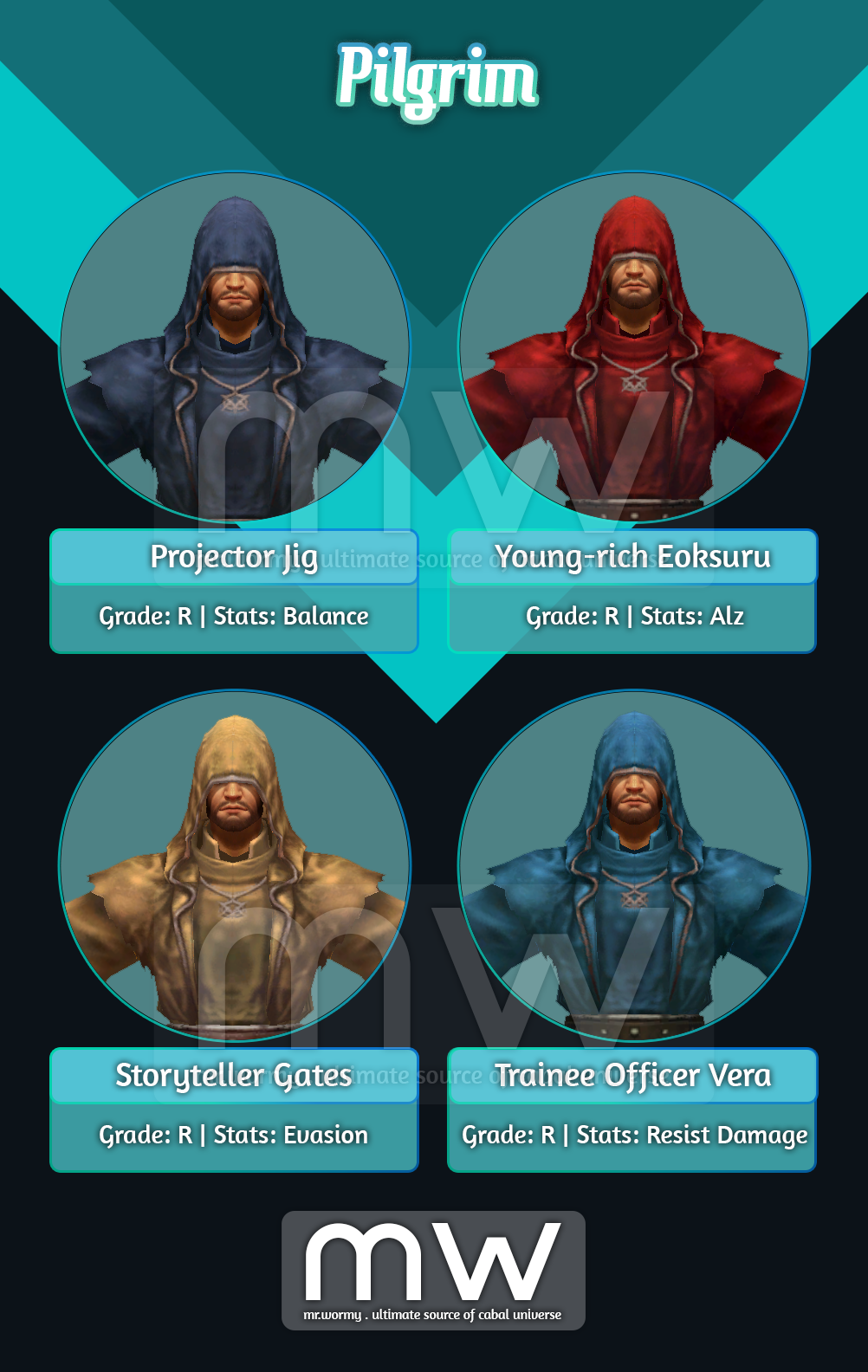

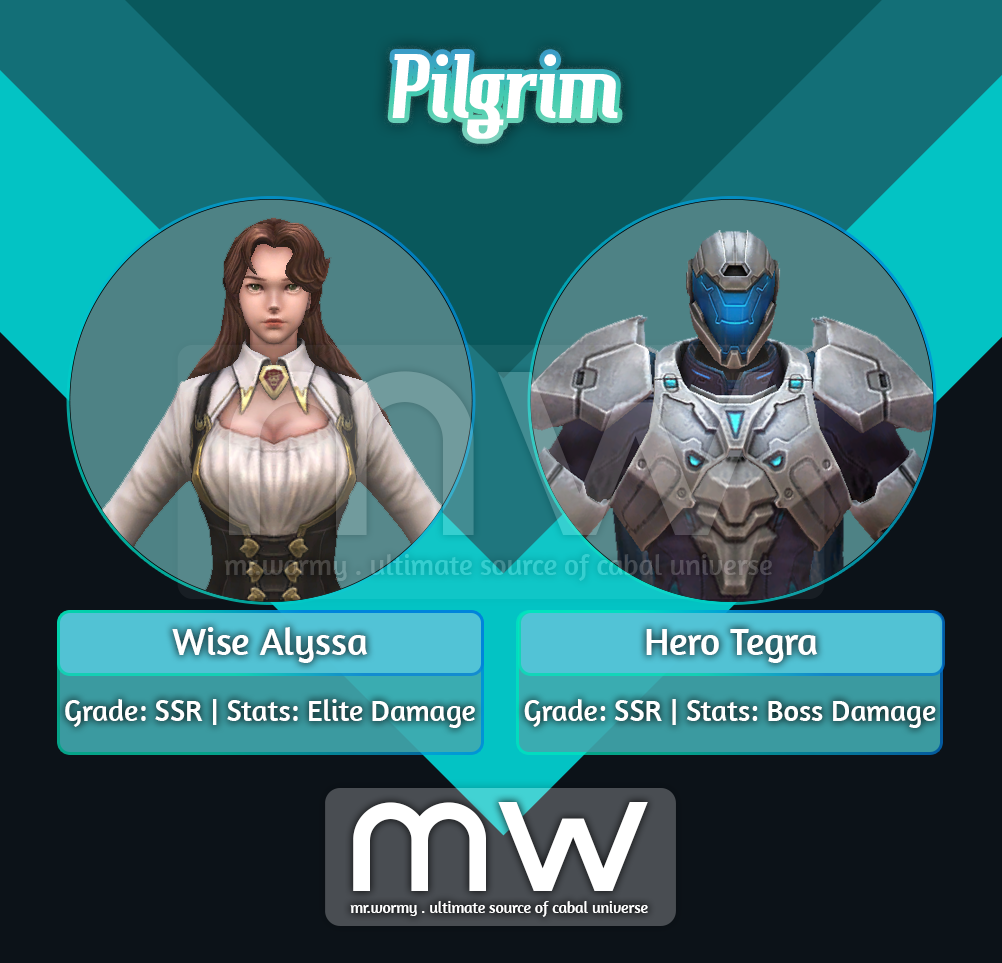
- Summon Pilgrim:
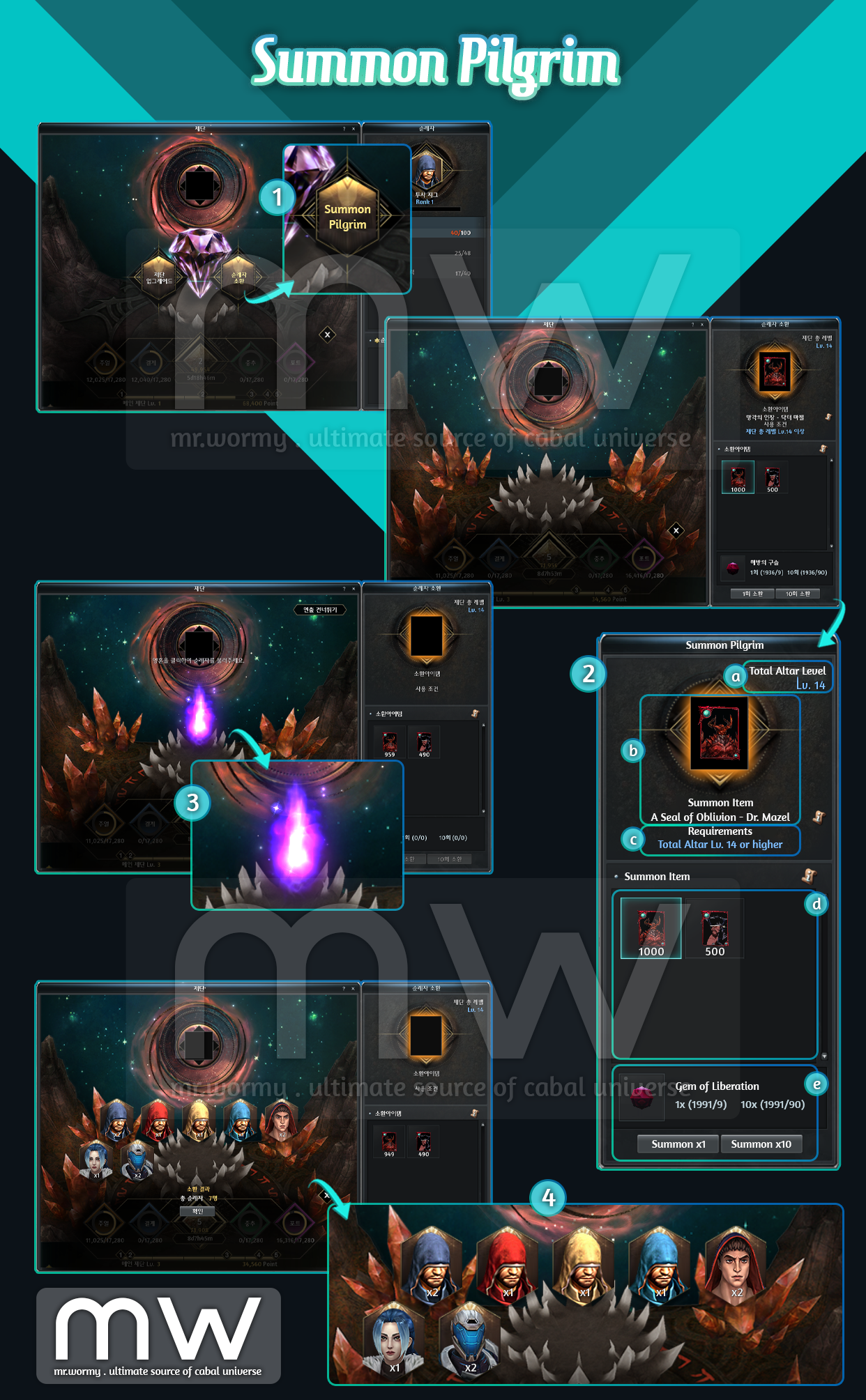
- [1] From Altar Menu, select “Summon Pilgrim”
- [2] Select Boss Seal Card on the right side of the screen:
- [a] Total Altar Level is displayed here as of sum for all Main Altar upgrades.
- [b] Here will show the registered Boss Seal Card.
- [c] To use some Boss Seal Card, a specific “Total Altar Level” is required.
- For example, in this case “A Seal of Oblivion – Dr. Mazel” requires Total Altar Lv. 14 or higher, as we have the Total Altar Lv. 14 here, that’s why text is in blue. Otherwise, text will be displayed in red.
- [d] In this area, all of Boss Seal Card available in inventory will be displayed.
- [e] Summon a Pilgrim consumes Boss Seal Card and Gem of Liberation.
- Depends on the Boss Seal Card, a specific amount of Gem of Liberation is needed.
- There is also option to Summon 1x or 10x at once. The amount of Gem of Liberation required is also displayed for both cases.
- [3] After clicking on Summon, a random Pilgrim will be summoned from the available pool, different Pilgrim will have different summoning effects.
- [4] Result of summoning will also be displayed at last for review.
- Pilgrim Summon Details:
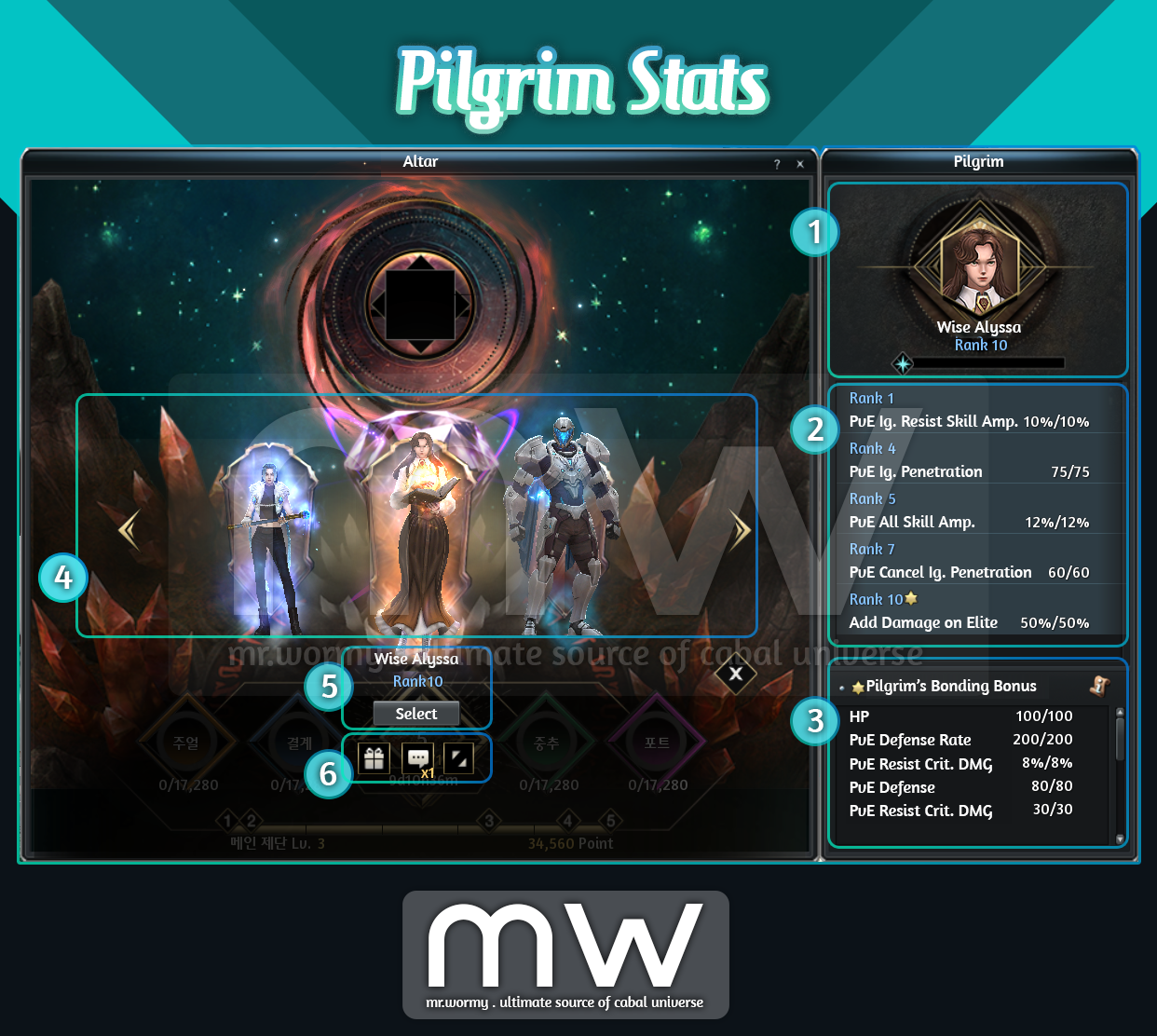
- Pilgrims Rank & Stats:
- [1] By select a Pilgrim as the main Pilgrim to worship, player will obtain all of available unlocked stats from that Pilgrim.
- [2] By reaching to higher Rank, new stats will be unlocked.
- Value of stats depends on the Condition Level of the Altar.
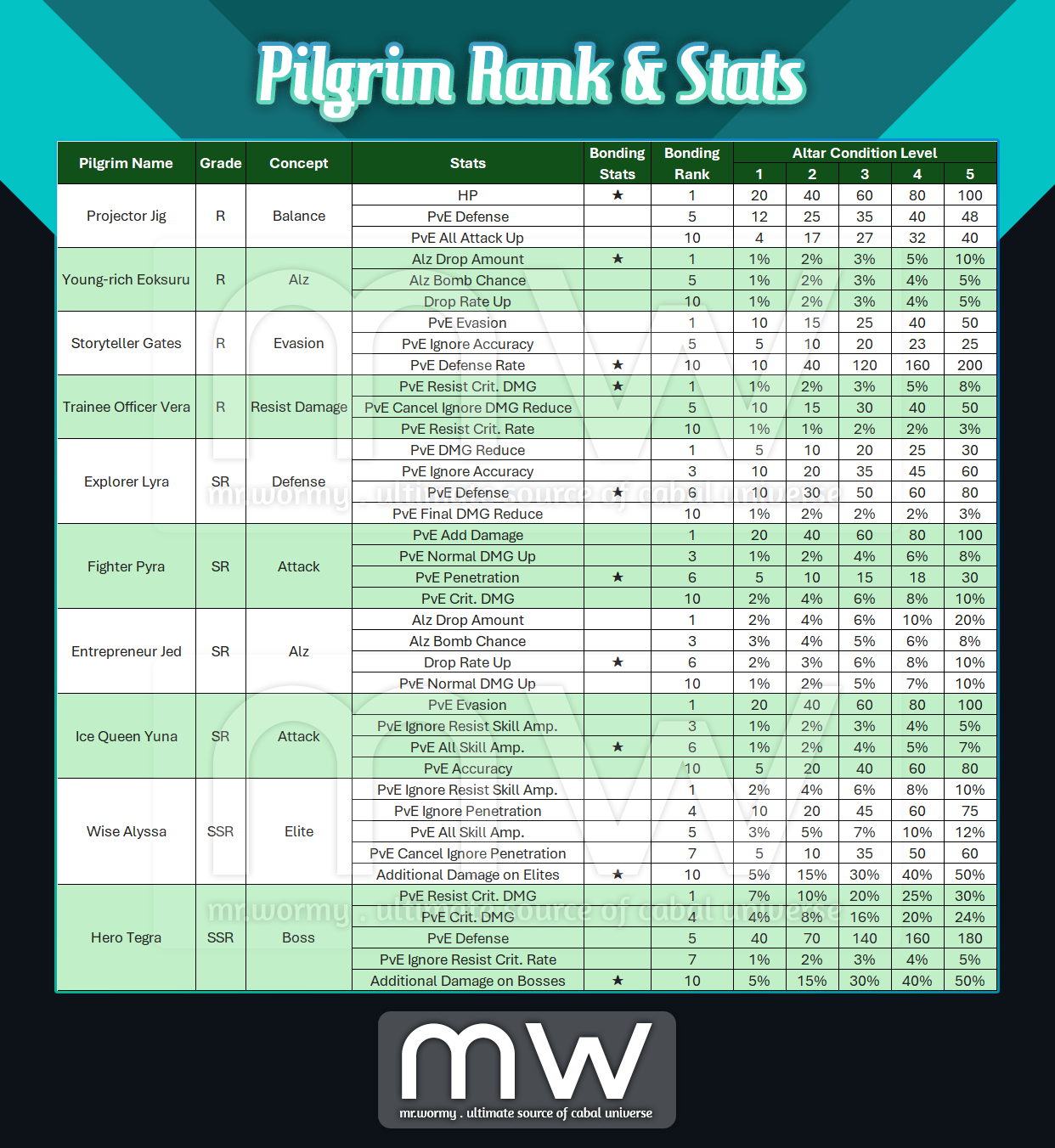
- Beside of normal stats, there will be “Bonding Stats”, the stat is marked with a yellow star.
- [3] If a Pilgrim reaches the highest Rank, the Bonding Stats will be activated even if that Pilgrim is not set as the main Pilgrim.
- [4] Player can switching between available Pilgrims at anytime.
- [5] Click on the “Select” button under the Pilgrim name to switch to that Pilgrim.
- [6] By gifting or making conversation, the Pilgrim EXP will be gained for that specific Pilgrim.
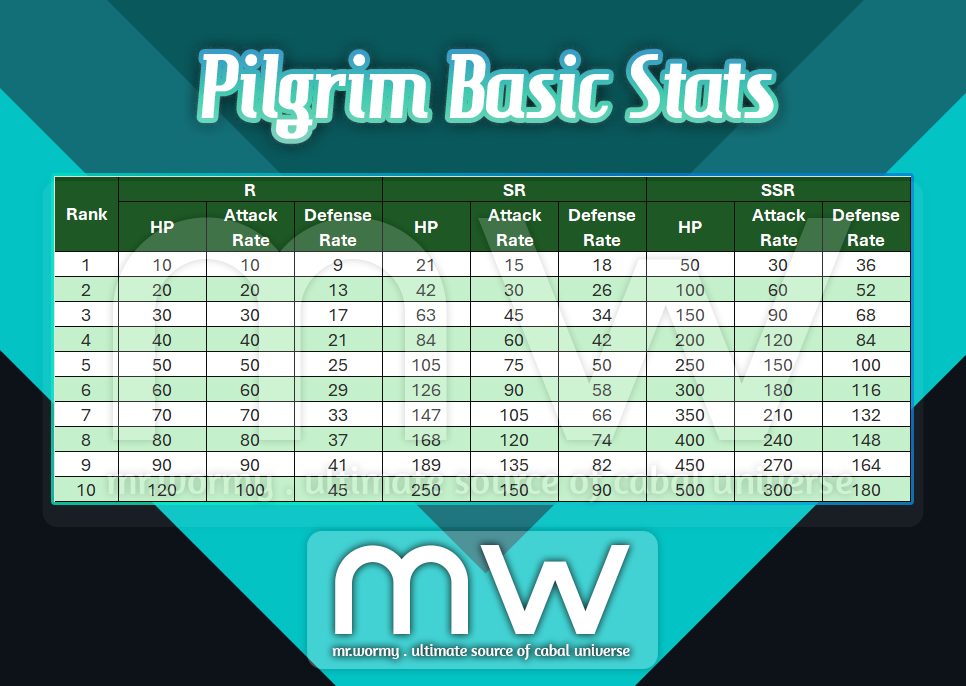
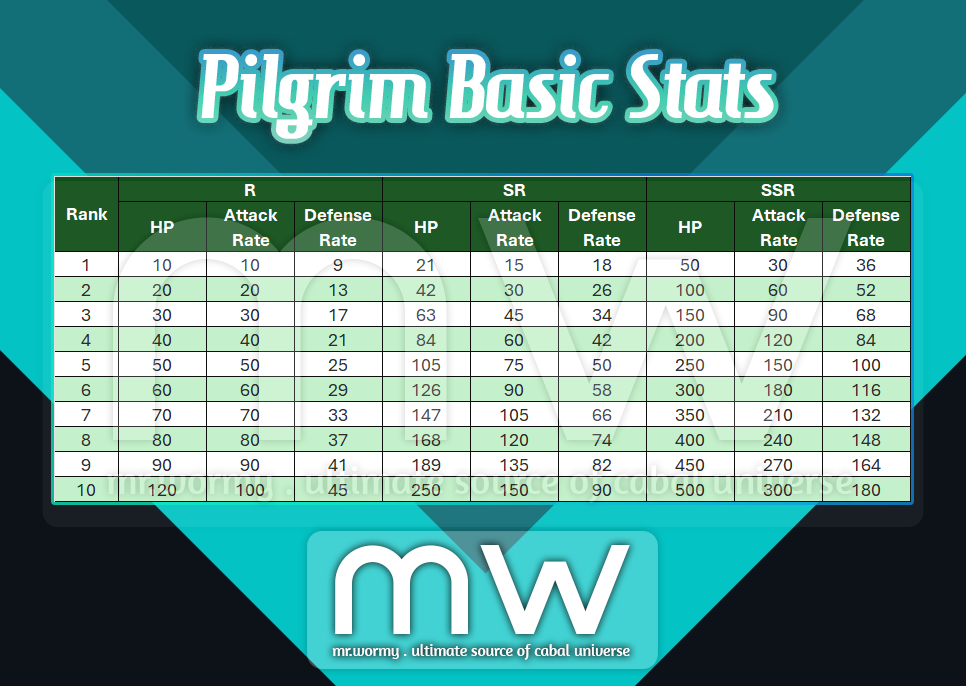
- Pilgrim Basic Stats:
- Basic stats based on Pilgrims’ Level and Rank
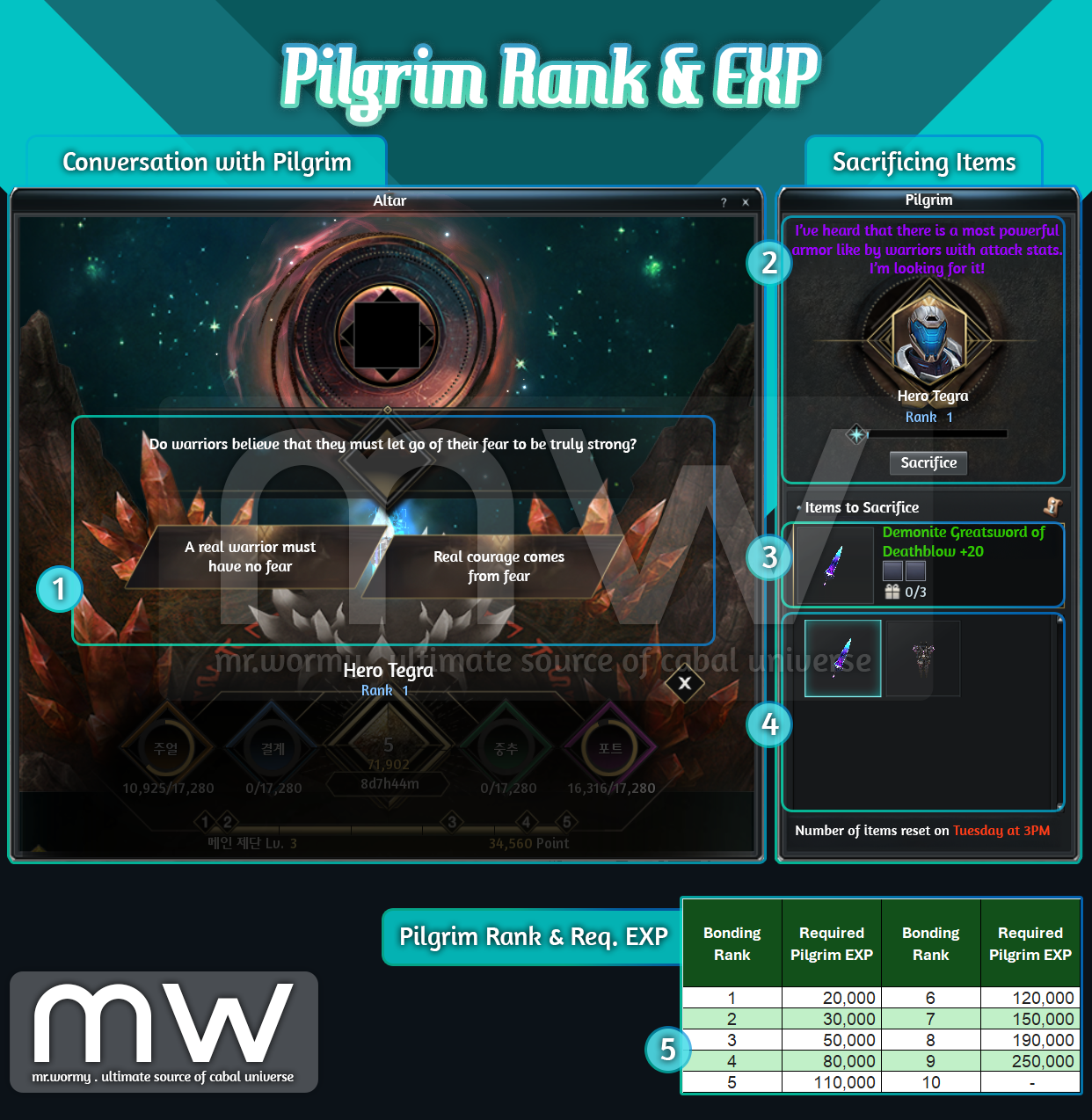
- Pilgrim Ranks & EXP:
- [1] By making conversation with Pilgrim, the Pilgrim EXP will be increased.
- If the same Pilgrim got summoned for multiple times, the number of times that Pilgrim can talk increase.
- If player answers the correct answer, it will result into big amount of Pilgrim EXP.
- If player answers the correct answer to a Pilgrim at maximum Rank will generate a Pilgrim Reward.
- Another mechanism for growing Pilgrim EXP is by sacrificing items:
- [2] The current Pilgrim, Rank, EXP gauge and “Special Request” are available to check.
- Special Request gives hints about type of item that the Pilgrim is looking for, sacrificing the matching item will result into big amount of Pilgrim EXP.
- [3] By selecting an item from [4], the details of the items are available here
- Normal items with Epic:
- Sacrificing is limited to up to 3 items per week.
- Reset of the limit is at 3:00PM Tuesday.
- Cash Shop items:
- Will be available from Cash Shop
- Result in high amount of Pilgrim EXP.
- No limit on sacrificing.
- Normal items with Epic:
- Sacrificing items for a Pilgrim at maximum Rank will generate a Pilgrim Reward.
- [2] The current Pilgrim, Rank, EXP gauge and “Special Request” are available to check.
- A table of Pilgrim EXP and equivalent Rank are available for references [5]
- [1] By making conversation with Pilgrim, the Pilgrim EXP will be increased.
- Pilgrim Rank and available Stats:
- Bonding Stats are marked with ⭐ in the table, once the Pilgrim passed the required Rank, the Bonding Stats is added to all character in the account, regardless of the selection for the main Pilgrim in the Altar.
- Pilgrim Reward:
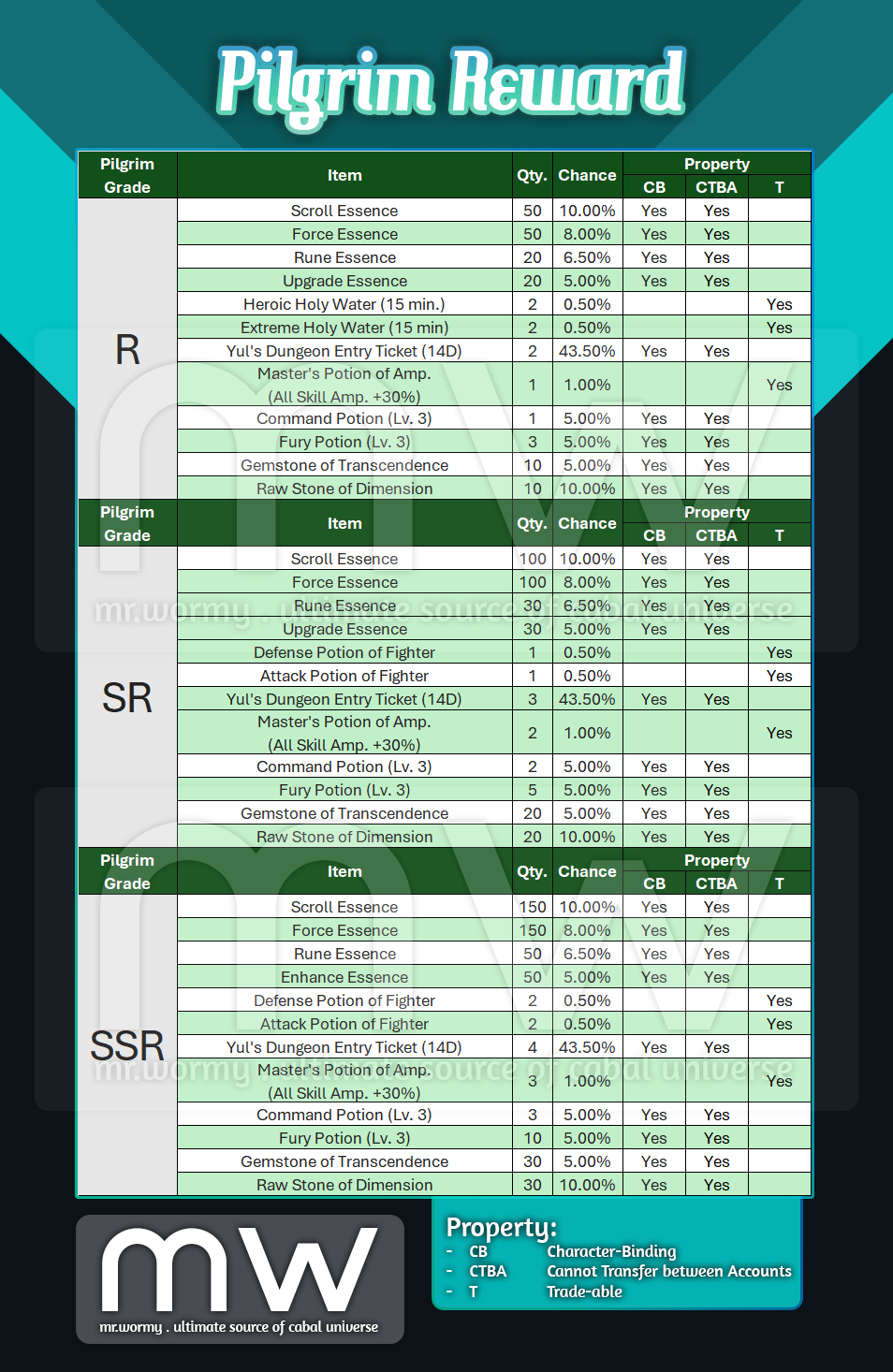
- A “Pilgrim Reward” will be generated if players:
- Answer a correct question to a Pilgrim at maximum Rank.
- Sacrifice an items to a Pilgrim at maximum Rank.
- Pilgrim Reward is with property “Cannot Transfer between Accounts”
- Available outputs:
- A “Pilgrim Reward” will be generated if players:

1. Pet Exploration Overview:
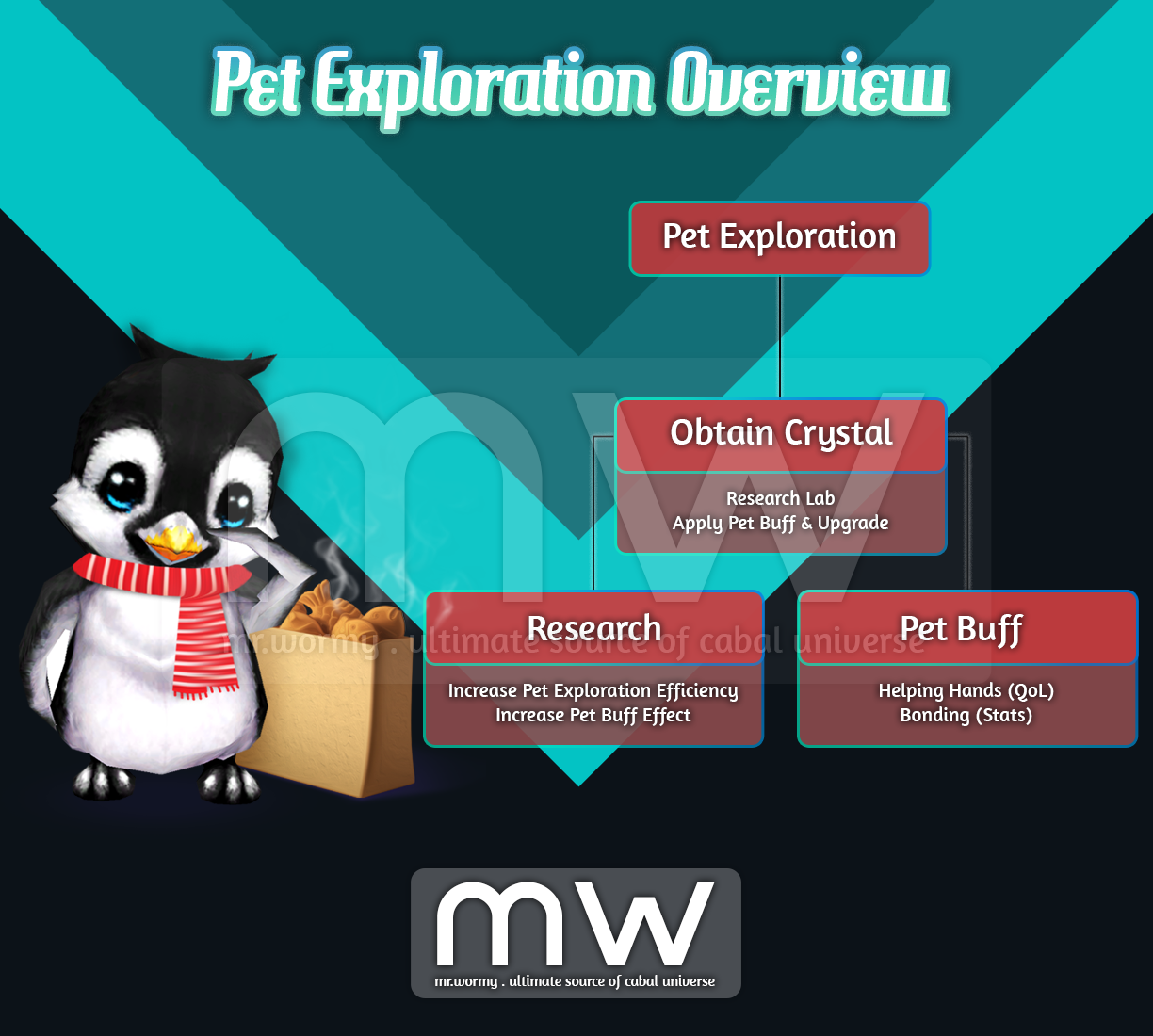
- Send pets to various regions to obtain rewards called “Crystal”.
- Use Crystals to:
- Conduct researches at Exploration Centre and Research Lab
- Maintain Pet Buff.
- Upgrade at Exploration Centre and Research Lab:
- Efficiency for Pet Exploration
- Effect of Pet Buff
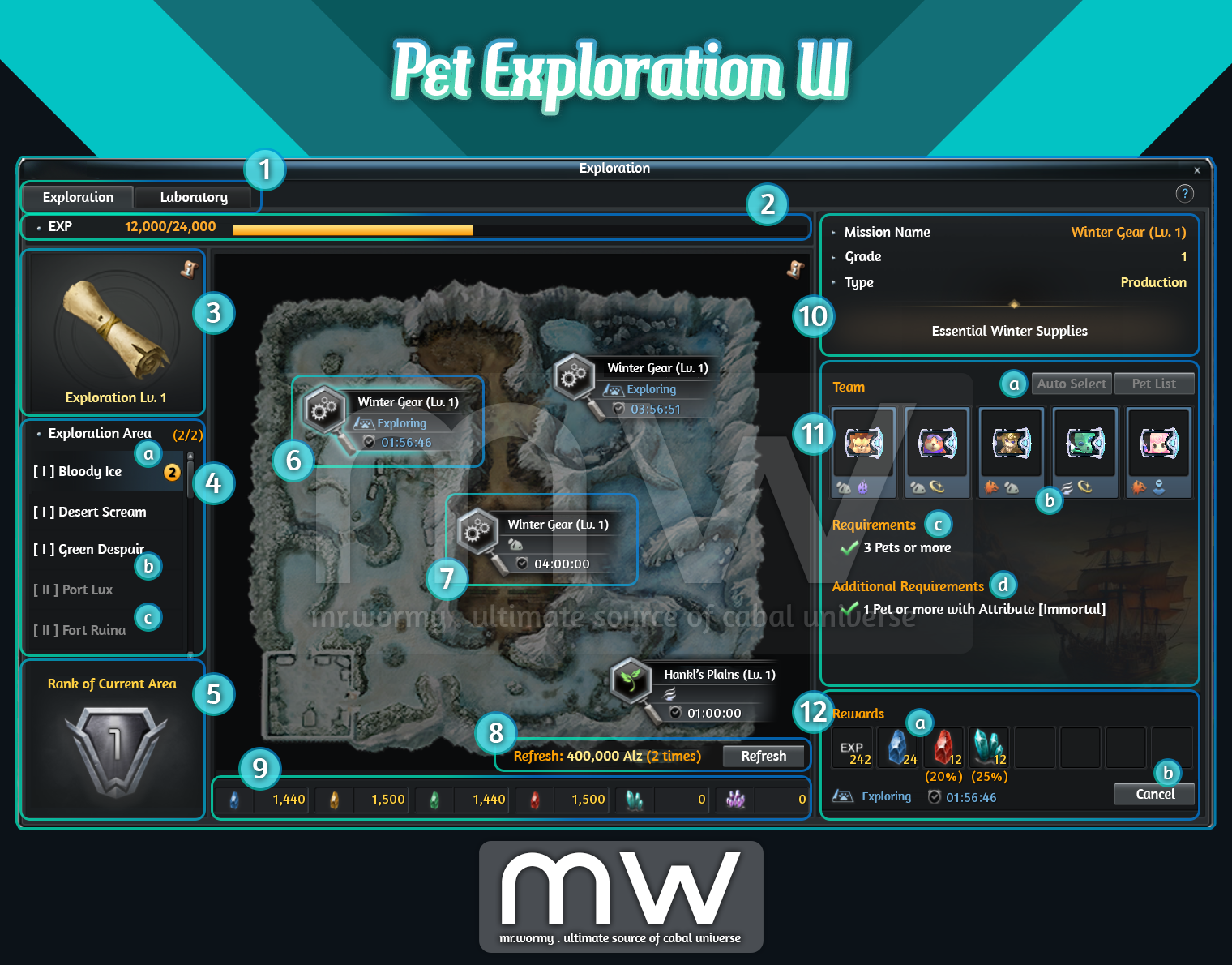
- Exploration UI: Can be access from Cabal Menu > Dungeons and Locations > Exploration
- [1] Tabs of the Exploration UI:
- Exploration: Form team of pets to explore locations on maps.
- Laboratory: Research on various aspects to improve game play.
- [2] Exploration EXP bar.
- [3] Current Exploration Level.
- [4] Areas of Exploration, initially, there are 3 maps for exploring, but it can be unlocked via “Laboratory”:
- [a] Unlocked map with on-going Exploration.
- [b] Unlocked map.
- [c] Locked map.
- [5] Rank of the current area.
- [6] Mission under exploration.
- [7] Mission available for exploring.
- [8] Allow to “Refresh” the list of available Missions:
- Consume Alz for refreshing.
- Only missions which are not under exploration will be refreshed.
- [9] Current owned materials (Crystals).
- [10] Mission details:
- Name
- Grade
- Type
- [11]
- [a] Convenient Buttons
- Auto Select: Click to let game automatically select pets to match with requirements for forming the team.
- Pet List: Manually select pets to form the team.
- [b] Exploration Team: List selected pets.
- [c] Basic Requirements: Required criteria, if the requirements are not fulfilled, the exploration cannot be started.
- [d] Additional Requirements: Additional criteria, if the requirements are fulfilled, additional rewards could be earned.
- [a] Convenient Buttons
- [12]
- [a] Expected rewards:
- Some rewards are guaranteed.
- Some rewards are with specific chance to obtain.
- [b] Allow Start / Cancel the exploration.
- [a] Expected rewards:
- [1] Tabs of the Exploration UI:
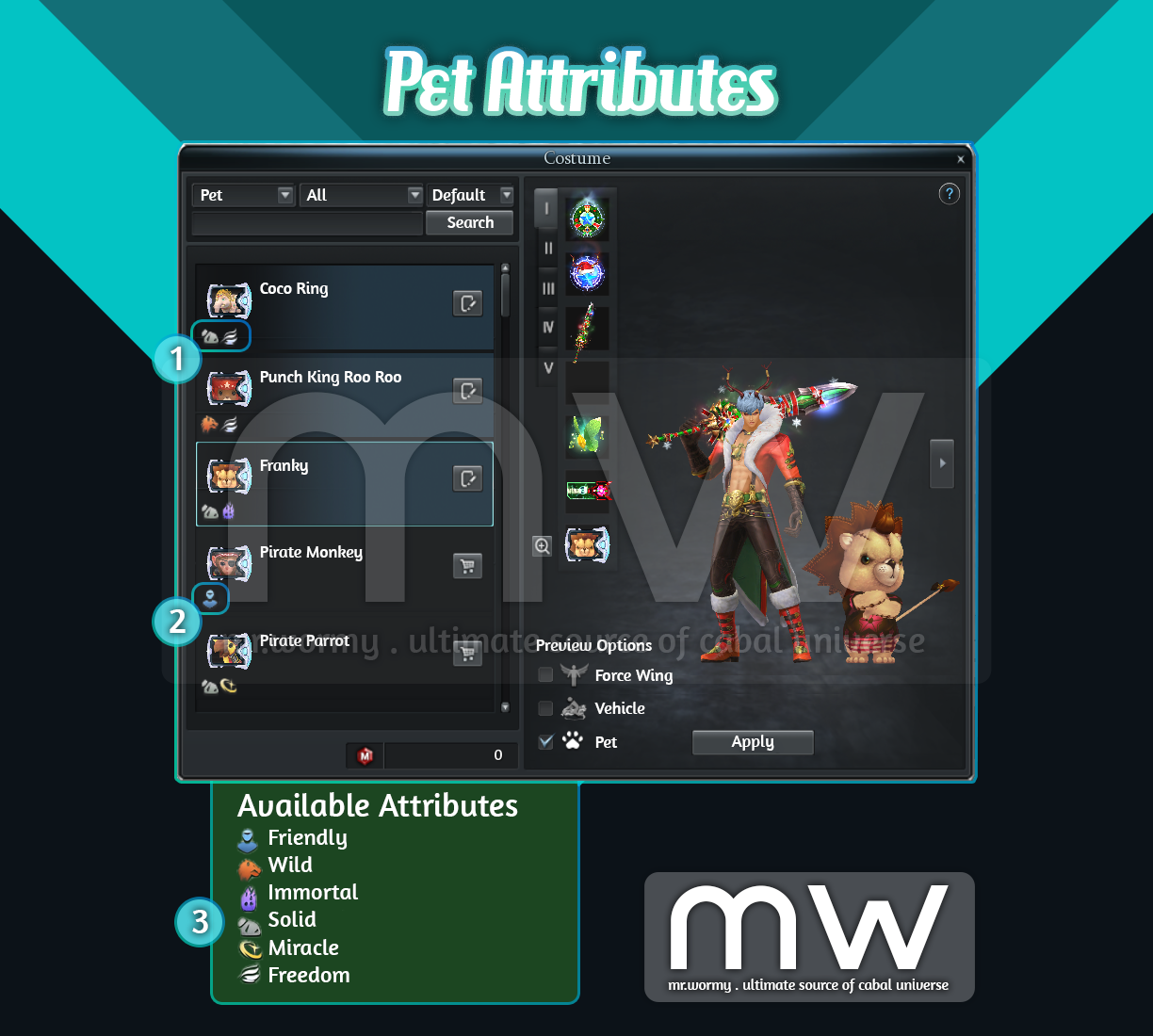
- Pet Attributes:
- There are 6 different Attributes, Attributes can be checked at: Costume UI, Pet Exploration UI and Pet Item Tooltip.
- Pet can have 0 or more Attributes
- [1] Example of a pet with 2 attributes
- [2] Example of a pet with 1 attribute
- Pet Exploration:
- Overview:
- Form a team based on criteria.
- Requirements:
- If the team matches the required criteria, team can be sent for exploration.
- If the team does not not match the required criteria, team cannot be sent for exploration.
- Additional Requirements:
- Team can be sent for exploration regardless of satisfying the Additional Requirements.
- But if the Additional Requirements are satisfied, additional rewards could be obtained.
- Requirements:
- Form a team based on criteria.
- Exploration Areas:
- Exploration Map: Bloody Ice – Senillinea.
- Exploration Location: 4-5 locations per map.
- By default, only 3 starting villages are available, and other maps can be unlocked via Laboratory
- After the exploration, there is a cooldown time for 50% of the exploration time, during that time the Pets in the team could not be assigned for any other team.
- Overview:
- Exploration EXP, Grade:
- By sending teams of pets for exploration, Exploration EXP will be gained.
- By reaching to a certain amount of Exploration EXP, Exploration Grade will be increased.
- Depends on Exploration Grade, additional researches could be unlocked at Laboratory.
- Currently we have up to Exploration Grade 5, in the future, it will be expanded up to Grade 20.

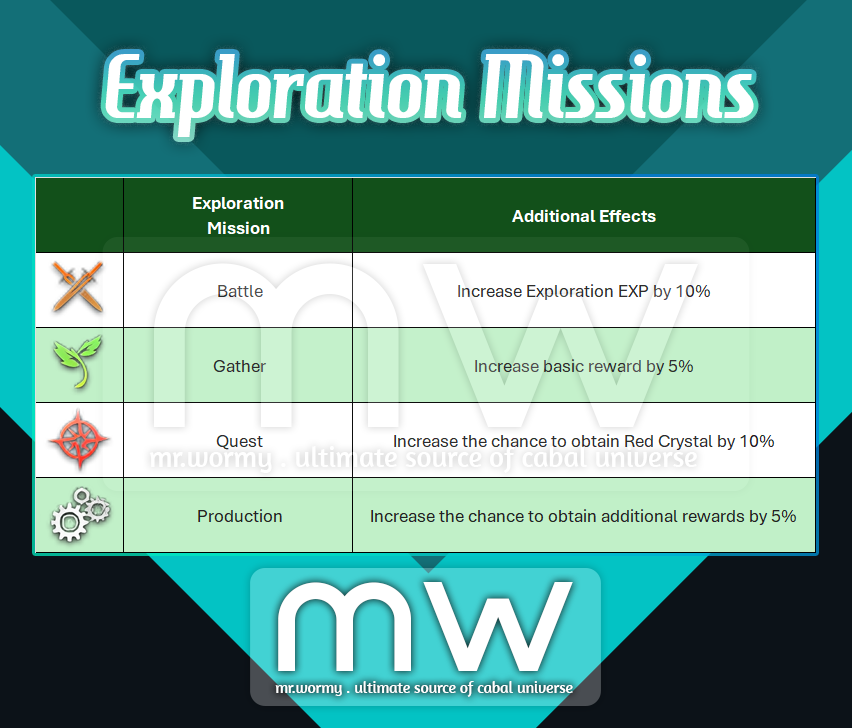
- Exploration Missions:
- There are 04 types of Exploration Missions.
- Additional effects are granted, based on the Mission type.
- Number of explorations can be done concurrently is limited, but can be increased by researching in Laboratory
- Exploration Rewards:
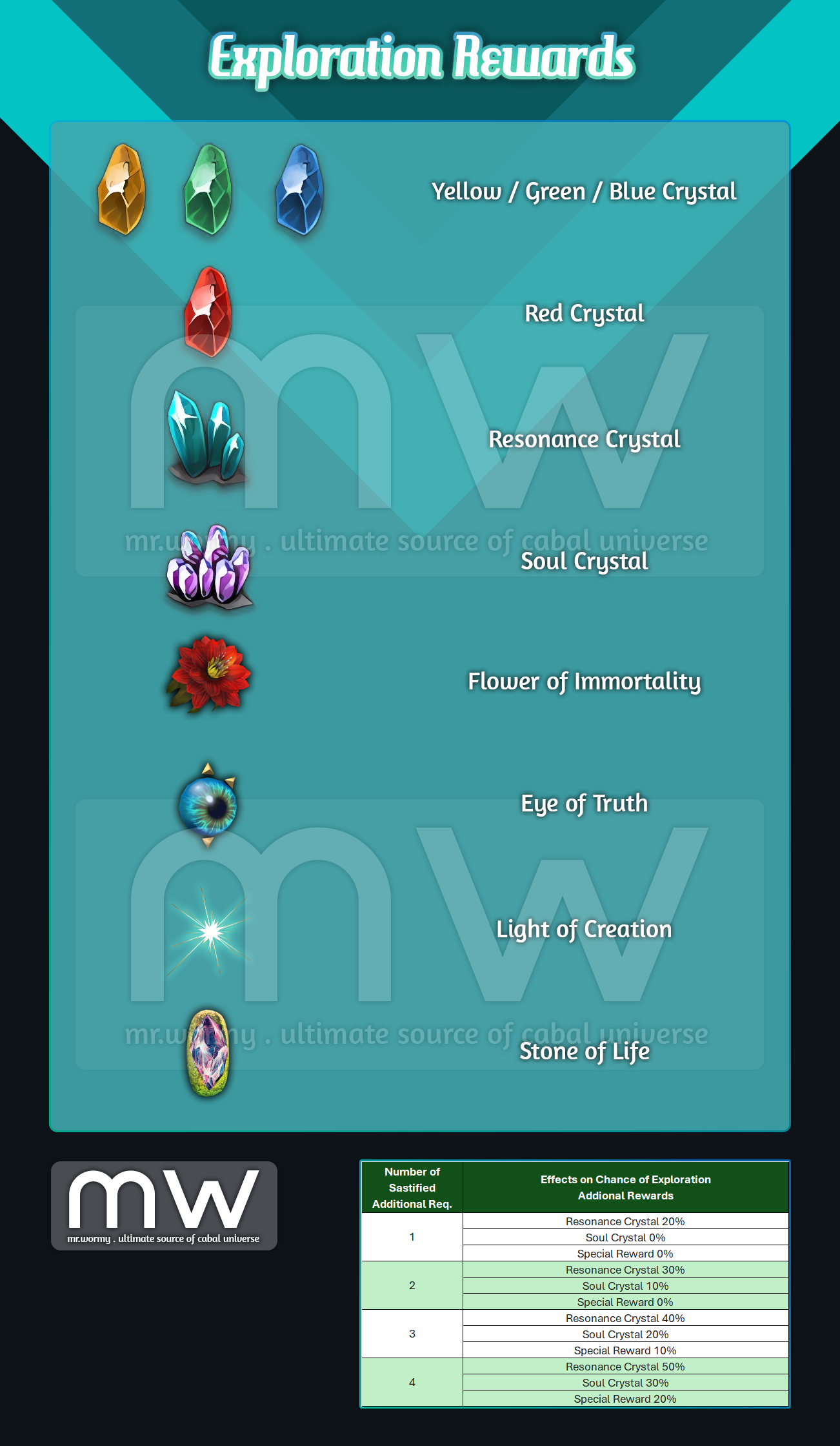
- Once the exploration duration is ended, player can click on the “Receive” button to take rewards.
- Guaranteed Rewards:
- Always can obtain, unconditionally.
- Target: Exploration EXP, Yellow / Green / Blue Crystals
- Additional Rewards:
- Randomly obtainable with a certain chance.
- Target:
- Red Crystal: 20% for starting villages, chance is higher in higher maps.
- By satisfying the “Additional Requirements”, chance to obtain rare rewards will be affected:
- Resonance Crystal, Soul Crystal
- Special Reward: Materials for Research (Flower of Immortality, Eye of Truth, Light of Creation, Stone of Life)
- Higher number of Pets, Exploration Duration and Exploration Grade, the better rewards.
- All rewards have “CRITICAL” chance at 10%, if the “CRITICAL” happens, rewards will be multiplied by 1.5 times.
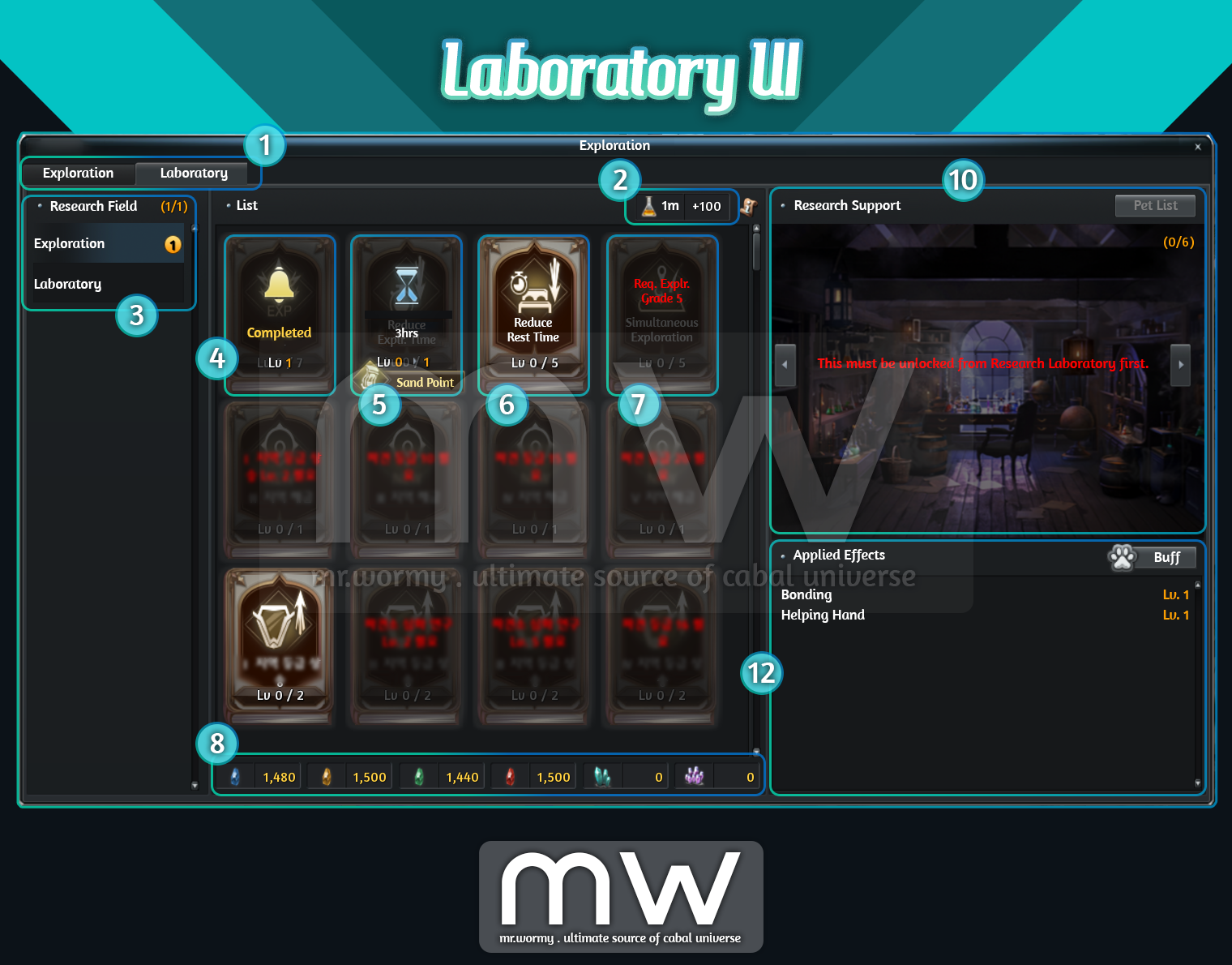
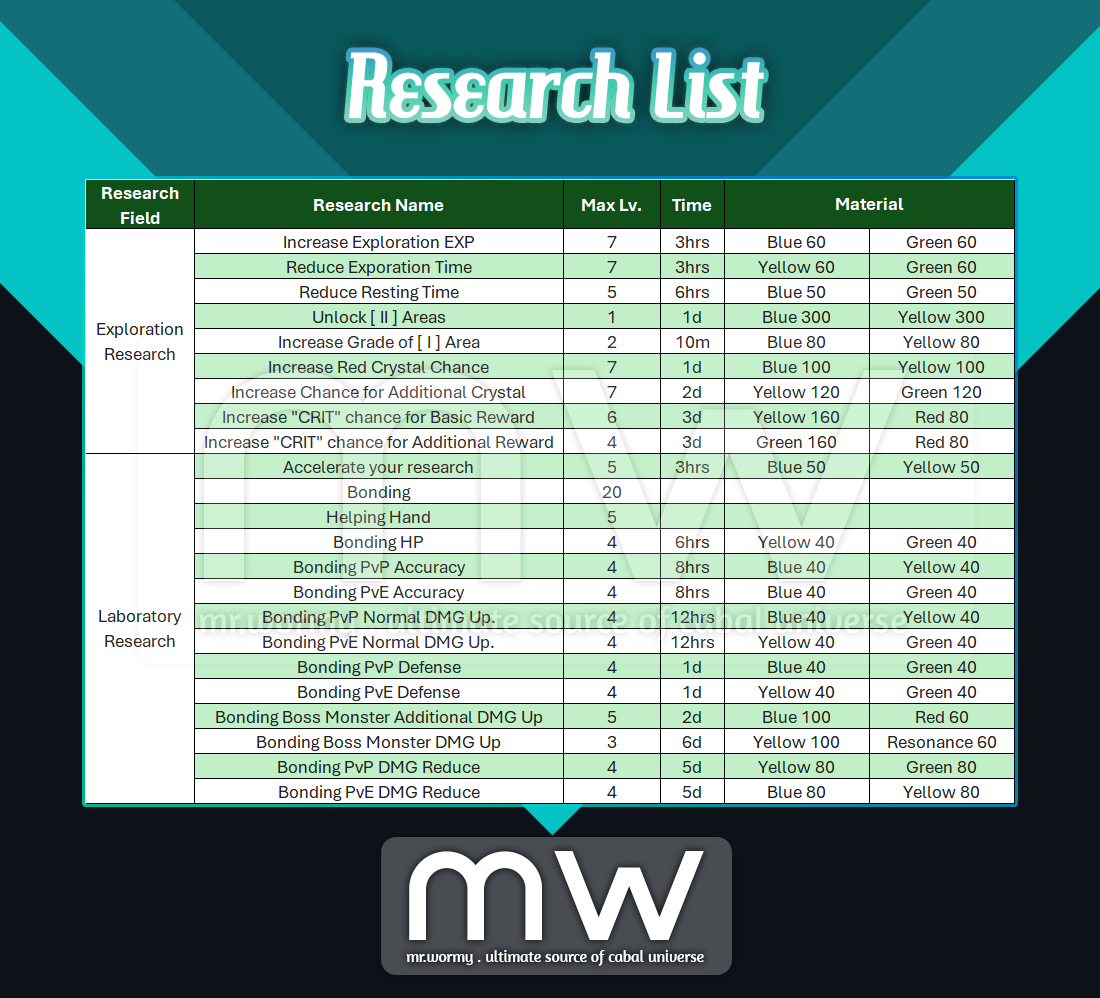
- Research Laboratory
- Various types of researches could be performed at Laboratory for improving the Pet Exploration.
- Crystals will be consumed as materials for Research.
- Depends on the Exploration Grade and perquisite researches, specific Research will be unlocked.
- Research List:
- Additional researches will be added in the future update.
- Research Support:
- By adding the Pet for supporting the Research, the efficiency will be improved.
- Up to 6 pets could assigned for Research Support.
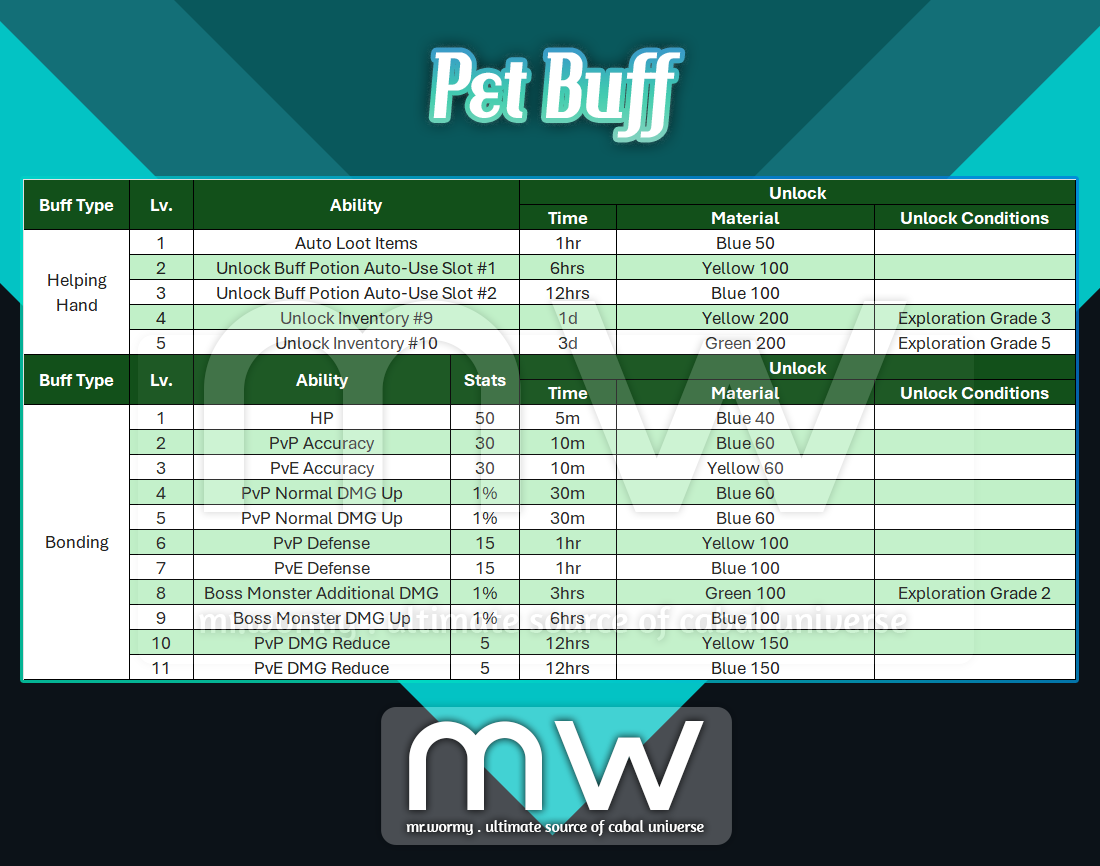
- Pet Buff:
- There are two types of Pet Buff:
- Bonding
- Helping Hand
- The buff can be obtained by spending Crystals.
- By default the duration is 1hr.
- Buff can be reactivate again manually or automatically if check box for Auto Use is checked (material will be consumed).
- Pet Buff can be unlocked and leveled up through Laboratory.
- Buff Stats:
- In the future, Bonding Buff can be increased to Level 20.
- There are two types of Pet Buff:
Added on 08-Jan-2025
1. Fixed the bug that show the “%” in some tooltip in Pet Exploration UI.
2. Change the text the buff status of Pet Buff:
- Old: Inactive
- New: Expired
3. Auto Looting Improvement
- When a character enters a dungeon along, the Auto-Loot will work.
- For the case the character is in a party, but enters the dungeon along, the Auto-Loot will still be activated, regardless of looting permission settings.
- If the Auto-Loot can not be applied, due to the current party status of the character, a warning message will be displayed.
- Fixed bugs:
- Fixed the bug that item drop / loot sounds weren’t play during the Auto-Loot.
- Fixed the bug that linked between Auto-Loot and Pet’s position.

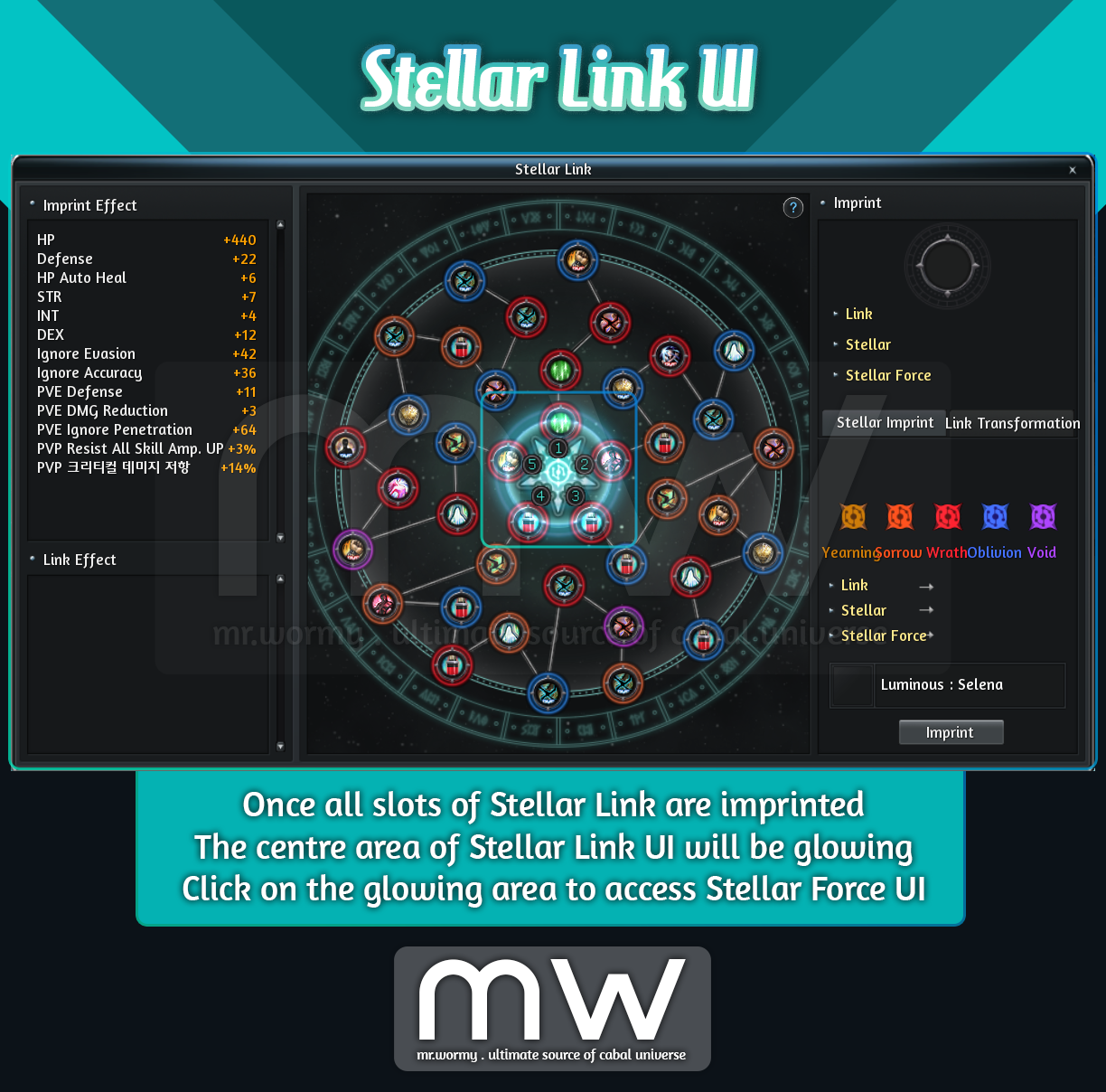
1. Add new expansion content for Stellar Link system, named “Stellar Force”
- Once all slots of the Stellar Link were imprinted, the centre area will be glowing.
- By clicking on the glowing area, player can access the “Stellar Force” UI
- Stellar Force UI
- [1] Summary of Stellar Force
- Which grade of Star Fall was opened
- Number of opened slots for Star Fall buff
- Number of Star Dust required for using Buff
- [2] Stellar Force Ring
- Here you can equip Star Crystals into the corresponding slots
- There are 05 slots in the Stellar Force ring, each slot for one Star Crystal
- Only Star Crystal that went through the examination 10 times could be equipped
- You cannot equip the same type of the Star Crystal
- Once all 05 slots are filled with Star Crystal, a special buff named “Star Fall” is activated
- [3] Each Star Crystal have its own stats, the summary stats will be displayed here and directly add to your character stats
- [1] Summary of Stellar Force

2. Star Fragment / Star Crystal
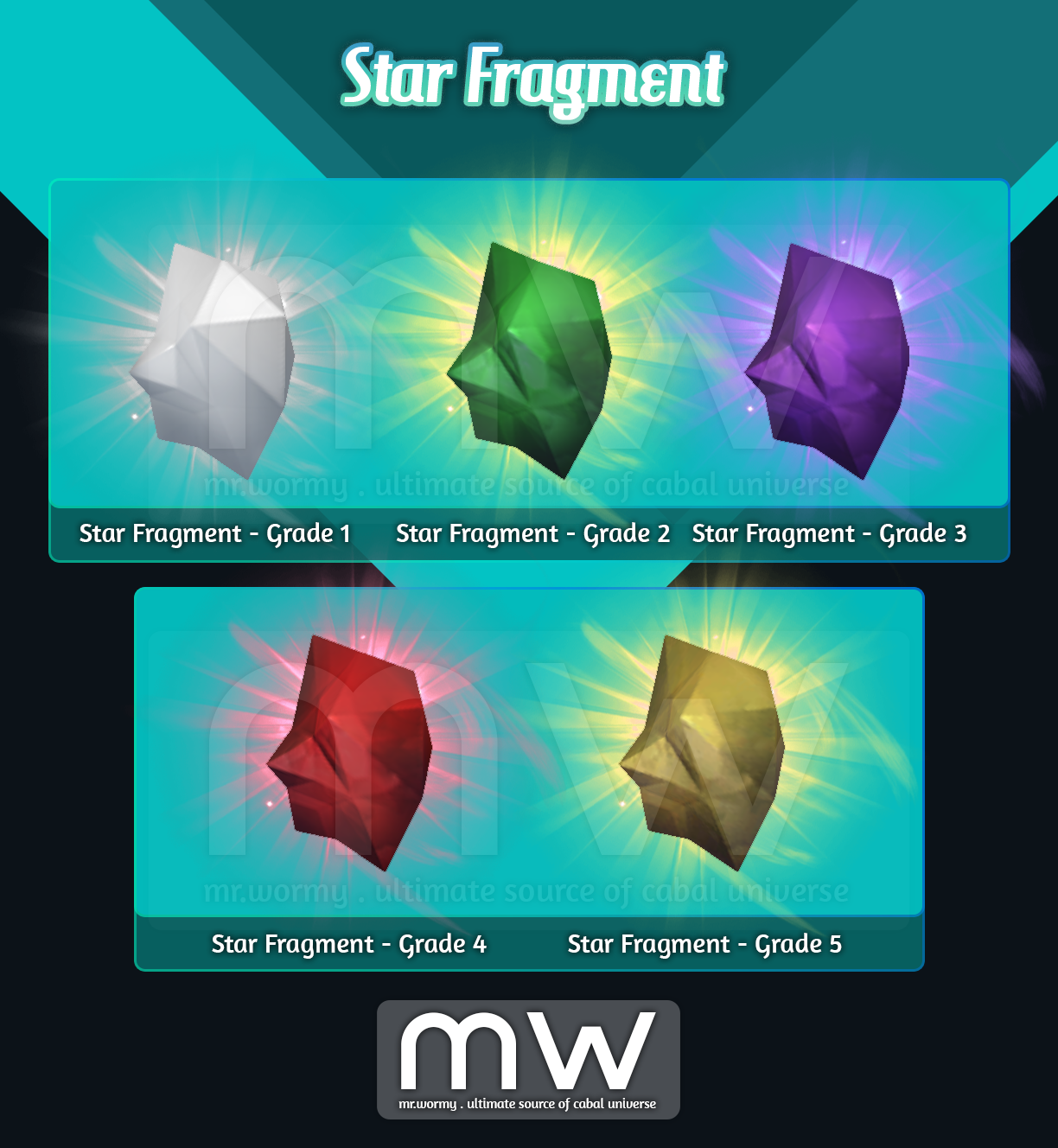
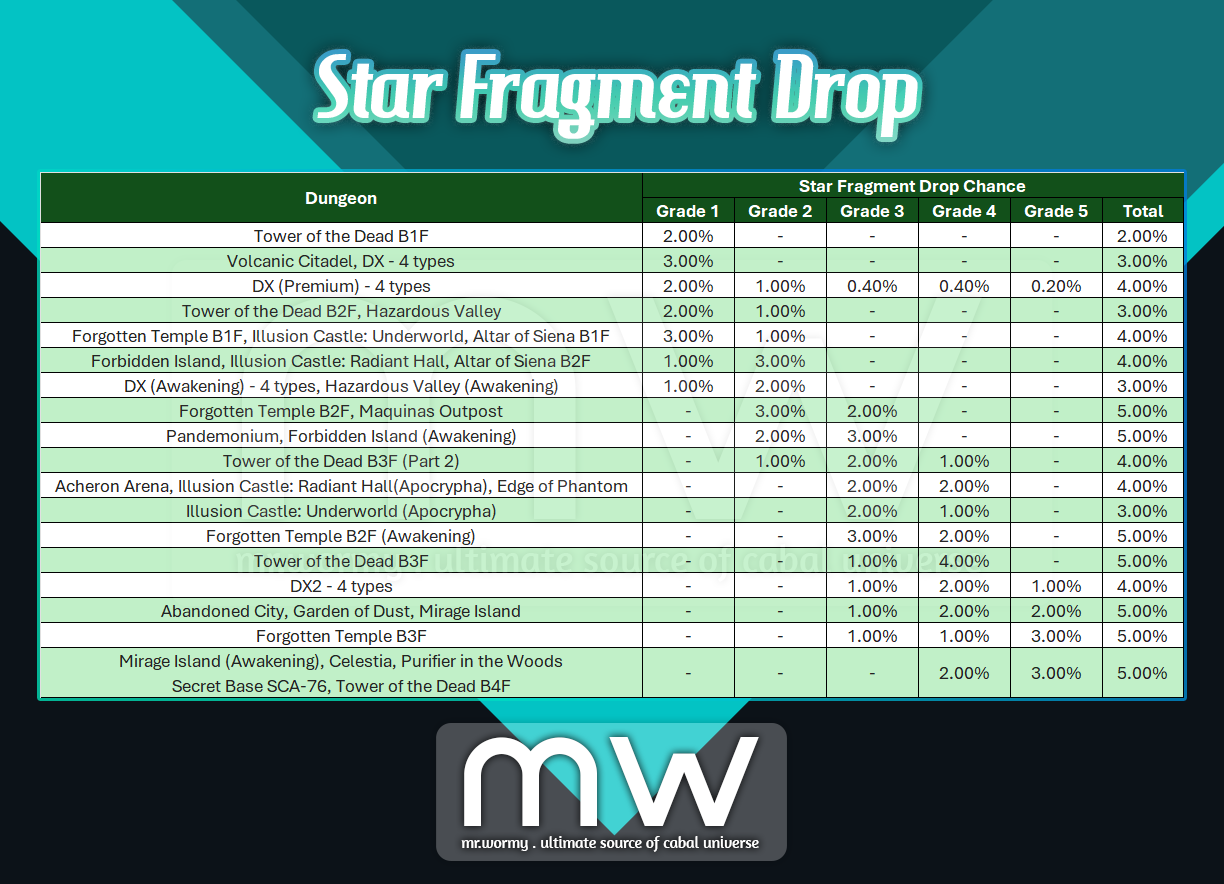
- Star Fragments
- Property: Trade-able
- Source: Legendary Box / Legendary Cube from selected dungeons
- Purpose: Using Star Fragment to obtain Star Crystal of the equivalent grade
- Star Crystals:
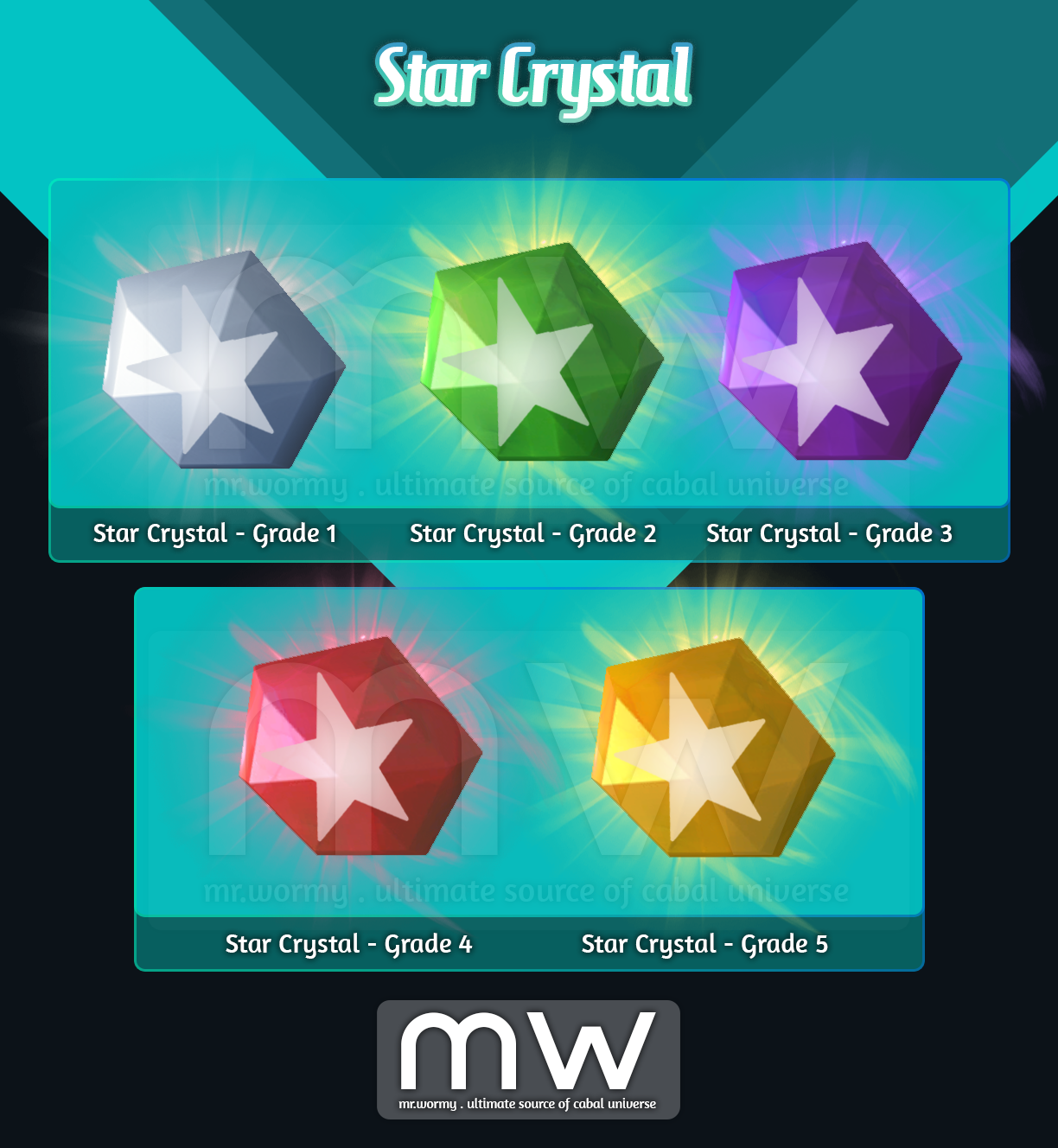
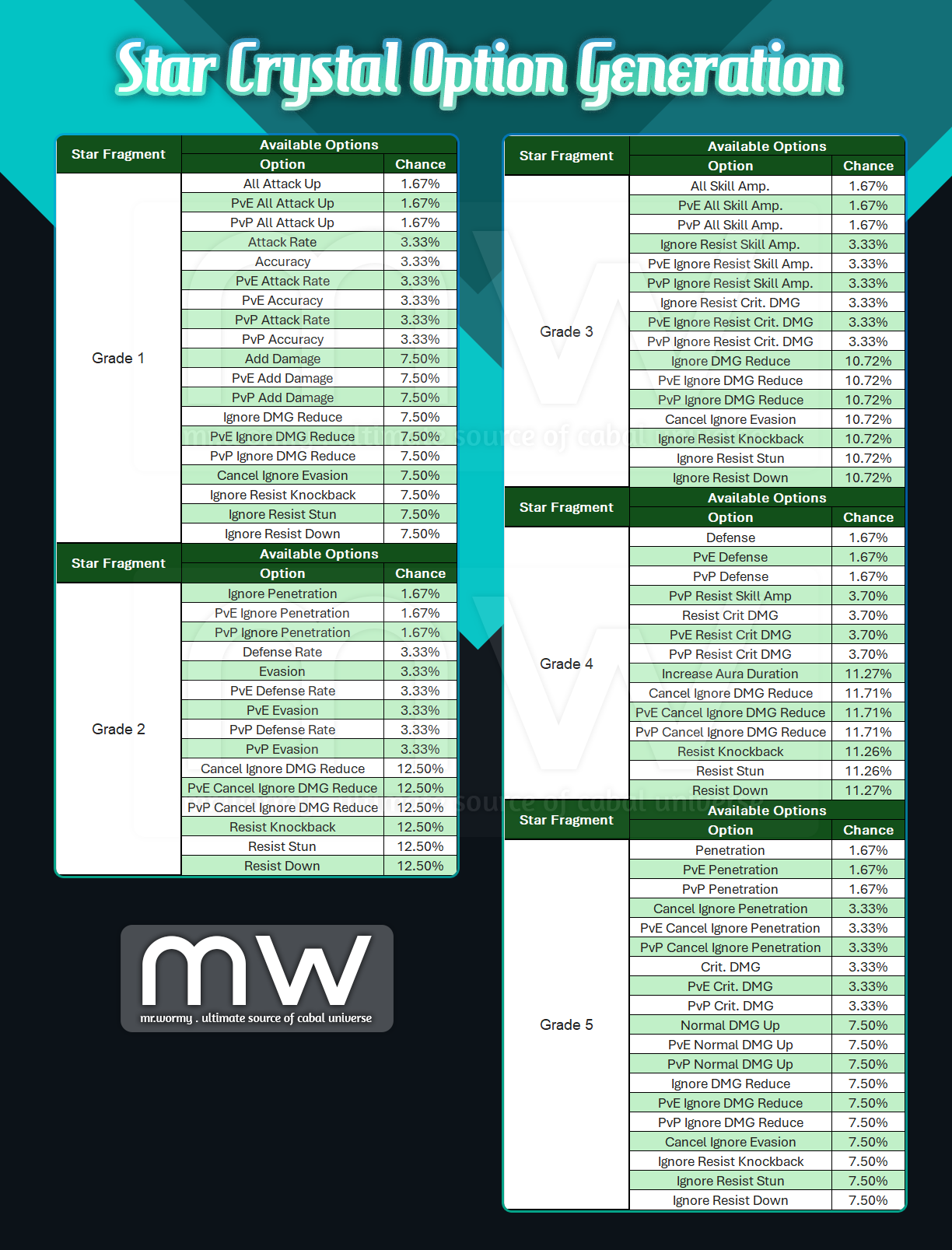
- Star Crystal of the equivalent grade is generated randomly upon opening Star Fragment
- Different grades have different appearance
- Star Crystal must go through 10 times of examination before it is equip-able
- Stellar Examination:
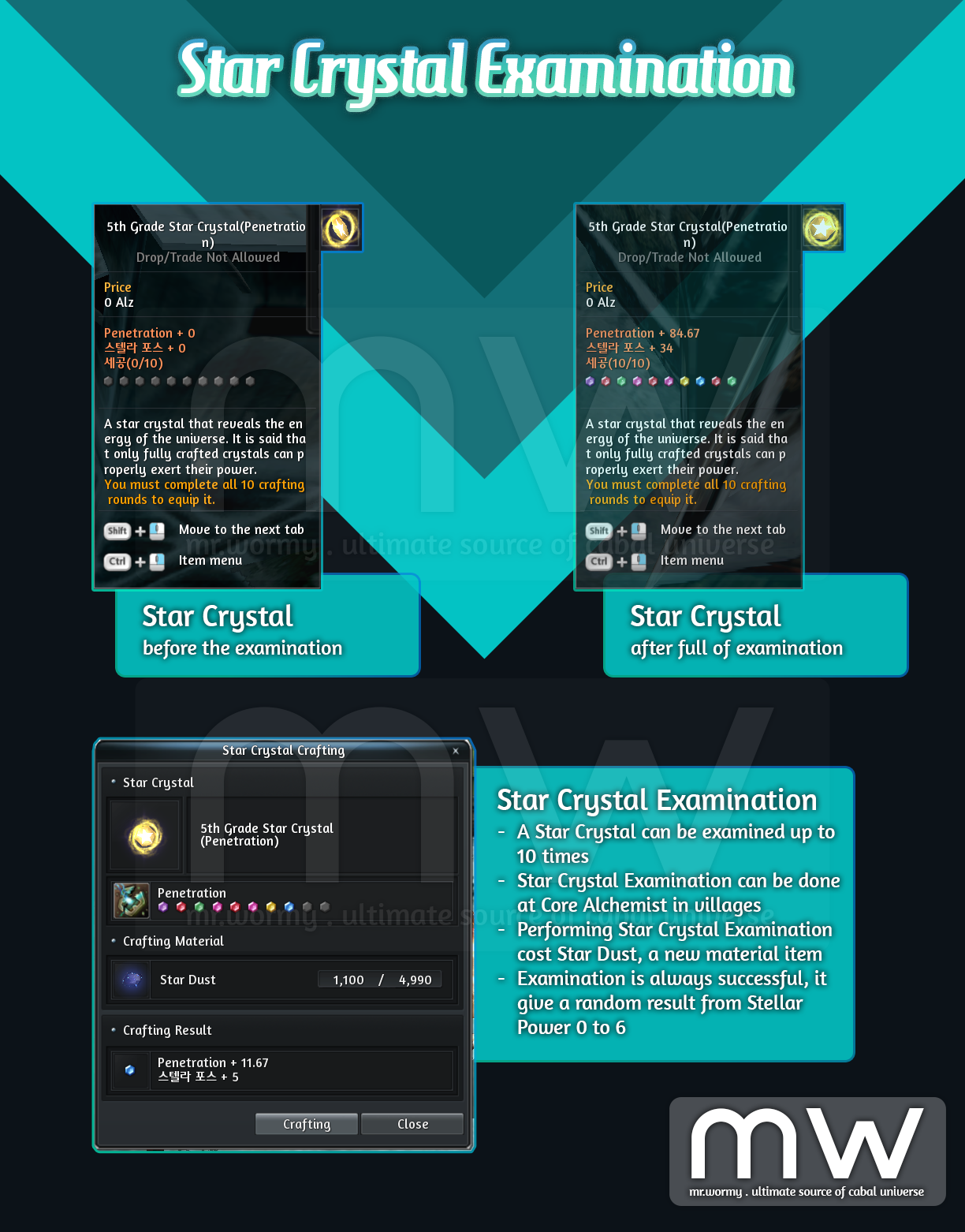
- Each Star Crystal has 10 chances for Examination
- Examination can be done via Core Alchemist NPC in villages
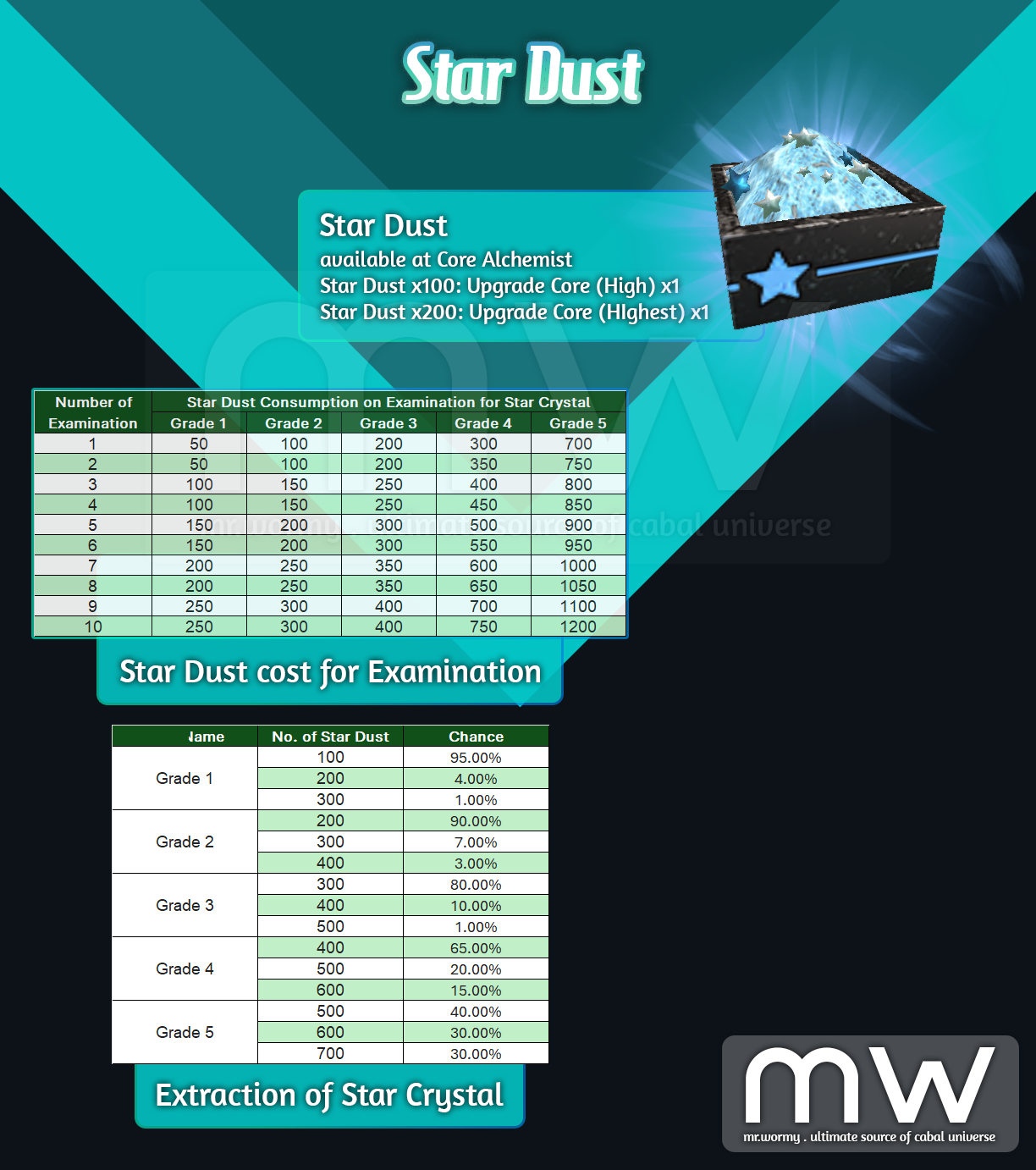
- Examination will cost “Star Dust”
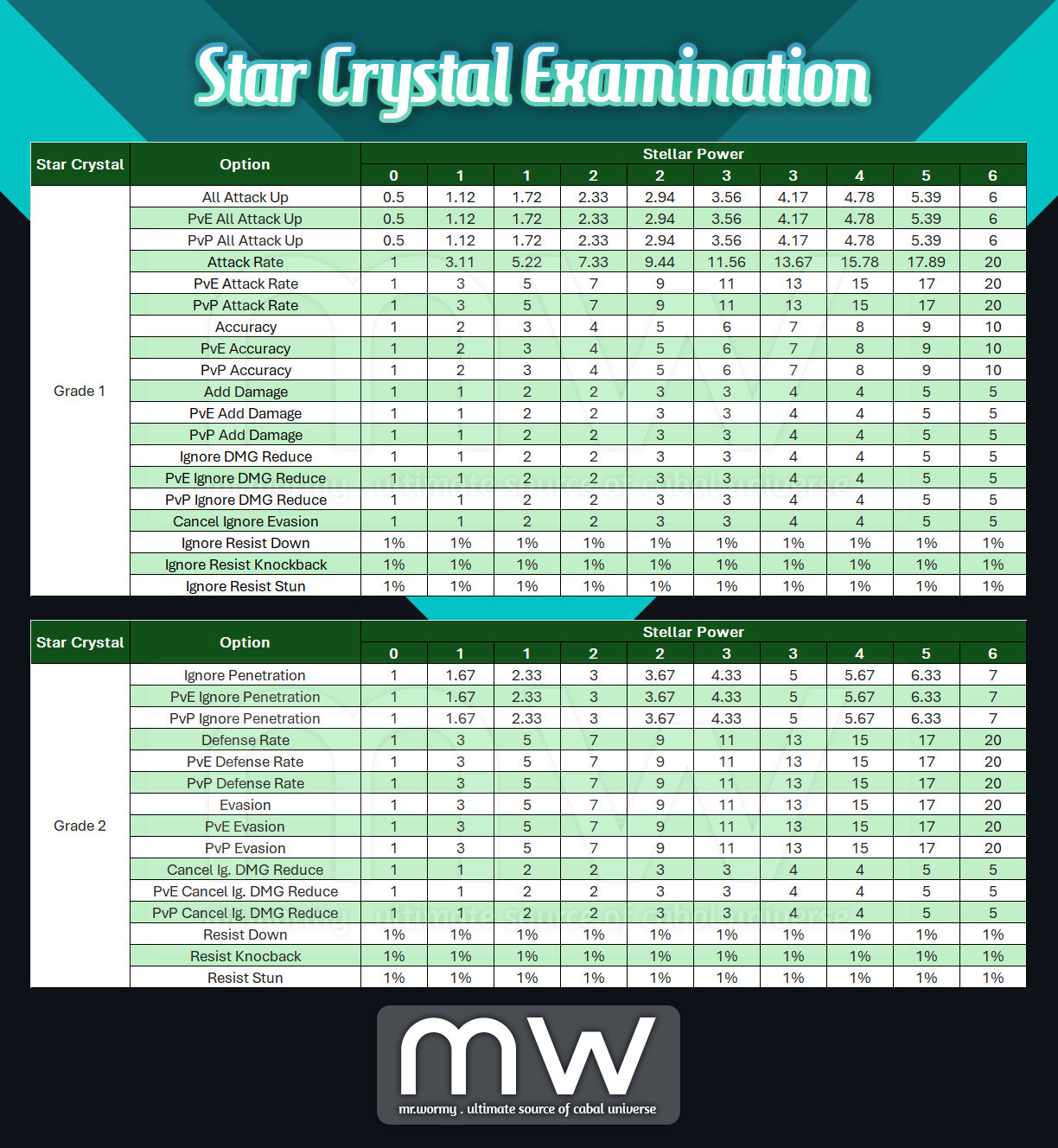
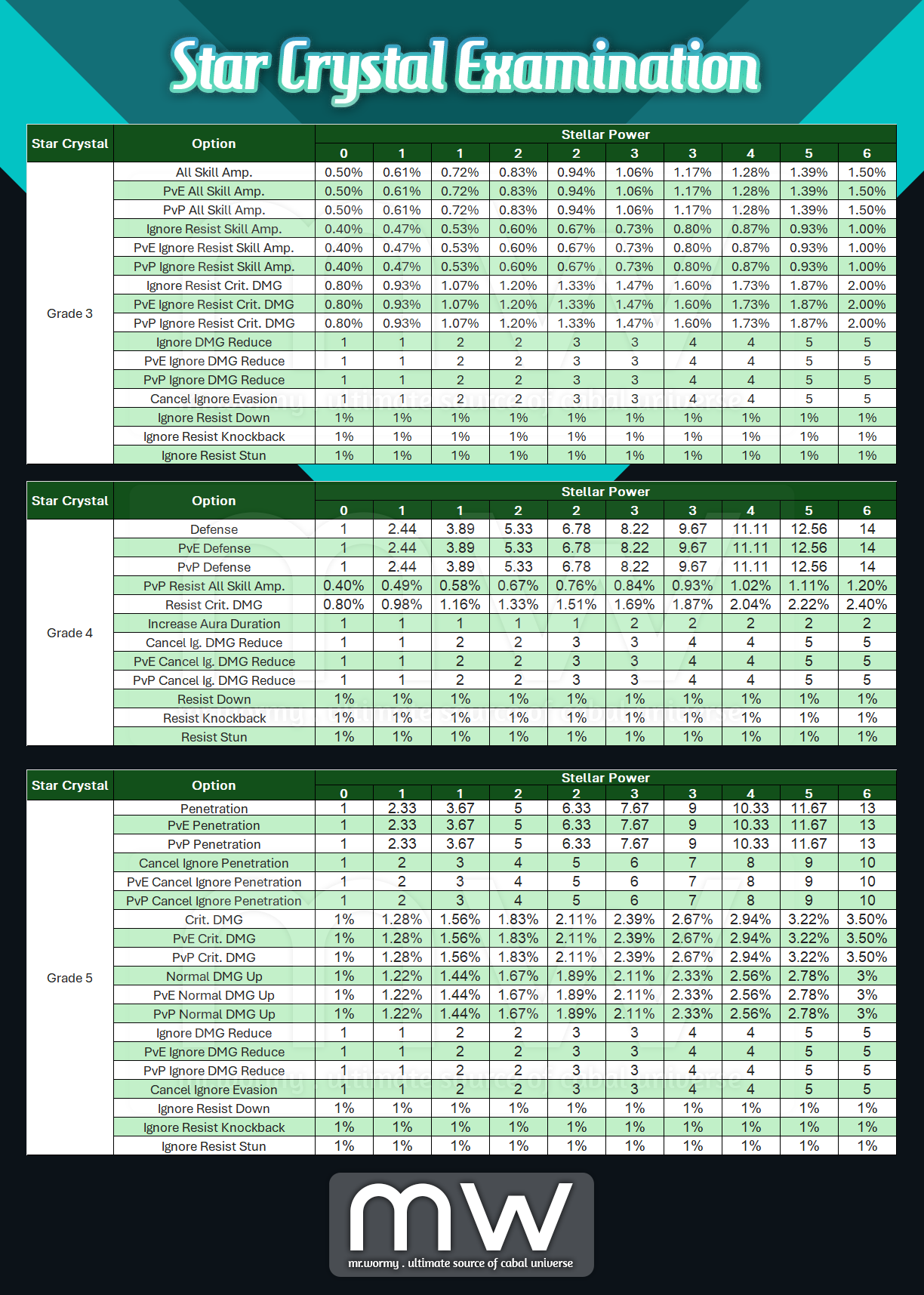
- Examination will grant randomly a Stellar Power from 0 to 6, according to a certain value for the existing stats of the Star Crystal
- For some Force Code, the value can even calculated down to the decimal value
- However, the decimal value won’t be applied for character stats
- In the tooltip of the Star Crystal, you can see:
- Stats
- Current Stellar Power
- Number of Examination
- A line of colorful small crystal to reflect the result of examination
- Available Options / Stellar Power
3. Star Dust:
- Special material for Stellar Force
- Can be used for:
- Material of Star Crystal Examination
- Granting random slots for Star Fall buff
- Consume for casting Star Fall buff
- Source:
- Purchase from NPC Shop of Core Alchemist in villages
- Extract Star Crystal
4. Star Fall
- When all 05 Star Crystals are equipped, the buff skill Star Fall can be used.
- Duration: 30s
- Cooldown: 180s
- Consumption: 20 – 40 Star Dust (depends on number of unlocked Stellar slots)
- Stats: Stats come from granted Stellar slots in “Stellar Training” tab in “Stellar Force” UI
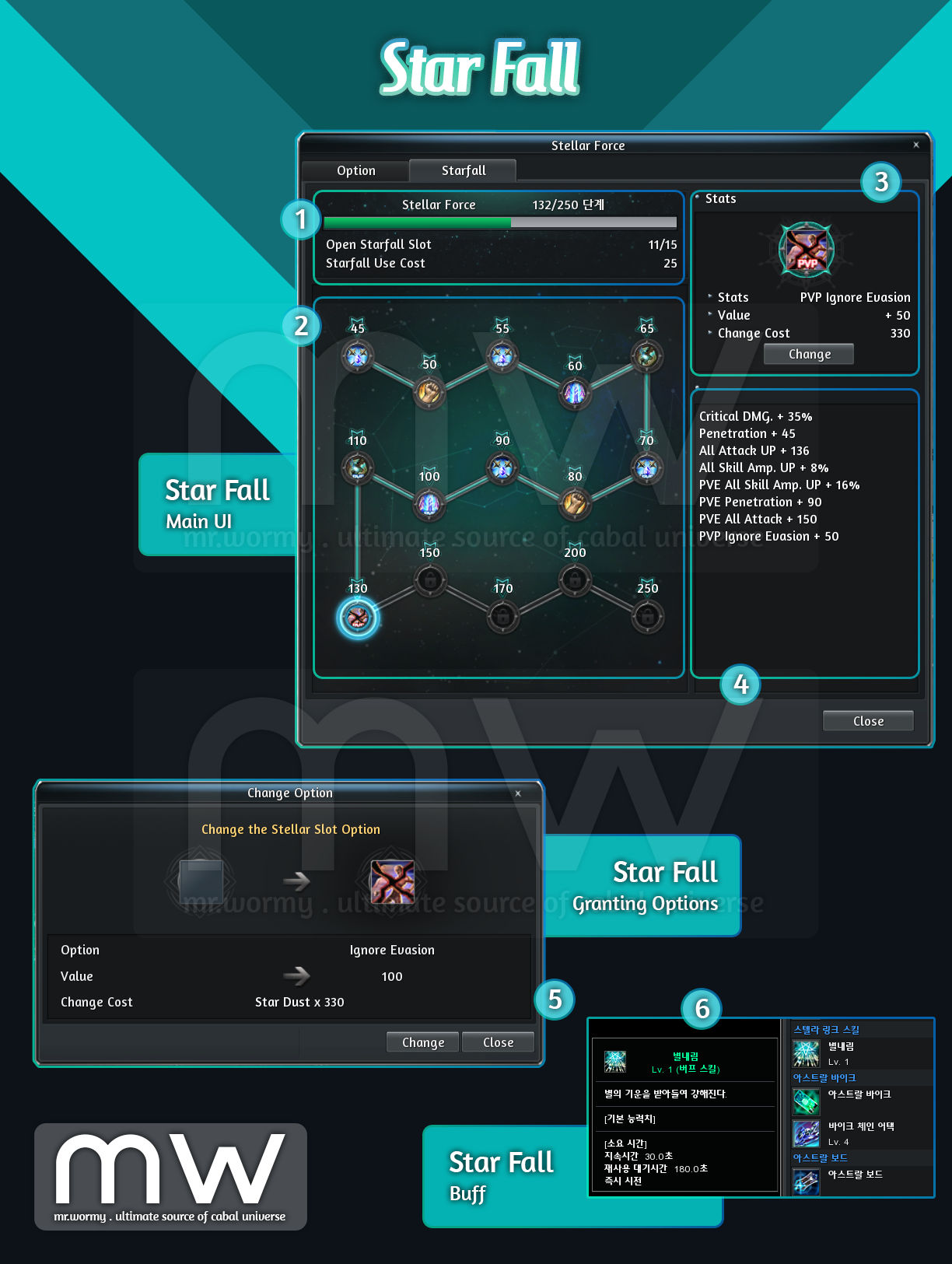
- Star Fall UI
- [1] Summary of Stellar Force
- Which grade of Star Fall was opened
- Number of opened slots for Star Fall buff
- Number of Star Dust required for using Buff
- [2] List of available Star Fall option slots
- [3] By clicking in any slot in [2], player can grant new option / re-grant new option for that slot. Granting options will cost Star Dust as material. Option / value will be generated randomly from the available options / value.
- [4] Summary of the Star Fall buff stats.
- [5] By clicking in the button in [3], this UI will be displayed allows seeing old and new option / value.
- [6] New “Star Fall” buff will be available in Skill UI
- [1] Summary of Stellar Force
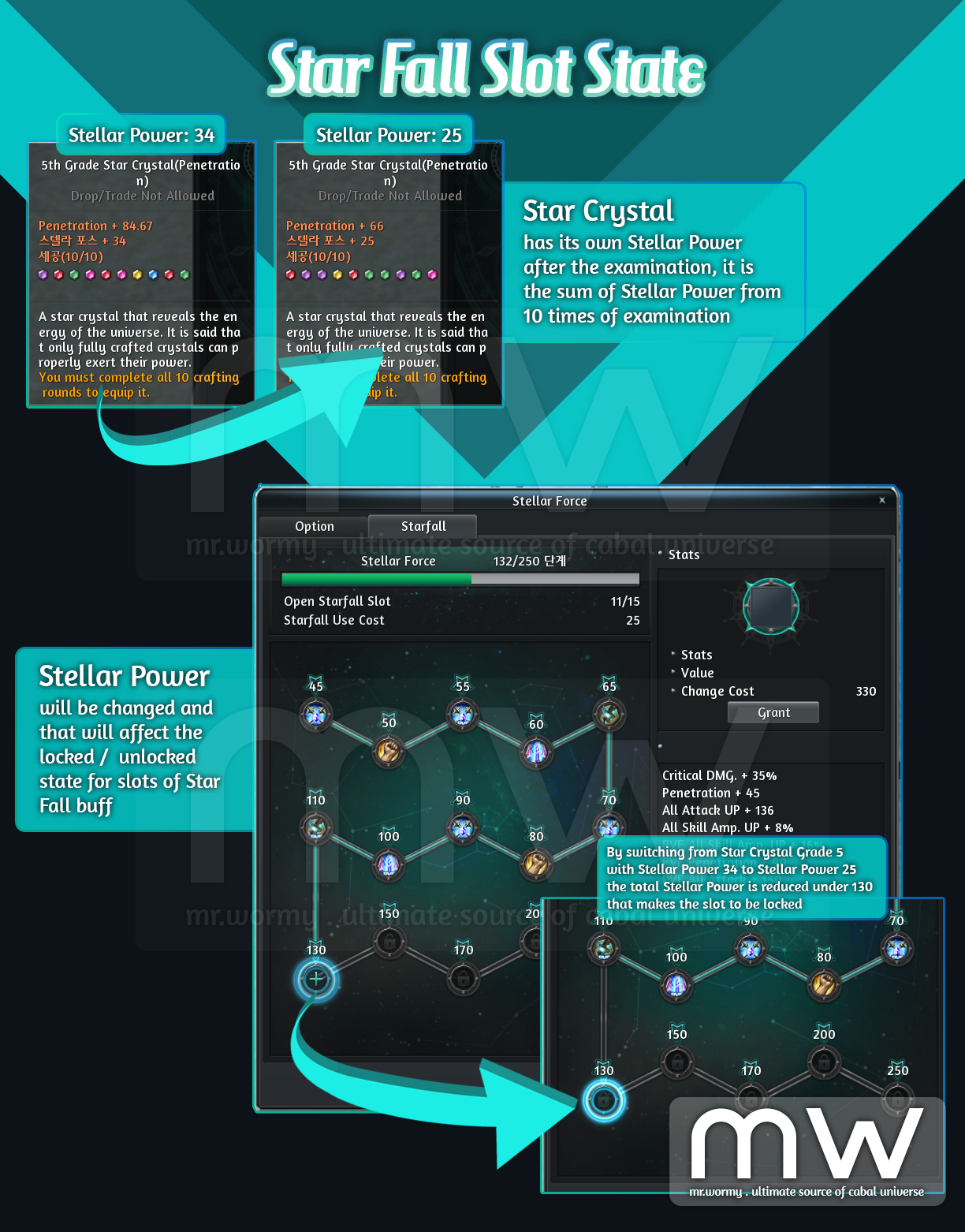
- Based on the total Stellar Power (sum of the Stellar Power from all 5 Star Crystals), certain amount of Star Fall option slots will be unlocked.
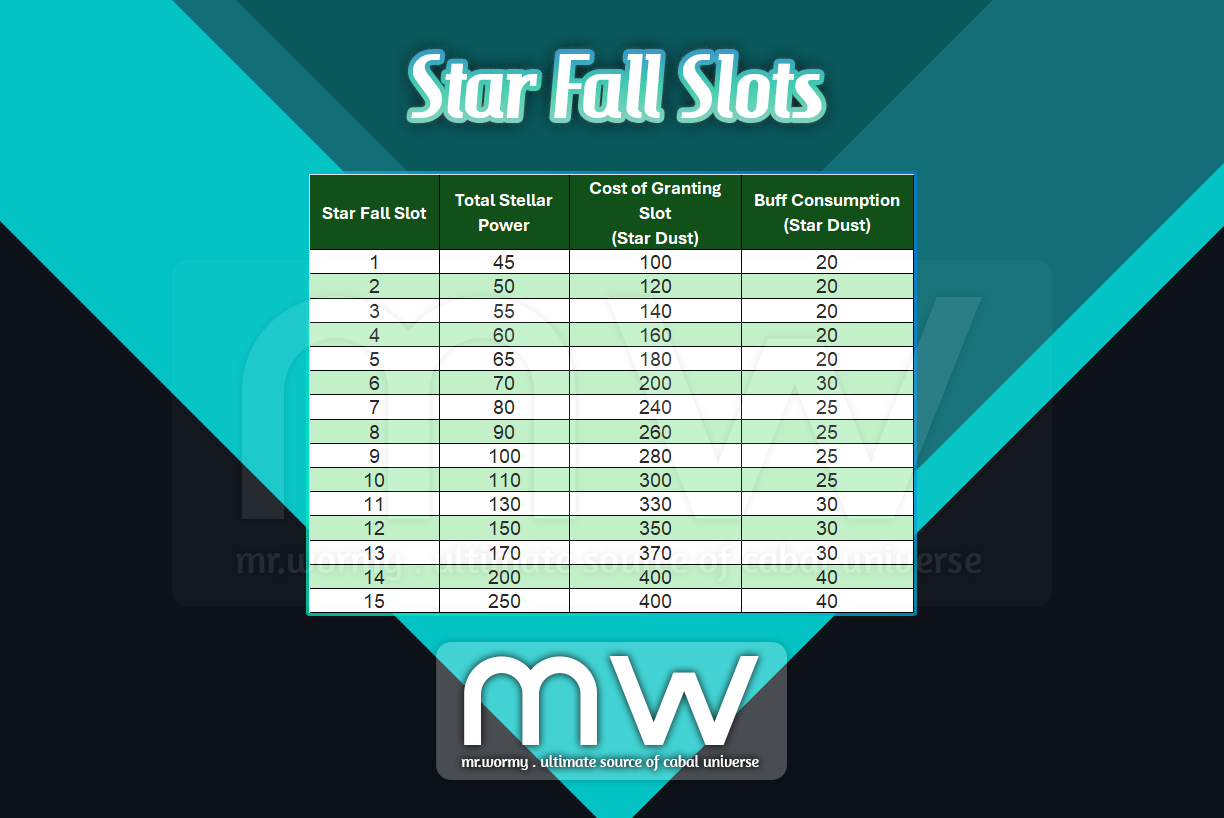
- In case the total Stellar Power is changed the state for locked / unlocked slots might be changed.

1. Ingens Proelium Balancing Adjustment (added on 15-Jan-2025)
- Changes related to the Temple of Purification
- Increasing points when hitting:
- Old: Get point based on specific formula each hit
- New: Every 5 minutes, get additional random point.
- Additional Point for last hit:
- Old: 300
- New: 500
- “Weapon Refining” buff (obtainable by destroying the Temple of Purification) will not be removed if character is dead.
- Increasing points when hitting:
- Structure and Monster Balancing:
- Increasing Defensive stats for structures and monsters.
- Reducing some special abilities of Guardian of the Sanctuary at “Temple of Purification” area.
- Reduce the amount of MP got decreased by MP Reducer Guardian.
- Reduce the percentage of damage from damage of Damage Dealer Guardian.
- Increase HP of structures and monsters based on amount of participants.

1. Quick Slot Expansion (added on 15-Jan-2025)
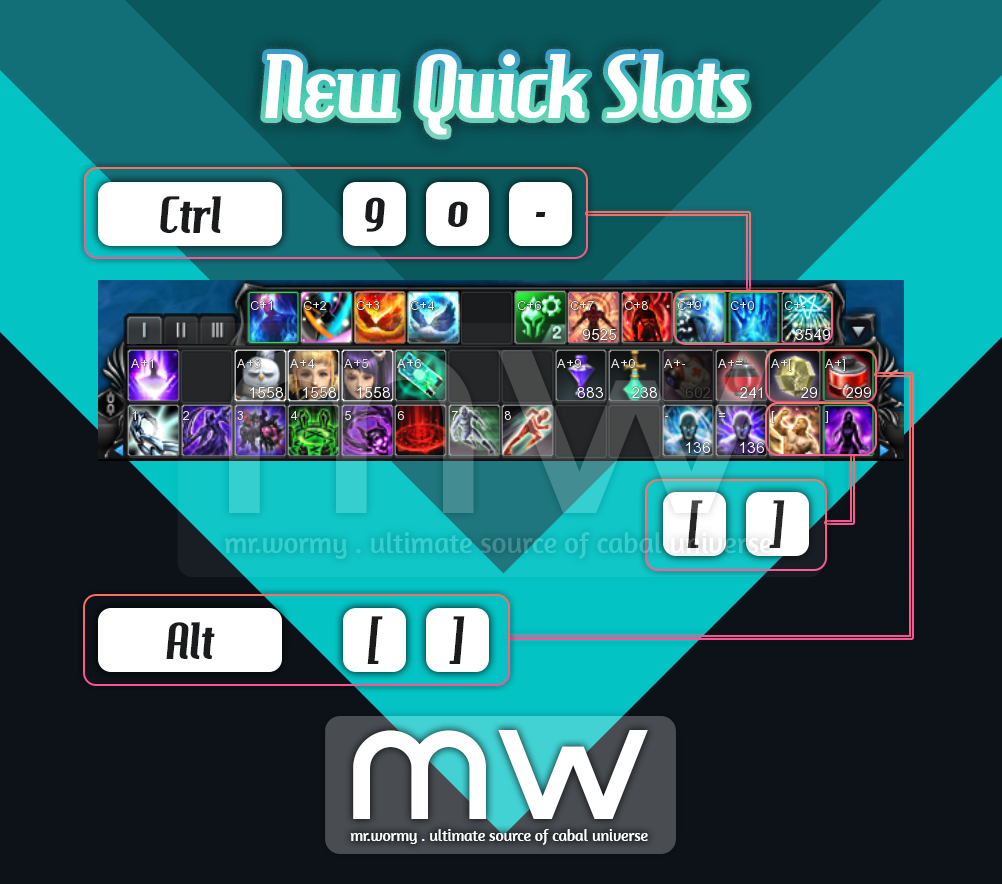
- Total we have 7 new slots were added:
- Increase the slots of Quick Slots by 2 slots per line.
- Shortcuts:
- Below Line: [ , ]
- Upper Line: Alt + [, Alt + ]
- Shortcuts:
- Increase the slots of Expanded Quick Slot by 3 slots
- Shortcuts:
- Ctrl + 9, Ctrl + 0, Ctrl + –
- Shortcuts:
- Increase the slots of Quick Slots by 2 slots per line.

1. Add the ability to extract some items:
- Stackable items:
- Target: Essence Rune / Option Scroll
- Mechanism:
- Activate “Extraction Mode”
- Select desired item
- Input quantity for extraction
- Cannot extract multiple items at once
- Upgrade Core:
- Target: Upgrade Core Low / Medium / High / Highest / Ultimate
- Output: Upgrade Essence x1 / x2 / x4 / x8 / x14
2. Add a text in World Ruler Boss to show the map that World Ruler Boss is spawned.

1. Change the property of Palestra Inferna entry item:
- Target:
- Entry item: Key of Mighty Fighter (for Palestra Inferna)
- Source: NPC Unon in Bloody Ice and Remote Shop
- Changes:
- Add property of “Cannot Transfer between Accounts”.
2. Addition and changes related to PK-able maps:
- Add notification when someone attack player’s character in PK-able maps, such as during World Ruler Boss.
- When there is no World Ruler Boss active, if your character is dead due to PK, a notification will be displayed:
- Death due to attack from “Character Name”.
- When there is World Ruler Boss active, once every minute, there will be notifications for:
- Your character is being attacked:
- Your character is being attacked by “Character Name”.
- Your character is dead:
- Death due to attack from “Character Name”.
- Your character is being attacked:
- When there is no World Ruler Boss active, if your character is dead due to PK, a notification will be displayed:
- Disable /follow command for PK-able maps and Mission Battle maps.
3. Increased the result amount for Force Essence requests:
- Converting Force Core (Highest) to Force Essence:
- Old: Force Core (Highest) x1 ~ Force Essence x4
- New: Force Core (Highest) x1 ~ Force Essence x5
- Converting Force Core (Ultimate) to Force Essence:
- Old: Force Core (Ultimate) x1 ~ Force Essence x5
- Old: Force Core (Ultimate) x1 ~ Force Essence x7
Added on 05-Dec-2024
1. Altar UI improvement:
- When selecting an items while sacrificing items for Pilgrim, the Slot Option will be displayed.
- Add the ” ? ” help information for Altar UI.
2. Changed the notification for last-hitter won’t be displayed for Mission Battle, Mission War and PvP Battles
Added on 11-Dec-2024
1. Improved the display of Integrated Combat Power:
- Change that the Combat Power now will be displayed as:
- Display Combat Power = General Combat Power + PvE Combat Power + PvP Combat Power
- For the case of Mission War, the Combat Power will be displayed with a different way of calculation.
- Breakdown of General / PvE / PvP stats are still available in Character Info UI
2. Dungeon Rebalance
- Changes:
- Slightly reduced the Crit. Rate.
- Slightly reduced Ignore DMG Reduce.
- Target:
- Hazardous Valley (Awekening)
- Tower of the Dead B3F (Part 2)
- Acheron Arena
- Illusion Castle: Underworld (Apocrypha), Illusion Castle: Radiant Hall (Apocrypha)
- Forgotten Temple B2F (Awakening)
- Holia Keldrasil / Holia Tristy
- Devil’s Tower (Part 2)
- Edge of Phantom
- Tower of the Dead B3F
- Abandoned City
- Frozen Canyon / Flame Nest / Terminus Machina / Ancient Tomb
- Garden of Dust
- Mirage Island
- Forgotten Temple B3F
- Mirage Island (Awakening)
3. Added visual effects and sound when monster performs Critical Attack.
4. Changes related to Stellar Force:
- Add sale of Star Dust in Remote Shop.
- Star Dust can be stacked up to 9,999.
- When opening Star Fragment to obtain Star Crystal the item colour will be displayed in the result window.
- Changed that the cooldown of Star Fall buff will not be reset when changing channel.
- When changing the Stellar Slot:
- The amount displayed of Star Dust is the amount that character owned.
- If the amount of Star Dust is not enough, the amount will be displayed in red.
- Fixed the bug that caused the Star Fall was bugged if the Stellar Force is higher or equal 255.
Added on 18-Dec-2024
1. Add Exploration shortkey:
- Default: Alt + P
2. Changed the concept for opening researches in Laboratory.
- Required item will be calculated and displayed as “Required Point”.
- By default 100 Point will be earned for every minute.
- The default amount can be increased when performing / completing certain researches in Laboratory UI.
3. Research system changes
- Time now will be calculated and then displayed in Point.
- E.g.:
- A research that needs 20 minutes and current Point generation is 100 per 1 minute.
- Then the “Point” will displayed as 2000 points.
- The “Point Generation is upgrade-adle via Research under Laboratory.
- E.g.:
4. Add Sand Point Item:
- Use for obtaining Research Point, aka reducing the Research Time for Laboratory
5. Laboratory UI changes
- Tooltip will be displayed when moving the mouse over a Research.
- Add the UI part to show number of owning Crystal at the bottom of the Laboratory UI.
- When player clicks on “Auto-Set”, game tries to maximize number of pet to form a team.
- Add guide / help button for Laboratory UI.
6. Changes and Additions related to Altar:
- Fixed the bug that Close button doesn’t work for some situations.
- Increase size of Pilgrim’s buff icons.
- Add the basic stats based on Pilgrims’ Level and Rank
7. Changes and additions related to Pilgrim’s Sacrificing:
- Items that are under protection or has duration will not be shown while selecting items for sacrificing.
- Add new warning message when players try to sacrifice items.
- Add new Cash Item: Soul Energy
- Use Soul Energy to sacrificing to obtain high amount of Pilgrim EXP
- Fixed some typos in Pilgrims’ conversation
8. Fixed the bug that when changing channel the cooldown of Battle Mode 2 special skill and Evasion Potion (Lv. 4) do not reset.
Added on 08-Jan-2025
1. Fixed typos in Pilgrims’ dialogues.
2. Changed the method of upgrading the Altar that allows players to submit all of eligible items at once .
3. Improvements:
- Add tooltip to show current Bonding points of Pilgrils.
- Add information of stats received from Pilgrim’s Buff Bonus into Benefit UI > Others.
Added on 15-Jan-2025
1. Add some Buttons for quick accessing contents
- Buttons to access:
- Fixed buttons:
- Overlord Mastery / Myth Mastery
- Combined Preset
- Booster Storage
- Conditional Buttons:
- Pilgrim’s Altar: Available if the activation quest of Altar is completed (named Inner Altar)
- Stellar Link: Available if the activation quest of Stellar Link is completed (named: Power brought by Meteor)
- Pet Exploration: Available always
- Fixed buttons:
4. Limit Guild Treasure at Level 30,
- Required Point for level 30: 10,000,000
- Once reached Level 30, every 10,000 points will grant another Guild Golden Treasure Chest
Added on 22-Jan-2025
1. Improved Auto-Loot function:
- Fixed the bug that animation was played as the pet loot the item when an item is loot manually and while buff Helping Hand is activated.
- Changed that the Auto-Loot will work even when the party looting setting is set to “By order”.
- Auto-Loot work regardless of the Party Loot settings if:
- Your character is along in the field / dungeon while in a party
- All party member are dead
- When an item is looted automatically, the item will be disappeared if your pet reaches the item.
2. Improvements related to the Research Lab
- Research Tooltip:
- Delete Level Up condition
- Changed the title information into orange.
- If any required items are missing, the amount will be displayed in red colour.
- Add comma for separating amount of required material / points.
- Bonding / Helping Hand Tooltip:
- Keep current stats / Next level stats.
- Remove text / value of Max stats.
- Research Start Confirmation UI:
- If a material is missing, amount will be displayed in red.
- Start button will be disabled inf any material is not enough.
- Cancel Research Confirmation UI:
- Change name of buttons:
- Confirm -> Cancel
- Cancel -> Close
- Change name of buttons:
Added on 12-Feb-2025
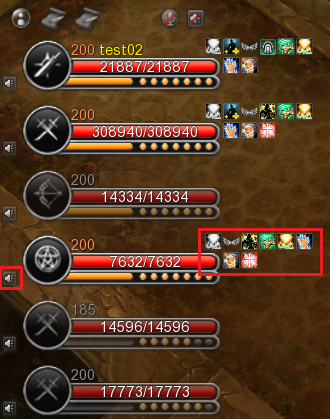
1. Improved UI convenience of party member list:
- Reduce the UI size.
- Change the buff icons of party members on the right side.
- Raise Spirit (Wizard Buff) cooldown icon is displayed at first, right above the HP bar of party members.
- Move the voice chat icon to the left side.
Added on 19-Feb-2025
1. Lowering the cost of material required for Bonding Buff.
2. Change the Pet Exploration UI
- Add text for showing status under the Pet List:
- Number of Pets on exploration
- Number of Pets on researching
- Number of Pets on resting
- Add the comma for separating the thousands in various places in the UIs.
- Add the required material in tooltip of Helping Hand and Bonding.
3. Add new tab “Exchange”
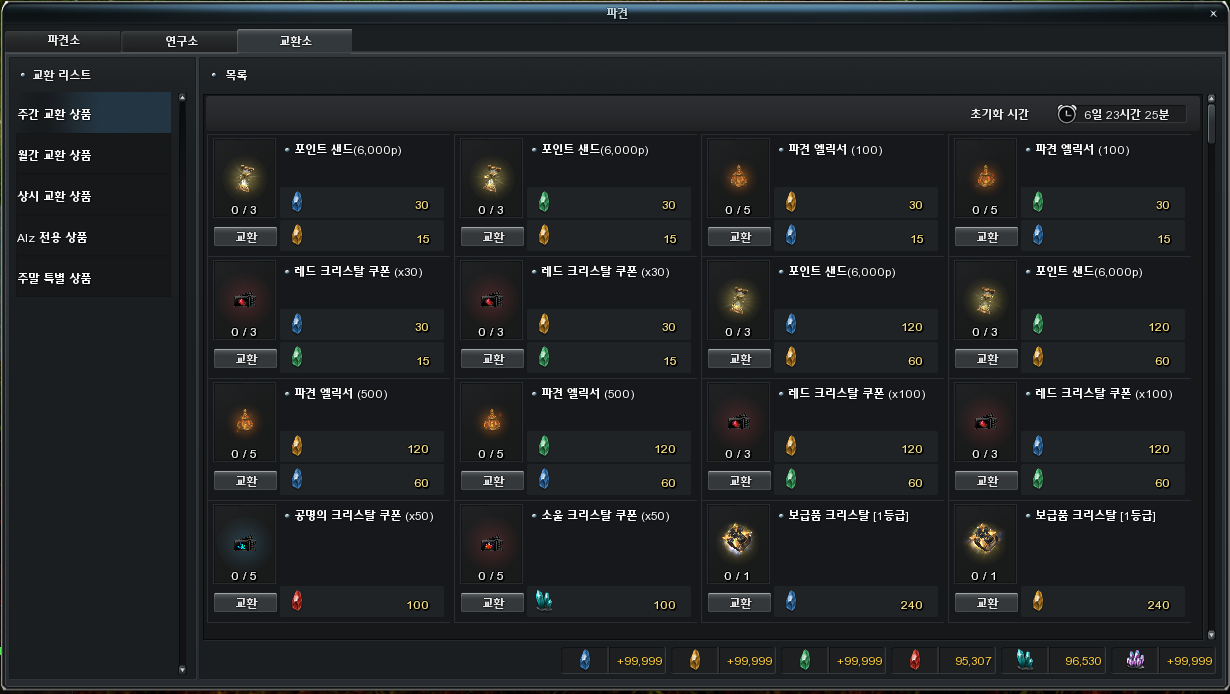
- Allow exchanging using materials obtained from Exploration activities.
- Add Research on Exchange
4. Changed that Costume UI will open when right-click on the Pet Name Card.
Added on 12-Mar-2025
1. Exploration Station
- Add comma for thousand separations in various places of Pet Exploration UI
- When player clicks on a completed Exploration:
- Show the “Exploration Completion Reward” UI immediately.
- Remove the “Reward” button at the bottom-right of the Exploration Station UI.
2. Research Lab
- Change the Unlock conditions of some Exchange related researches.
3. Exchange
- Fixed the bug that caused the abnormal display of some items in Exchange tab
- Changes to some existing items in the Exchange tab
- Add new items in the Exchange tab

1. Fixed the bug that caused a different item could be gifted to a Pilgrim while gifting another item.
2. Fixed the bug that caused client disconnection when using Transformation Card.
3. Fixed the bug that caused client disconnection when clicking on the Star Fragment item in the link inside chat area.
4. Fixed the bug that caused the Inventory Sort option settings was reset.
5. Fixed the bug that caused crashes for specific channel of Test Server due to abnormal stats of Pet.
6. Fixed the bug that reward of Pet Exploration was set abnormally.
7. Fixed the bug that caused unable to create a the first character in an account.
8. Fixed the bug that the total chance of drop for some dungeons was over 100%.
- Hazardous Valley:
- Upgrade Core (High):
- Old: 4.0243%
- New: 4.0242%
- Upgrade Core (High):
- Devil’s Tower (Part 2):
- Devil’s Token (Highest):
- Old: 98.716424%
- New: 98.708424%
- Devil’s Token (Highest):
9. Fixed the bug that caused the Alz was not consumed while assigning options to Crest in certain situations.
Added on 05-Dec-2024
1. Fixed the bug that caused stats of Crest items were displayed abnormally.
2. Fixed the bug related to Merit Mastery – Diamond Insignia that caused “PvP” text was not included for some resist stats.
3. Fixed the bug that Pet Exploration is now close-able with “ESC” key.
4. Fixed the bug that caused Pilgrim summoning was with abnormal rate.
- Material that consumed abnormally will be returned.
- Summoned Pilgrims will be kept as normal.
5. Fixed the bug that caused abnormal materials were required for maintaining Pet Buff.
6. Fixed the bug that caused client disconnection when receiving Critical Attack from monsters in certain situations.
Added on 06-Dec-2024
1. Fixed the bugs related to Altar:
- Fixed the bug that caused “Lock” icon was not displayed when switching between the Pilgrim in the selection window.
- Fixed the bug that cause the tooltip for Summoning Chance of Pilgrim was not displayed in certain situations.
- Fixed some typos in Pilgrims’ conversation.
- Fixed the bug that caused tooltip showing abnormally while moving mouse over Pilgrims’ conversation.
2. Fixed the bug that Force Wing Arrival skill icon would disappear when using Force Wing Buff or Star Fall Buff
3. Fixed the bug that “/follow” command can be used in PK-able fields / Mission Battlefields in certain situations
4. Fixed the bug that caused client disconnection in certain situation while using Star Fall buff.
5. Fixed the bug that Resist PvP stats were not applied normally.
Added on 11-Dec-2024
1. Fixed the bug that PvE Resist Crit. Rate and PvE Resist Crit. DMG were not applied normally.
2. Fixes and changes for Pet Exploration:
- Fixed the bug that caused Buff Potion Registration could be done only if the buff period is active.
- Add a feature that if player clicks on the Pet Buff icons on top-right corner of the screen the Pet Buff UI and Laboratory UI will be shown.
- In Pet Buff UI, if the number of Crystal is more than 9,999, the actual amount of crystal will be shown in tooltip clearly.
- Changed that the number of Crystal is displayed with commas for separating the thousands.
- Fixed bugs related to game behaviour while pressing EST key in the Laboratory UI.
- Changed the system message showing in the case that Pet Buff is inactive and player tries to access Inventory #9 and / or Inventory #10.
3. Fixed the bug that “Protected” items can still be registered in Altar upgrade UI.
4. Fixed the bug related to HP Potions:
- Fixed the bug related to tooltips of HP Potions not showing the correct amount of recovery.
- Fixed the bug that Inexhaustible HP Potion is now healing with expected amount:
- Inexhaustible HP Potion (Lv. 3): 700 > 800
- Inexhaustible HP Potion (Lv. 4): 1,000 > 1,200
5. Fixed the bug that caused tooltips were displayed abnormally when comparing items stats from Auction House.
Added on 18-Dec-2024
1. Fixed the bug that caused Buff Effects from Pilgrims which are depended on Altar Condition Level were not applied normally.
2. Fixed bug that caused Pet Buff were not applied properly until relogging.
3. Fixed bugs related to Stellar Force:
- Fixed the bug that the “percentage” mark (%) were not displayed for certain parts of Stellar Force content.
- Fixed the caused abnormal behaviour of the UI in certain situations.
4. Fixed the bug that caused the HP Healing amount of some event potions were not synchronized, now those are sync’ed at 800 HP.
5. Fixed bug that client got disconnected when receiving rewards from Bingo in a batch.
6. Fixed bug that PvE Attack Rate were not applied in certain situation.
7. Fixed bug related with Follow command in warzone.
Added on 19-Dec-2024
1. Fixed the bug that caused client disconnection while using Sand Point.
2. Fixed the bug that caused abnormal behaviour when trying to register / re-register / cancel the scroll from Auction House.
3. Fixed bug that Buff Potions in Auto-Use slots of Pet Buff get unequipped in certain situations
Added on 24-Dec-2024
1. Fixed the bug that character can be transferred while equipping Star Crystal item.
2. Fixed the bug that option icon “Crit. Rate” was displayed abnormally while granting options for Two-handed Weapons.
3. Fixed the bug that Pet Exploration UI was displaying abnormally when opening the Pet Buff UI while Pet Exploration UI is opening.
4. Fixed the bug that some Research Name were displayed abnormally in Research Lab.
5. Fixed the bug related to counting the completed times of Mandarat’s Legacy dungeon in Event Pass.
Added on 08-Jan-2025
1. Fixed the bug that client got disconnected when opening Newbie Support UI in certain conditions.
2. Fixed the bug that the client got slightly hanged when selling or restoring items from NPC.
Added on 22-Jan-2025
1. Fixed the bug that Saints’ Force Calibur buff cannot be used.
2. Fixed the bug that caused damage would decrease or combo would stop when using movement skill during Combo.
3. Fixed the bug that caused Merit stats were not applied normally in certain situations.
4. Fixed the bug that caused shortcuts for some newly added slots could not be used when the additional quick slots were hidden (closed).
5. Fixed the bug related to text of the quest “Skalid’s Proposal Plan”.
6. Fixed the bug that caused abnormal monster indication in Automata Lab SCA-76 / Secret Base SCA-76.
7. Fixed the bug that sounds were generated abnormally when Dark Mage performs Basic Attack.
Added on 23-Jan-2025
1. Fixed the bug that caused Inventory Expansion were not activated in certain situations (effects from Helping Hand buff).
Added on 05-Feb-2025
1. Fixed the bug that caused “EXP Up” effect from Campfire was displayed “not-being applied”.
2. Fixed the bug that caused the task “Use Special Exchange Ticket” could not count in Event Pass.
3. Fixed the bug that caused Pet Auto-Loot animation was not played when pet automatically performs loot while character is in party.
Added on 06-Feb-2025
1. Fixed the bug that caused connection to the server got terminated when using some buff skills in Guild Dungeon “Flame Dimension”.
Added on 12-Feb-2025
1. Fixed the bug that allowed using of a Collection Chest that sealed an already completed collection.
Added on 19-Feb-2025
1. Fixed the bug that caused the connection to the server got terminated when registering Time Reducers with different durations into the Auction House.
2. Fixed the bug that caused the connection to the server got terminated in certain situations related to Stellar Force.
Added on 26-Feb-2025
1. Fixed the bug “Sealed Mergaheph’s Ring” which was created from Request system cannot be used as Altar upgrade materials.
2. Fixed the bug that caused the attribute of “Little Jack” was abnormally set.
3. Fixed the bug that tooltips were not displayed when moving mouse over the 5th / 10th buff slots of party members.
4. When extracting a scroll with binding property which was obtained from Guild Treasure, the Scroll Essence will be also generated with the same binding property.
Added on 05-Mar-2025
1. Fixed the bug that caused the client got disconnected in certain situations.
Added on 06-Mar-2025
1. Fixed the bug that server response was slow in certain situations.
Added on 12-Mar-2025
1. Fixed the bug that caused the connection to server got terminated when using Battle Mode attack skill after exiting dungeon.
2. Fixed bug related to Campfire:
- Fixed the bug that caused the connection to the server got terminated when equipping / unequipping / replacing equipment while using a Campfire.
- Change that, the equipment cannot be changed while using a Campfire.
- Fixed the bug that caused the connection to the server of the Campfire owner got terminated in certain situations.
3. Platinum Buff UI:
- Fixed the bug that caused the cost was displayed abnormally when there is some remaining duration.
- Add a message in the UI to reflect that the selected duration is the maximum selectable duration.
4. Fixed the bug that caused Guild Golden Treasure Chest could not be received in certain situation.
5. Fixed the bug was showing the duration of some periodical services and the benefit stats abnormally.
Discover more from Mr. Wormy
Subscribe to get the latest posts sent to your email.
 Mr. Wormy
2 comments