

 Posted by
 Summer 2024 Update for Cabal Korea is a big proof that Cabal franchise is going strong and even stronger than ever. Lots of content get reworked and expanded to ensure that the game is more enjoyable for newbie but also open a broad way for high-end players to challenge themselves. Summary of content updates as below:
- 🐶 Pet Appearance
- 🐱 Anima Mastery
- ⚔️ Equipment Preset
- 🔃 Combined Preset
- ☠️ Tower of the Dead B4F
- 💪 Skill Transcendence
- ↗️ Damage Amplifier
- 🔥 Campfire
- 🛡️ Rune: Defense 3
- 💍 New Unique Rings
Last Update: 30-May-2025, up-to-date to 14-Aug-2024 patch notes of Episode 39, added clips.
- Change of Pet System
- Old:
- Each pet has up to 30 different slots which are tied with the pet appearance.
- New:
- Pet slots and appearance are separated from each other.
- Pet appearance can be changed / registered using Costume UI.
- Pet slots are now unlinked with appearance, slots are moved to new system named Anima Mastery.
- Old:
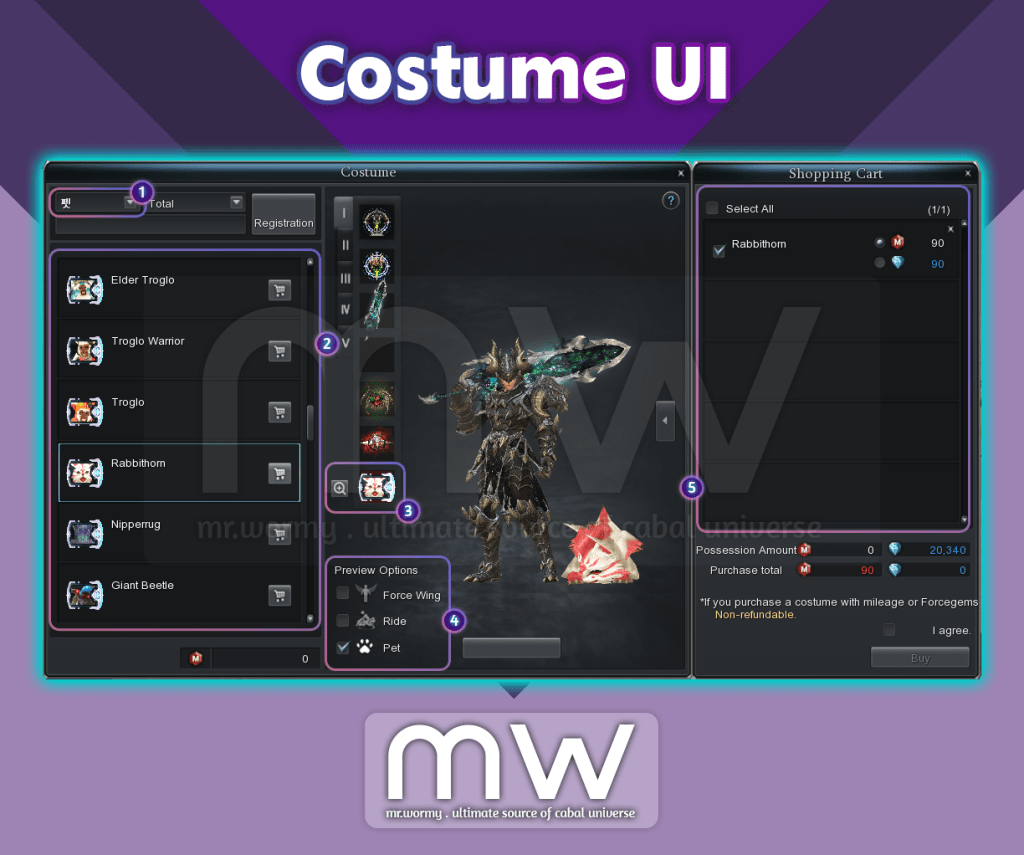
- Integration of Pet Appearance into Costume UI:
- [1] New Option to select for “Pet”
- [2] List of available Pet Appearance
- [3] New slot of Pet Appearance in Costume Preset list
- [4] New Preview option with Pet, also new Zoom button
- [5] Able to purchase Pet (appearance) via Costume UI
- Old System Conversion:
- All changes which result into items will be mailed to highest level character in the account.
- Pet (appearance) will be automatically unequipped and mailed to highest level character in the account.
- Those can be used to register into the Costume UI.
- All slots of the pet will be automatically turned into Anima Gem and mailed to highest level character in the account.
- Those can be used to register into the Anima Mastery UI.
- Pet (appearance) will be automatically unequipped and mailed to highest level character in the account.
- All pet related items stored in Guild Warehouse will be mailed to Guild Master.
- All changes which result into items will be mailed to highest level character in the account.
- Pet-Related new item
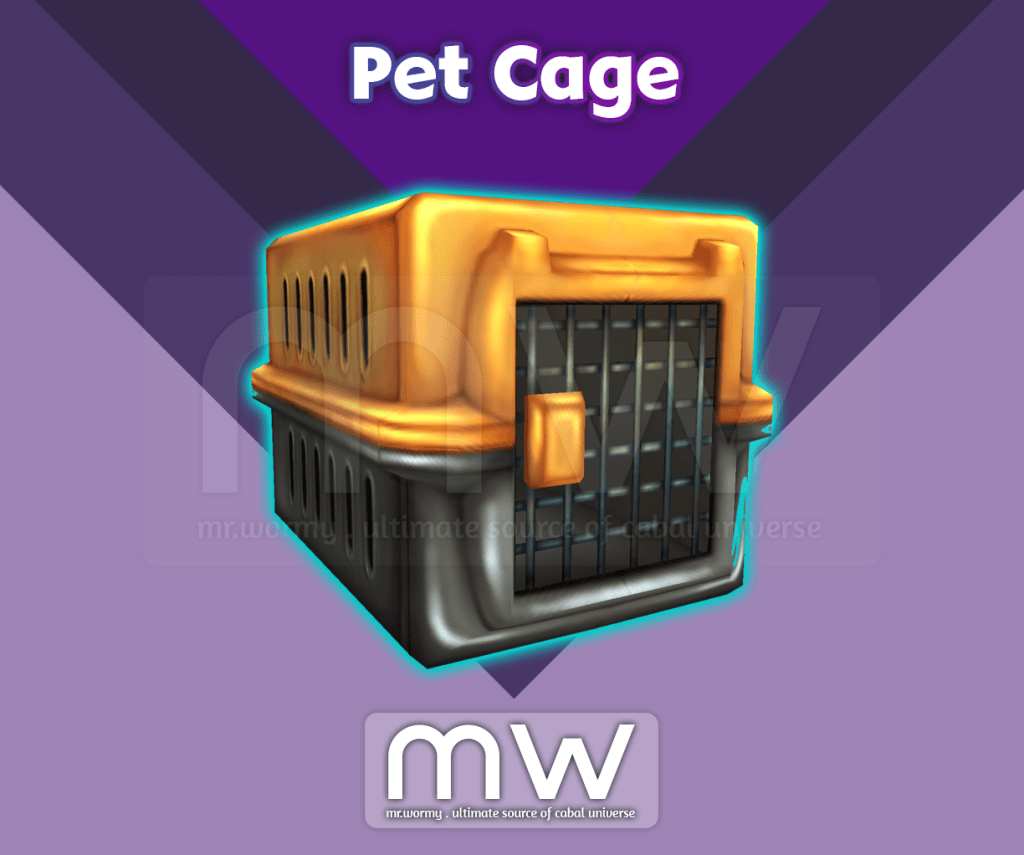
- Pet Cage: Allow seal a registered Pet (appearance) into tradeable state
- Achievements for Pet Appearance / Anima Mastery:
- Change the achievements of Pet before the update into achievements for Anima Mastery
- Category: General
- Criteria:
- Old: Grant specific option for Pet
- New: Grant specific option for Anima Mastery
- No changes of rewards
- Changes of Title / Achievement rewards due to obsoletion of Pet EXP
- As pet is not leveling up with Pet EXP anymore, Pet EXP is removed
- Titles with Pet EXP will be changed into Force Wing EXP
- Changes to existing achievement rewards:
- Combine Lv. 200: Force Wing EXP +1%
- Combine Lv. 400: Force Wing EXP +1%
- Combine Lv. 600: Force Wing EXP +1%
- Combine Lv. 800: Force Wing EXP +1%
- Combine Lv. 1000: Force Wing EXP +1%
- Combine Lv. 1200: Force Wing EXP +1%
- Combine Lv. 1400: Force Wing EXP +2%
- Combine Lv. 1600: Force Wing EXP +3%
- Combine Lv. 1800: Force Wing EXP +4%
- Combine Lv. 2000: Force Wing EXP +5%
- Change the achievements of Pet before the update into achievements for Anima Mastery

- Anima Mastery System
- Old System Conversion:
- All changes which result into items will be mailed to highest level character in the account.
- Pet (appearance) will be automatically unequipped and mailed to highest level character in the account.
- Those can be used to register into the Costume UI.
- All slots of the pet will be automatically turned into Anima Gem and mailed to highest level character in the account.
- Those can be used to register into the Anima Mastery UI.
- Items related to Pet system that character owns, will be converted and mailed to highest level character in the account.
- Those can be used via new Anima Mastery UI.
- Pet (appearance) will be automatically unequipped and mailed to highest level character in the account.
- All pet related items stored in Guild Warehouse will be mailed to Guild Master.
- All changes which result into items will be mailed to highest level character in the account.
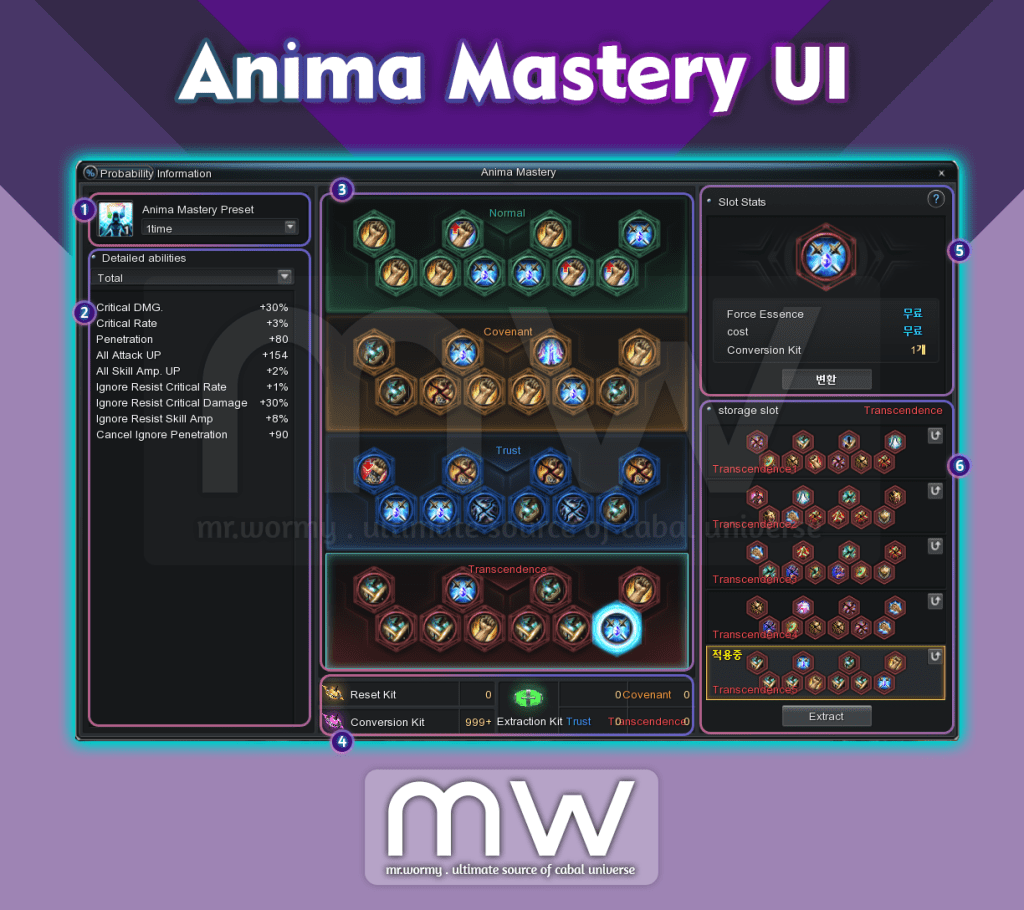
- Anima Mastery UI:
- [1] Allow to select up to 05 Anima Mastery Preset, preset can be registered to quick slot for fast switching
- By default, 03 presets will be available.
- Can be expanded up to 05 presets using Force Gem (02 times of expansion)
- Expansion price: 100 Force Gem.
- [2] List of current accumulated stats based on:
- Selected preset [1]
- Sum of all stats from [3] of the selected slots in [6]
- [3] List of available slots in current Preset
- Each grade we have 10 slots
- Normal: Green
- Covenant: Orange
- Trust: Blue
- Transcendence: Red (New grade)
- Each grade we have 10 slots
- [4] Summary of Pet related items that current character owns
- [5] Select a slot in [3] to see the fee for granting / converting the slot option
- [6] For each grade you selected in [3], a list of 05 available options will be displayed allow you to switching between.
- [1] Allow to select up to 05 Anima Mastery Preset, preset can be registered to quick slot for fast switching
- Old System Conversion:
- The “Anima Mastery” system is applicable for all characters in the same account.
- Slot Ability:
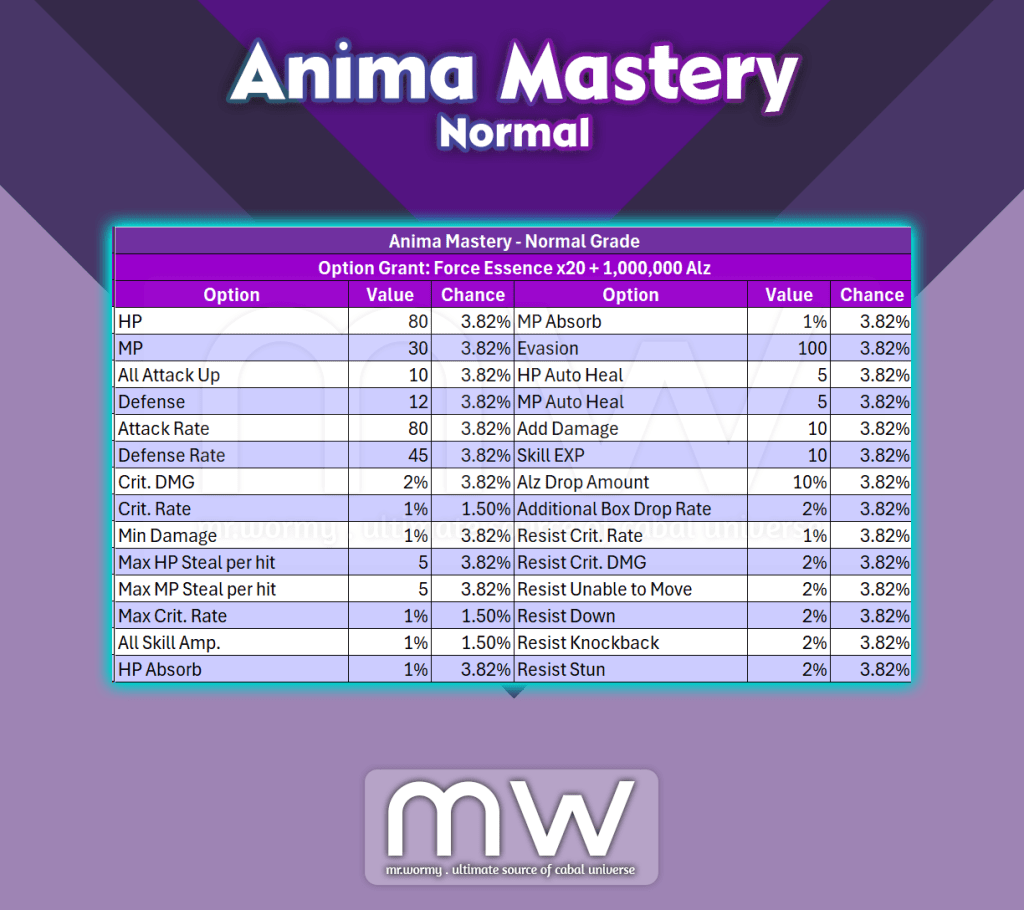
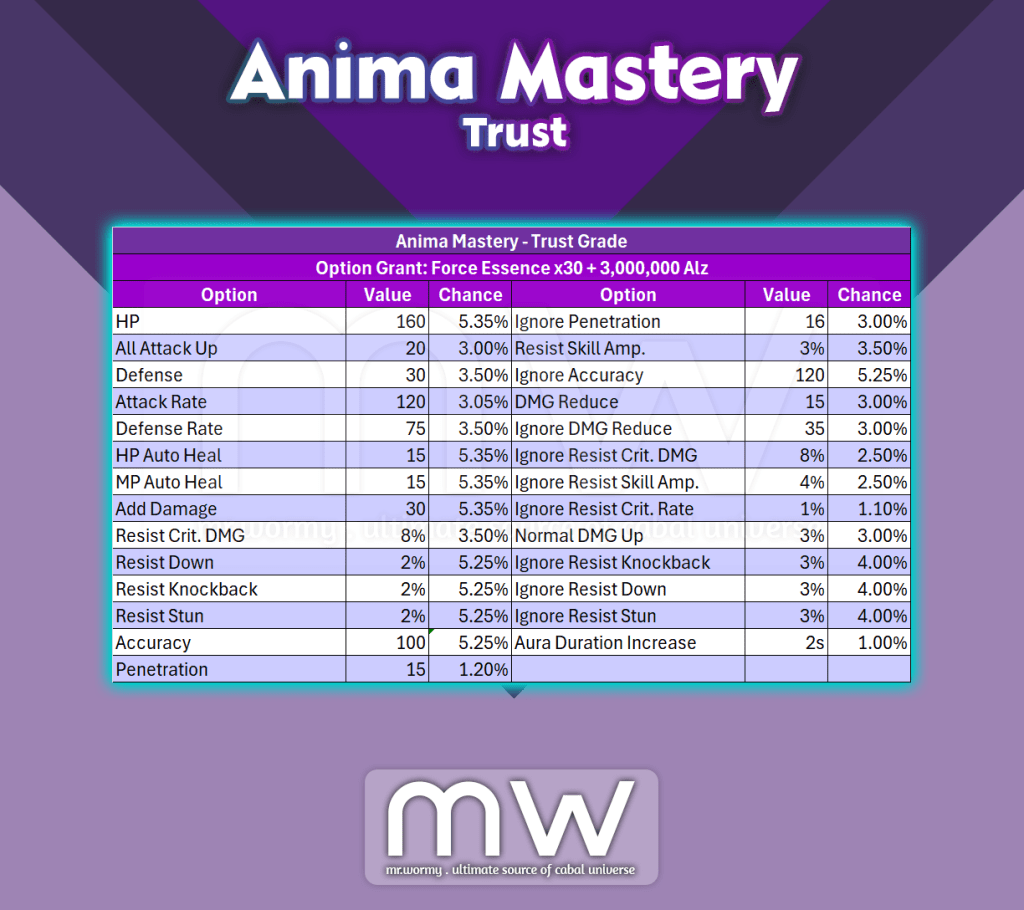
- Option Pools for Normal / Covenant / Trust are the same with old Pet system
- New Grade is available:
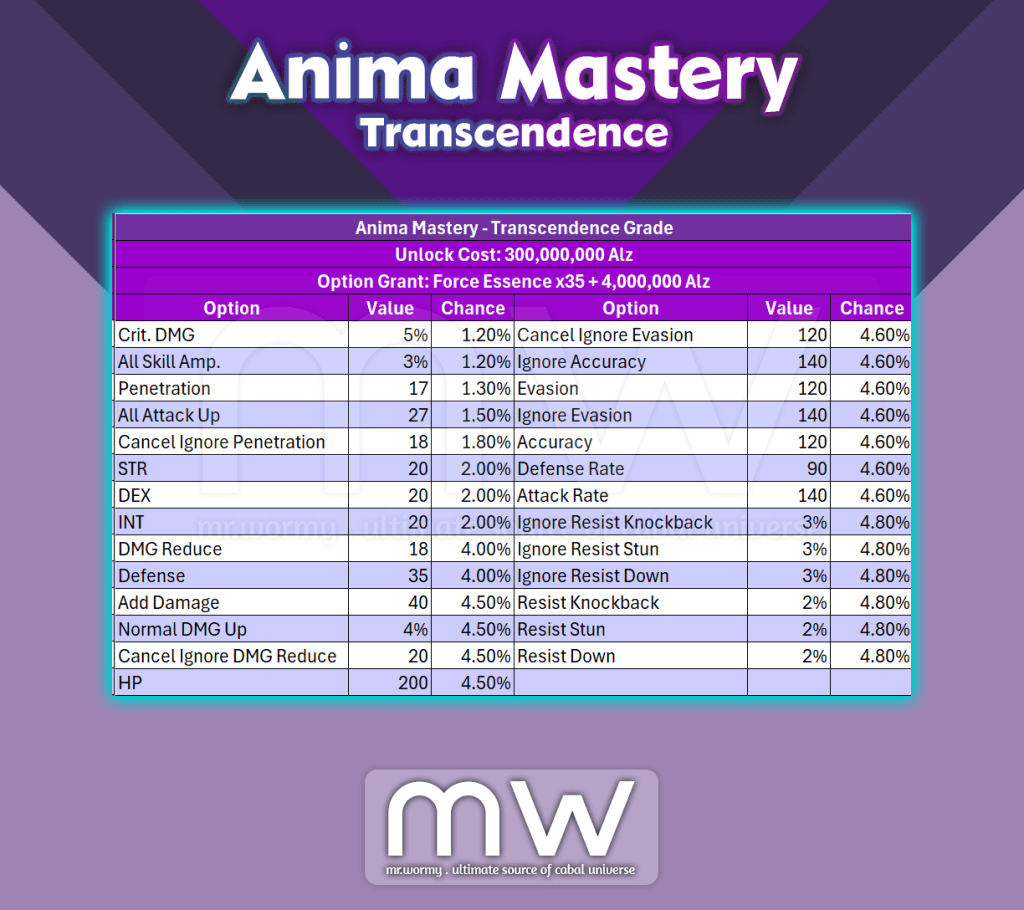
- Grade: Transcendence
- Unlock: 300,000,000 Alz
- Unlock cost is one time per account.
- Unlock is required to have access to new slots in the Transcendence Grade
- Granting option:
- Instead of using Force Core with different grades, now granting option will consume Force Essence.
- Anima Mastery – Normal Slot
- Anima Mastery – Covenant Slot

- Anima Mastery – Trust Slot
- Anima Mastery – Transcendence Slot
- Saved Slots
- When a certain grade is selected in the Anima Mastery UI, up to 05 different saved slots setup can be stored.
- Stats from Saved Slots won’t be applied if the set is not selected as the active slots.
- Stats can be saved into Anima Gem using “Extract Kit” or “Force Gem”.
- Extraction Force Gem price: 488 Gems
- Full set of stats can be reset using “Reset Kit” or “Force Gem”.
- Saved Slots Reset Force Gem price: 20 Gems
- When a certain grade is selected in the Anima Mastery UI, up to 05 different saved slots setup can be stored.

- Anima Mastery Related Items
- Pet Untrain Kit – Selective => Conversion Kit
- Reset a specific slots of the Anima Mastery system
- 01 Conversion Kit will be consumed for resetting a single slot in Anima Mastery.
- Granting slots cost must be paid along with the Conversion Kit.
- Pet Untrain Kit => Reset Kit
- Reset a full Saved Slots set in Anima Mastery system
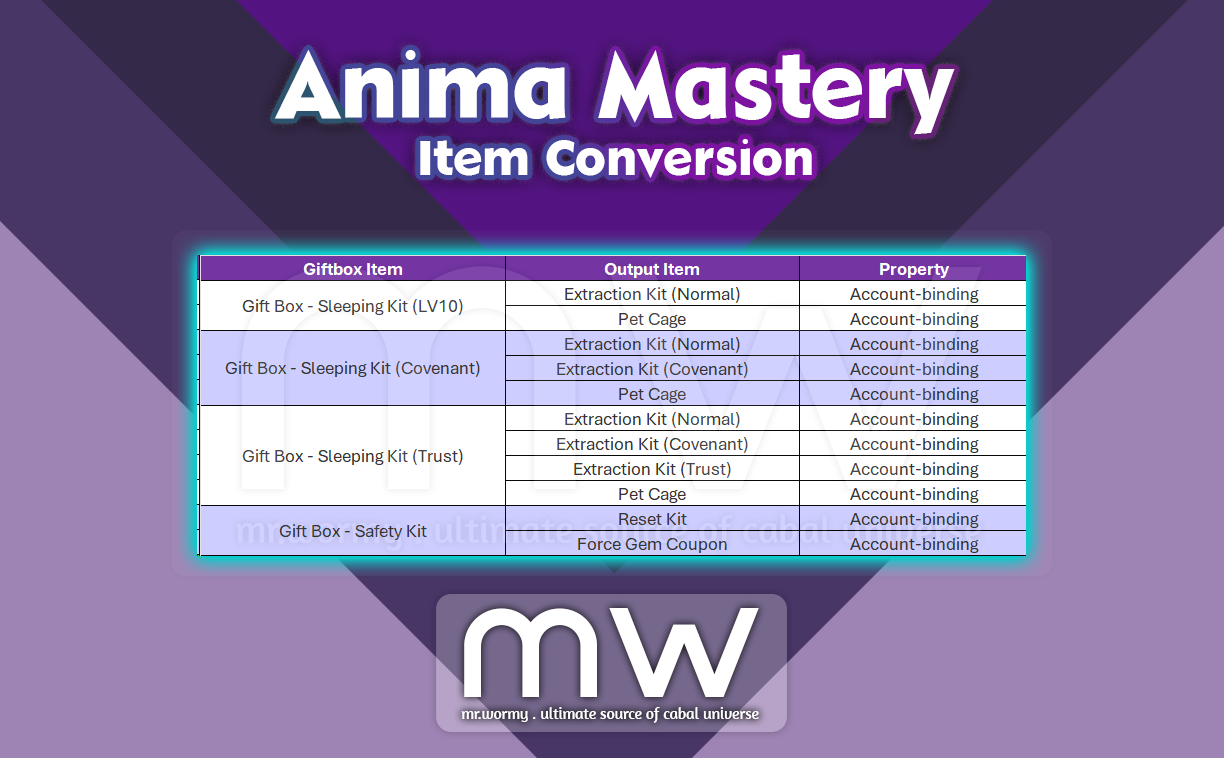
- Pet Sleeping Kit (Lv. 10) => Extraction Kit (Normal)
- Extract a Saved Slots of Normal grade into Anima Gem
- Pet Sleeping Kit (Covenant) => Extraction Kit (Covenant)
- Extract a Saved Slots of Covenant grade into Anima Gem
- Pet Sleeping Kit (Trust) => Extraction Kit (Trust)
- Extract a Saved Slots of Trust grade into Anima Gem
- New: Extraction Kit (Transcendence)
- Extract a Saved Slots of Transcendence grade into Anima Gem
- Pet Untrain Kit – Selective => Conversion Kit
- Conversion of existing items:
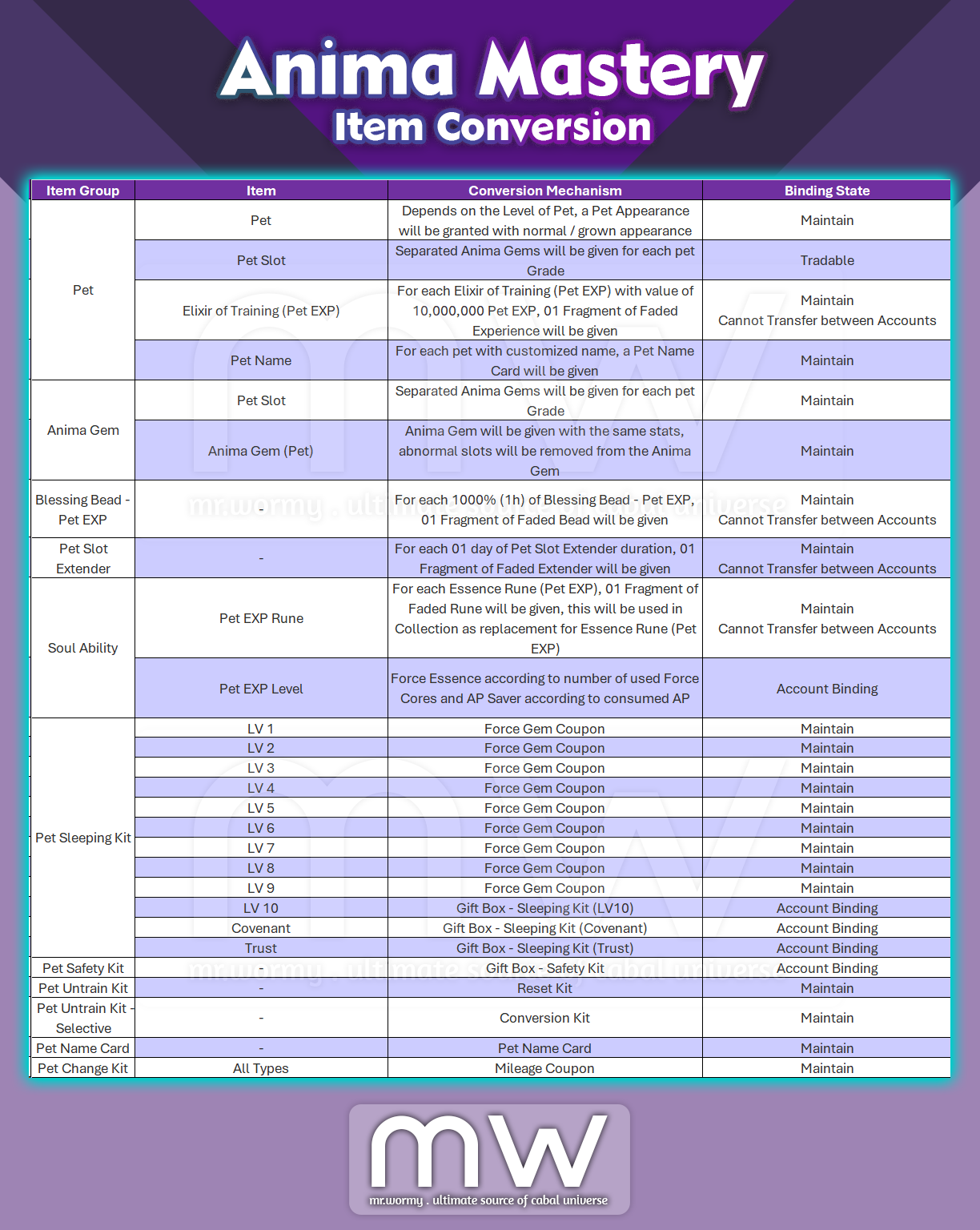
- Remarks:
- Force Gem Coupon / Mileage Coupon: When used, equivalent amount of Force Gem / Mileage will be gained.
- Fragment of Faded Experience, Fragment of Faded Bead, Fragment of Faded Extender: Usage and purpose will be implemented in the future.
- Description of Gift Box items after Item Conversion from Anima Mastery
- Add feature for changing Equipment Preset:
- Overview:
- A function that allows you to register specific equipment in presets so that you can immediately change the equipment you want in the desired situation.
- A function that allows player to switch between different setup of equipment depends on situations
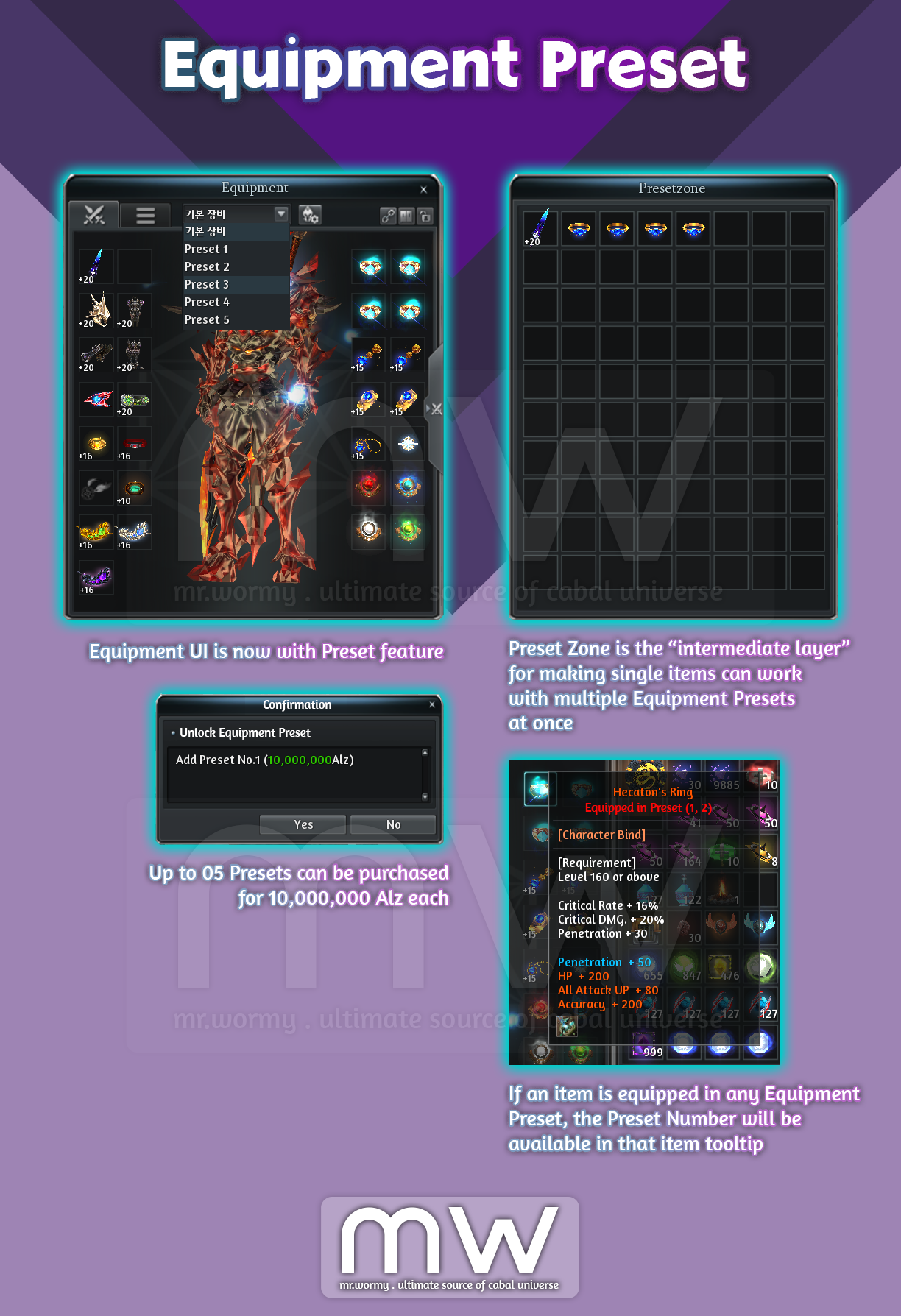
- A new intermediate UI “Preset Zone” is added as the middle-layer for registering for Equipment Presets.
- Up to 05 presets could be purchased. Price for each preset: 10,000,000 Alz.
- Preset Registration Process:
- Step 1: Purchase a Preset if your character does not have any Equipment Preset.
- Price: 10,000,000 Alz.
- Step 2: Click on Preset Edit Mode button.
- Step 3: Move items from inventory to Preset Zone.
- Step 4: Equip items from Preset Zone to Equipment UI of the equivalent Preset.
- Step 5: Click on “Complete” button to save the preset.
- Step 6: To use a saved Preset, select from the Preset list.
- Step 1: Purchase a Preset if your character does not have any Equipment Preset.
- Notes:
- There is a “Clear” button to clear all slots of the currents Preset.
- Items which were registered in any Equipment Preset will be marked with special border and information in tooltip.
- One item can be registered for multiple presets.
- Items with duration cannot be registered.
- Equipment Preset cannot be changed during Mission Battles / PvP Battles.
- Overview:
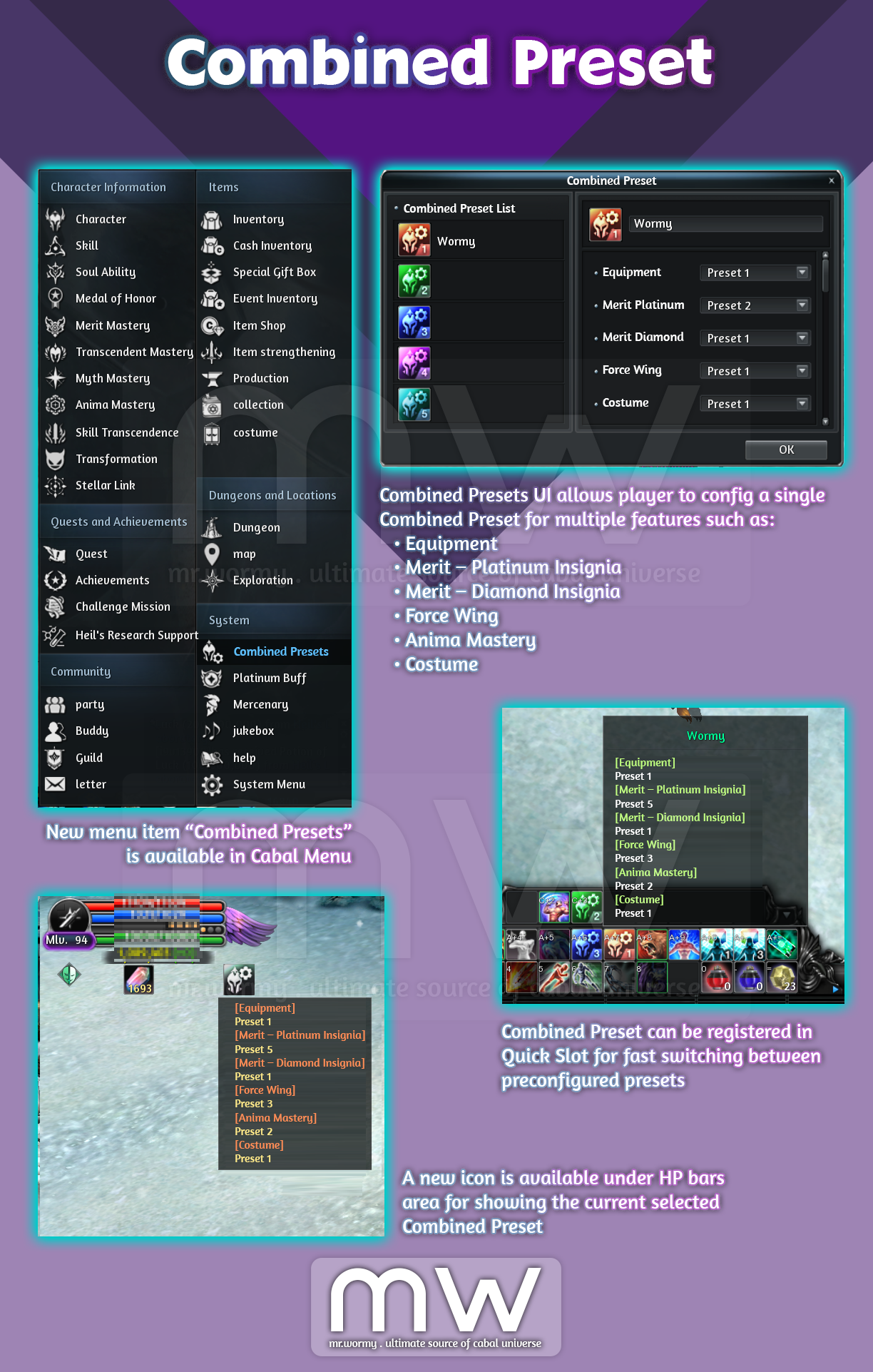
- A feature that combine the selection of multiple Presets from multiple systems and allow changes quickly at once.
- Access:
- Via Cabal Menu.
- Shortcut: Ctrl + P.
- Combined presets:
- Equipment
- Merit – Platinum Insignia
- Merit – Diamond Insignia
- Force Wing
- Anima Mastery
- Costume
- Able to set name for specific Combined Preset.
- A Combine Preset icon will be displayed under your HP Area.
- Can see name of the linked individual presets when moving mouse over the Combined Preset icon.

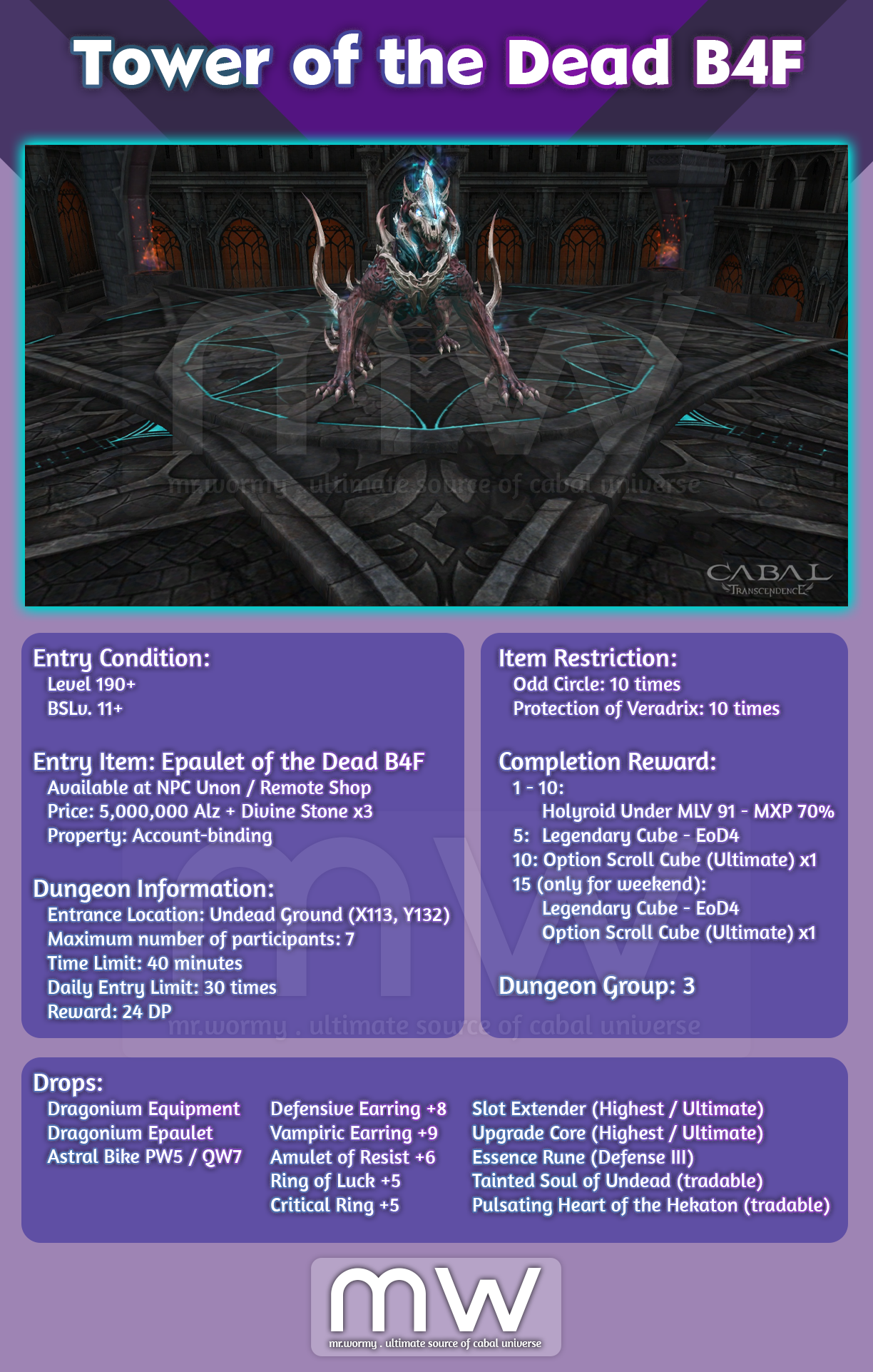
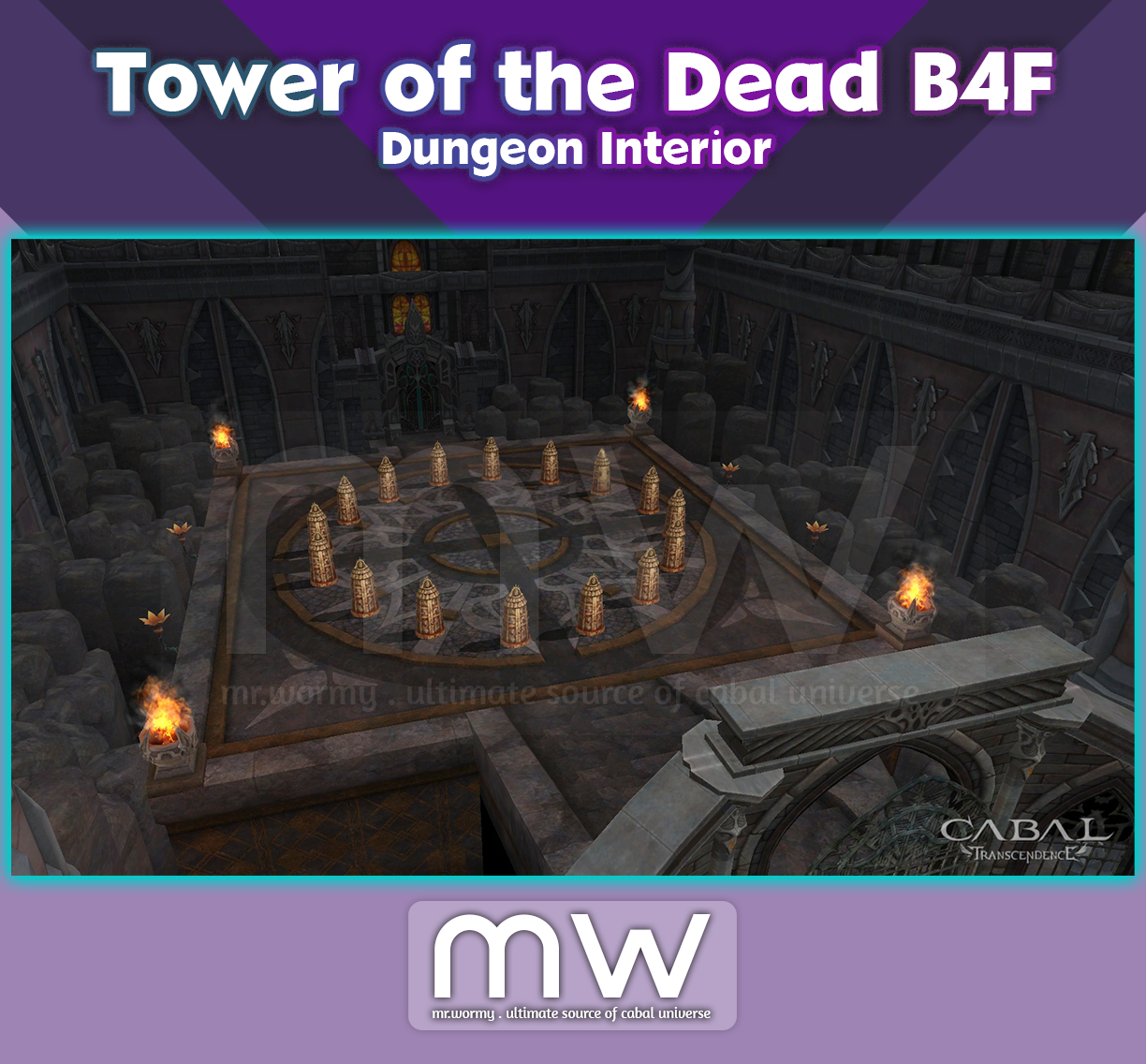
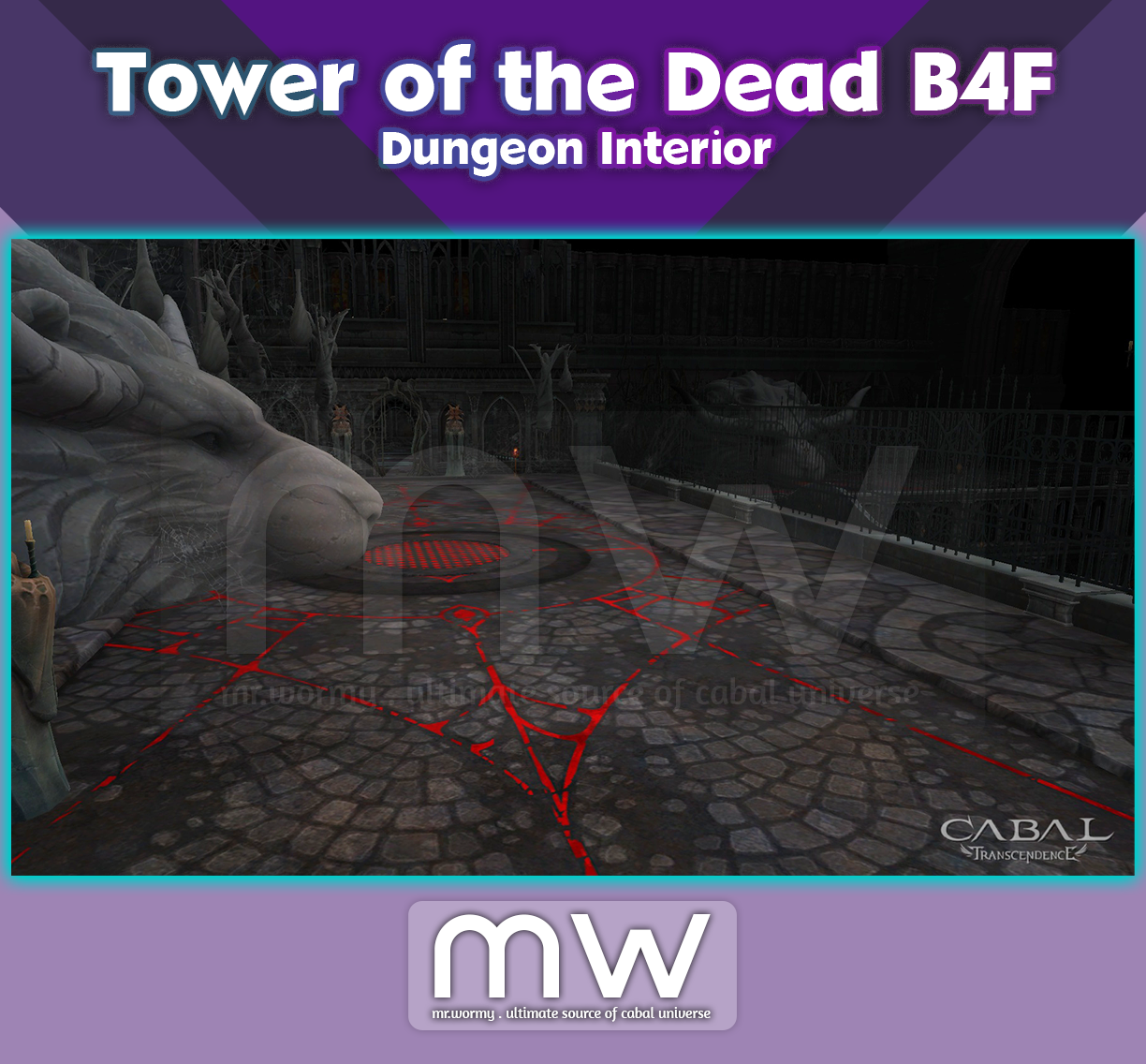
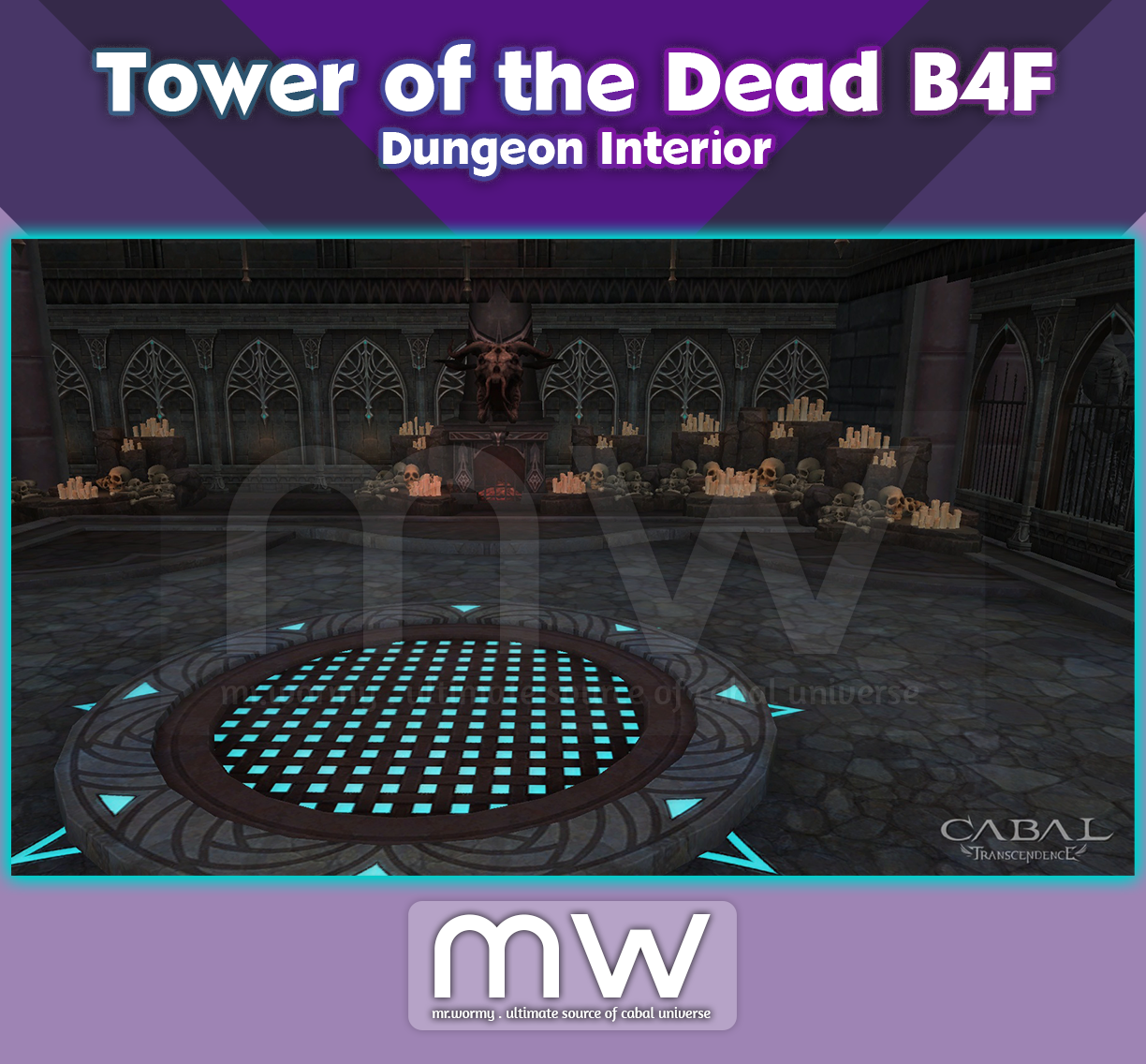
- New dungeon “Tower of the Dead B4F”
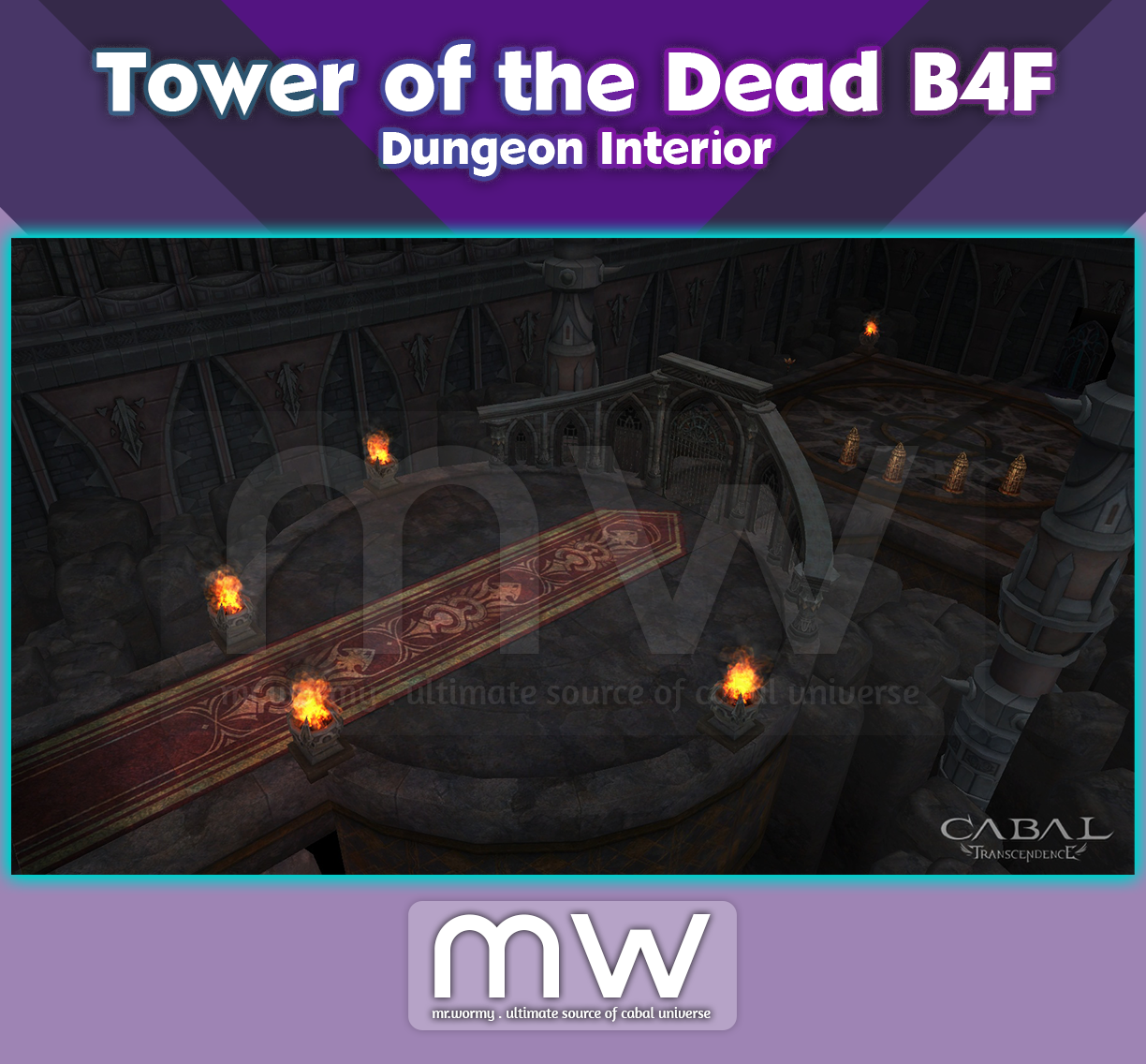
- Tower of the Dead B4F: Dungeon Interior
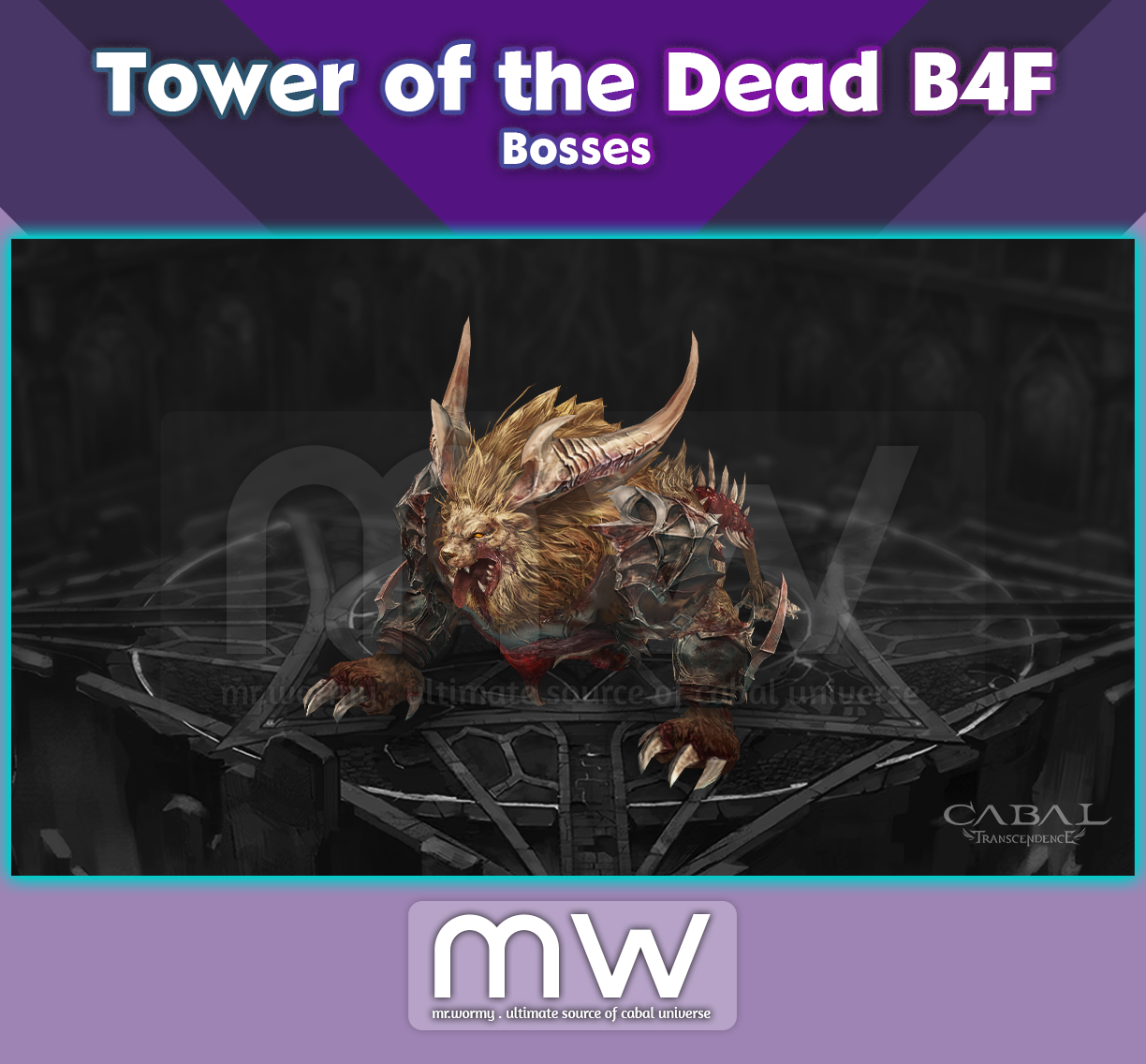
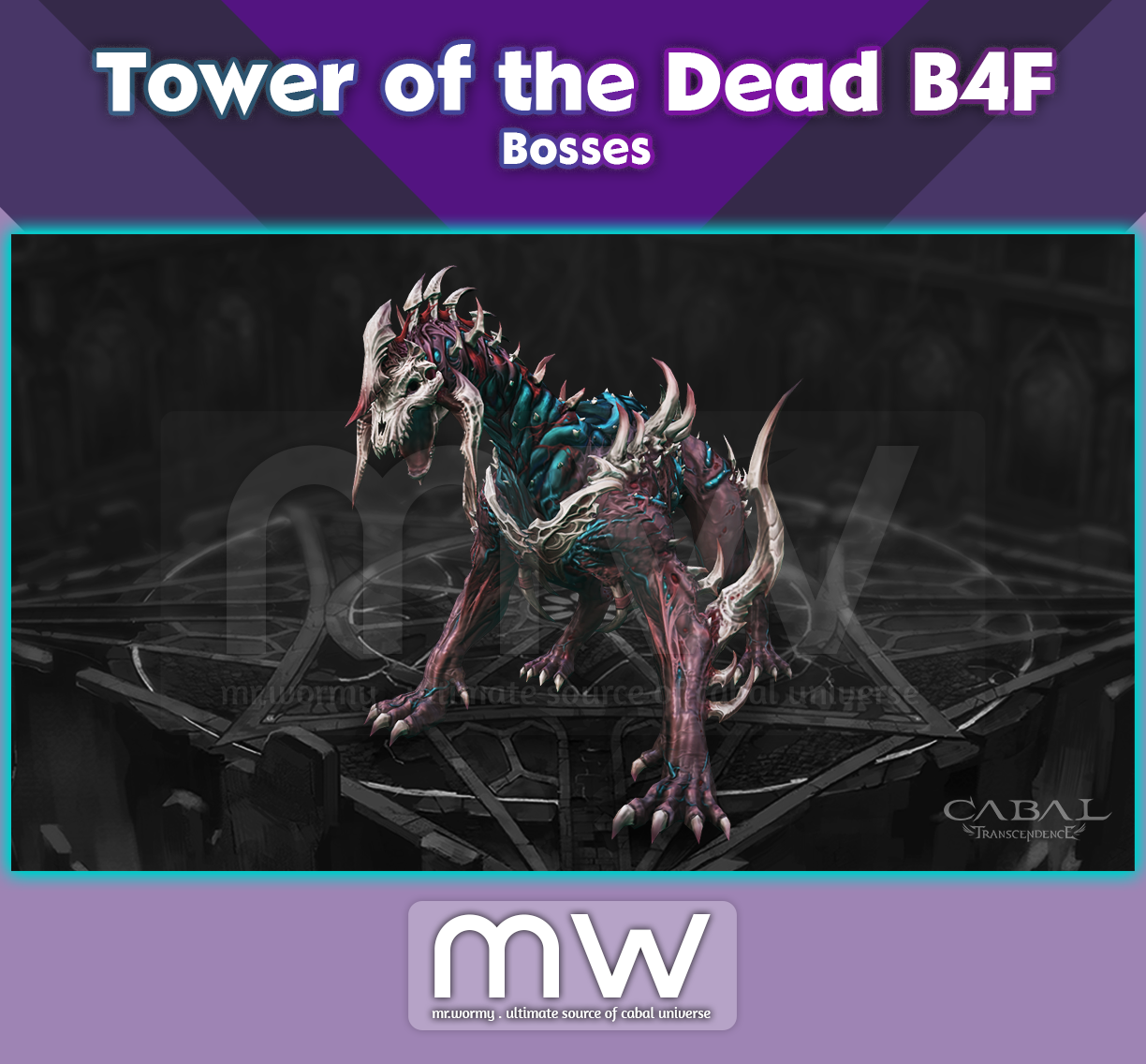
- Tower of the Dead B4F: Monsters & Bosses
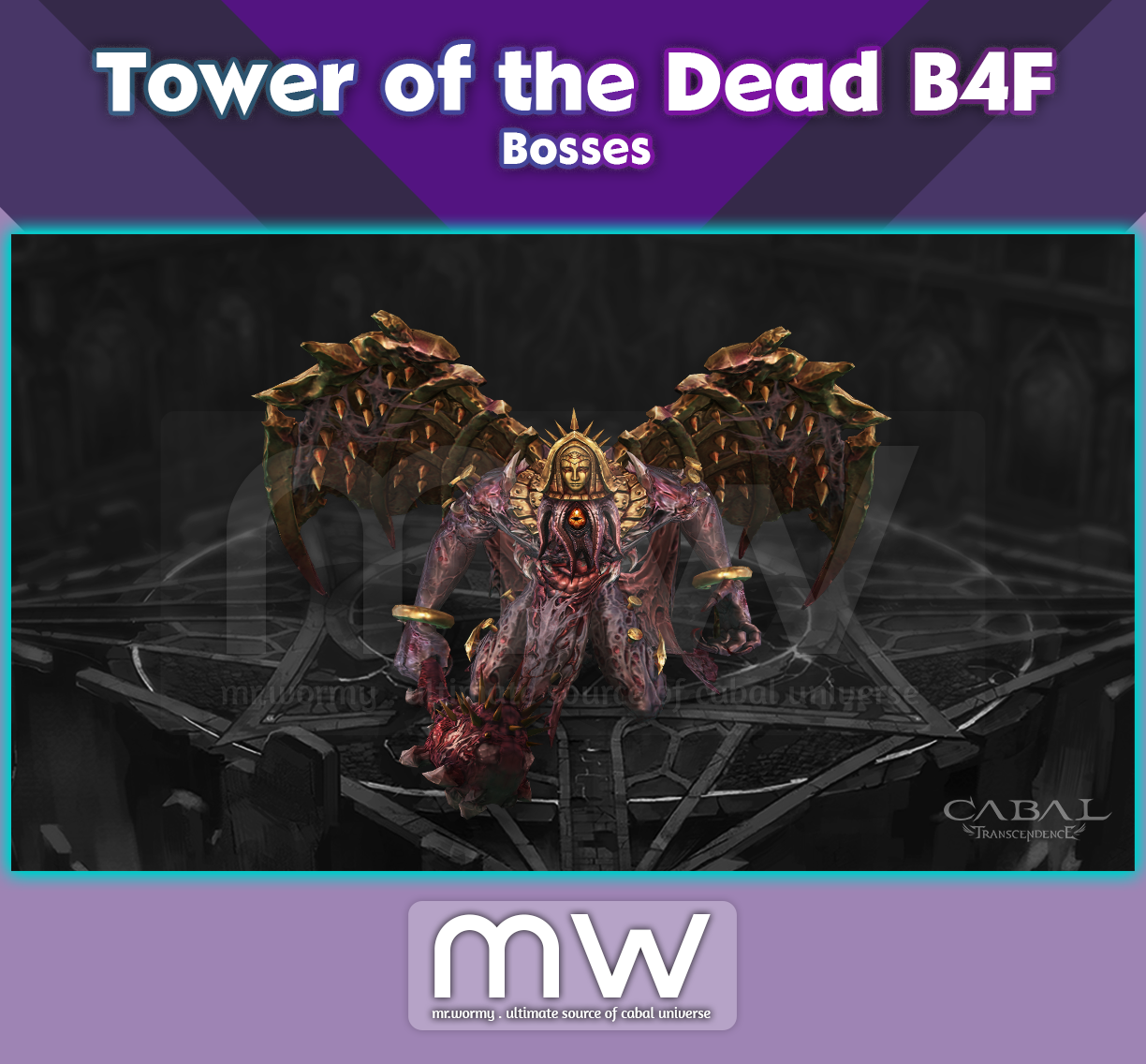
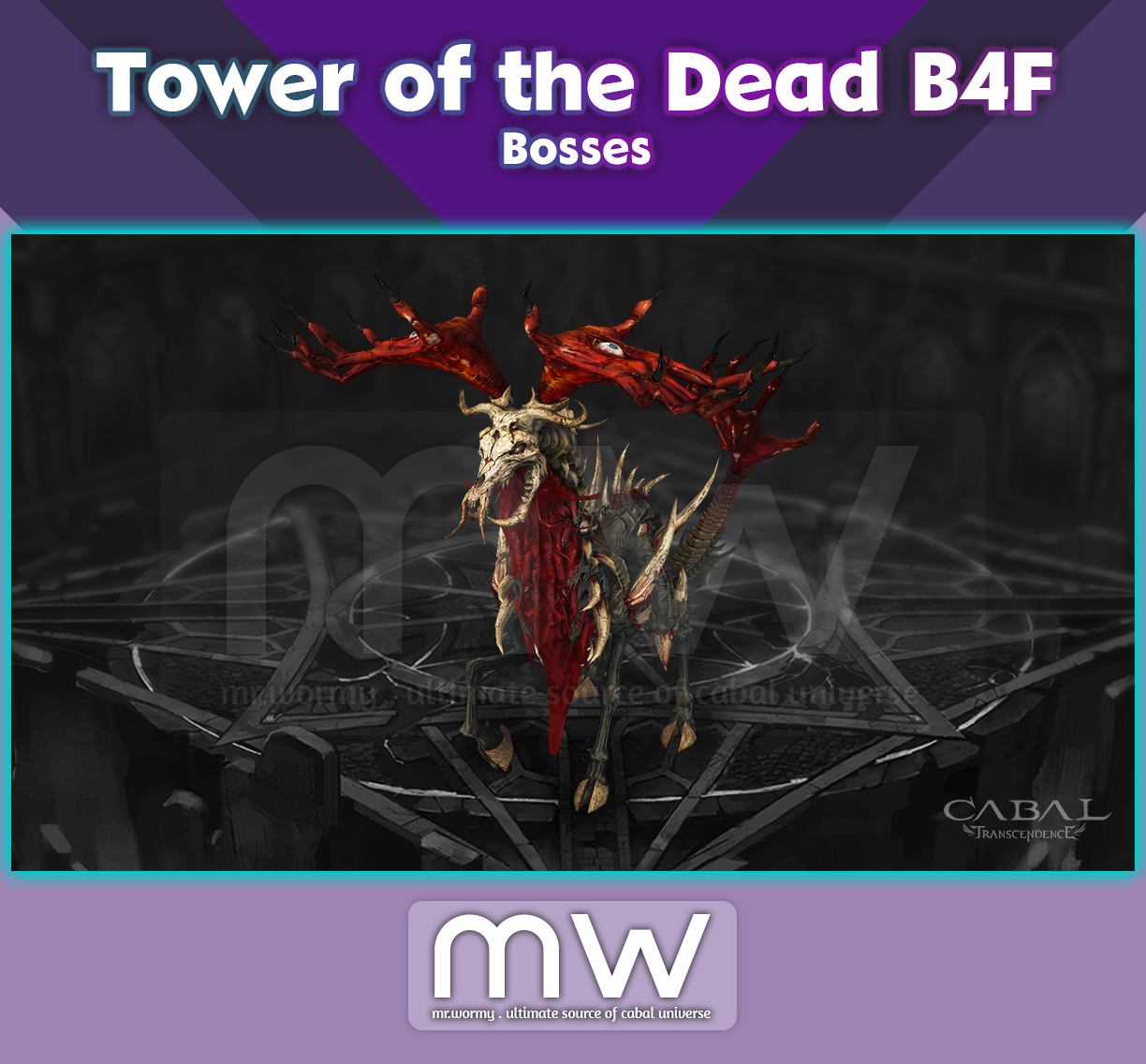
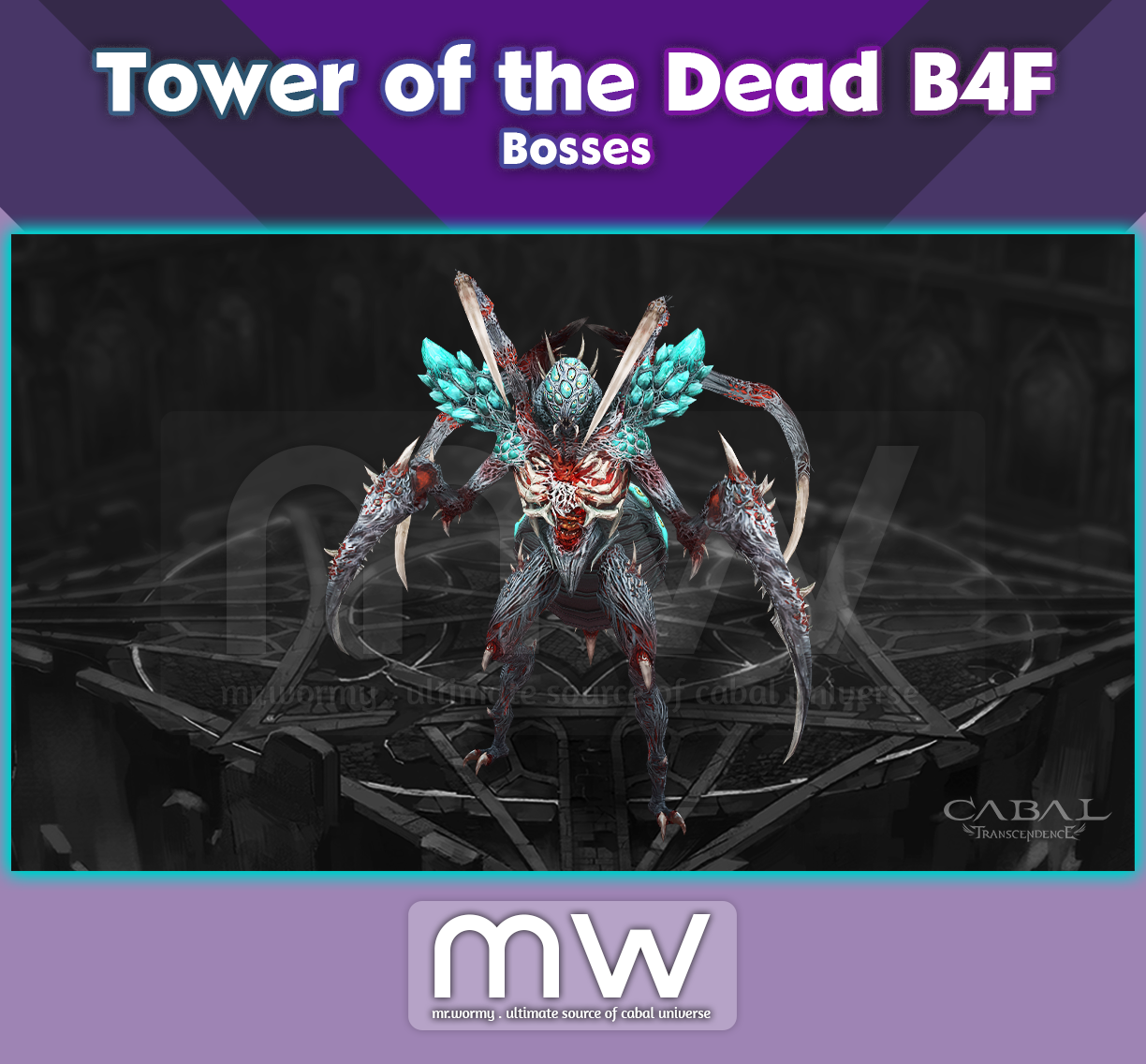
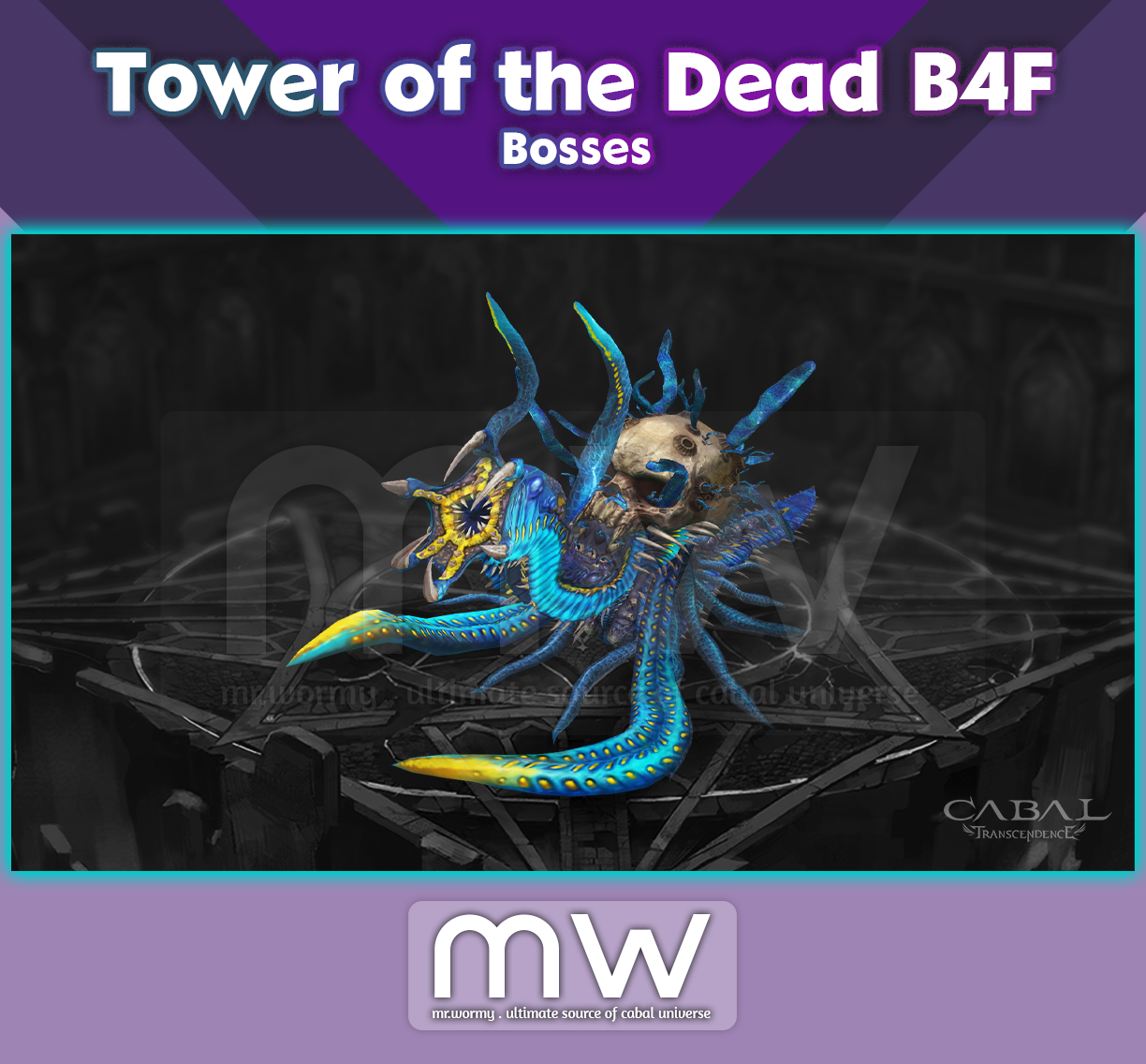

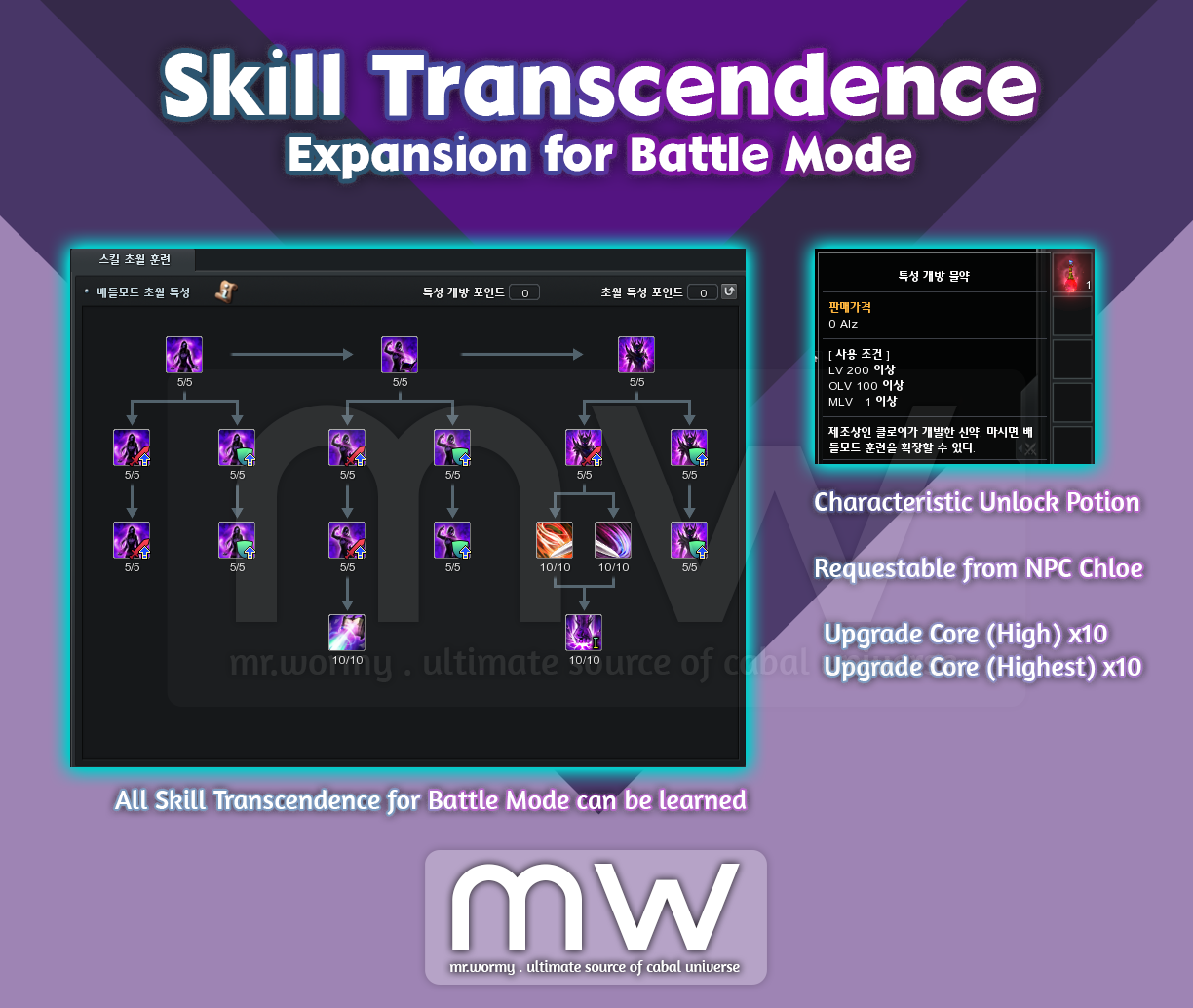
- Skill Transcendence for Battle Mode Expansion
- A new quest at NPC Chloe, named “Chloe’s New Medicine” available at Overlord Lv. 100 is available. By completing the quest, character can use new Potion for obtaining additional Strait Point.
- New Item: Characteristic Unlock Potion
- Available via Request system at NPC Chloe.
- Required Amity: 0
- Registration Fee: 50,000,000 Alz
- Material:
- Upgrade Core (High) x10
- Upgrade Core (Highest) x10
- Success Rate: 100%
- Requirement: MLV 1
- Obtain Skill Transcendence Point x1 after using the potion
- Can be used up to obtain up to 255 Skill Transcendence Point
- Available via Request system at NPC Chloe.

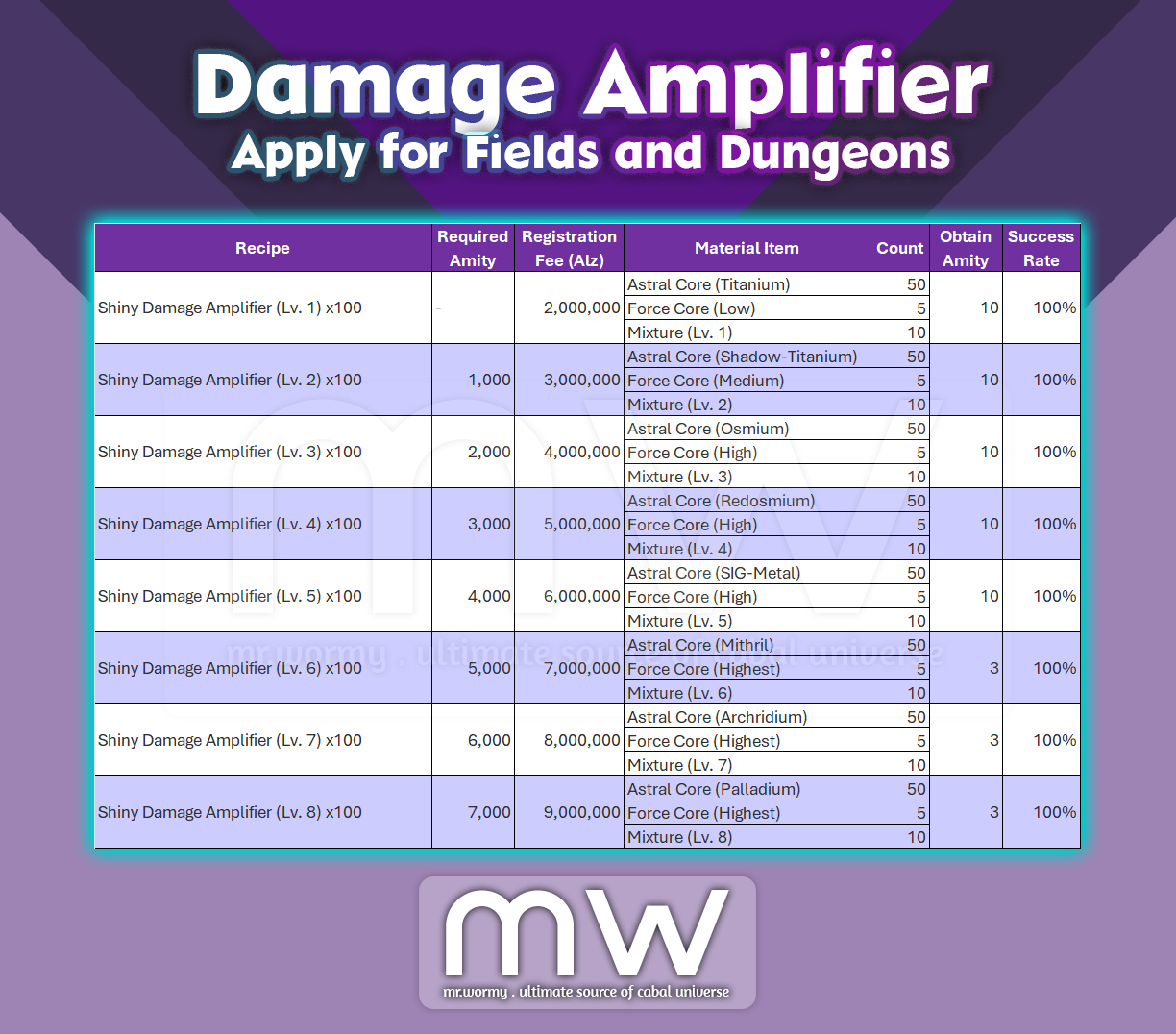
- Add a new type of Damage Amplifier that helps to boost damage in Fields and Dungeons
- Able to boost damage only in Fields and Dungeons
- Not able to boost damage for PvP activities in Fields in Dungeons
- Can be obtained via Request system at NPC Chloe in Port Lux
- New Item: Shiny Damage Amplifier
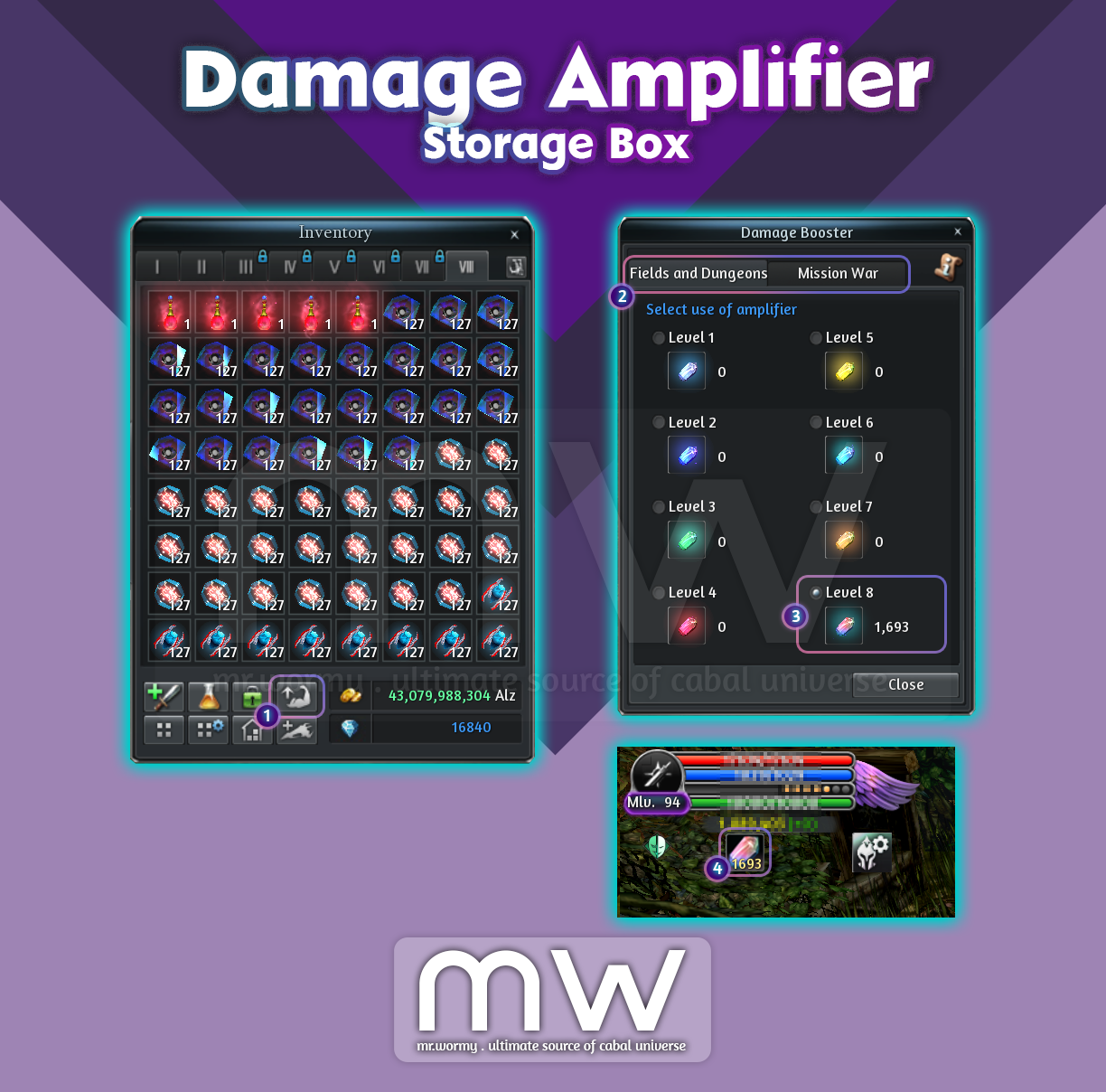
- Damage Amplifier Storage Box
- A new button in the Inventory [1] for accessing the Damage Amplifier Storage Box
- Damage Amplifiers are categorised into 2 groups [2]:
- Fields and Dungeons
- Mission War
- By using the Damage Amplifier in the inventory, it will be registered into the Damage Amplifier Storage Box
- Select a type of Damage Amplifier [3] to get it activated.
- Right click on the Damage Amplifier icon under HP Area [4] to stop using the Damage Amplifier.
- Ctrl + Click on a Damage Amplifier from the Storage Box to take it back to Inventory.
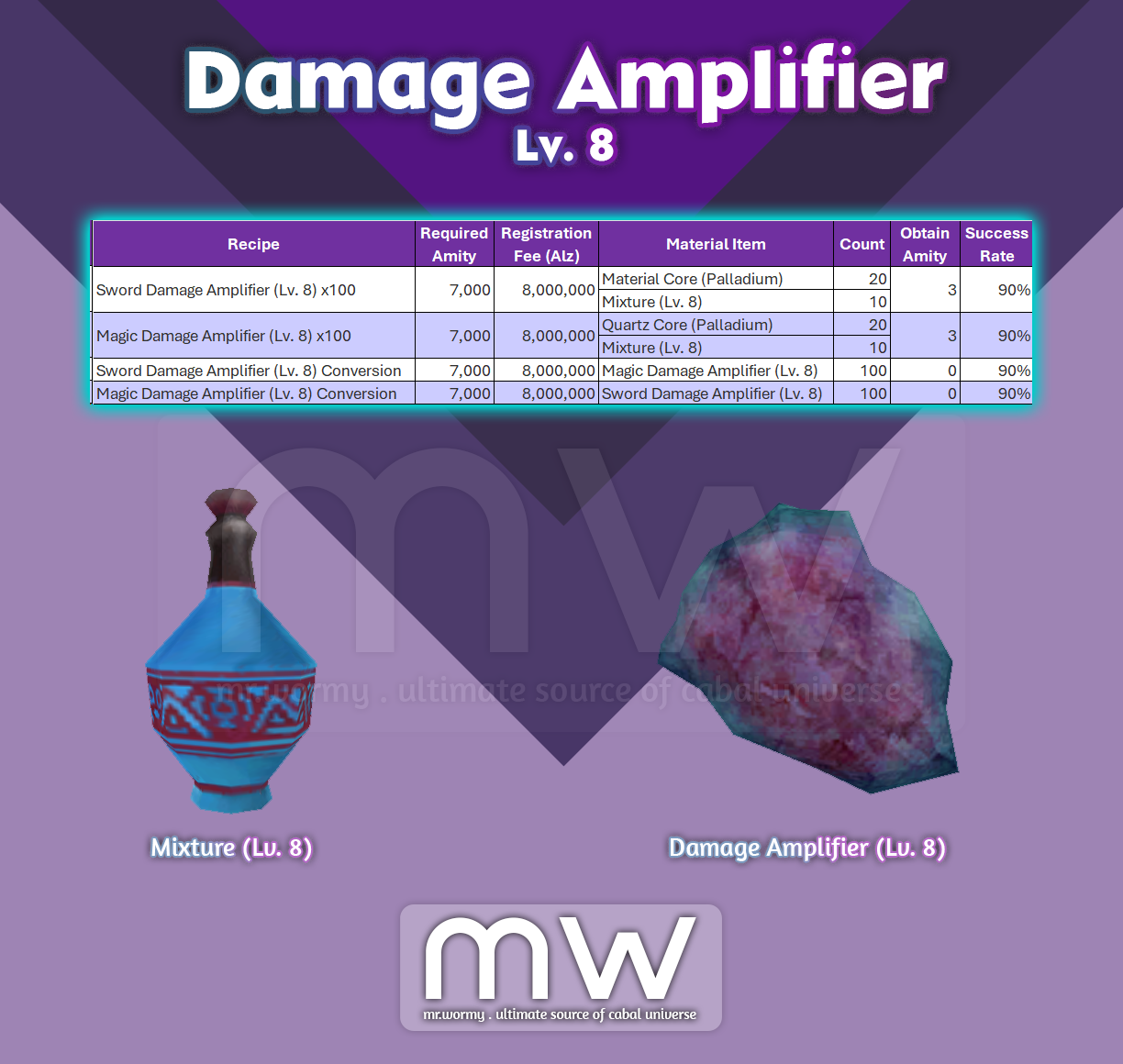
- Add new Damage Amplifier (Lv. 8)
- New Content: Campfire.
- Purchase:
- Able to purchase from Grocer Deighton – Bloody Ice / Remote Shop
- Price: 3,000,000 Alz
- Usage:
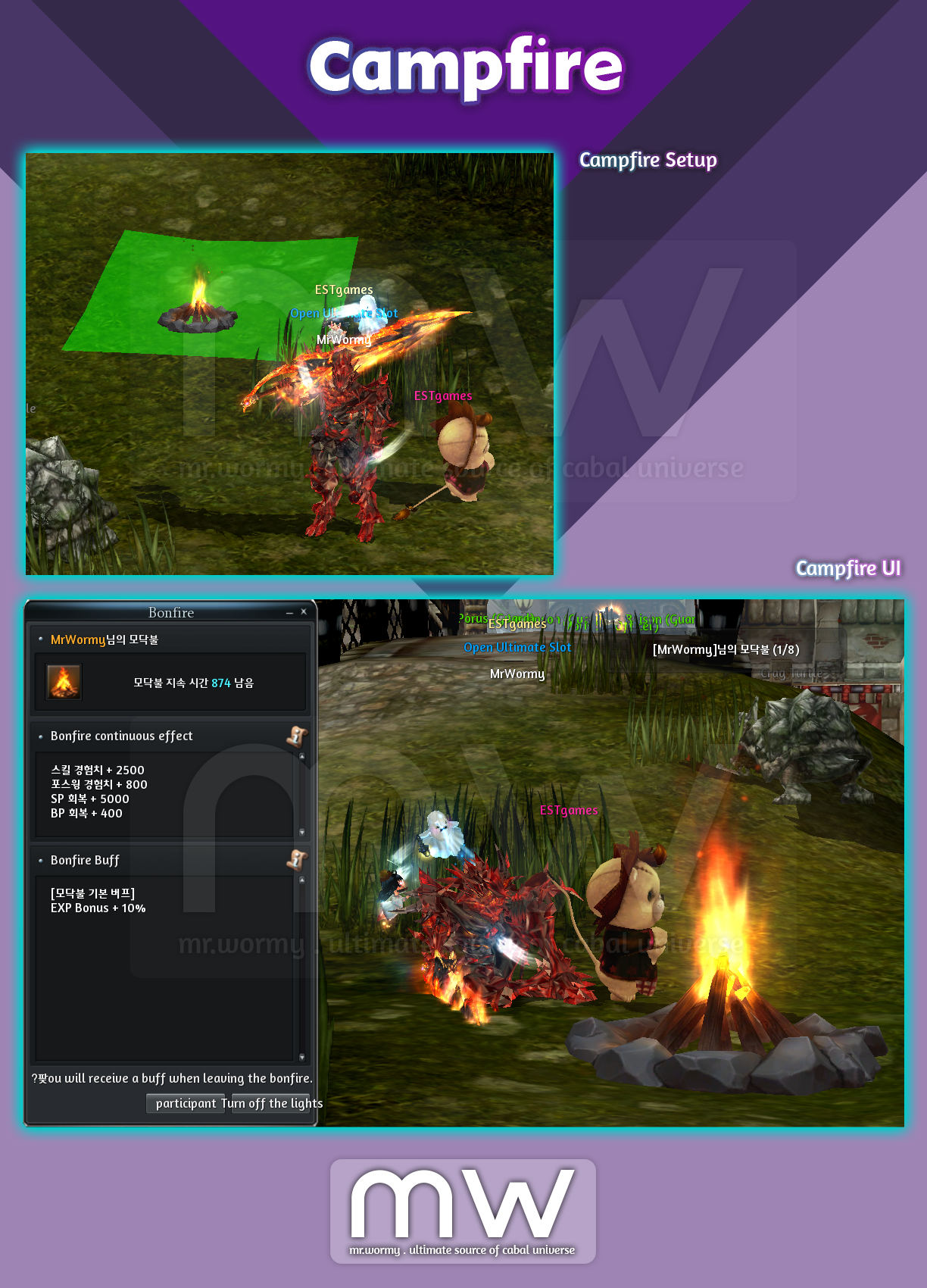
- Use the “Campfire” item directly from inventory.
- Can setup in villages / fields.
- Other players who want to participate can click on the Campfire and request for participation.
- Duration: 15 minutes
- Limit: Max 8 participants
- Campfire related effects:
- Campfire Duration Effect: Effect will be granted continuously as long as participant is still in the Campfire:
- Full HP recover (once at the time participated the Campfire)
- Gain per 60s:
- 2,500 Skill EXP
- 800 Force Wing EXP (01-Aug-2024)
- 5,000 SP
- 400 BP
- Campfire Buff (Warm Heat): Buff will be granted for participant of the Campfire when the left the Campfire:
- For 30 minutes:
- EXP +10%
- Fire Powder Buff:
- This buff will be granted for players who use “Campfire Powder” during Campfire.
- This buff will be activated only after player leaves the Campfire (with usage of “Campfire Powder”).
- During the Campfire, player can use different types of Campfire Powder but cannot use the same type for multiple times.
- Currently, there are 04 types:
- Red Powder: All Attack Up +50
- Green Powder: Increase Movement Speed +100
- Blue Powder: Defense +50
- Purple: HP Potion Recovery +10%
- Campfire Duration Effect: Effect will be granted continuously as long as participant is still in the Campfire:

- Other Information:
- Player can set for automatically accept the Campfire request if it’s from Guild Member.
- Cannot set the Campfire at the same location of any monster on the field.
- Players in Campfire cannot participate in PvP.
- Restriction:
- Can setup at any places in villages / fields.
- Cannot setup in dungeons.
- Cannot setup in Mission War / Mission War Lobby / PvP Battle
- Other Restrictions: These activities cannot be done while Campfire is activated:
- Movement
- Casting Skill
- Warp
- Complete / Participate in Quest

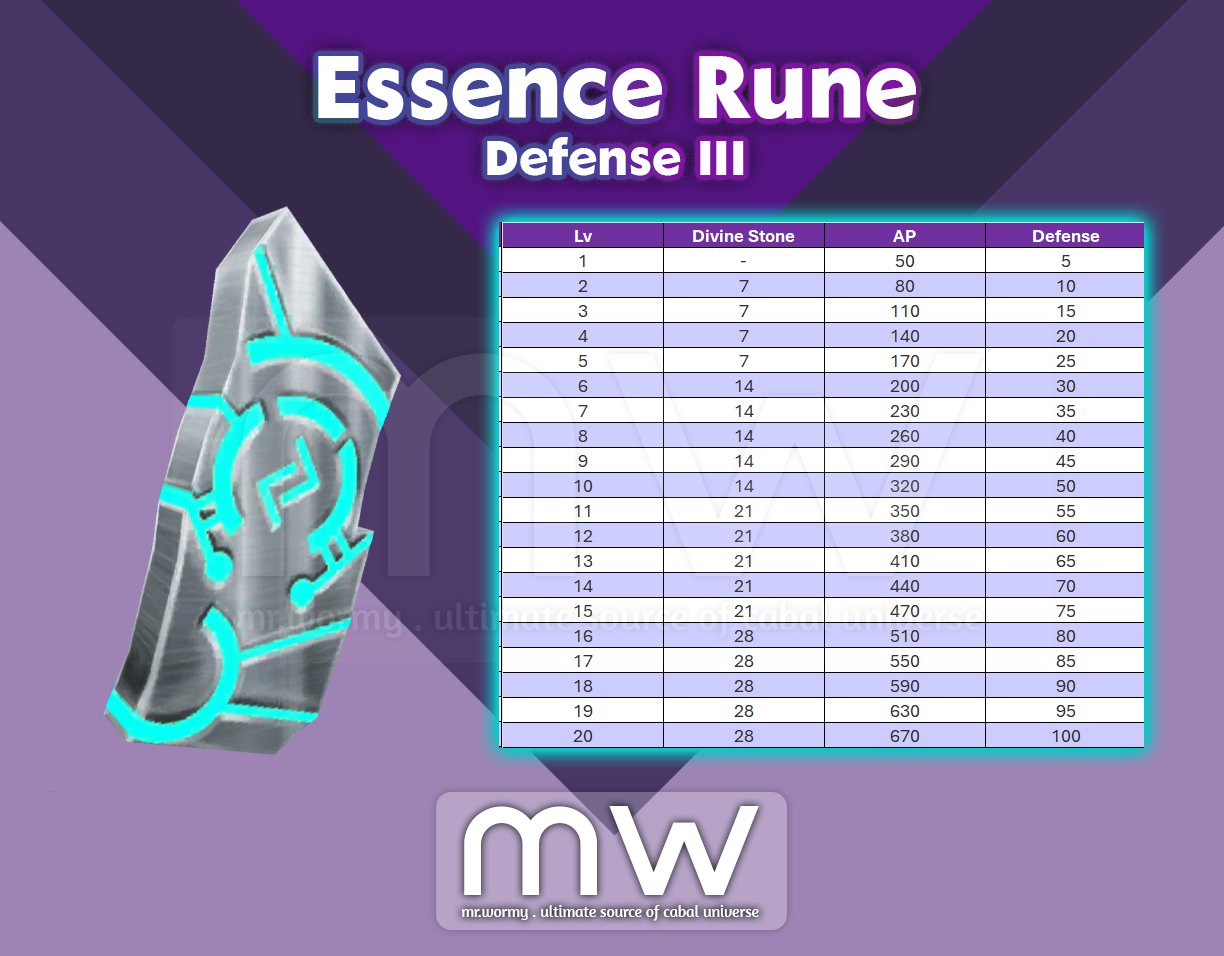
- New Essence Rune (Defense III)
- Requirement: Lv. 120+
- Obtainable from: Legendary Box – Tower of the Dead B4F
- Stats & Learning Cost:

- Unique materials for 02 new unique rings can be obtain from the new dungeon: Tower of the Dead B4F.
- Tainted Soul of Undead:
- Obtainable from 04th boss of Tower of the Dead B4F
- Property: Tradable
- Pulsating Heart of the Hekaton:
- Obtainable from last boss of Tower of the Dead B4F
- Property: Tradable
- Tainted Soul of Undead:
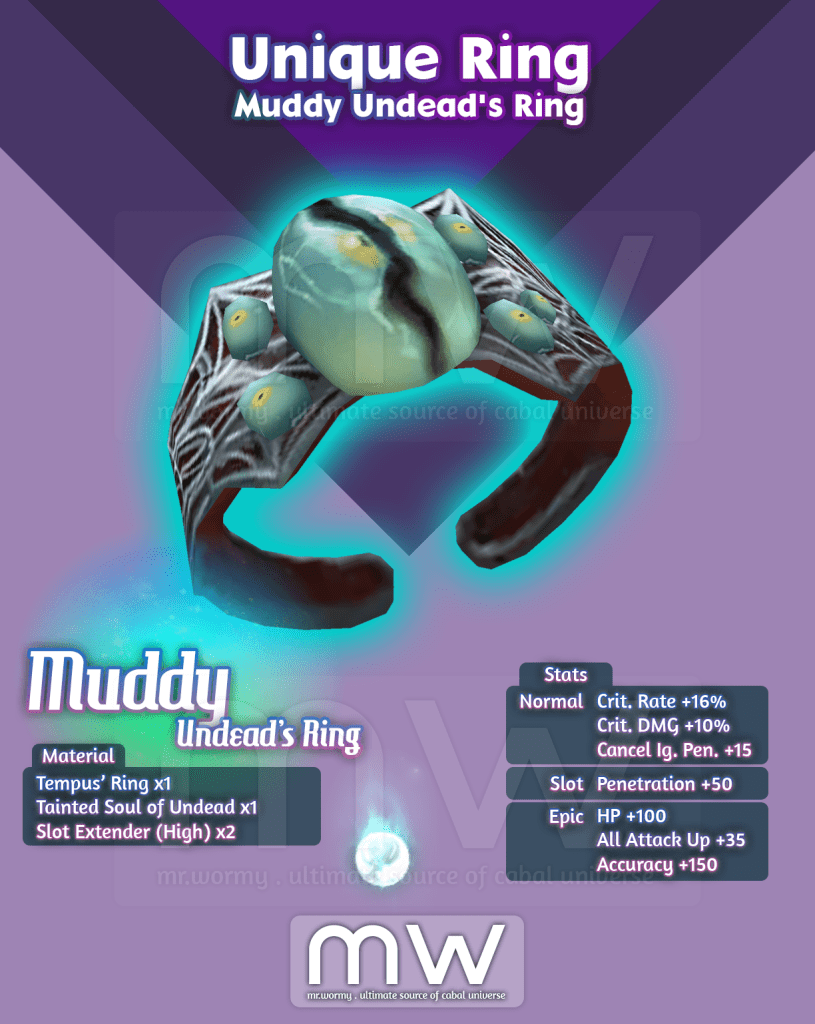
- Muddy Undead’s Ring:
- Equip Condition: Lv. 160+
- Property: Character-binding
- Stats:
- Basic Stats:
- Crit. Rate +16%
- Crit. DMG +10%
- Cancel Ignore Penetration +15
- Slot Option:
- Penetration +50
- Epic Options:
- HP +100
- All Attack Up +35
- Accuracy +150
- Basic Stats:
- Unique Material: Tainted Soul of Undead
- Obtainable from 04th boss of Tower of the Dead B4F
- Property: Tradable
- Request Recipe at NPC Chloe:
- Registration Fee: 400,000,000 Alz – or – Chloe’s Token x20
- Material:
- Tempus’ Ring x1
- Tainted Soul of Undead x1
- Slot Extender (High) x2
- Success Rate: 100%
- Request Duration: 2s
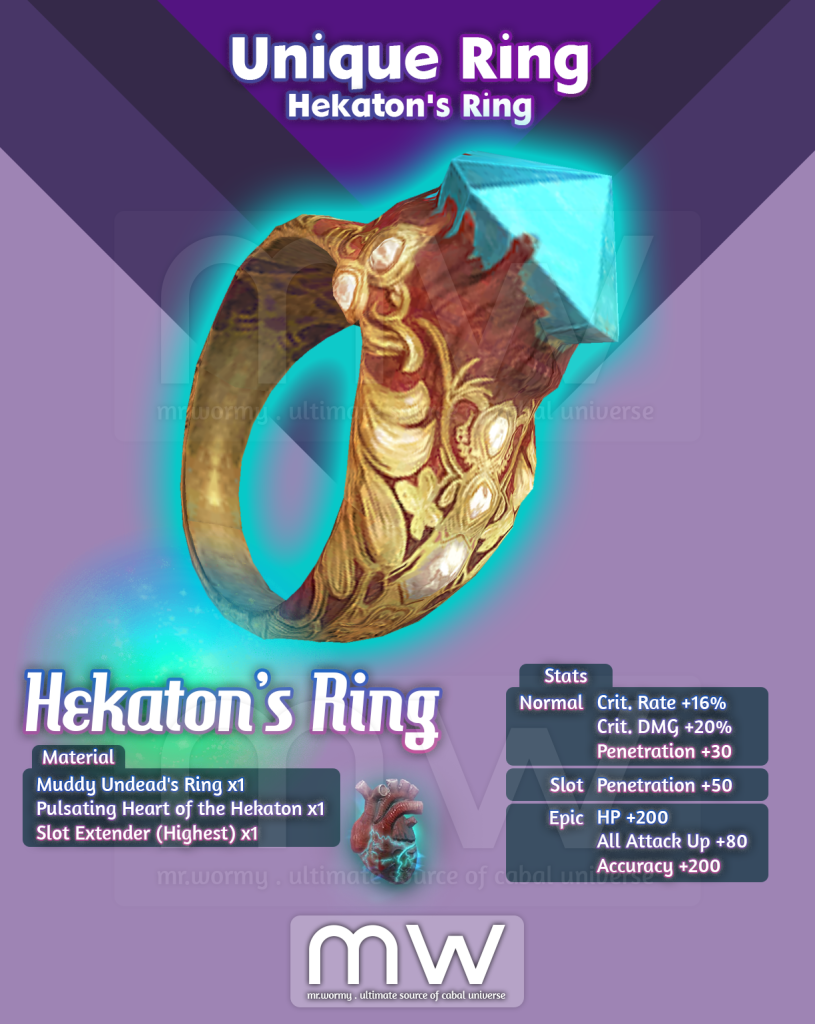
- Hekaton’s Ring:
- Equip Condition: Lv. 160+
- Property: Character-binding
- Stats:
- Basic Stats:
- Crit. Rate +16%
- Crit. DMG +20%
- Penetration +30
- Slot Option:
- Penetration +50
- Epic Options:
- HP +200
- All Attack Up +80
- Accuracy +200
- Basic Stats:
- Unique Material: Pulsating Heart of the Hekaton
- Obtainable from last boss of Tower of the Dead B4F
- Property: Tradable
- Request Recipe at NPC Chloe:
- Registration Fee: 800,000,000 Alz
- Material:
- Tainted Soul of Undead x1
- Pulsating Heart of the Hekaton x1
- Slot Extender (Highest) x1
- Success Rate: 100%
- Request Duration: 2s

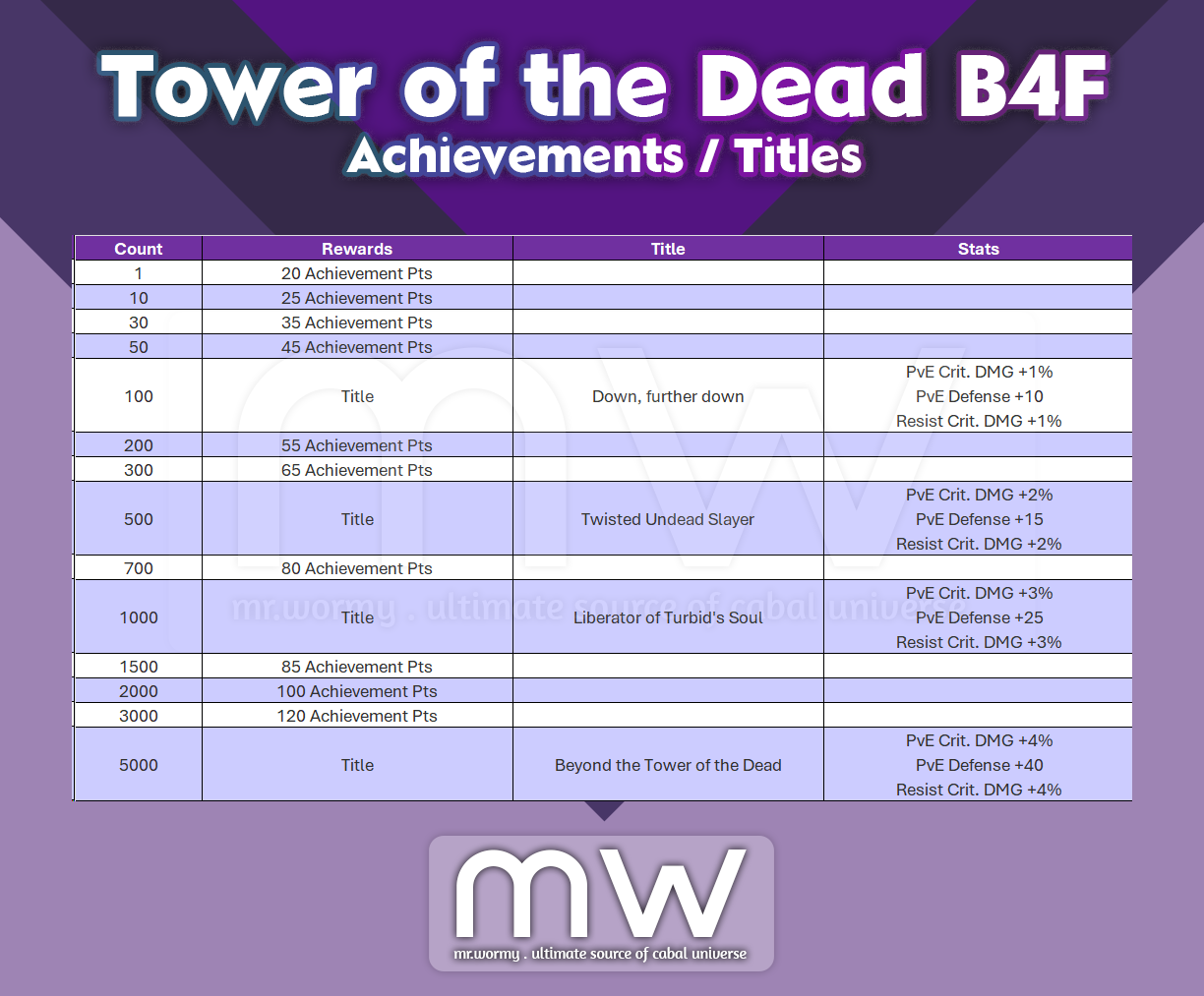
- New Achievements & Titles related to Tower of the Dead B4F:
- Add new item property named “Account Non-Transferable” to make an item could not be able to transfer between accounts.
- Item which has this property cannot move between accounts.
- Character with these items cannot be moved (transferred) to another account.
- To make character to transferrable, player must:
- Move the item with “Account Non-Transferable” property to another character in the account.
- Move the item with “Account Non-Transferable” property into the warehouse of the account.
- Sell the item with “Account Non-Transferable” property into NPC.
- Increase the Arcana Equip Limit:
- Old: Can equip up to 02 Arcanas at once, no duplication based on type.
- New:
- Can equip up to 03 Arcanas at once, no duplication based on type.
- Arcana with wrong slots of equipment must be unequipped then equipped again to get stats applied.
- Add comma ( , ) to show the number of available Damage Amplifier in the Damage Amplifier Storage Box.
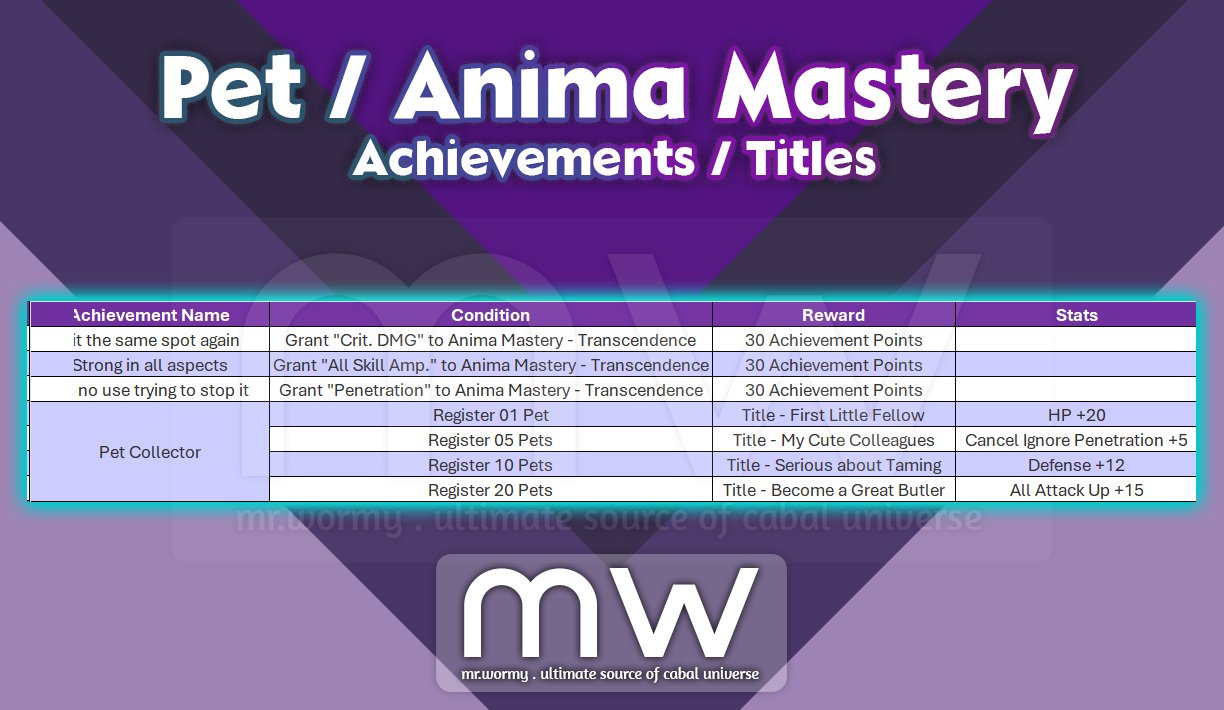
- Add achievements related to Pet Appearance / Anima Mastery:
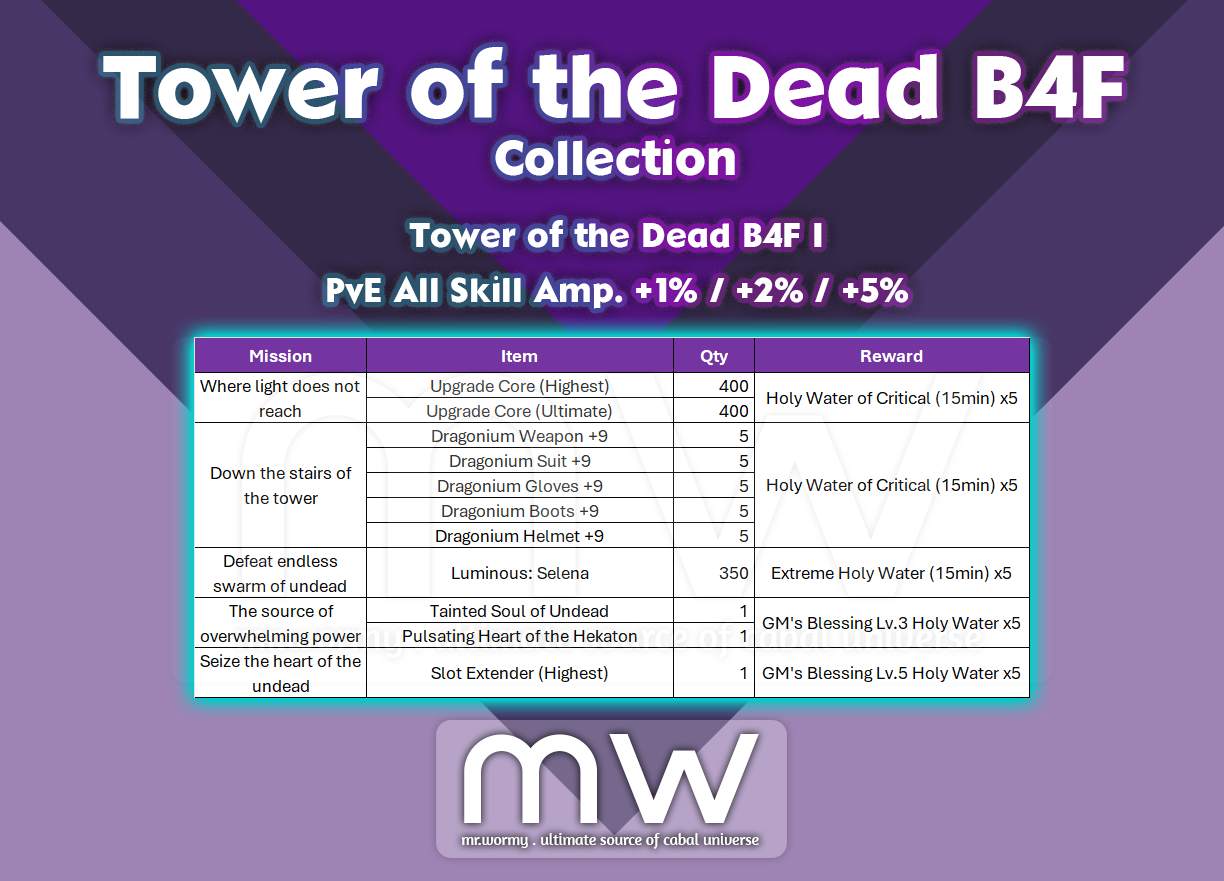
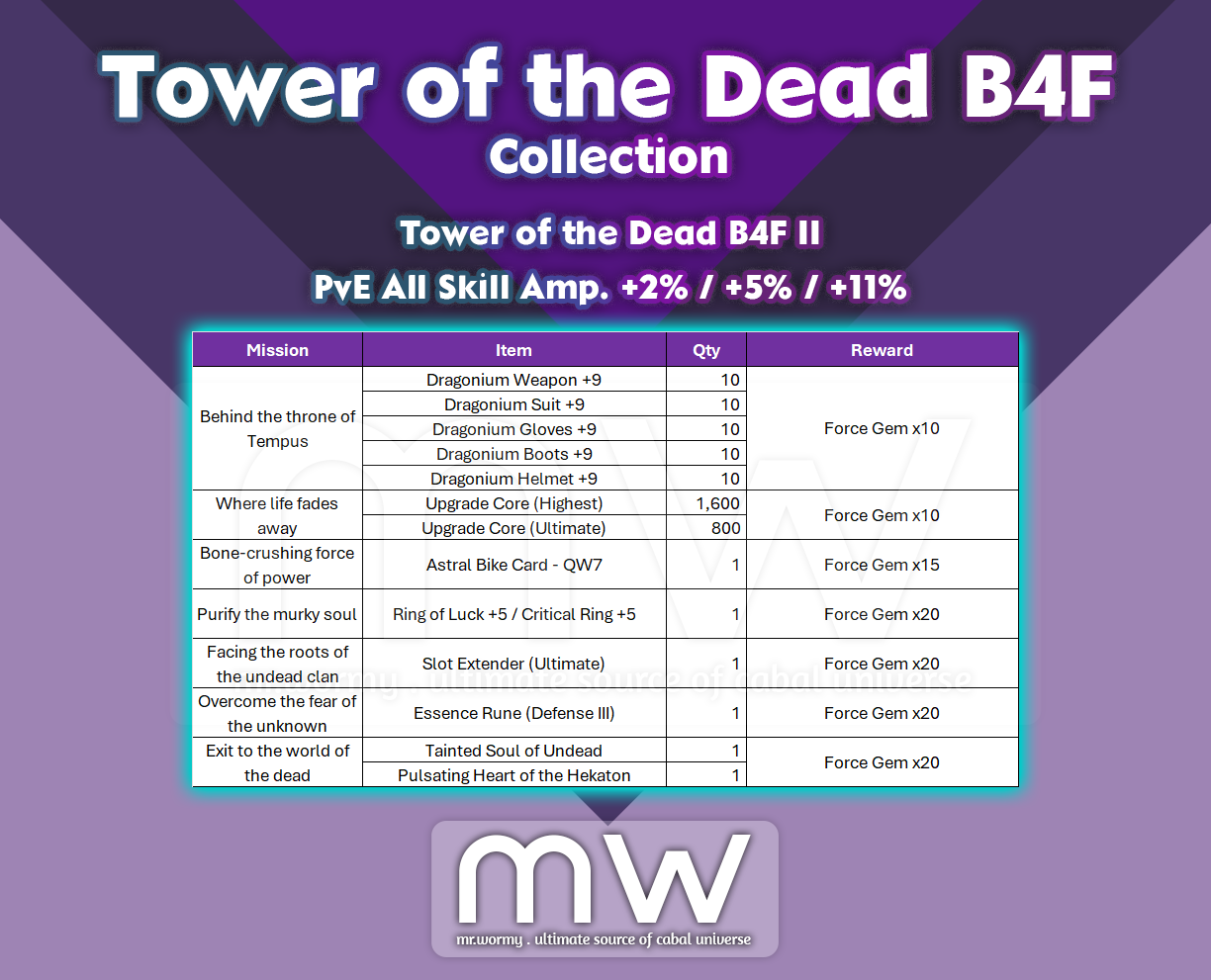
- Add new Collections for Tower of Undead B4F:

- Fixed bugs that training of Skill Transcendence for Battle Mode were not applied properly.
- Knuckle Attack A/B
- Max Lv. 10
- Per Level stats:
- Old: Crit. DMG +0.9%
- New: Crit. DMG +1.0%
- Hammer Attack A/B
- Max Lv. 10
- Per Level stats:
- Old: Crit. DMG +0.9%
- New: Crit. DMG +1.0%
- Shield Master
- Max Lv. 5
- Per Level stats:
- Old: Ignore Penetration +0.3
- New: Ignore Penetration +3.0
- Knuckle Attack A/B
- Fixed the bug that client could get disconnected in certain situation when character open the warehouse and hover the mouse over Equipment UI. (02-Aug-2024)
- Bug fixes for Campfire: (02-Aug-2024)
- Fixed bug that Campfire could be set even while character is moving.
- Fixed bug that character could not be moved until Request for Campfire is accepted or rejected the by the owner of the Campfire.
- Fixed the bug that character information were displayed abnormally in Campfire Participation UI if the participant is buddy or member in party.
- Fixed the bug that the confirmation window was not displayed in case adding buddies or party members into Campfire.
Fixes on Aug 02nd 2024:
- Fixed bug that Arcanas were not displayed in the View Equipment UI for certain situation.
- Bug fixes for Launcher:
- Fixed bug that launcher would not run when click on the button “GAME START” on homepage.
- Fixed bug that launcher get overlapped in certain situations by other running windows.
- Fixed bug that some fonts were no displayed by the launcher.
- Fixed bug that client got crashed in certain situations.
- Fixed bug that options registered in Saved Slot of Anima Mastery were not visible in certain situations.
Fixes on Aug 07th 2024:
- Fixed the bug that caused some stackable items (e.g. Enchant Safeguard) could not be registered or purchased from Auction House.
- Fixed bug that Mini Map was not displayed when moving to Senillinea while character is in a party.
- Fixes related to Campfire system:
- Change the Level Requirement of Campfire:
- Old: Lv. 200
- New: Lv. 40
- Add Campfire into reward of “Newbie Support” system at Level 40
- Add the feature to cancel the request of Campfire after sending the request
- Add the time limit for the request, the request will be automatically cancelled after 60s
- Campfire Buff will be granted for participants only if they participate the Campfire for minimum 60s
- Fixed the bug that Skill EXP was not obtained properly while participating the Campfire
- Fixed the bug that caused Add Buddy / Party menu would popup when clicking on a blank space in the Participant UI
- Fixed bug that the popup menu in the Participant UI would not disappear after leaving the Campfire
- Fixed the bug that request for participation would not work when the player cancelled the request and tried to request for another Campfire
- Fixed the bug that character animation was not displayed properly in certain situations related to Campfire
- Fixed the bug that client was disconnected if a player requests to participate in Campfire, and during that time, the host of the Campfire logged out
- Fixed bug that caused some UIs of Campfire overlapped other UIs
- Change the Level Requirement of Campfire:
- Fixed the bug that caused Pet Appearance titles were able to register only in the Event titles.
- Fixed bug that Combat Power was displayed lower than the actual stats when Force Blade uses Fire / Ice / Lightning Blade skills.
- Fixed bug that some stats got applied abnormally when using Battle Mode with Skill Transcendence Trait unlocked.
- Fixed bug that some Sealed Crest could be disappeared when player tried to register in Auction House then cancelled.
- Fixed bug that caused abnormal activities when player changed the screen resolution.
- Fixed the bug that caused level requirement of “Trait Unlock Potion” was not working properly
- Fixed the bug that help screen in Merit Mastery – Diamond Insignia worked abnormally.
- Fixed bug that stats comparison for Arcana of Guardian was not working properly in View Equipment UI (viewing other player’s equipment).
- Fixed the bug that Arcana if Guardian got unlocked after switching channels even after locked
- Changed that Arcana, Effector and Artifact items were equipped in the wrong slots would not have any stats.
- Adjust the movable areas in the last zone of Tower of the Dead B4F
Fixes on Aug 14th 2024:
- Fixed the bug “Extraction Kit (Transcendence) could not be search in Auction House.
- Fixed the bug that client gets disconnected when players try to put Force Gem Coupon / Mileage Coupon into Guild Warehouse.
- Fixed the bug that caused failure in receiving rewards from game systems when the inventory space was insufficient.
- Fixed the bug that caused client disconnection when player tries to register items with property “Account Non-Transferable”

- Changes related to Secret Base SCA-76:
- Changes in drop of Legendary Box / Legendary Cube:
- Increase drop rate of Astral Bike PW5 / QW7
- Change Ring of Luck +4 into Ring of Luck +5
- Change Critical Ring +4 into Critical Ring +5
- Reduce drop rate of Upgrade Core (Ultimate)
- Changes Holyroid reward:
- Old: Holyroid Under Myth Level 91 – MXP 50%
- New: Holyroid Under Myth Level 91 – MXP 55%
- Changes in drop of Legendary Box / Legendary Cube:
- Some changes applied to Dungeon Completion Rewards (depends on publisher)
Changes on Aug 02nd 2024:
- When registering an Anima Gem:
- Automatically select an empty Saved Slot (if available).
- Add new Confirmation UI, when target Saved Slot is filled.
- Changes of Campfire:
- Change that if any other character is applying for Campfire that your character is setting up, the request will be automatically rejected.
- Change that Campfire setup is not possible while in PvP
Changes on Aug 07th 2024:
- Improvements related to Combined Presets:
- Changed that Combined Presets can be used even while character is casting skills
- In case, both weapons got unequipped as result of changing the Combined Presets, the Battle Mode will be cancelled and auto-attack will also be cancelled.
- Improvements of the Combined Presets icon: If player uses a Combined Preset is used, the icon will be displayed accordingly.
- If any linkage Presets (e.g. Force Wing, Equipment…) is changed manually and different than the Combined Preset, the icon of the Combined Preset will be displayed as General Combined Preset (to express that no Combined Presets are matched with the current presets)
- Improvements related to Anima Mastery UI
- Change that the “Normal” grade will be selected by default when opening the Anima Master UI and switching between presets
- Change that the tooltip of Anima Mastery UI is overlapped with some other UIs like Inventory and Equipment
- Fixed the bug that tooltip of Anima Mastery UI was blinking when player moves mouse in the UI
- Changed the location of some icons at the bottom of the HP bar.
- Overlord / Myth Icon
- Combined Preset Icon
- Damage Amplifier Icon
- Aura Mode Icon
- Battle Mode Icon
- Campfire Icon
- Protection of Veradrix Icon
- Change the item sorting priority:
- Old: Based on Quantity of the Stack
- New: Change the sorting based on the Duration and Property:
- 1st: Items with Duration will be sorted in front of the non-duration / permanent items
- 2nd: Items are sorted with this priority queue:
- Cannot not be moved between
- Character Binding
- Account Binding
Changes on Aug 14th 2024:
- Change related to Anima Mastery:
- Target: Transcendence Grade
- Option: Add Damage
- Old: Add Damage +18
- New: Add Damage +40
- Change that after the “Reset” of any slot in Anima Mastery, the slot will be automatically selected/
- Add error message, showing when a player tries to use Anima Gem (Transcendence) while the Transcendence Grade is not yet unlocked.
- Change related to Campfire:
- Change the price of Campfire:
- Old: 3,000,000 Alz
- New: 1,000,000 Alz
- Restriction for PvP in Campfire:
- Character who participates in Campfire cannot accept or request PvP
- Players from the block list cannot request / participate the Campfire.
- Campfire cannot be used when character is in battle with monster / character
- Cooldown is 7 seconds from the last action of battle with any monster / character
- Change the price of Campfire:
Changes on May 18th 2024:
- Change Names of some items according to official translation:
- Brilliant Damage Amplifier is changed into Shiny Damage Amplifier
- Turbid Ring of the Dead is changed into Muddy’s Undead Ring
- Turbid’s Soul of the Dead is changed into Tainted Soul of Undead
- Hekaton’s Beating Heart is changed into Pulsating Heart of the Hekaton
- Cannot Transfer between Accounts is changed into Account Non-Transferable
- Strait Unlocking Potion is changed into Characteristic Unlock Potion
Discover more from Mr. Wormy
Subscribe to get the latest posts sent to your email.
 Mr. Wormy
2 comments